End-to-End WebSocket Audio Access
ダウンロード
フォーカスモード
フォントサイズ
This document is intended for client integrators and describes how to access the end-to-end real-time Speech-to-Speech (S2S) capability of this service over the WebSocket protocol, including URL specifications, authentication flows, complete event protocols, interaction sequences, error codes, and FAQs.
Note:
The external protocol of this service is 100% compatible with the Realtime WebSocket GA event specification, and clients written with the standard Realtime GA SDK can connect directly.
The server internally provides three capability series:
audio-og-realtime-2.1 / audio-og-realtime-2.1mini / audio-s-realtime-3.0. At runtime, it automatically routes requests based on customer requirements.1. Service Overview
Communication protocol: WebSocket (RFC 6455) over TLS.
wss:// is mandatory for production, and ws:// is for private network debugging only.Message format:
Text frames carry JSON events. Binary frames are not accepted (they are ignored by the server and a warning is logged).Audio transport: All audio is placed in the
audio / delta fields of JSON events as base64 strings.Supported capability series:
model Parameter | Location |
audio-og-realtime-2.1 | End-to-end voice conversation, basic capability. |
audio-og-realtime-2.1mini | End-to-end voice conversation, lightweight capability. |
audio-s-realtime-3.0 | End-to-end voice conversation, enhanced capability. |
Note:
Clients can pass in any case (
Audio-OG-realtime-2.1 is equivalent to audio-og-realtime-2.1). The server normalizes it to lowercase during parsing. The canonical values are the lowercase forms in the table above, and the same applies throughout this document.Unified protocol: Different capabilitys use the exact same WebSocket event protocol (consistent with the standard OpenAI Realtime). Clients do not need to write branch code for different
model values. Capability differences are handled internally by the server, and unsupported fields are silently ignored or responded to with error(code=not_supported) on control events without interrupting the session.Maximum idle timeout per session: 30 seconds by default, which can be overridden by the
timeoutSec query parameter, with an upper limit of 120 seconds.Fallback when
model is not specified: The server falls back based on the account-level default route. If no match is found, audio-og-realtime-2.1 is used.2. Access URL and Query Parameters
2.1 URL Template
wss://{host}/ete/v1/{appid}?model=<audio-og-realtime-2.1|audio-og-realtime-2.1mini|audio-s-realtime-3.0>&secretId=<TC3 SecretId>&signature=<TC3-HMAC-SHA256 hex>&timeStamp=<unix seconds>&expired=<unix seconds>&nonce=<random integer>&timeoutSec=<session idle timeout in seconds>
2.2 Path Parameters
Parameter | Required | Description |
appid | Yes | Tencent Cloud AppID, a decimal unsigned integer, passed in through the path /ete/v1/{appid}. |
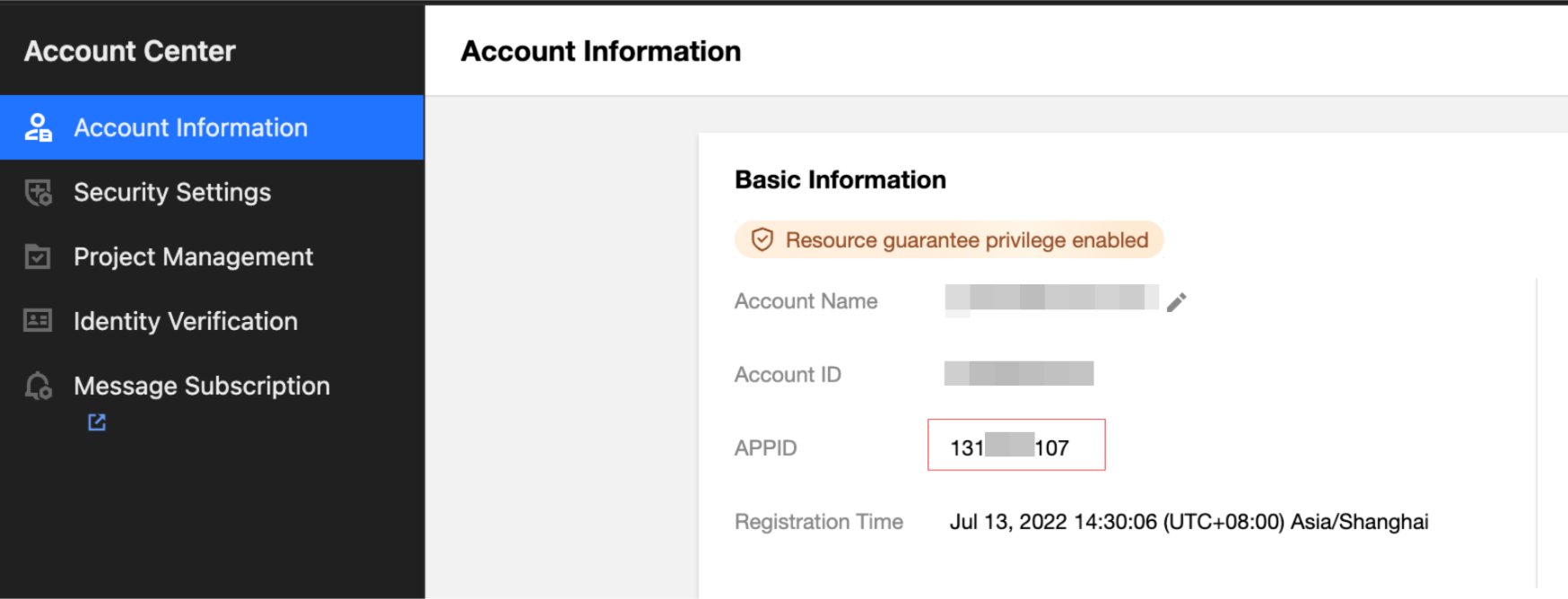
appid is the unique identifier of a Tencent Cloud user account (UInt64). You can obtain it from the Account Center > page in the console:
2.3 Other Parameters (Query)
Parameter | Required | Type | Description |
secretId | Yes | string | CAM SecretId. |
signature | Yes | string | |
timeStamp | Yes | int64 | Current UNIX timestamp at the time of signing, in seconds. |
expired | Yes | int64 | UNIX timestamp of the signature expiration time, in seconds. Must be greater than timeStamp and greater than now. |
nonce | Yes | int64 | One-time random integer for replay prevention. |
model | No | string | Alias of the capability series. For details, see the Service Overview section above. If not specified, the default route based on the account is used as a fallback. |
timeoutSec | No | int | Session idle timeout in seconds. Default value: 30. Maximum value: 120. Values exceeding the upper limit are truncated to 120. |
resId | No | string | Resource ID on the business side, passed through for reconciliation. |
2.4 URL Example
wss://mps.tencentcloud.com/ete/v1/1301234567?model=audio-s-realtime-3.0&secretId=AKIDzxxxxxxxxxxxxxxxxxxxxxxxxxxxxxx&signature=8f2c...4b3a&timeStamp=1735012345&expired=1735015945&nonce=8391023472&timeoutSec=60&resId=order_20260826_0001
3. Signature
3.1 Query Parameters Involved in Signing
All query parameters except
signature itself are included in the signature (sorted in ascending alphabetical order). This means:The required parameters
secretId / timeStamp / expired / nonce are always included in the signature.Optional parameters (such as
model / timeoutSec / resId) must be included in the signature if you include them in the URL. If they are not included, they do not participate in the signature.The
signature parameter itself is not included in the signature (it is placed in the URL as the signature result).Other business parameters (such as audio format, voice, instructions, and tools) are passed through the
session.update event after a successful handshake, and are unrelated to the URL.3.2 Signing Algorithm
Step 1: Sort and URL-encode the parameters to construct a canonicalized query string.keys = sort(param keys involved in signing) // All query parameters except signaturecanonicalQueryString = keys.map(k => k + '=' + urlEncode(params[k])).join('&')Step 2: Construct a canonicalized request.canonicalRequest ="post" + "\\n"+ "/ete/v1/{appid}" + "\\n"+ canonicalQueryString + "\\n"+ "content-type:application/json; charset=utf-8" + "\\n"+ "host:" + host + "\\n"+ "" + "\\n"+ "content-type;host" + "\\n"Step 3: Construct the string to be signed.date = YYYY-MM-DD of UTC(timeStamp)credentialScope = date + "/mps/tc3_request"hashedRequest = hex( SHA-256( canonicalRequest ) )stringToSign = "TC3-HMAC-SHA256" + "\\n"+ timeStamp + "\\n"+ credentialScope + "\\n"+ hashedRequestStep 4: Calculate the derived signing key.kDate = HMAC-SHA256( date, "TC3" + secretKey )kService = HMAC-SHA256( "mps", kDate )kSigning = HMAC-SHA256( "tc3_request", kService )Step 5: Calculate the final signature.signature = hex( HMAC-SHA256( stringToSign, kSigning ) ) // Lowercase hex
3.3 JavaScript Reference Implementation
The
generateSignature() method is implemented by using the browser-native crypto.subtle API. The following excerpt shows the core snippet:async function sign(cfg) {const now = Math.floor(Date.now() / 1000);const expired = now + 3600;const params = {// All query parameters except signature must be included in the signature.model: cfg.model, // Optional. If not passed, it is not added to params.timeStamp: String(now),expired: String(expired),nonce: String(Math.floor(Math.random() * 1e10)),secretId: cfg.secretId,timeoutSec: String(cfg.timeoutSec || 30),// If resId is used, include it and add it to the signature as well:// resId: cfg.resId,};const path = `/ete/v1/${cfg.appid}`;const keys = Object.keys(params).sort();const canonicalQueryString = keys.map((k) => `${k}=${encodeURIComponent(params[k])}`).join('&');const canonicalRequest = ['post', path, canonicalQueryString,'content-type:application/json; charset=utf-8',`host:${cfg.host}`, '', 'content-type;host', '',].join('\\n');const hashed = await sha256Hex(canonicalRequest);const date = new Date(now * 1000).toISOString().split('T')[0];const scope = `${date}/mps/tc3_request`;const stringToSign = ['TC3-HMAC-SHA256', String(now), scope, hashed].join('\\n');const kDate = await hmacSha256(date, 'TC3' + cfg.secretKey);const kService = await hmacSha256('mps', kDate);const kSigning = await hmacSha256('tc3_request', kService);const signature = bufToHex(await hmacSha256(stringToSign, kSigning));const q = new URLSearchParams(); keys.forEach((k) => q.append(k, params[k]));q.append('signature', signature);return `wss://${cfg.host}${path}?${q.toString()}`;}
3.4 Go Reference Implementation
func sign(host, appID, secretID, secretKey, model string, timeoutSec int) string {now := time.Now().Unix()expired := now + 3600params := map[string]string{"timeStamp": strconv.FormatInt(now, 10),"expired": strconv.FormatInt(expired, 10),"nonce": strconv.Itoa(rand.Intn(1e9)),"secretId": secretID,"timeoutSec": strconv.Itoa(timeoutSec),}if model != "" {params["model"] = model}keys := make([]string, 0, len(params))for k := range params { keys = append(keys, k) }sort.Strings(keys)parts := make([]string, 0, len(keys))for _, k := range keys {parts = append(parts, k+"="+url.QueryEscape(params[k]))}cqs := strings.Join(parts, "&")path := "/ete/v1/" + appIDcanonical := strings.Join([]string{"post", path, cqs,"content-type:application/json; charset=utf-8","host:" + host, "", "content-type;host", "",}, "\\n")hashed := sha256Hex([]byte(canonical))date := time.Unix(now, 0).UTC().Format("2006-01-02")scope := date + "/mps/tc3_request"stringToSign := strings.Join([]string{"TC3-HMAC-SHA256", strconv.FormatInt(now, 10), scope, hashed,}, "\\n")kDate := hmac256([]byte(date), []byte("TC3"+secretKey))kService := hmac256([]byte("mps"), kDate)kSigning := hmac256([]byte("tc3_request"), kService)signature := hex.EncodeToString(hmac256([]byte(stringToSign), kSigning))q := url.Values{}for k, v := range params { q.Set(k, v) }q.Set("signature", signature)return "wss://" + host + path + "?" + q.Encode()}func sha256Hex(b []byte) string { h := sha256.Sum256(b); return hex.EncodeToString(h[:]) }func hmac256(msg, key []byte) []byte { m := hmac.New(sha256.New, key); m.Write(msg); return m.Sum(nil) }
3.5 Handshake Response for Authentication Failure
The server completes authentication and concurrency checks before the WebSocket handshake upgrade. If any step fails, the request is rejected with an HTTP response and does not enter the WebSocket channel. Therefore, the client does not receive an
error event but instead gets a standard HTTP status code. See Section 9.1.4. Interaction Sequence
4.1 Key Conventions
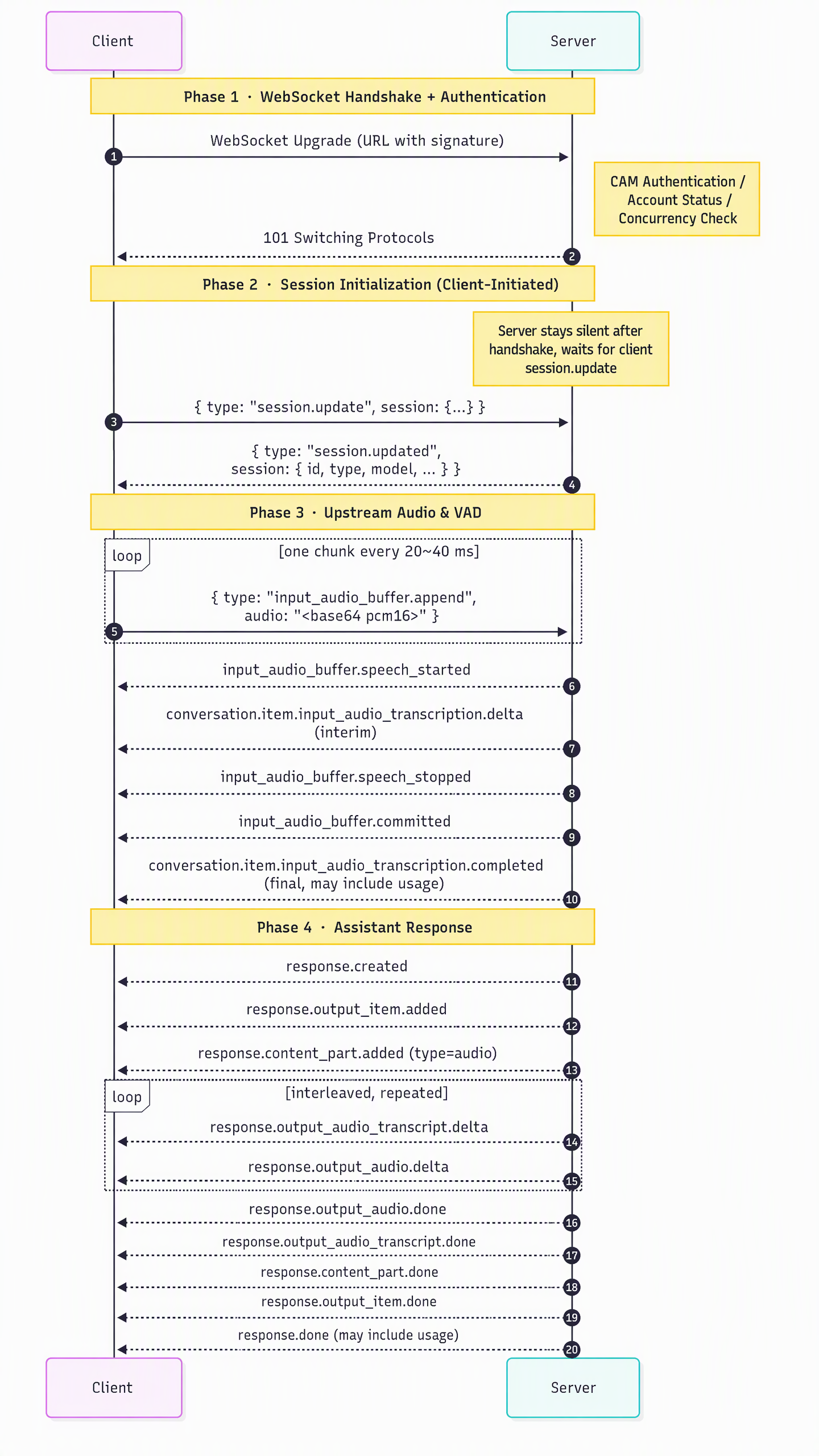
After a successful handshake, the server does not actively send any events. The first message must be initiated by the client:
The client sends
session.update to complete session initialization, and only then does the server return a session.updated message.Receiving
session.updated indicates that you can start sending audio.4.2 Typical Sequence (Server-Side VAD Mode)
4.3 Interrupting the Current response
The client can send
{"type": "response.cancel"} at any time to interrupt the response that is currently being generated.The server immediately stops sending TTS and returns a
response.done message, where status may be cancelled.5. Uplink Events (Client → Server)
5.1 Event Type Overview
Event type | Purpose |
session.update | Update session parameters (the first call is equivalent to completing handshake initialization). |
input_audio_buffer.append | Append a segment of user audio (base64-encoded). |
input_audio_buffer.commit | Manually commit the audio buffer (used when server_vad is disabled). |
input_audio_buffer.clear | Clear the uncommitted upstream audio buffer. |
response.create | Actively request the server to generate a response ( instructions can be included for greeting / intervention replies). |
response.cancel | Interrupt the response currently being generated. |
conversation.item.create | Add an item to the conversation context (including function_call_output return). |
conversation.item.retrieve | Request details of a specified item. |
conversation.item.delete | Delete the specified item. |
conversation.item.truncate | Truncate the generated assistant audio (not supported in some scenarios, and an error(not_supported) is returned). |
output_audio_buffer.clear | Clear the current assistant audio playback buffer (the server will synchronously map this to response.cancel). |
transcription_session.update | Update an independent transcription session (currently not supported, and an error(not_supported) is returned). |
5.2 session.update
{"type": "session.update","session": {"instructions": "You are a professional AI assistant. Speak concisely and in a friendly manner.","audio": {"input": {"format": { "type": "audio/pcm", "rate": 16000 },"transcription": { "language": "zh" }},"output": {"format": { "type": "audio/pcm", "rate": 24000 },"voice": "xxxxxx","speed": 100,"loudness": 100}},"tools": [{"type": "function","name": "get_current_time","description": "Obtain the current system time","parameters": { "type": "object", "properties": {}, "required": [] }}]}}
Field description:
Field | Type | Description |
session.instructions | string | System instructions that override server defaults. |
session.audio.input.format.type | string | |
session.audio.input.format.rate | int | Uplink sample rate (Hz). |
session.audio.input.transcription.language | string | ASR transcription language (ISO 639-1, such as zh / en / ja). If left empty, the server automatically detects it. Some capabilities adapt based on built-in language support, and client-specified values may be ignored. |
session.audio.output.format.type | string | Downlink audio format. |
session.audio.output.format.rate | int | Downlink sample rate (Hz). |
session.audio.output.voice | string | Voice ID. Supports plaintext voice IDs and encrypted voice IDs (generated by the voice encryption service), which the server automatically identifies. If a voice is not applicable to the current session capabilities, the server silently falls back to the default voice (see Q9 for details). |
session.audio.output.speed | int | Speech rate (supported by some capabilities; silently ignored if not supported). |
session.audio.output.loudness | int | Loudness (supported by some capabilities; silently ignored if not supported). |
session.tools | array | Function tool definitions that follow the standard GA Function Tool schema. |
session.extension | object | Reserved advanced extension field (supported by some capabilities; silently ignored if not supported). |
VAD / turn_detection: The server enables
server_vad by default. Custom parameters specified by the client in session.audio.input.turn_detection are adapted by the server on a best-effort basis. The actual effective configuration is subject to the session.updated.session.audio.input.turn_detection receipt.5.3 input_audio_buffer.append
{"type": "input_audio_buffer.append","audio": "<base64-encoded audio chunk>"}
audio is a complete audio payload. The server decodes it according to the format declared in session.audio.input.format.Recommended fragment size: 20 ms to 40 ms (approximately 640 to 1280 bytes before base64 encoding for PCM 16 kHz mono).
append messages sent before the first
session.update are silently discarded.5.4 input_audio_buffer.commit / clear
{ "type": "input_audio_buffer.commit" }{ "type": "input_audio_buffer.clear" }
commit needs to be explicitly called only when server_vad is disabled.clear is used to cancel the current uncommitted user audio. Regardless of whether the capability backend natively supports it, the server sends an input_audio_buffer.cleared event to the client.5.5 response.create / cancel
{"type": "response.create","response": {"instructions": "Hello, I am your AI assistant." // Optional}}{ "type": "response.cancel" }
Unified semantics (consistent behavior across all
models):With
response.instructions, the server proactively speaks this text (for greetings / response intervention).Without
instructions, the client attempts to trigger a new response generation. Some capabilities may return error(code=not_supported) while waiting for generation context. The client can ignore this message or send a version with instructions instead.Fields supported by
response.create:Field | Type | Description |
response.instructions | string | Text that the server actively speaks. |
response.voice | string | Voice temporarily overridden for this turn (optional). |
response.modalities | []string | Output modalities for this turn (optional, standard). |
response.metadata | object | Metadata passed through to the server for logging (optional). |
5.6 conversation.item.create
Use case 1: Append a user / assistant message
{"type": "conversation.item.create","item": {"type": "message","role": "user","content": [{ "type": "input_text", "text": "Check today's weather in Shenzhen for me" }]}}
{"type": "conversation.item.create","item": {"type": "function_call_output","call_id": "call_abc123","output": "2026-08-26 09:30:00"}}
5.7 conversation.item.retrieve / delete / truncate
{ "type": "conversation.item.retrieve", "item_id": "item_xxx" }{ "type": "conversation.item.delete", "item_id": "item_xxx" }{ "type": "conversation.item.truncate", "item_id": "item_xxx","content_index": 0, "audio_end_ms": 1500 }
Attention:
conversation.item.truncate is not supported by some capabilities, and the server responds with error(code=not_supported). The client can use response.cancel + instead.5.8 output_audio_buffer.clear
{ "type": "output_audio_buffer.clear" }
The server will:
1. Internally trigger
response.cancel once to interrupt the current TTS.2. Return an
output_audio_buffer.cleared event, based on which the client clears the local audio playback buffer.6. Downlink Events (Server → Client)
6.1 Complete Event List
Event type | Trigger Timing |
session.updated | The first response after the server applies session.update. |
error | Invalid parameter / Backend service exception / Unsupported capability. |
conversation.item.created | An item is added to the conversation context. |
conversation.item.retrieved | Responds to conversation.item.retrieve. |
conversation.item.deleted | Responds to conversation.item.delete. |
conversation.item.input_audio_transcription.delta | Incremental user ASR transcription (unstable). |
conversation.item.input_audio_transcription.completed | Stable user ASR transcription (may include usage). |
conversation.item.input_audio_transcription.failed | User ASR transcription failed. |
input_audio_buffer.committed | A user utterance is committed to the audio buffer (triggered by VAD or committed by the client). |
input_audio_buffer.cleared | Responds to input_audio_buffer.clear. |
input_audio_buffer.speech_started | Server-side VAD detects that the user starts speaking. |
input_audio_buffer.speech_stopped | Server-side VAD detects that the user stops speaking. |
response.created | A response starts to be generated. |
response.output_item.added | Adds an output_item to the response ( message / function_call). |
response.content_part.added | Adds a content part to the output_item ( audio / text). |
response.output_audio.delta | Assistant audio delta (base64). |
response.output_audio.done | Assistant audio ends. |
response.output_audio_transcript.delta | Assistant audio transcript delta. |
response.output_audio_transcript.done | Assistant audio transcript finalized. |
response.output_text.delta / response.output_text.done | Plain text modality output (reserved, not delivered in default audio modality). |
response.function_call_arguments.delta | Function call argument delta (if the capability backend delivers it in streaming mode). |
response.function_call_arguments.done | Function call arguments are fully delivered. |
response.content_part.done | The content part ends. |
response.output_item.done | The output_item ends. |
response.done | A response ends completely (possibly carrying usage). |
output_audio_buffer.started | The server starts delivering assistant audio. |
output_audio_buffer.stopped | The server finishes a segment of assistant audio. |
output_audio_buffer.cleared | Responds to the client's output_audio_buffer.clear. |
rate_limits.updated | Rate limit update for the capability backend (transparently passed through if delivered by the capability backend). |
6.2 session.updated (First Server Event)
{"type": "session.updated","event_id": "evt_xxxxxxxx","session": {"id": "sess_xxxxxxxx","type": "realtime","model": "audio-s-realtime-3.0","audio": { "input": {...}, "output": {...} },"voice": "xxxxxx","instructions": "..."}}
The client should start sending
input_audio_buffer.append only after receiving this event. The session.model in the event is the model name actually in effect for this session, which may come from client URL parameters or from the server-side default routing fallback.6.3 User ASR Events
{"type": "conversation.item.input_audio_transcription.delta","event_id": "evt_xxx", "item_id": "item_xxx","content_index": 0, "delta": "Shenzhen"}{"type": "conversation.item.input_audio_transcription.completed","event_id": "evt_xxx", "item_id": "item_xxx","content_index": 0, "transcript": "How is the weather in Shenzhen today","usage": { "type": "duration", "seconds": 2 }}
The
usage field carries the per-second billing usage of this ASR transcription (type="duration" + seconds).Some capabilities carry this field, while in other cases it is omitted (omitempty). Clients should treat this field as optional for compatibility.
transcription.completed.usage and response.done.response.usage (token usage) are two independent and parallel billing dimensions: ASR is billed by audio transcription seconds, and response is billed by token usage.6.4 Assistant Audio/Text Events
{"type": "response.output_audio.delta","event_id": "evt_xxx","response_id": "resp_xxx","item_id": "item_xxx","output_index": 0, "content_index": 0,"delta": "<base64 pcm16 / opus chunk>"}{"type": "response.output_audio_transcript.delta","event_id": "evt_xxx","response_id": "resp_xxx","item_id": "item_xxx","delta": "Shenzhen"}
6.5 response.done
{"type": "response.done","event_id": "evt_xxx","response": {"id": "resp_xxx","status": "completed","usage": {"total_tokens": 123,"input_tokens": 45,"output_tokens": 78,"input_token_details": {"text_tokens": 20,"audio_tokens": 15,"cached_tokens": 10,"cached_tokens_details": {"text_tokens": 6,"audio_tokens": 4}},"output_token_details": {"text_tokens": 30,"audio_tokens": 48}}}}
Common values of
status: completed / cancelled / failed / incomplete.response.usage carries the token usage details of the current response, and its field structure is 100% aligned with the standard Realtime GA. If the capability backend does not return usage, this field is omitted (omitempty). Clients can use it for cost monitoring or billing self-checks.6.6 error
{"type": "error","event_id": "evt_xxx","error": {"type": "invalid_request_error","code": "unsupported_output_format","message": "unsupported opus output rate 44100, allowed: 8000/12000/16000/24000/48000","event_id": "The event_id of the original event that triggered this error on the client"}}
After an error, if the error is fatal, the server may proactively close the connection (for example,
pipeline_init_failed / upstream_send_error / upstream_closed / idle_timeout), and the client should handle it accordingly.7. Audio Formats and Sample Rates
7.1 Uplink Audio (Input)
Format ( format.type) | Description | Supported Sample Rate |
pcm / audio/pcm / pcm16 / pcm_s16le / s16le | 16-bit signed LE mono PCM | Any (16000 recommended) |
opus / audio/opus | Raw Opus packet (each append carries a complete packet) | 8k / 12k / 16k / 24k / 48k |
7.2 Downlink Audio (Output)
Format | Supported Sample Rate | Remarks |
pcm | Any | The server resamples audio as needed to the sample rate declared by the client. |
opus | 8k / 12k / 16k / 24k / 48k | The server encodes audio into raw Opus packets; each response.output_audio.delta.delta typically corresponds to a 20 ms Opus frame. |
Compatible MIME aliases: Clients can declare PCM using any of
audio/pcm / pcm / pcm16 / pcm_s16le, and declare Opus using audio/opus / opus. The server normalizes them automatically.7.3 Server Downlink Policy
When a session is established, the server automatically selects the optimal downstream link based on the
session.audio.output.format declared by the client, either direct pass-through or server-side resampling/format conversion, without client awareness.The client only needs to ensure that
format / rate fall within the valid ranges declared in the tables in sections 7.1 / 7.2. The effective format will be provided in session.updated.session.audio.8. Complete Function Call Flow
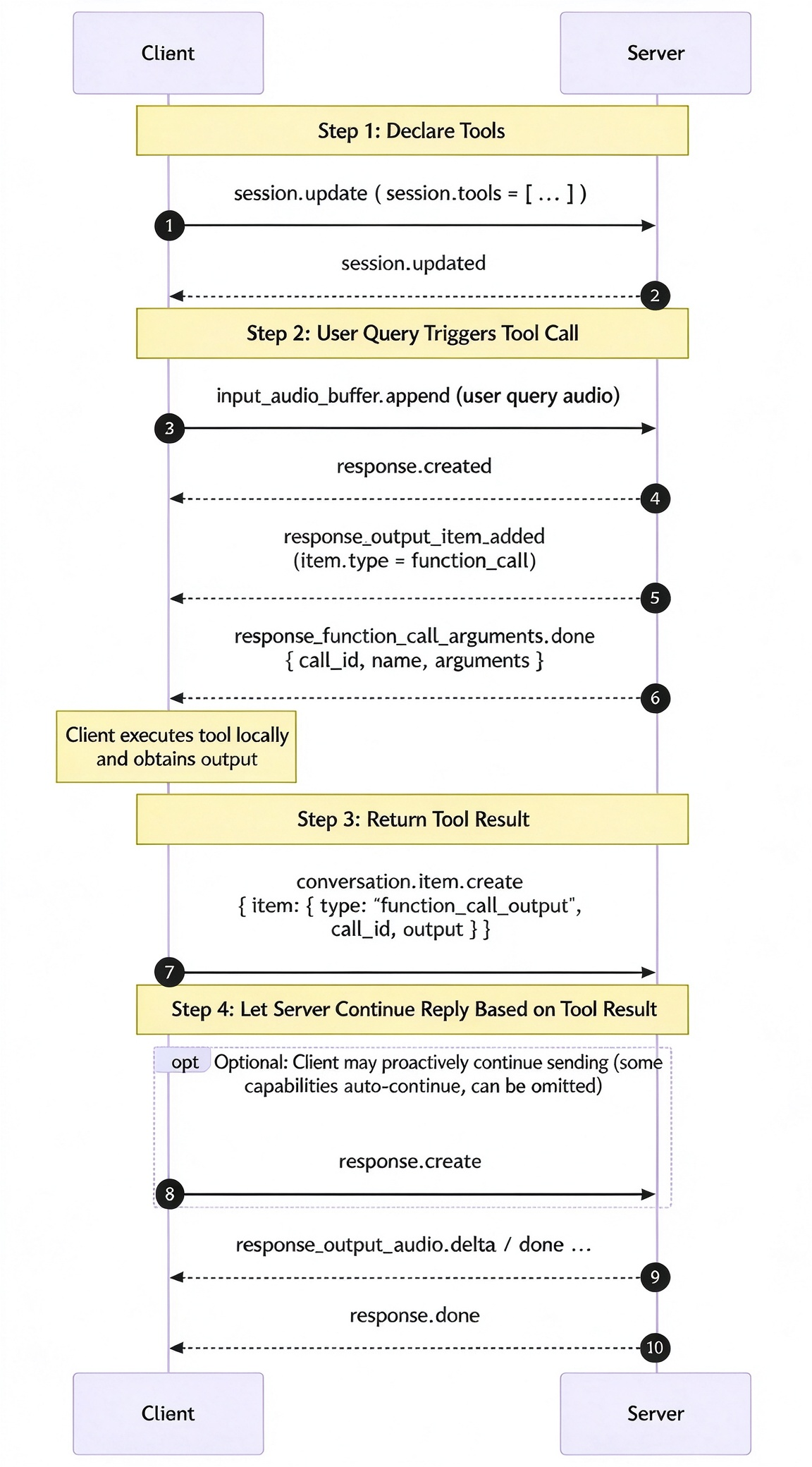
8.1 Sequence
8.2 Key Fields
Downstream
response.function_call_arguments.done:{"type": "response.function_call_arguments.done","event_id": "evt_xxx","response_id": "resp_xxx","item_id": "item_xxx","call_id": "call_abc123","name": "get_current_time","arguments": "{}"}
Uplink
conversation.item.create return:{"type": "conversation.item.create","item": {"type": "function_call_output","call_id": "call_abc123","output": "2026-08-26 09:30:00"}}
8.3 Complete Runnable Example
Select the "Enable Demo Tool" checkbox on the left.
Ask "What time is it now?".
Observe the complete function call sequence in the runtime logs.
9. Error Codes and Handshake Rejections
9.1 HTTP Rejection Codes During Handshake
During the authentication and concurrency check phase before the WebSocket upgrade is completed, any failure will be rejected with an HTTP status code:
HTTP Status | Reason Phrase | Triggering Cause |
400 | invalid_request: ... | Missing URL parameter / invalid appid / invalid model value. |
401 | invalid_timestamp | timeStamp or expired has expired or is in an invalid format. |
401 | authentication_failed: code=<n> | CAM signature verification failed. |
403 | account_invalid | Account overdue payment / frozen. |
429 | connection_limit_exceeded: uin=... num=... max=... | The number of concurrent connections exceeds the upper limit. |
500 | authentication_failed: <err> | CAM backend call exception. |
500 | check_user_status_error: <err> | An exception occurred while querying the account status. |
500 | limit_check_error: <err> | Concurrency limit query exception. |
The client should prompt the user to retry or contact the administrator based on these status codes.
9.2 error Events During Session
After a successful handshake, business errors are delivered through JSON
error events:error.type | error.code | Description |
invalid_request_error | invalid_json | The message is not valid JSON. |
invalid_request_error | invalid_audio | Failed to decode the upstream audio from base64 or parse it with the decoder. |
invalid_request_error | unsupported_output_format | The downstream format is not pcm / opus, or the opus sample rate is not in the allowlist. |
invalid_request_error | not_supported | Used a control event that is not supported by the current session capabilities (such as conversation.item.truncate / transcription_session.update / an empty response.create without instructions). |
invalid_request_error | session_not_ready | Sent a control event ( response.create / conversation.item.*, and so on) without first sending session.update. |
invalid_request_error | missing_item | conversation.item.create is missing the item field. |
invalid_request_error | missing_item_id | conversation.item.retrieve / delete is missing the item_id field. |
server_error | pipeline_init_failed | Failed to initialize the server-side session. |
server_error | upstream_send_error | The server failed to send data to the capability backend. |
server_error | upstream_error | The capability backend returned an exception. |
server_error | upstream_closed | The capability backend closed the connection proactively. |
session_expired | idle_timeout | The session times out when idle (default: 30 s, overridable via timeoutSec). |
10. FAQ
Q1: Why are no events received after a successful connection?
This service adopts a "client-driven" model. After a successful handshake, the server does not actively send any events.
The client must first send a
session.update to complete session initialization. Only then does the server return session.updated as the "first visible response", after which audio can be sent. This is intentionally different from the standard GA specification where session.created is sent first, in order to better align with the "client-driven" semantics.Q2: How to troubleshoot client signature 401 errors?
Check first:
1. Local clock skew: TC3 allows a difference of no more than 15 minutes between
timeStamp and the server. Calibrate the machine time with date -u first.2. Parameter set included in the signature: All query parameters except
signature must be included in the signature.timeoutSec / model / resId must be included in the canonicalQueryString as long as they appear in the URL.3. Parameter sorting: keys must be sorted in ascending alphabetical order, and then each
k=urlEncode(v) must be concatenated with &.4. canonicalRequest blank line: there must be a blank line (
\\n\\n) before content-type;host.5. Use UTC for date: do not use the local time zone.
Q3: Can only JSON be sent upstream? Why are Binary frames ignored?
Yes, this service is consistent with the standard Realtime GA specification and only accepts JSON events carried in WebSocket
Text frames. Audio is carried in the audio field of the input_audio_buffer.append event as base64.Q4: How to make the server proactively send a greeting?
Send immediately after
session.updated:{ "type": "response.create","response": { "instructions": "Hello, I am your AI assistant. How can I help you?" } }
All
models support this usage where the client specifies the text and the server speaks it proactively.Q5: How to receive opus instead of pcm on the client downstream?
Declare in
session.update.audio.output.format:{ "format": { "type": "opus", "rate": 48000 } }
The sample rate must be in the Opus allowlist:
8000 / 12000 / 16000 / 24000 / 48000. The returned response.output_audio.delta.delta field is the base64 of raw Opus packets (one delta typically corresponds to one 20 ms Opus frame), and the client must decode it to PCM using an Opus decoder.Q6: conversation.item.truncate reports not_supported. How to truncate generated assistant audio?
If the current session returns
not_supported, the active model does not provide native truncate capability. Recommended alternatives:Interrupt the current TTS: send
response.cancel.Clear audio that has been sent but not yet played: send
output_audio_buffer.clear. The server will also send output_audio_buffer.cleared, and the client can clear the local playback scheduling.Q7: What is the maximum duration of a single session?
This service does not limit the total session duration and only enforces an idle timeout: the connection is disconnected by default after 30 seconds without sending or receiving messages.
It can be overridden through the URL parameter
timeoutSec, with an upper limit of 120 seconds. Recommended heartbeat method: the client can occasionally send 20 ms of silent PCM to input_audio_buffer.append during speech pauses to keep the session alive.Q8: Are there SDKs for Python / Java / iOS / Android?
The external protocol of this service is 100% compatible with the standard Realtime GA WebSocket API, so any client SDK written according to the standard GA specification can connect directly with only the following changes:
Replace the WebSocket URL with the URL of this service.
Add the TC3-HMAC-SHA256 signing logic.
session.audio.output.format must use a format supported by this service.Q9: How to use encrypted voice IDs? Can they be mixed with plaintext voices?
The
session.audio.output.voice field supports both plaintext voice IDs and encrypted voice IDs, and the server automatically identifies and processes them:Plaintext voice ID: use it directly.
Encrypted voice ID (generated by the voice encryption service): the server retrieves the real voice ID through an internal decryption API before using it.
Fallback policy: In the following cases, the session is silently downgraded to the default voice configured on the server without interrupting session establishment:
1. If the server encounters a parsing exception / timeout, it retries internally for a certain number of times and falls back if the retries fail.
2. Plaintext voice ID (the server uses it directly without decryption).
3. The voice ID is not applicable to the current
model (for example, a dedicated voice from one model is passed to another model).4. The voice ID is not in the set of voices available for the current
model.Therefore, the client can safely enter any valid voice ID directly, and the server will try its best to parse it and provide the best result. Only when all paths fail will the server default voice be used.
Q10: How are response.done.response.usage and transcription.completed.usage billed respectively?
The two fields carry two independent and parallel billing dimensions:
conversation.item.input_audio_transcription.completed.usage= The per-second usage of this ASR transcription (
type="duration" + seconds). Some capabilities include this field, while it is absent in other cases.response.done.response.usage= The per-token usage details of the current response (
total_tokens / input_tokens / output_tokens / *_token_details). If the capability backend does not return usage, this field is omitted.The client can be used for local cost observation. Actual billing is subject to the bill.
Appendix: Complete Runnable Demo
Browser Demo: Testing Demo (a single file with zero dependencies, ready to open with a single click).
フィードバック