Purchase Guide
Unduh
Mode fokus
Ukuran font
This document guides you through the steps of purchasing an EdgeOne plan. Choose a plan that suits your needs by referring to Comparison of EdgeOne Plans. Note that this article only explains the purchase of resources required for using EdgeOne. For details about other cloud services, see Fees for Other Cloud Services.
Prerequisites
Purchasing
Method 1: Purchase a plan when adding sites
You can purchase a new plan when binding a plan to your site during site addition. For detailed instructions, see Quick Start.
Method 2: Purchase a plan on the Tencent Cloud EdgeOne purchase page
You can also purchase a plan on the EdgeOne purchase page.
Subscribing to a Personal/Basic/Standard plan
1. Go to the Tencent Cloud EdgeOne purchase page and click the TEO Monthly Plan tab.
2. Select the plan type and validity.
Configuration | Description |
Plan | Select a preferred plan: Personal, Basic, or Standard. |
Purchase Period | Select a purchase period: 1 month - 3 years. Select Enable monthly auto-renewal via your account as needed. |
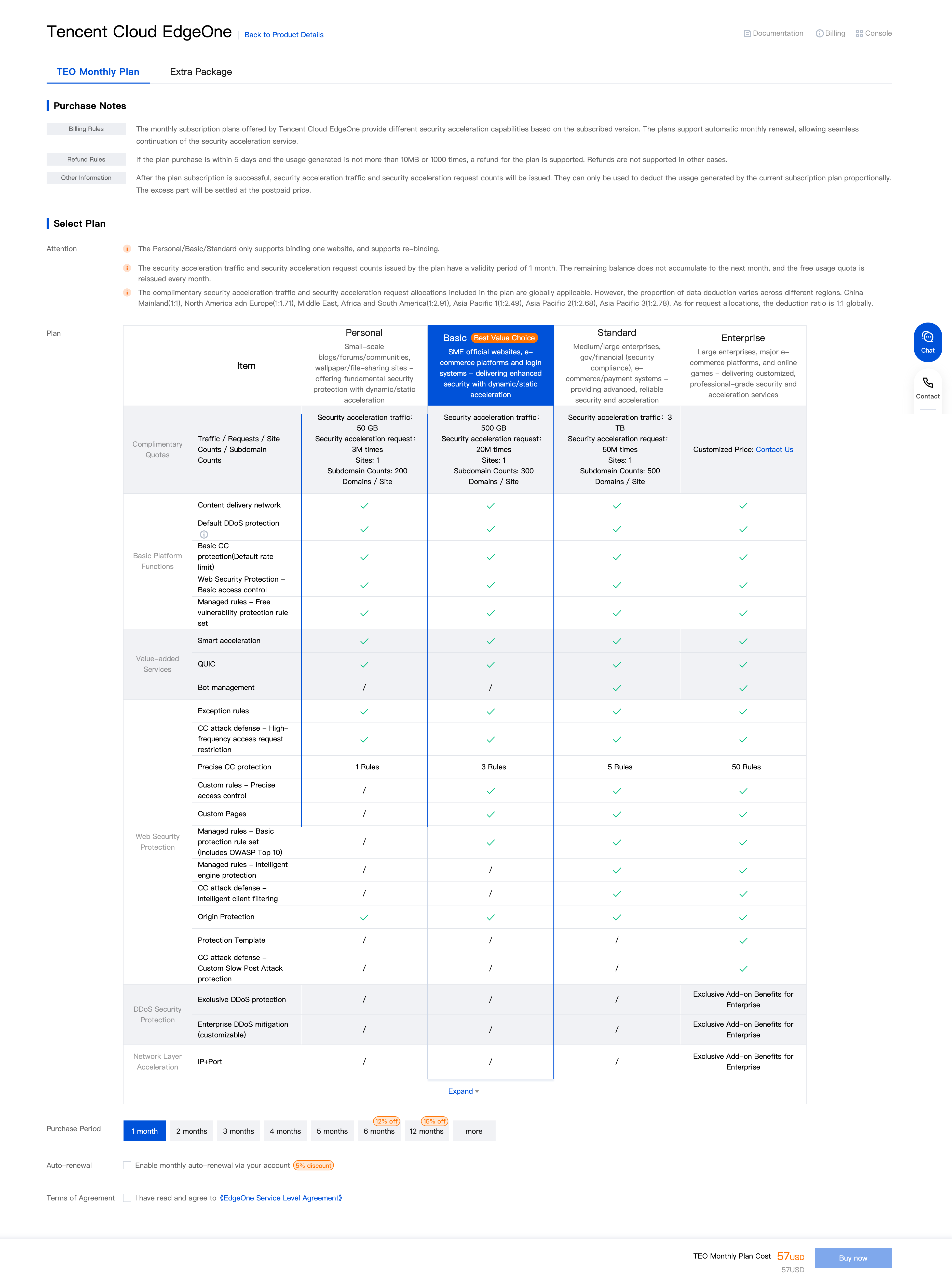
3. Select I have read and agree to EdgeOne Service Level Agreement and Refund Policy. Click Buy now.
4. Check the information, select a voucher (if available), and click Submit Order.
Subscribing to an Enterprise plan
EdgeOne Enterprise does not support self-service activation. To activate it, contact us, and we will get back to you as soon as possible.
Bantuan dan Dukungan
Apakah halaman ini membantu?
Anda juga dapat Menghubungi Penjualan atau Mengirimkan Tiket untuk meminta bantuan.
masukan