This document describes how to improve DTS transfer speed in different scenarios.
Factors Affecting Transfer Performance
1. Source/target specifications: DTS transfer increases the load on the source and target sides, and high load can degrade transfer performance. For scenarios where the source or target has low specifications, you can reduce the DTS transfer speed appropriately.
2. DTS transfer parameter configuration: The RPS and concurrency of DTS tasks can be flexibly configured. In most cases, the default parameters do not need to be modified. Improper settings can lead to performance limitations.
3. Network bandwidth and latency between source and target: The network between the source and target must be stable, with no latency or packet loss.
When the public network access method is used, bandwidth cannot be guaranteed, and the network may become a transfer bottleneck. We recommend using Direct Connect or VPN connection to improve network quality.
When the CCN access method is used, CCN provides only free bandwidth below 10 Kbps across all regions. To transfer production business data with DTS, you need to pay for higher bandwidth.
Cross-region transfer latency is higher than intra-region transfer latency. The region of a DTS task instance must be consistent with the target instance region. Otherwise, latency will increase. For self-built databases, select a DTS region close to the database for transfer.
4. Source data issues: If the source data does not comply with DTS specifications (for example, long-running SQL statements or tables without primary keys), the transfer progress may get stuck. In this case, optimize the indexes and queries on the source. Alternatively, large transactions or frequent DDL operations on the source can slow down the transfer speed in the incremental stage for a short period.
DTS Performance Tuning Methods
1. Adjust the transfer parameters of the DTS task.
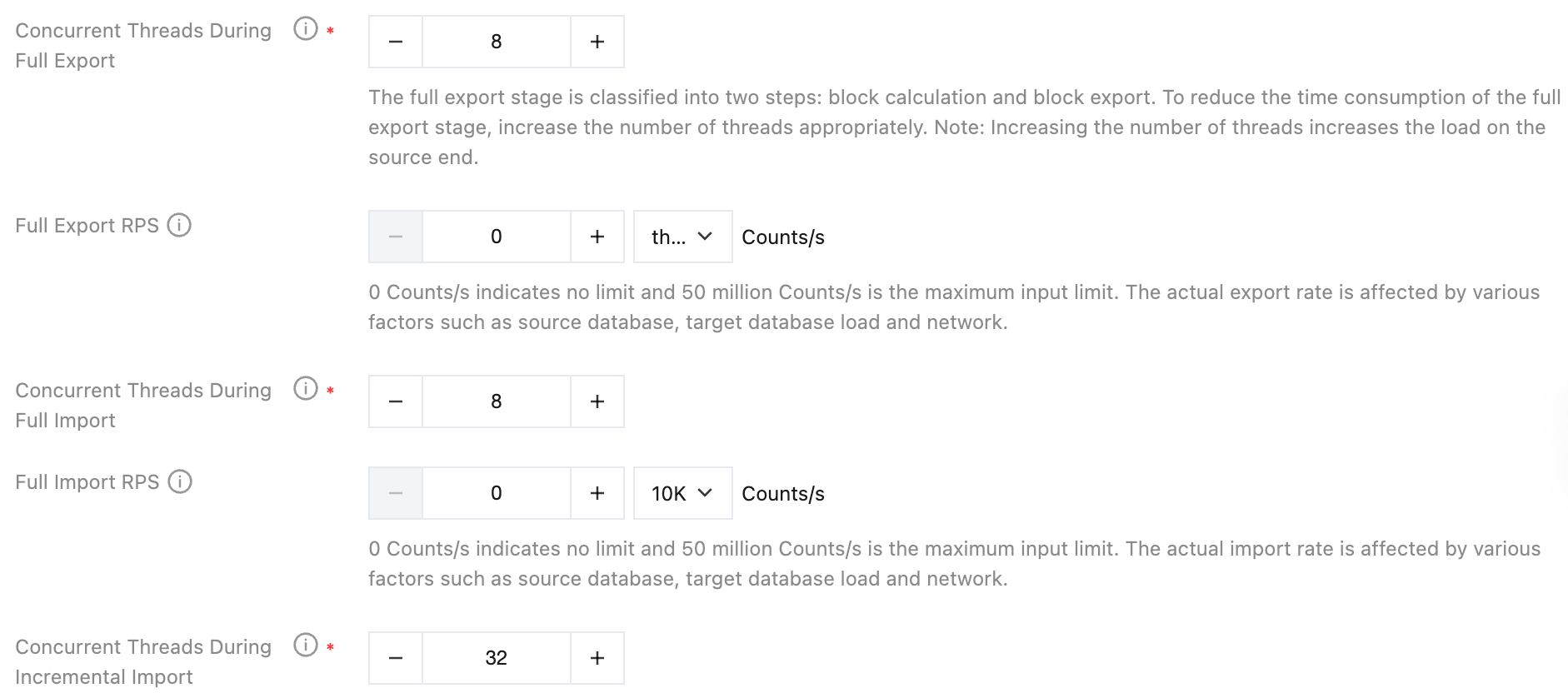
Select the specified task, and in the Operation column, choose More > Rate Limit to adjust the speed.
Adjustable parameters in the full stage: the number of concurrent threads and RPS for full import from the source database, and the number of concurrent threads and RPS for full import to the target database.
Adjustable parameters in the incremental stage: the number of concurrent threads for incremental import to the target database.
2. Adjust the DTS task specification.
Select the specified task, and in the Operation column, choose More > Modify Configuration to adjust it.
When a DTS task is purchased, different specifications correspond to different RPS limits in the incremental stage. The following uses a data synchronization task as an example. For more information, see Specifications. If the source database writes too much data in the incremental stage and the purchased specification is insufficient, upgrade the DTS task specification.
Specification
Performance Limit (RPS) Reference
micro
1000
small
2000
medium
5000
large
11000
xlarge
17000
2xlarge
34000
3. The task is paused and then resumed.
Select the specified task, and in the Operation column, choose More > Pause.
If a short-term business peak occurs on the source database and causes high load on the target side, you can pause the task first and resume synchronization after the data peak subsides.
General Principles
If you encounter performance issues, first check network and configuration factors, and then modify the DTS rate configuration parameters.
DTS transfer performance is related to the configurations of the source/target databases, DTS task specifications, network bandwidth, and network latency. Therefore, simply increasing the number of concurrent threads or RPS may not effectively improve DTS transfer performance. You need to identify the bottleneck in the process and address the specific issues accordingly.
Performance Tuning Steps
1. Observe the monitoring information.
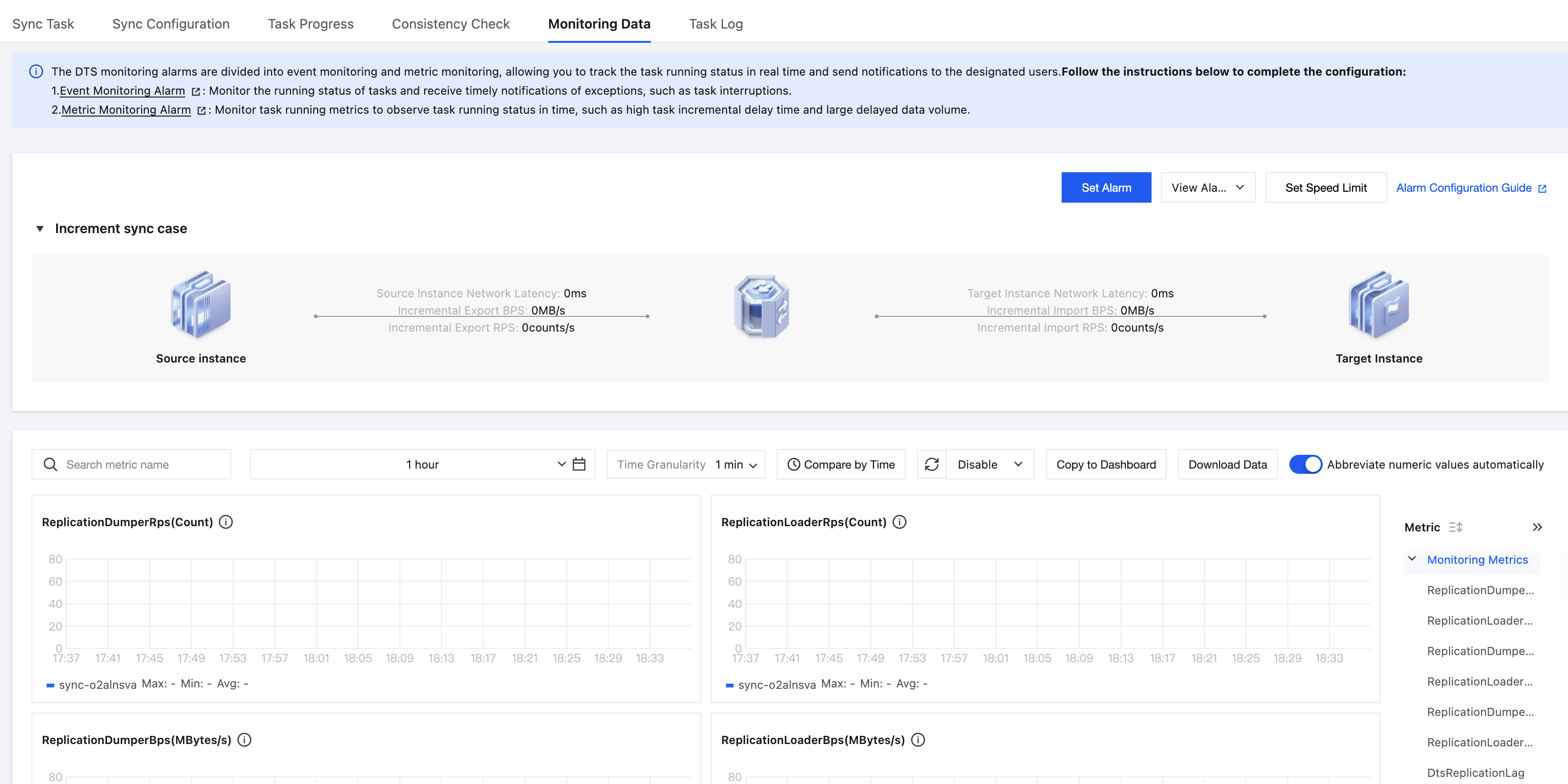
Select the specified task and click Task ID to go to the task details page. Switch to the Monitoring Data tab to view the corresponding metric data.
2. If the monitoring data shows high latency, check network issues first. If the latency in the same region is greater than 3 ms, the latency is considered high. Cross-region latency may be slightly higher.
2.1 When the public network access method is used, bandwidth cannot be guaranteed, and the network may become a transfer bottleneck. We recommend using Direct Connect or VPN connection to improve network quality.
2.2 When the CCN access method is used, CCN provides only free bandwidth below 10 Kbps across all regions. To transfer production business data with DTS, you need to pay for higher bandwidth.
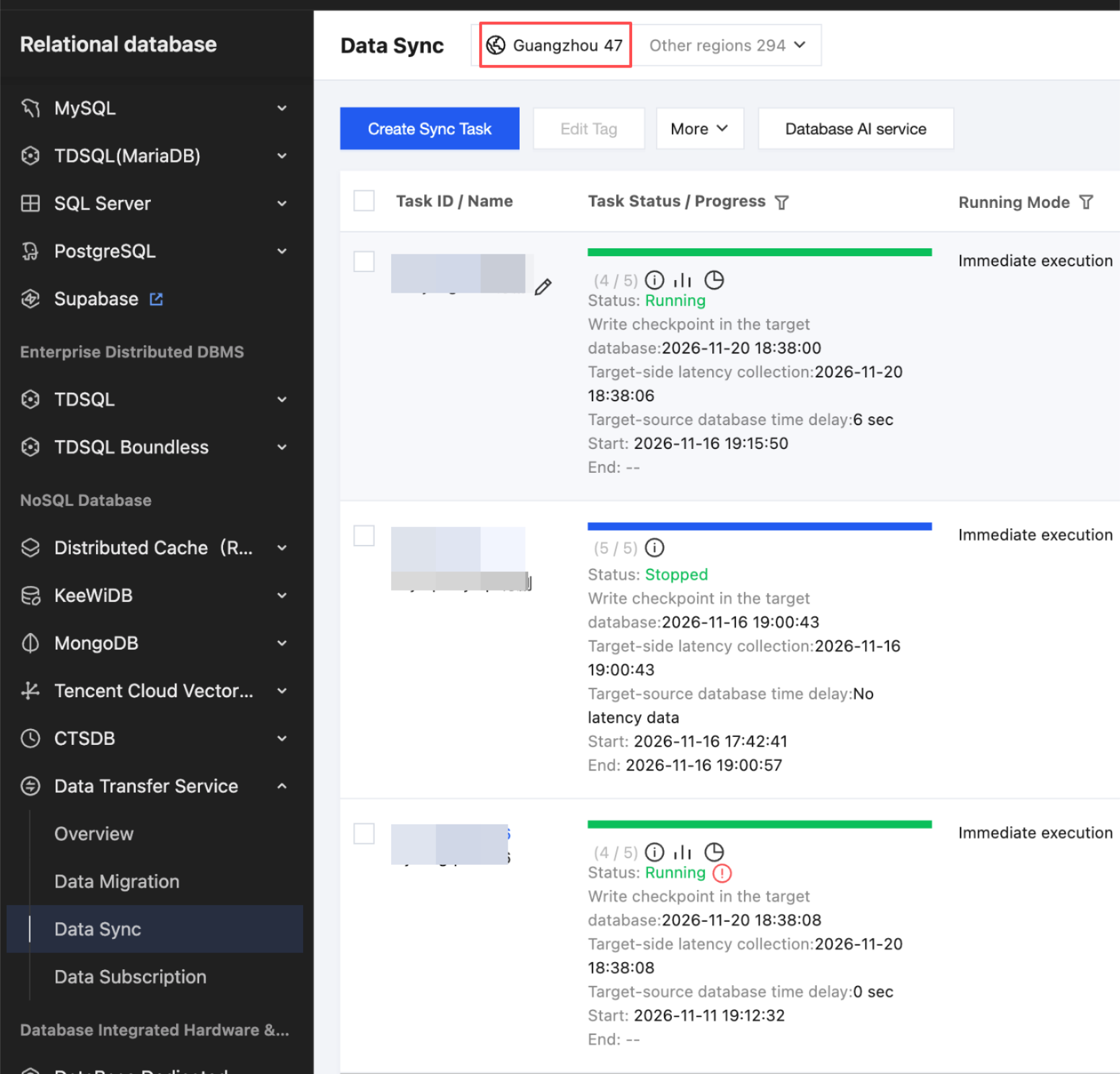
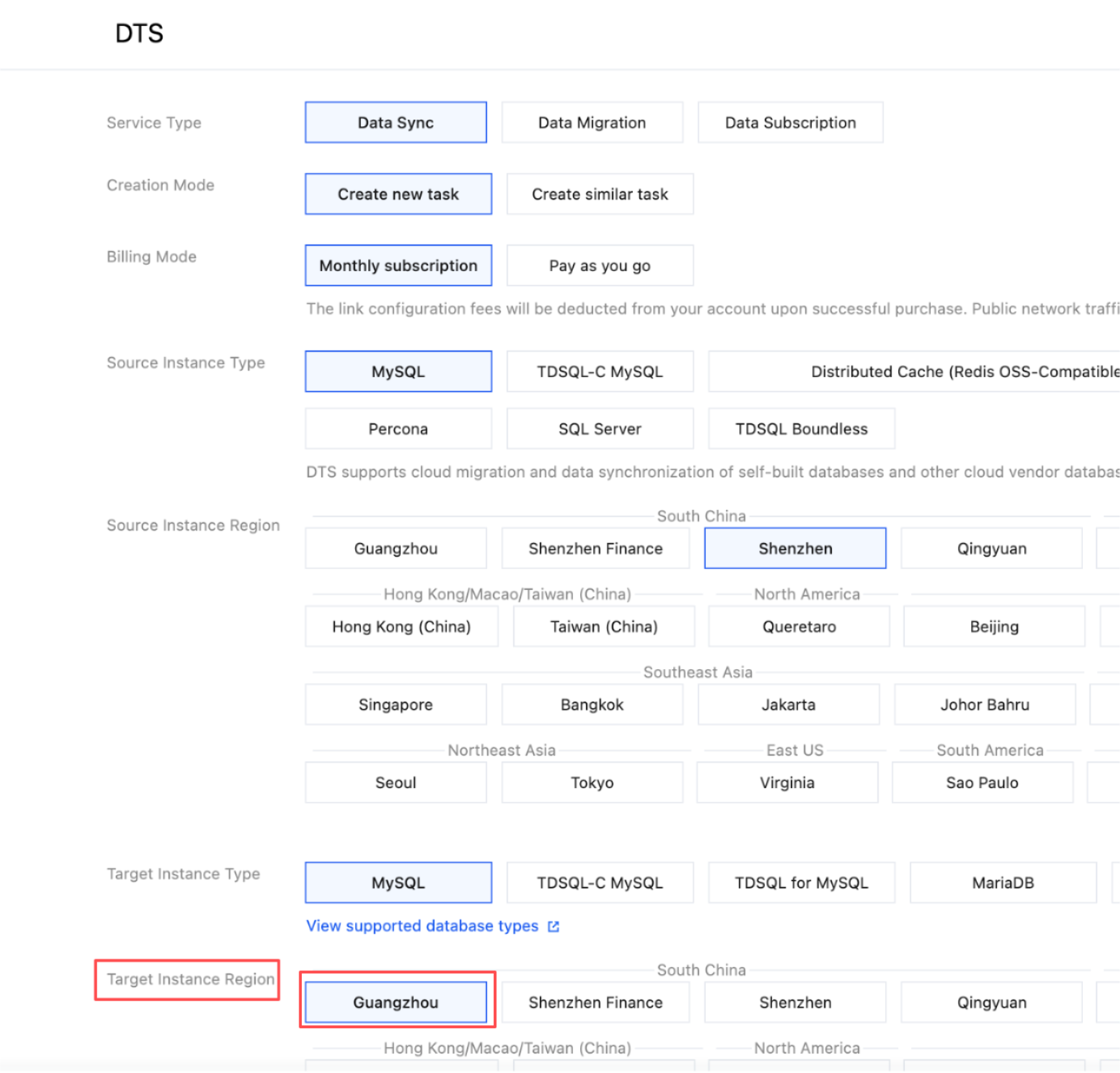
2.3 The region of a DTS task instance must be consistent with the target instance region. Otherwise, latency will increase. For example, if you want to synchronize data to the Guangzhou region, create a sync task in the Guangzhou region.
2.4 For a self-built database, select a DTS region close to the database for transfer. Otherwise, latency will increase. For example, if a self-built database is in Beijing and you need to synchronize it to a Tencent Cloud database in the Shanghai region, select "Beijing -> Shanghai" as the region when creating a DTS link. Selecting "Shanghai -> Shanghai" or "Shenzhen -> Shanghai" will increase latency.
3. In the full migration phase, adjust the DTS rate.
Note:
In the following scenarios, adjusting the rate parameters may cause the task to restart from the beginning: a data migration task in the full export phase (structure export and export of tables without primary keys only), a data synchronization task in the full export phase (structure export and export of tables without primary keys only), or the primary key conflict policy set to Conflict Error. Therefore, carefully evaluate before performing the adjustment operations described in sections 3.1 and 3.2.
3.1 Normal export rate: The full export BPS is higher than 20-50 MB/s, and the network latency to the source instance during full export is less than 1 ms.
This generally does not need to be adjusted. If you need to increase the rate, analyze the load on the source database.
If the load on the source database is high (for example, CPU utilization is greater than 90%), do not increase the rate further.
If the load on the source database is low (for example, CPU utilization is less than 50%), you can appropriately increase the number of concurrent threads for source export. The default RPS in the full phase is very high, so you generally do not need to adjust RPS when improving the transfer rate. If the effect is not significant after the number of concurrent export threads is modified, proceed to step 5.
3.2 Limited export rate: The full export BPS is less than 20 MB/s, and the network latency to the source instance during full export is greater than 3 ms.
Analyze the load on the source database.
If the load on the source database is high (for example, CPU utilization is greater than 90%), the source database configuration is low, and DTS transfer further increases the load, resulting in limited performance. In this case, reduce the number of concurrent threads for source export and the RPS. If the effect is not significant, use a secondary database for synchronization.
If the load on the source database is low, appropriately increase the number of concurrent threads for source export. If the effect is not significant after the adjustment, proceed to step 5.
3.3 Normal import rate: The full import BPS is higher than 20-50 MB/s, and the network latency to the target instance during full import is less than 1 ms.
This generally does not need to be adjusted. If you need to increase the rate, analyze the resource usage on the target side.
If the load on the target side is high (for example, CPU utilization is greater than 90%), do not increase the rate further.
If the load on the target side is low (for example, CPU utilization is less than 50%), you can appropriately increase the number of concurrent threads for target import. If the effect is not significant after the modification, proceed to step 5.
3.4 Limited import rate: The full import BPS is less than 20 MB/s, and the network latency to the target instance during full import is greater than 3 ms.
Analyze the load on the target side.
If the load on the target side is high (for example, CPU utilization is greater than 90%), the target side configuration is low, and DTS transfer further increases the load, resulting in limited performance. In this case, reduce the number of concurrent threads for target import and the RPS first.
If the effect is not significant after adjustment, you can use the pause feature to temporarily stop task transfer. Do not pause a task for more than 3 days. Otherwise, the transfer may fail to resume after recovery.
If the load on the target side is low, you can appropriately increase the number of concurrent threads for target import. If the effect is not significant after the modification, proceed to step 5.
4. In the incremental stage, adjust the DTS rate.
4.1 Use monitoring to check whether the RPS of the incremental task (the incremental export RPS of the source instance and the incremental import RPS of the target instance) reaches the specification limit. Tasks with different specifications have different RPS limits.
If the incremental RPS has reached the limit, upgrade the DTS task specification first (by performing a configuration change).
If the incremental RPS is less than 60% of the task specification limit, performance may be limited. Proceed to step 4.2.
4.2 Check the load on the target side.
If the load on the target side reaches its limit (for example, CPU utilization is greater than 95%), proceed to step 4.3.
If the load on the target side is relatively normal (for example, CPU utilization is between 60% and 85%), no adjustment is generally required.
If the load on the target side is low (for example, CPU utilization is less than 50%), you can appropriately increase the DTS rate parameters.
If the target side is a database, you can appropriately increase the number of concurrent threads for writing to the target side. If the effect is not significant after the adjustment, proceed to step 5.
If the target side is Kafka, increasing the number of concurrent threads for writing to the target side may not have a significant effect. Increase the bandwidth configuration and the number of partitions of CKafka on the target side first, because multiple partitions can support concurrent writes and improve the write speed to the target side.
4.3 Check whether the source database has large transactions or frequent DDL operations.
4.3.1 The source database has large transactions/frequent DDL operations.
This can cause temporary load on the target side. You can pause the task and resume it after the large transaction/DDL synchronization is complete. However, it is recommended that the pause duration not exceed 3 days, otherwise the task may fail.
4.3.2 The source database has no large transactions/frequent DDL operations.
This is because the target side configuration is low, and DTS transfer further increases the load, resulting in limited performance. It is recommended to reduce the number of concurrent threads for target import first.
If the target side is a database, you can appropriately reduce the number of concurrent threads for writing to the target side. If the adjustment has no effect, perform a specification downgrade on the task.
If the target side is Kafka, first appropriately increase the bandwidth configuration and the number of partitions of CKafka on the target side, because multiple partitions can support concurrent writes and improve the write speed to the target side. Then reduce the number of concurrent threads for writing to the target side. If the adjustments have no effect, perform a specification downgrade on the task.
5.
Check the data content on the source side.
5.1 Check whether there are long-running SQL statements on the source side.
If slow SQL statements are running on the source side, the synchronization speed will slow down. Check whether there are slow SQL statements on the source side. If so, handle them and optimize indexes to prevent slow SQL statements from running.
5.2 Check whether the source database contains data that does not comply with DTS specifications.
If the source database contains tables without primary keys, large-scale queries on these tables may slow down the synchronization progress. It is recommended to add primary keys to all tables in the source database, or to exclude tables without primary keys from synchronization.