Hi3D API Guide
Unduh
Mode fokus
Ukuran font
Introduction
The hi3d model intelligently generates 3d content based on input images. This document applies to: hi3d-2.1 and hi3d-3.0.
Integration Guide
1. Obtaining an API Key
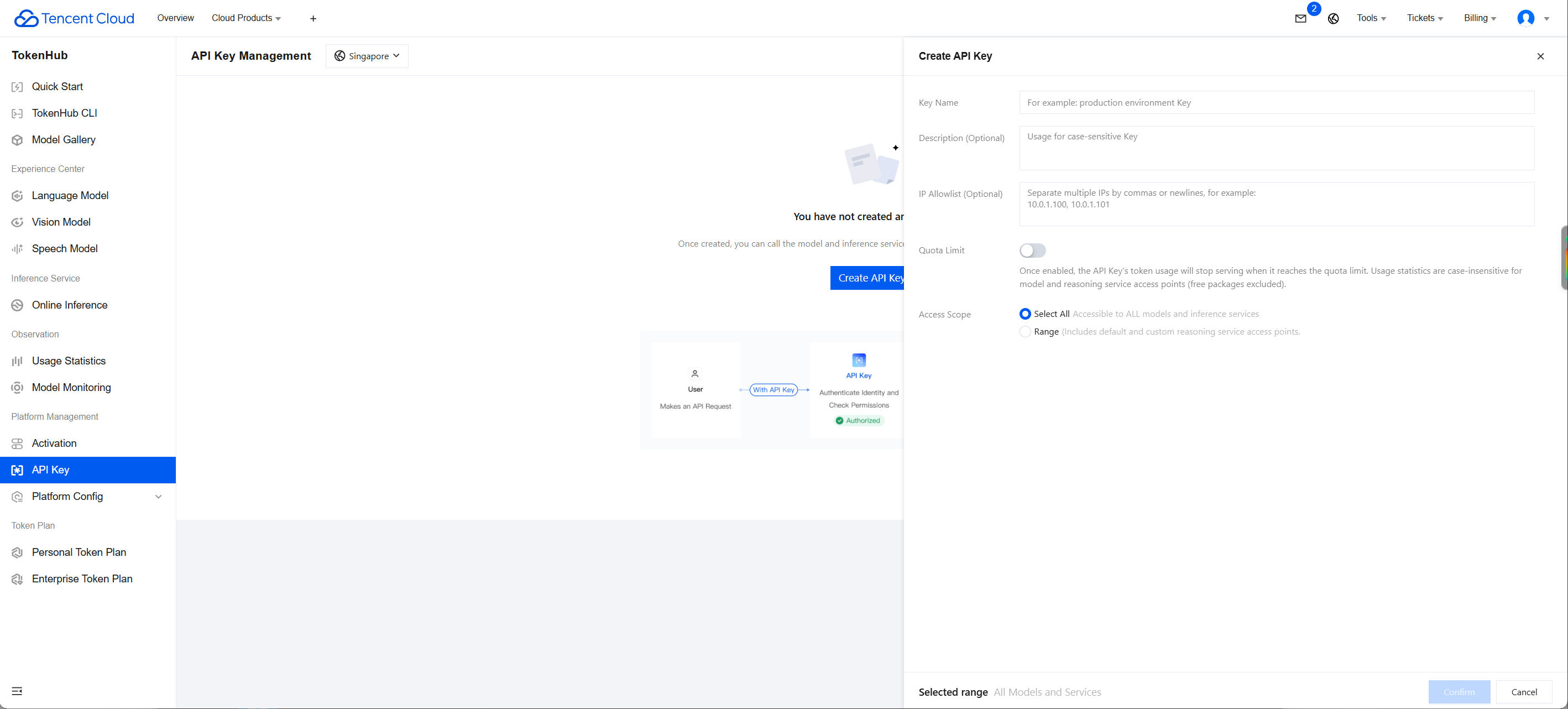
1. Go to the API Key Management page and click Create API Key. For detailed operations, see Create API Key.
2. After creation, be sure to copy and securely store the API Key. This information will be used in the subsequent process of configuring the tool.
Note:
The key of each account can only be queried by that account. Sub-accounts cannot view the key information of the main account. If a sub-account needs to call APIs, it must create its own key information.
If a sub-account cannot be created, the user may not have permission to create keys and needs authorization from the main account. After the main account logs in, click User List, and select Authorize next to the corresponding sub-account. A dialog box for associating policies will appear. Enter the authorization policy name and search, then select the corresponding policy and click Confirm.
Authorization policy: QcloudTokenhubFullAccess
2. Concurrency Quota
Three concurrent tasks are provided by default, meaning that up to three submitted tasks can be processed simultaneously. Tasks that exceed the concurrency limit must wait until the preceding tasks are completed before they can start processing.
Concurrent tasks: the maximum number of tasks that can run during the period when the corresponding service is being called. While a task is not completed, the next task cannot be submitted. After the task is completed, the next task can be submitted.
API Documentation
Submitting hi3d Tasks
Input parameters
Parameter Name | Required | Type | Parameter Description |
model | Yes | string | Model version. Options: hi3d-2.1, hi3d-3.0. Example value: hi3d-3.0. |
request_type | No | int | Request type: 1=generate geometry only, 2=generate texture based on existing geometry, 3=generate both geometry and texture. Default: 3. request_type=2 is supported only by hi3d-3.0. |
images | No | string | Single-image URL. Select one from image_url, image_base64, and multi_images. |
image_url | No | string | Single-image URL. Select one from images, image_base64, and multi_images. |
image_base64 | No | string | Single-image Base64 encoding. Select one from images, image_url, and multi_images. |
multi_images | No | string[] | Multi-view URL list, up to 4 images (front, back, left, and right views). Mutually exclusive with single-image parameters. |
multi_images_bit | No | string | Multi-view bitmap. The length must be 4 and contain only 0 or 1. The number of 1s must match the number of multi_images. For example, 1010 indicates the front and left views. |
resolution | No | string | Resolution. For hi3d-2.1, options are 1536fast and 1536pro, with 1536pro as the default. For hi3d-3.0, options are 2048quality and 2048master, with 2048quality as the default. |
pbr | No | int | PBR switch: 1=enable (default), 0=disable. |
shading | No | float | Shadow removal degree, ranging from 0.0 to 1.0, default 0.5. |
face | No | int | Model face quantity. For hi3d-2.1, the range is 100000 to 2000000. For hi3d-3.0, the range is 100000 to 5000000. |
format | No | int | Output format: 1=obj (default), 2=glb, 3=stl, 4=fbx, 5=usdz, 6=3mf. |
mesh_url | No | string | URL of the geometry model in GLB format. Required when request_type=2, and must start with http:// or https://. Supported only by hi3d-3.0. |
callback_url | No | string | Callback URL for receiving notifications when a task is completed or fails. Must start with http:// or https://. |
Output parameters
Parameter Name | Type | Description |
id | string | Task ID, used to query tasks. |
object | string | Type of the returned object, fixed as 3d_job. |
status | string | Initial task status, typically queued. |
created_at | int | Task creation timestamp, in seconds. |
request_id | string | Request ID, used for issue locating. |
error | object | Error message, returned only when the task fails. |
error.code | string | Error code. |
error.message | string | Error message. |
error.type | string | Error type, fixed as api_error. |
Querying hi3d Tasks
Input parameters
Parameter Name | Required | Type | Parameter Description |
model | Yes | string | Model version. Must be consistent with the version used when the task is submitted. Options: hi3d-2.1, hi3d-3.0. |
id | Yes | string | Task ID, returned by the task submission API. |
Output parameters
Parameter Name | Type | Description |
status | string | Task status: queued=queued, processing=processing, completed=completed, failed=failed. |
data.url | string | Download URL of the generated asset. Returned only when the task is completed. Valid for 1 hour. |
data.cover_url | string | Cover image URL of the generated asset. Returned only when the task is completed. Valid for 1 hour. |
result_credit_consumed | int | Total credits actually consumed by this task. Returned only when the task is completed. |
result_credit_details | string | Credit consumption details of this task, in JSON string format. mesh, texture, and pbr represent geometry, texture, and PBR material credits respectively. |
request_id | string | Request ID, used for issue locating. |
created_at | int | Task creation timestamp, in seconds. |
completed_at | int | Task completion timestamp, in seconds. Returned only when the task is completed. |
object | string | Type of the returned object, fixed as 3d_job. |
error | object | Error message, returned only when the task fails. |
error.code | string | Error code. |
error.message | string | Error message. |
error.type | string | Error type, fixed as api_error. |
Examples
Submitting hi3d Tasks
Input example
curl --location --request POST 'https://tokenhub-intl.tencentcloudmaas.com/v1/api/3d/submit' \\--header "Authorization: Bearer ${APIKEY}" \\--header 'Content-Type: application/json' \\--header 'Accept: */*' \\--header 'Connection: keep-alive' \\--data-raw '{"image_url": "https://example.com/lee.jpg","model": "hi3d-3.0"}'
Output example
{"created_at": 1787890699,"id": "xxxxx","object": "3d_job","request_id": "75c28fde-6abe-4fa5-973a-xxxxx","status": "queued"}
Querying hi3d Tasks
Input example
curl --location --request POST 'https://tokenhub-intl.tencentcloudmaas.com/v1/api/3d/query' \\--header "Authorization: Bearer ${APIKEY}" \\--header 'Content-Type: application/json' \\--header 'Connection: keep-alive' \\--data-raw '{"model": "hi3d-3.0","id": "ID"}'
Output example
{"created_at": 1787892116,"data": {"cover_url": "https://example.com/lee.jpg","url": "https://example.com/lee.jpg"},"object": "3d_job","request_id": "4ba8a00b-ebb0-458d-bae2-xxxxx","status": "completed"}
Error Codes
Error Code | HTTP Status Code | Description |
1001 | 400 | Invalid request parameters: failed to parse the request body JSON, model is empty, or model is not in the supported list. |
1002 | 400 | Missing query parameters: id or model is empty. |
FailedOperation.JobNotExist | 200 | The queried task ID is invalid or has expired. |
FailedOperation.GenerateFailed | 200 | Generation failed (timeout or model parsing failure), and consumed credits have been refunded. |
FailedOperation.BalanceNotEnough | 200 | Insufficient credit balance. |
InvalidParameter.FileSizeExceedsLimit | 200 | The file exceeds 20 MB. |
InvalidParameter.FaceNotValid | 200 | Invalid number of faces: for hi3d-2.1, the range is 100000 to 2000000; for hi3d-3.0, the range is 100000 to 5000000. |
InvalidParameter.ResolutionNotValid | 200 | Invalid resolution: hi3d-2.1 supports 1536fast and 1536pro, and hi3d-3.0 supports 2048quality and 2048master. |
InvalidParameter.RequestTypeNotSupport | 200 | Request type not supported. |
InvalidParameter.ImageFormatError | 200 | Invalid image format. Only png, jpeg, jpg, and webp are supported. |
InvalidParameter.ModelNotSupport | 200 | Model version not supported. |
InvalidParameter.ImageConflict | 200 | Single images and multi-view images cannot be uploaded at the same time. |
InvalidParameter.ImageRequired | 200 | A single image or multi-view images must be uploaded. |
InvalidParameter.MultiImagesExceedsLimit | 200 | Multi-view supports up to 4 images. |
InvalidParameter.EmptyFile | 200 | The file cannot be empty. |
InvalidParameter.MeshRequired | 200 | When request_type=2, mesh_url must be provided. |
InvalidParameter.MeshUrlInvalid | 200 | mesh_url must start with http:// or https://. |
InvalidParameter.MultiImagesBitLengthError | 200 | The length of multi_images_bit must be 4. |
InvalidParameter.MultiImagesBitCharError | 200 | multi_images_bit can only contain 0 and 1. |
InvalidParameter.MultiImagesBitMismatch | 200 | The number of 1s in multi_images_bit must match the number of multi_images images. |
InvalidParameter.MeshFormatNotSupported | 200 | mesh_url supports only the GLB format. |
InvalidParameter.TextureNotSupported | 200 | hi3d-2.1 does not support request_type=2. This capability is supported only by hi3d-3.0. |
InternalError | 200 | Internal system error. |
Bantuan dan Dukungan
Apakah halaman ini membantu?
Anda juga dapat Menghubungi Penjualan atau Mengirimkan Tiket untuk meminta bantuan.
masukan