Key Prefix Filtering
Unduh
Mode fokus
Ukuran font
Overview
DTS supports configuring prefix filtering rules for multi-key commands in data migration links, making it easier for users to manage keys in databases.
Key Prefix Filtering Rules
You can configure one or more key prefix matching rules. Separate multiple prefixes with line breaks.
When migration rules and filtering rules are used together, the filtering rules take higher priority over the migration rules.
Earlier versions only support literal prefix filtering (for example,
\\xae\\xac). The new version adds the hex: prefix, which indicates that the subsequent string is parsed in hexadecimal format. To migrate keys with both prefixes at the same time, enter the following format in the console:\\xae\\xac: indicates a migration literal.hex:aeac: indicates migration of hex-encoded data (that is, "\\xae\\xac").Key Prefix Filtering Rule Examples
1. Exact matching rules for MSET/DEL/UNLINK commands.
Migration rule: If a multi-key command on the source matches a key, only that key is migrated to the target, while other keys are not migrated.
Filtering rule: If a multi-key command on the source matches a key, only that key is filtered out and not migrated to the target, while other keys are migrated.
Prefix Type | Source Key Command | Prefix Set in DTS | Target Result |
Migration key prefix | MSET dtsnew "111" abcd "222" | dts | MSET dtsnew "111" |
Filtering key prefix | MSET redisnew "111" efgh "222" | redis | MSET efgh "222" |
2. Commands other than MSET/DEL/UNLINK.
Migration rule: If a multi-key command on the source matches a migration prefix, the entire command is migrated to the target.
Filtering rule: A multi-key command on the source is filtered out only when all its keys match. If only one key matches, the command is not filtered out and is still migrated to the target.
Prefix Type | Source key Command | Prefix Set in DTS | Target Result |
Migration key prefix | SUNION dtsnew abcd | dts | SUNION dtsnew abcd |
Filtering key prefix | SUNION redisnew efgh | redis | SUNION redisnew efgh |
Filtering key prefix | SUNION redisnew efgh | redis efgh | Not synchronized |
Operation Steps
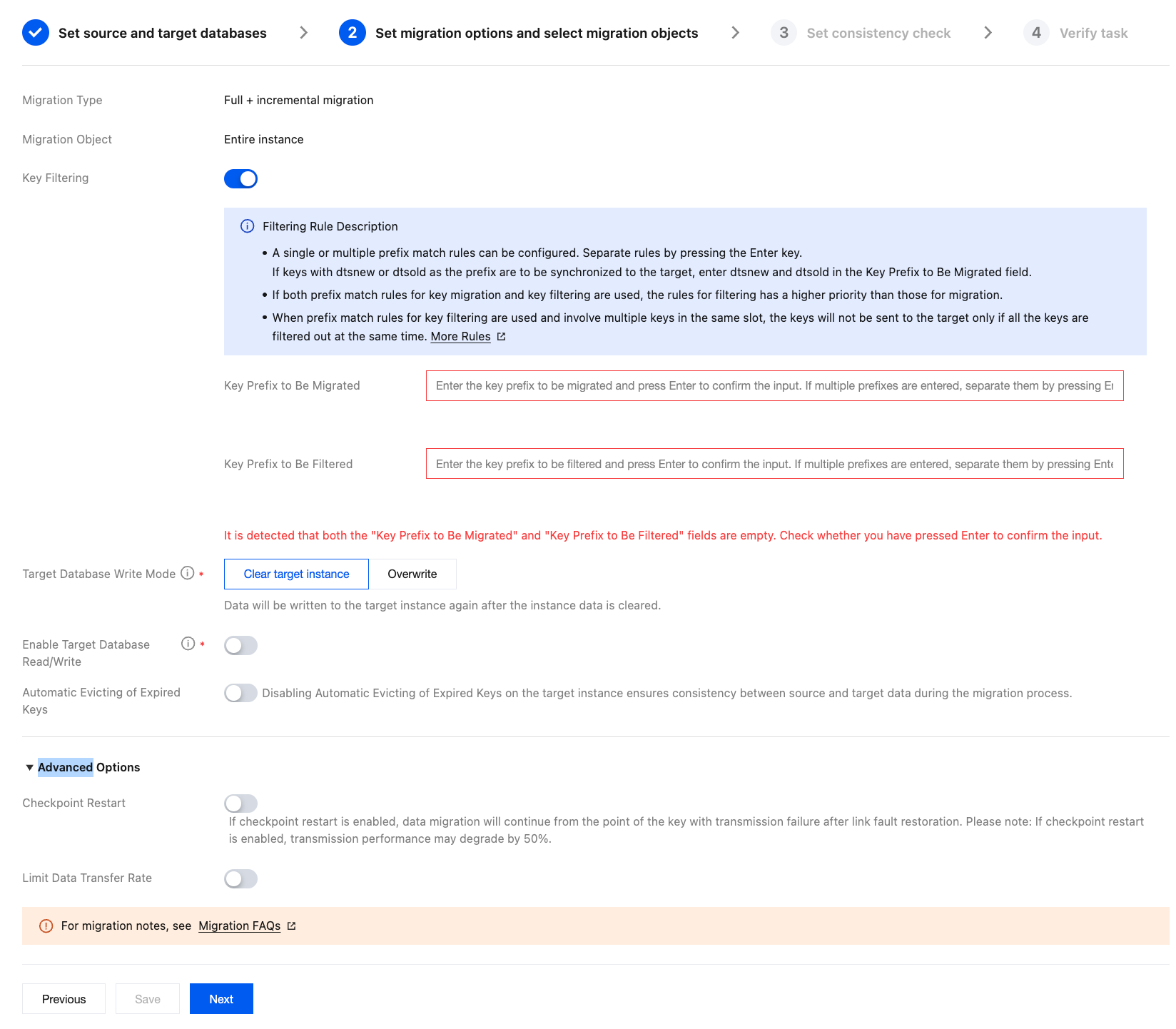
To configure a migration task, go to the Set migration options and select migration objects page, check Key Filter, set the filtering rules, and proceed with the subsequent configuration steps.
Bantuan dan Dukungan
Apakah halaman ini membantu?
Anda juga dapat Menghubungi Penjualan atau Mengirimkan Tiket untuk meminta bantuan.
masukan