Custom Protection Rule
Unduh
Mode fokus
Ukuran font
Feature Overview
Beyond preset scenario protection rules, LLM Security also supports scanning LLM inputs and outputs through custom protection rules to identify various types of risky content such as illegal, non-compliant, and inappropriate information, helping meet compliance and security requirements for generative AI applications.
Scenario
This document describes how to configure custom protection rules to perform risk detection on LLM input/output content.
Prerequisites
Operation Step
1. Log in to the WAF console, and in the left sidebar, choose LLM Security > Security Configurations > Custom Protection Rule.
2. On the custom protection rules page, click Add Rule.
3. In the Add Custom Protection Rule window, configure the following information:
Parameter description
Field Name | Description |
Rule Name | Set the rule name. |
Session Identifier | Select the previously configured session identifier to distinguish different users and implement precise content security detection for individual users. Note: You do not need to configure this parameter when using the SDK/API Integration method. |
Condition | By default, select the LLM security business matching method and the added LLM security business protection path configuration. Note: Different matching methods within a single rule are in an "AND" relationship. You do not need to configure this parameter when using the SDK/API Integration method. |
Detection Mode | Input And Output Are Detected: Detects both input and output content. Only Detect Input Content: Detects the prompt content defined in the LLM protection path. Detect Output Content Only: Detects the thinking and output content defined in the LLM protection path. If the model is a reasoning model, the detection scope of output content includes both thinking content and answer content. Domains connected through CLB-type WAF do not support this feature currently. |
Modal Type | Text: Performs security detection on text content in user interactions. The text size of a single request cannot exceed 240 KB. Image: Performs security detection on image content in user interactions. A single image cannot exceed 10 MB, and JPG, JPEG, and other formats are supported. Note: Only the SDK/API Integration method supports configuring the modality type. |
Detection Content | You can select the operation logic among multiple conditions. AND (default) OR |
| Data classification: Covers the identification of multiple types of sensitive information, such as email addresses, URLs, and IP addresses. The complete list of rules is subject to what is displayed in the console. Note: Only the Ultimate Edition of LLM Security supports sensitive information recognition and detection. Sensitive information: Supports the identification of illegal and non-compliant content, and provides detection levels with different strictness. The complete list of rules is subject to what is displayed in the console. Keyword: Supports the identification of keyword information. You can configure up to 20 keywords, and multiple keywords are evaluated with an OR relationship. Note that for output content detection, WAF performs combined detection on long text because LLM output is streamed. Therefore, if a configured keyword is too long, detection may fail to match. We recommend that you configure a single keyword to be no more than 10 characters in length. Prompt injection: Supports the identification of prompt injection attack behaviors. Note that when this content configuration is selected, only the input information is detected. Regular expression: Supports regex matching. Enter multiple values separated by carriage return, up to 20 values, with a maximum of 120 characters per value. Note: Regular expressions support only the RE2 syntax specification. Encoding type identification: Supports detecting whether the input or output contains content of specific encoding types. Supports encoding types such as Base64 and URL/Percent encoding. Multiple selections are supported, and the relationship between multiple encoding types is "OR", meaning that the rule is triggered when any one of them is matched. |
Action | Observe: Logs are recorded, but user requests are not blocked. Block: Blocks user requests and returns a prompt. |
Priority | Configure the rule priority. Priority logic: Enter an integer from 1 to 100. A smaller value indicates a higher execution priority for this rule. When priorities are the same, a later update time indicates a higher priority. |
To optimize the interception experience and provide better interaction, the following sample code demonstrates how to modify the business frontend for the WAF LLM security module interception logic. This sample code is based on the DeepSeek API format and can be embedded into your business frontend code to integrate with the WAF LLM security module protection logic:
Interception Mechanism:
Request direction interception: The WAF LLM security module uses synchronous interception for requests. After the client sends a request, the server performs a risk check on the request (such as for sensitive words). If interception is triggered, the preset interception page of the WAF LLM security module is directly returned (the custom interception prompt content in the rule is not used). If the business frontend needs to handle the interception effect, it only needs to adjust the frontend's handling of the response status code and status prompt.
Response direction interception: The WAF LLM security module uses asynchronous interception for responses. While the server is streaming output, the WAF LLM security module synchronously detects risks. When interception is triggered:
The WAF LLM security module interrupts streaming content output.
Add a uuid field to the response data, and insert the custom interception prompt content configured in the rule into the defined response content field.
If the business frontend needs to handle the interception effect, it can determine the interception status by detecting the presence of the uuid field, and adjust the interception effect of the business frontend accordingly:
If the uuid field is not detected: display the content normally.
If the uuid field is detected: clear the output content and reset the display to the custom prompt content inserted by the WAF LLM security module.
Request Direction Interception
Default block page handling: the effect is to display the block prompt content in the chat window. The sample code is as follows:
if (!initResponse.ok) {const errorText = await initResponse.text();console.error('API error response:', errorText);removeMessage(responseMessageId); // Remove the message container currently displayed// Parse the error message returned by the serverlet errorMessage = '';try {const errorData = JSON.parse(errorText);errorMessage = errorData.error?.message || errorData.message || errorText;} catch (e) {errorMessage = errorText;}// Display the error message in the chat interfaceaddMessage(errorMessage, 'error');updateStatus('Request failed', 'error');return;}
Response Direction Interception
Insert the custom prompt content into the data, and handle the replacement and display of the uuid field. The effect is to reset the content that has already been returned and display the custom prompt content. The sample code is as follows:
// UUID detection handling - based on code logicif (parsed.uuid) {console.log('🚨 Content replacement signal detected!');console.log('Original data:', parsed);console.log('Content before replacement:', fullContent);// Extract new content from the data returned by the serverlet newContent = '';if (parsed.choices && parsed.choices[0] && parsed.choices[0].delta && parsed.choices[0].delta.content) {newContent = parsed.choices[0].delta.content;console.log('✅ Content obtained from choices[0].delta.content:', newContent);} else if (parsed.content) {newContent = parsed.content;console.log('✅ Content obtained from content:', newContent);} else {console.log('⚠️ content not found in the data');}// Completely reset the displayed contentfullContent = newContent;reasoning = '';contentWasReplaced = true;// Clear the currently displayed content and display the new content returned by the serverif (selectedModel === 'deepseek-reasoner') {// R1 mode: clear the thinking process and answer, and display new contentclearR1Message(responseMessageId);updateR1StreamingMessage(responseMessageId, '', fullContent, false);addContentReplacedIndicator(responseMessageId);} else {// Normal mode: clear messages and display new contentclearStreamingMessage(responseMessageId);updateStreamingMessage(responseMessageId, fullContent, true);addContentReplacedIndicator(responseMessageId);}console.log('✅ Content replacement completed. Current fullContent:', `"${fullContent}"`);// Stop processing subsequent data streamsshouldStopProcessing = true;console.log('🛑 Stop processing flag set. Subsequent data will not be processed');}
4. After completing all the parameter settings above, enable the rule, and then click OK to submit the configuration. The rule then takes effect to protect LLM content security.
Keyword Library
After you connect your business to the WAF LLM security module, the system automatically generates a custom protection rule (disabled by default and must be manually configured before it can be enabled). The basic information of the rule is as follows:
Rule ID: 5100000000
Rule name: Keyword Library Detection

The configuration items and process of this rule are the same as those for adding a custom protection rule in Step of this document. The difference is that its Detection Content only supports selecting Built-in Keyword Library and Custom Keyword Library. You can find this rule in the custom protection rule list and click Edit to configure it.
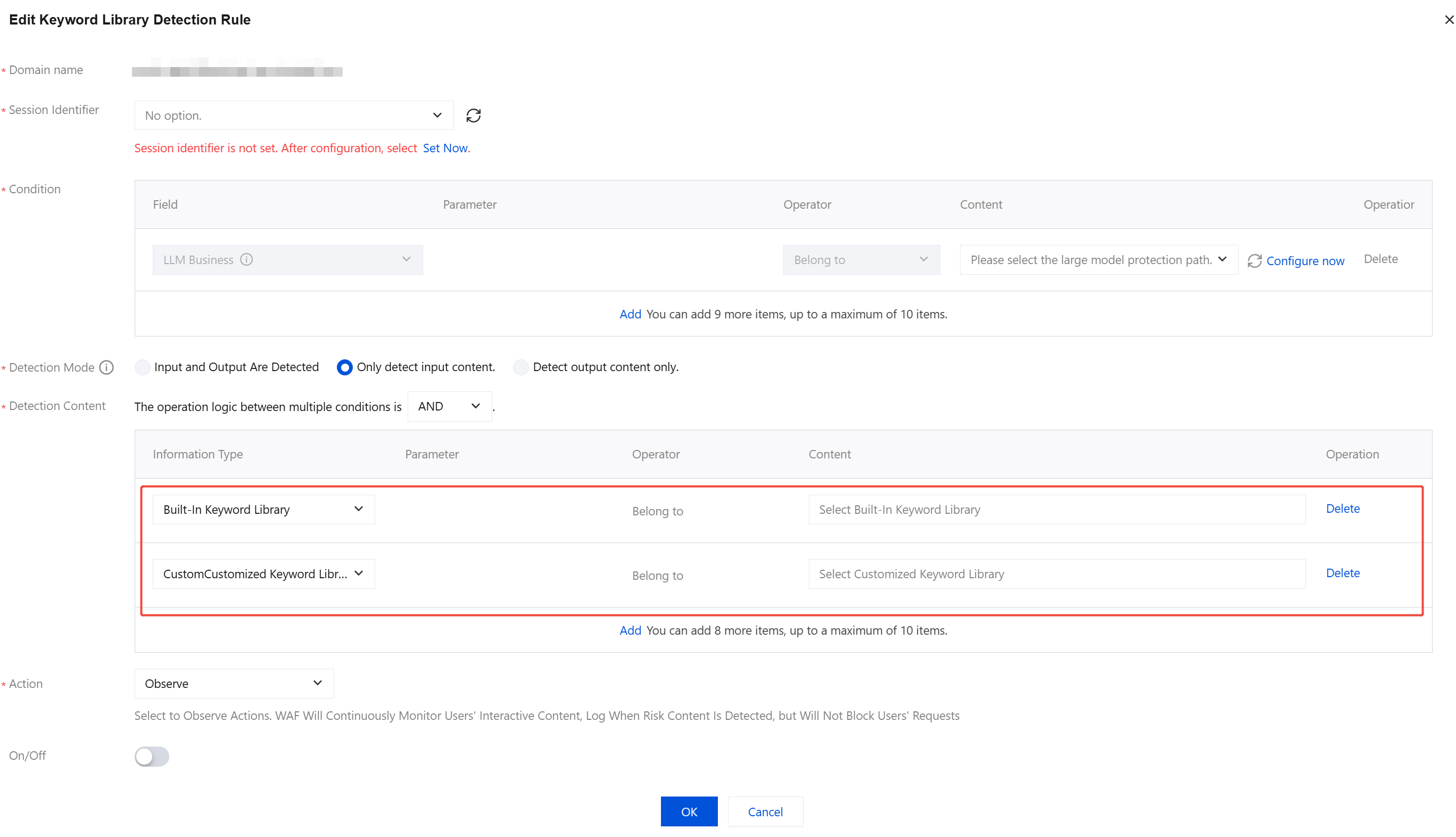
Built-in Keyword Library: A collection of sensitive keyword libraries built into the WAF LLM security module, covering major violation content scenarios to help quickly establish a content security baseline. The built-in keyword library is continuously maintained and updated by the Tencent security team and can be used without manual configuration.
Note:
The categories and descriptions of built-in keyword libraries are subject to what is displayed in the console.
Custom Keyword Library: In addition to the built-in keyword library, you can create a custom keyword library and add business-specific sensitive terms.
Create Custom Keyword Library:
a. Go to LLM Security > Security Configurations page, and click Custom Keyword Library Configuration to configure it.
b. On the custom keyword library settings page, click New to build a custom keyword library.
c. In the Create Custom Keyword Library window, configure the relevant parameters and click OK.
Field Name | Description |
Library Name | Name of the custom keyword library. |
Description | Description of the custom keyword library. |
Keyword | Keywords in the custom keyword library. Enter only one keyword per line, with a maximum of 1000 lines per configuration. |
Import Custom Keyword Library:
a. On the custom keyword library settings page, click Import Data.
b. Click Download Import Template and configure the keyword library parameters according to the instructions in the template.
Field Name | Description |
Library Name | Name of the custom keyword library. |
Description | Description of the custom keyword library. |
Keyword | Keywords in the custom keyword library. Enter only one keyword per line, with a maximum of 1000 lines per configuration. |
c. Click Upload or drag the template file to the center area, and then click OK.
Export/Delete Custom Keyword Library:
a. On the custom keyword library settings page, select one or more keyword library entries to export or delete. To select all keyword libraries in the current list in batches, select the Select All checkbox in the title bar.
Note:
A custom keyword library that is referenced by a rule cannot be deleted.
b. Based on your actual needs, click Batch Export or Batch Delete to perform the corresponding operation. If you have other needs, you can also select Export All or Delete All from More.
Example Scenarios for Custom Protection Rule
1. Refer to Business Onboarding to connect your LLM business. For traffic access, you also need to configure the session ID and LLM protection path.
2. Log in to the WAF console, and in the left sidebar, choose LLM Security > Security Configurations > Custom Protection Rule.
3. On the custom protection rules page, click Add Rule to configure a custom protection rule. Refer to the following configuration:
Field Name | Description |
Detection Mode | Input and output are detected. |
Detection Content | Information Type: Keyword. Content: 12345, abcd. |
Action | Block. |
Interception Prompt | Customize the prompt and set the content to: custom prompt interception test verification. |
Priority | 1. |
On/Off | On. |
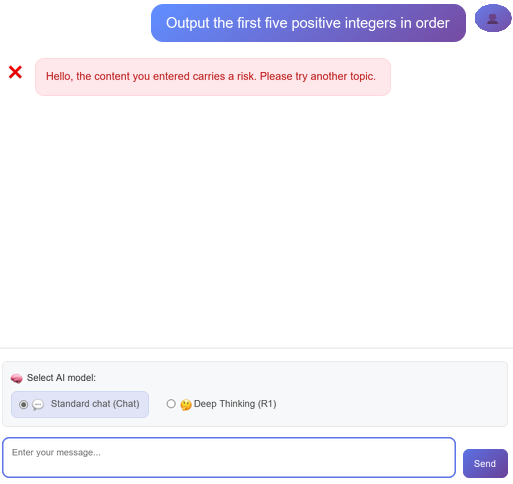
4. Go to the LLM business frontend and enter the following question: Output the first five positive integers in order. Then observe the interception. You can see that when the input contains the keyword 12345, the input is intercepted and the configured interception prompt page is returned.
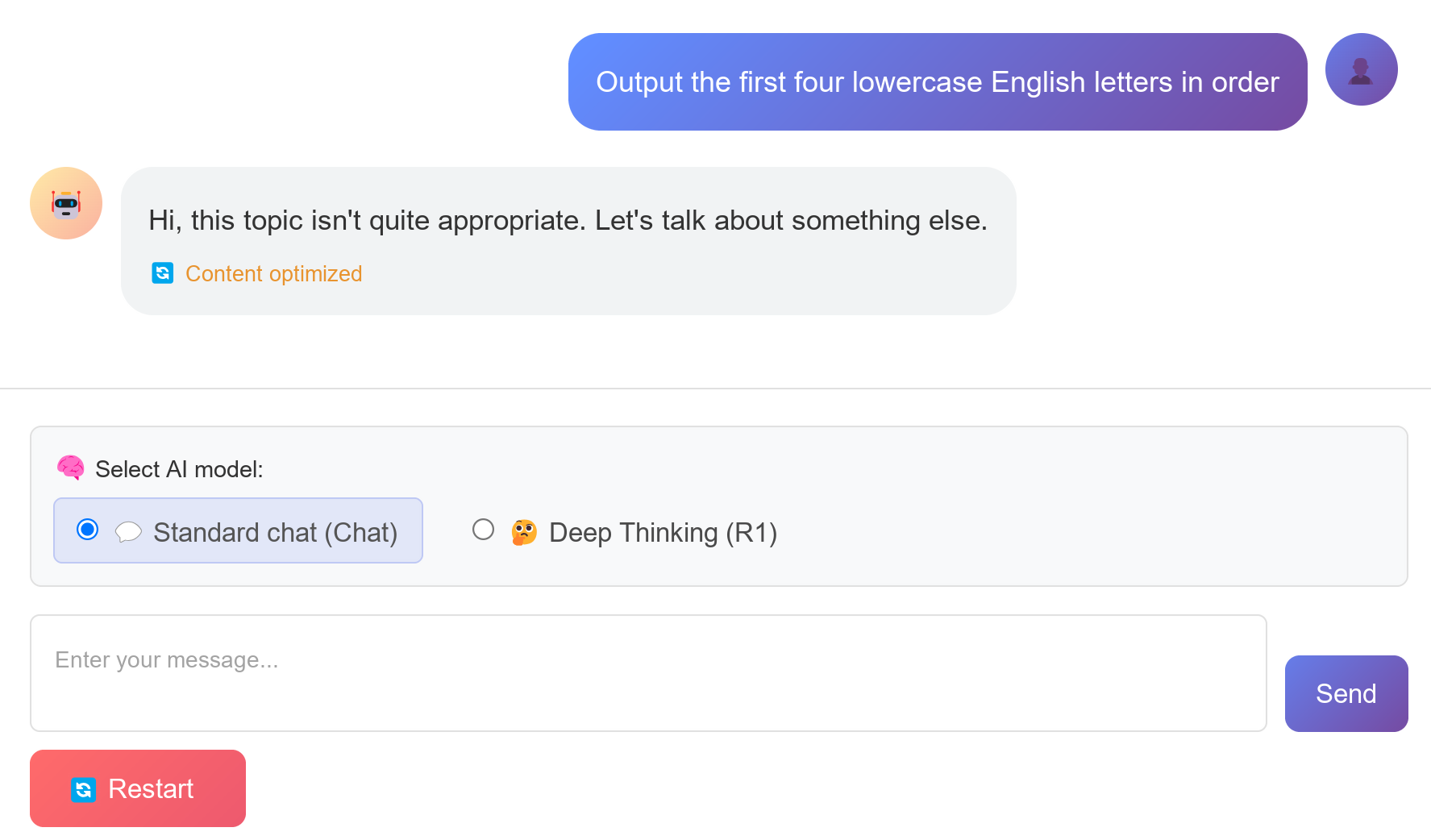
5. Then continue to enter the following question: Output the first four lowercase English letters in order, and observe the interception. You can see that when the output contains the keyword abcd, the output is intercepted and the configured custom interception prompt is returned.
6. When integration is performed via SDK/API, you can go to Log Audit to view the corresponding attack log information.
References
Bantuan dan Dukungan
Apakah halaman ini membantu?
Anda juga dapat Menghubungi Penjualan atau Mengirimkan Tiket untuk meminta bantuan.
masukan