Source Code Description (Android)
ダウンロード
フォーカスモード
フォントサイズ
Introduction
This document introduces how to run the Tencent Cloud Short Video (UGC) Android Demo and its source code structure. The Demo is built on the Tencent Cloud Short Video SDK (LiteAVSDK), covering short video recording, editing, composition, publishing, playback, as well as Tencent Effect beauty and other capabilities. By reading this document, you can quickly understand the responsibilities of each module in the project and how the code is organized.
How to Run the Demo
1. Download the Demo and unzip it.
2. Use Android Studio to open the project
LiteAVDemo(UGC).3. In the
xiaoshipindemo module, find the LicenseManager class and fill in the applied short video License and Tencent Effect License information:ugcLicenceUrl / ugcKey: the authorization URL and key of the short video License;xmagicAuthLicenceUrl / xmagicAuthKey: the authorization URL and key of the Tencent Effect License.4. In the
app module, find the build.gradle file and change the value of applicationId to the Android package name filled in when applying for the License.Project Structure
The short video project consists of six modules, where
app is the shell project and the business functions are distributed across the other five modules:Module | Description |
Shell project, contains the Application class of the entire project. | |
Business function module (account, list, playback, short video, etc.). | |
High-level wrapper of the short video SDK (including UI). | |
Tencent Effect beauty integration module. | |
Basic beauty module. | |
QUIC protocol detection and acceleration module for short video upload. |
app
The app module directory structure is as follows:
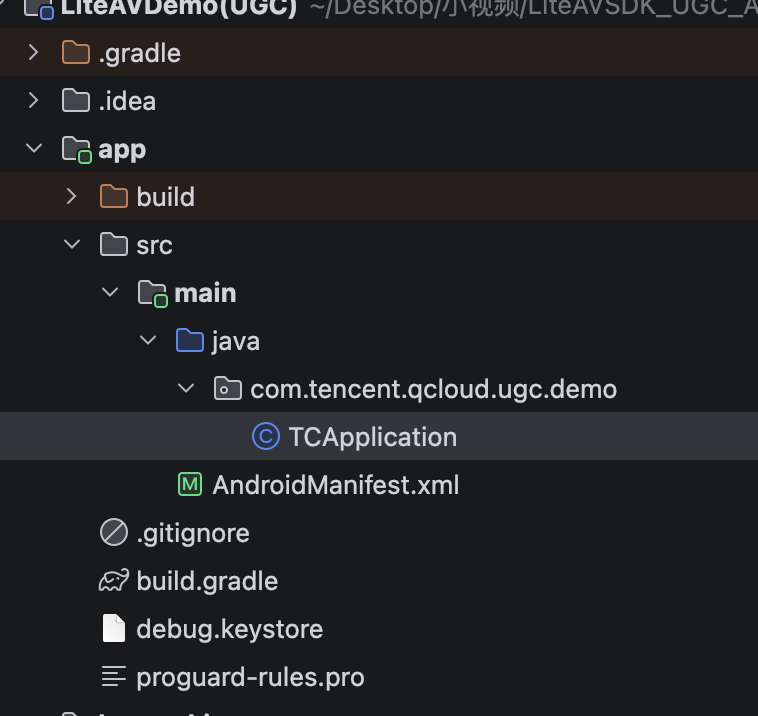
This module contains the Application class of the entire project; the specific function modules are located in their corresponding function modules.
File/Directory | Description |
TCApplication.java | Short video Application class, responsible for ELK data reporting (counting application usage duration). |
build.gradle | Module build configuration; applicationId is configured here. |
AndroidManifest.xml | Application manifest file. |
debug.keystore | Debug signature. |
proguard-rules.pro | Obfuscation rules. |
xiaoshipindemo
The xiaoshipindemo module directory structure is as follows:
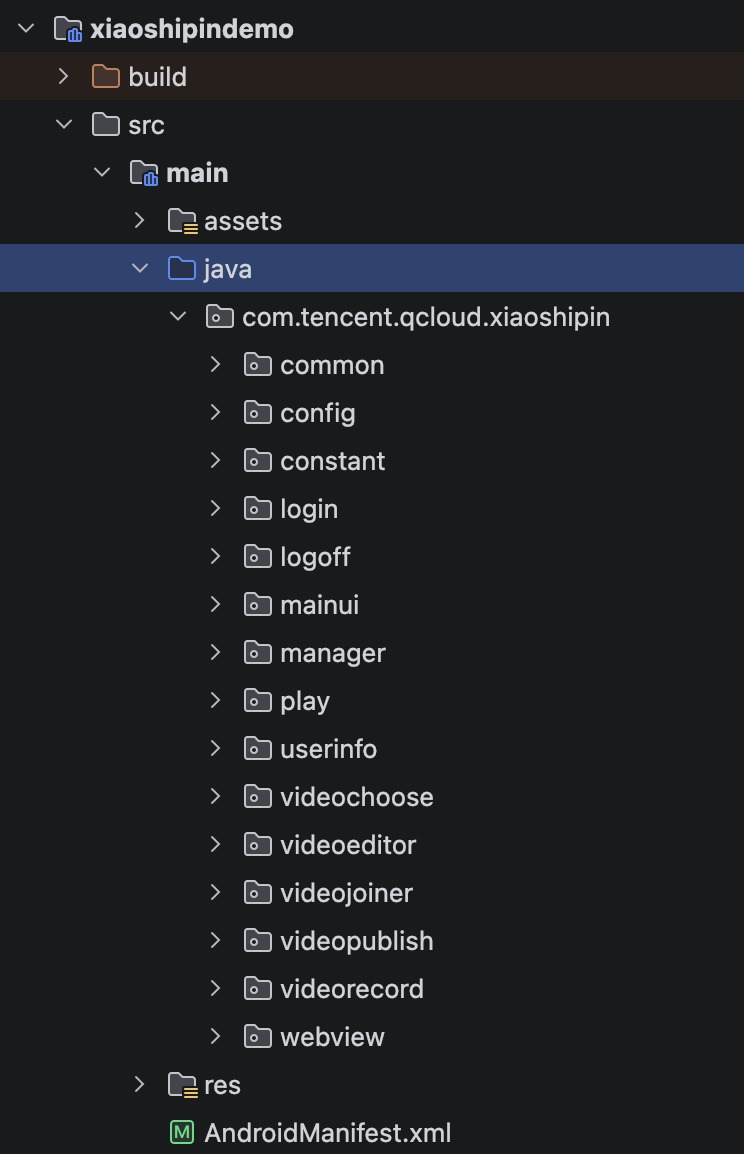
The short video is divided into account, main UI, playback, short video (editing, composition, recording, publishing) and other modules by function, and the code is also classified accordingly. The following introduces these modules and their corresponding implementations.
Directory Structure
File/Directory | Description |
common | Common components, including various utility classes and custom interfaces (beauty, player controls). |
login | Account module, including login and registration. |
logoff | Account logout page. |
mainui | Short video main UI, including the main Activity and the video list. |
manager | Permission handling module. |
play | VOD playback module. |
userinfo | Personal profile module. |
videochoose | Short video file selection module. |
videoeditor | Short video editing module. |
videojoiner | Short video composition module. |
videopublish | Short video publishing module. |
videorecord | Short video recording module. |
webview | Used to host H5 pages. |
Account Module
Responsible for handling user login, registration, and login cache logic.
If you already have your own account system, you can directly replace this module.
Register the username and password to the short video business backend by calling
TCUserMgr.register; log in by calling TCUserMgr.login, and cache the login information in the local SharedPreferences; clear the local cache when logging out.Related code:
Class Name | Description |
TCLoginActivity.java | User login page. |
TCRegisterActivity.java | User registration page. |
TCUserMgr | User login and registration management class. |
ProgressFragmentUtil | Control for displaying a progress bar. |
TCUserInfoFragment.java | User profile display page. |
TCAboutActivity | About page introducing the short video. |
Main UI and List Management Module
The main UI is mainly responsible for switching among three first-level functions: the short video list, short video recording/editing, and personal profile.
After successful login, the list interface is displayed by default; clicking the "+" button pops up a dialog box for you to choose to record a short video or edit a local short video; clicking the personal profile button jumps to the personal profile page.
List management includes fetching and displaying the list.
Related code:
Class Name | Description |
TCSplashActivity.java | Splash screen interface. |
TCMainActivity.java | Main interface, used to present the short video list, short video recording/editing, and the user information page |
TCLiveListMgr.java | List management class, provides interfaces to obtain the local in-memory list and update the list from the server |
TCLiveListFragment.java | List display interface, responsible for presenting short video data |
TCLiveListAdapter.java | Short video list adapter layer |
TCUGCVideoListAdapter.java | Short video list adapter layer |
TCVideoInfo | Video data |
Short Video Recording Module
The short video provides the short video recording function, which can record a one-minute short video; the SDK itself does not display the recording duration.
Related code:
Class Name | Description |
TCVideoRecordActivity.java | Short video recording interface. |
RecordProgressView | View for press-and-hold short video shooting. |
ComposeRecordBtn | Short video multi-segment shooting progress bar. |
File Selection Module
Provides a local file selection function, listing all mp4 video files on the phone.
Related code:
Class Name | Description |
TCVideoChooseActivity.java | Local mp4 file selection interface. |
TCVideoEditerListAdapter.java | Local mp4 file list adapter. |
TCVideoEditerMgr.java | mp4 video file management class, provides interfaces to obtain mp4 files stored on the phone. |
TCVideoFileInfo.java | Local video data. |
Editing Module
Video editing includes video trimming, slow motion, filters, music mixing, stickers, adding subtitles, and other functions.
Related code:
Class Name | Description |
TCVideoCutterActivity.java | Short video trimming interface. |
TCVideoEditerActivity.java | Post-trimming editing interface for short videos, with music, filter, speed, tone, sticker, subtitle, and other functions at the bottom. |
TCVideoEffectActivity.java | Click the bottom button to enter the short video effect-adding interface. |
Short Video Composition Module
The
videojoiner/ directory is responsible for short video composition-related functions.Short Video Publishing Module
Publishes the recorded files to the Tencent Cloud video distribution platform (VOD system).
Related code:
Class Name | Description |
TCVideoPublisherActivity.java | Short video publishing interface. |
Short Video Playback Module
Plays videos that have been published to the VOD system; slide up and down on the short video list page to quickly switch to the previous/next video.
Related code:
Class Name | Description |
TCVodPlayerActivity.java | Short video playback interface. |
ugckit
The ugckit module directory structure is as follows:
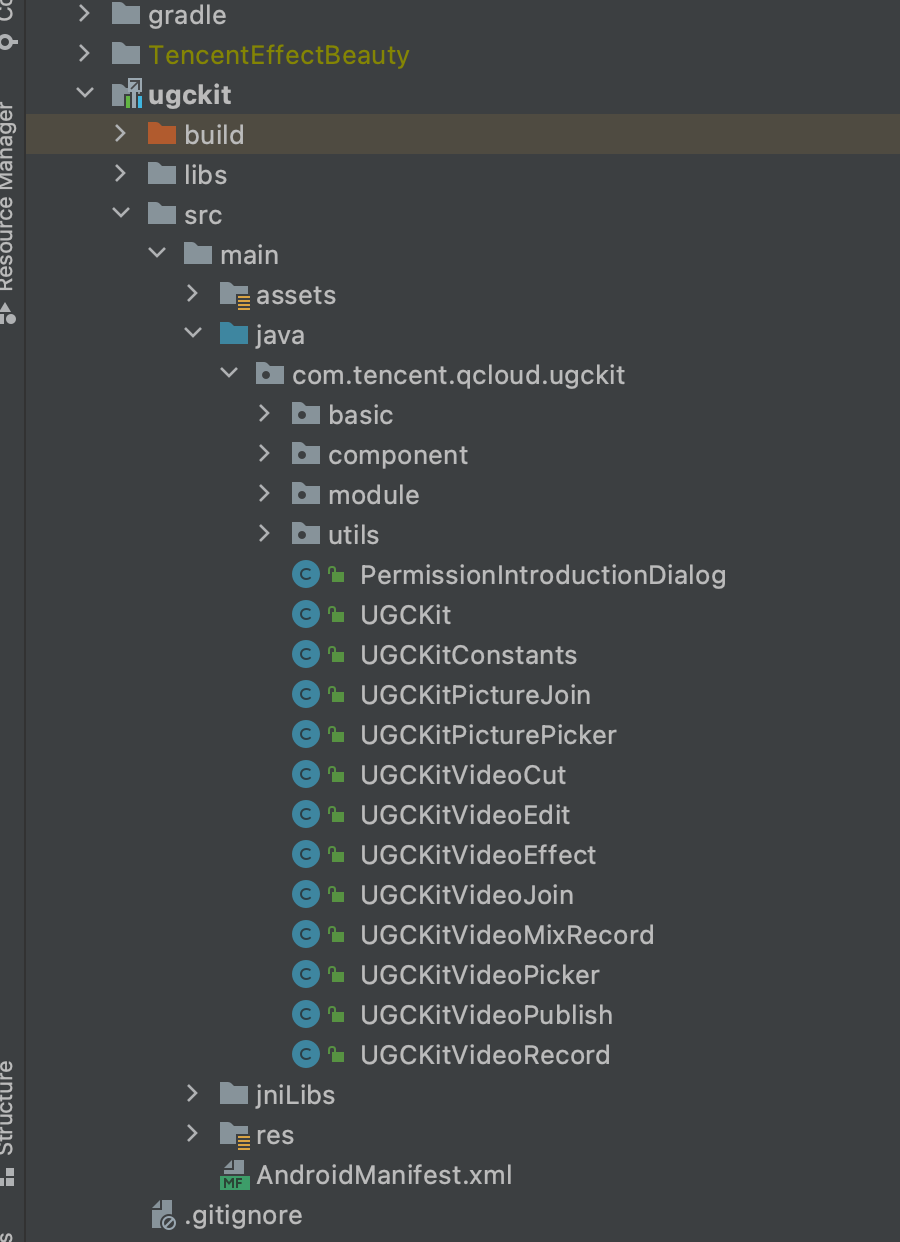
This module is mainly a high-level wrapper of the short video SDK (including UI), for quick integration.
File/Directory | Description |
basic | Common interfaces. |
component | Components used on pages. |
module | Module wrappers for trimming, editing, effects, composition, multi-screen co-recording, recording, upload, video selection, etc., for convenient use by the corresponding Views. |
utils | Utility class module. |
PermissionIntroductionDialog | Permission dialog. |
UGCKit | UGC initialization class. |
UGCKitConstants | Constant configuration information. |
UGCKitPicturePicker | Image selection module View. |
UGCKitVideoCut | Short video trimming module View. |
UGCKitVideoEdit | Short video editing module View. |
UGCKitVideoEffect | Short video effect setting module View. |
UGCKitVideoJoin | Short video composition module View. |
UGCKitVideoMixRecord | Multi-screen recording module View. |
UGCKitVideoPicker | Video selection module View. |
UGCKitVideoPublish | Video upload module View. |
UGCKitVideoRecord | Short video recording module View. |
xmagickit
The xmagickit module directory structure is as follows:
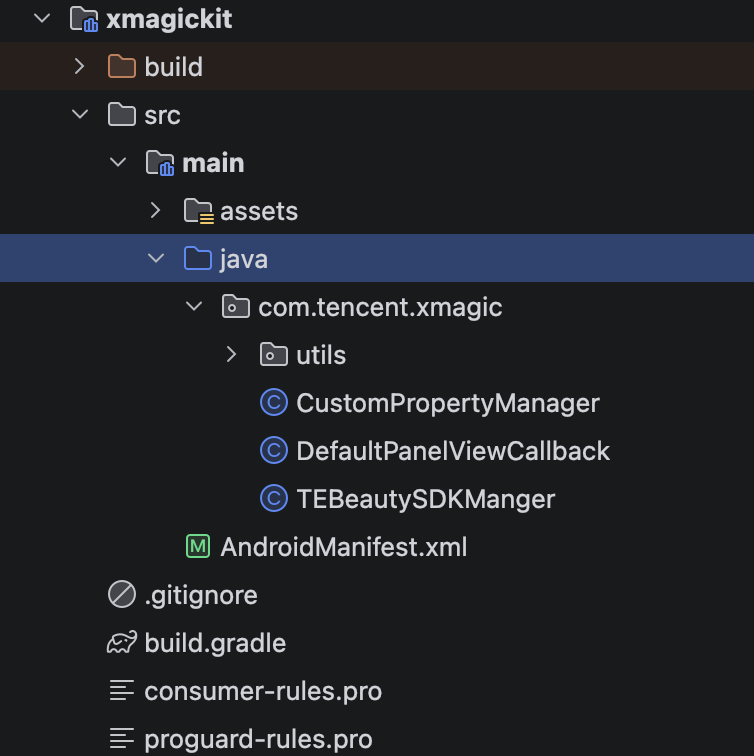
This module is used to quickly integrate Tencent Effect beauty, and is a secondary wrapper of the Tencent Effect beauty Kit (TEBeautyKit). If you need to integrate Tencent Effect into short videos, you can refer to how the Demo uses this module for quick integration.
File/Directory | Description |
assets | Stores the filters and stickers used in Tencent Effect, as well as the configuration files needed by the beauty panel in TEBeautyKit. |
TEBeautySDKManger | Tencent Effect beauty SDK management class, responsible for SDK initialization, authorization verification, beauty panel resource configuration, and effect resource copying. |
CustomPropertyManager | Custom property management class, handles material selection and setting for custom segmentation (custom background image/video). |
DefaultPanelViewCallback | Default implementation of the beauty panel view callback (TEPanelViewCallback). |
utils | Utility classes, including AppUtils (application information), BitmapUtil (image compression/rotation processing), SPUtils (local storage), UriUtils (Uri to file path). |
beautykit
The beautykit module directory structure is as follows:
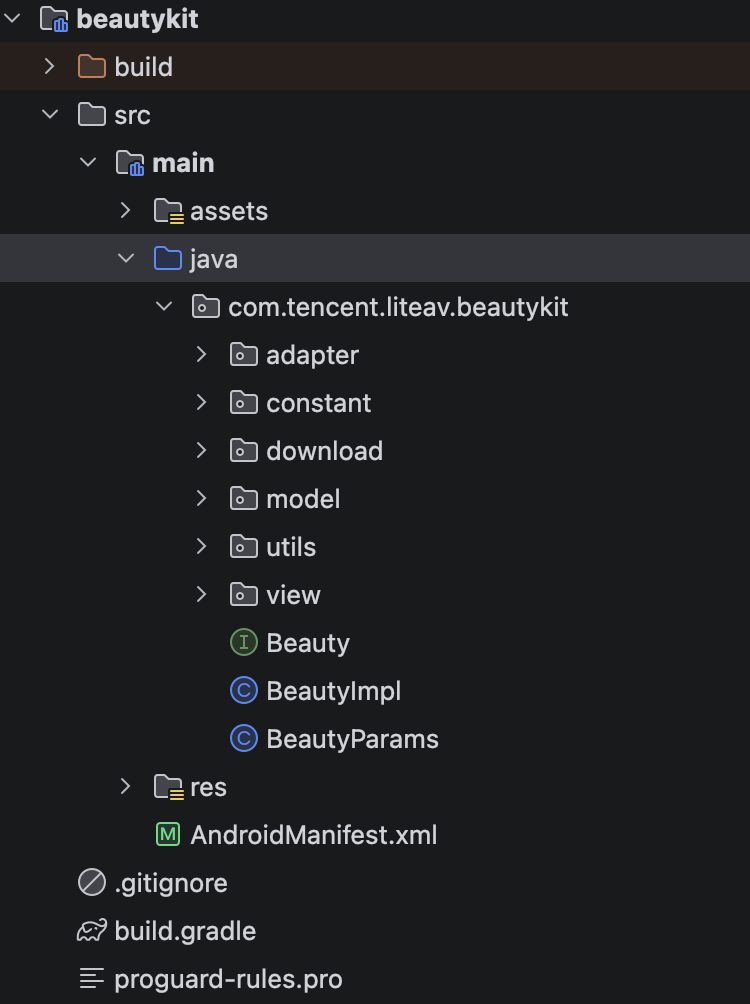
This module is the basic beauty module in short videos. If customers choose to use basic beauty, they can use this module for quick integration.
File/Directory | Description |
adapter | Beauty panel UI Adapter. |
constant | Beauty constant definitions. |
download | Beauty download module. |
model | Beauty attribute wrapper module. |
utils | Utility classes. |
view | Beauty panel. |
BeautyImpl | Wrapper class for using beauty. |
BeautyParams | Beauty parameter wrapper class. |
ugcquic
The ugcquic module directory structure is as follows:
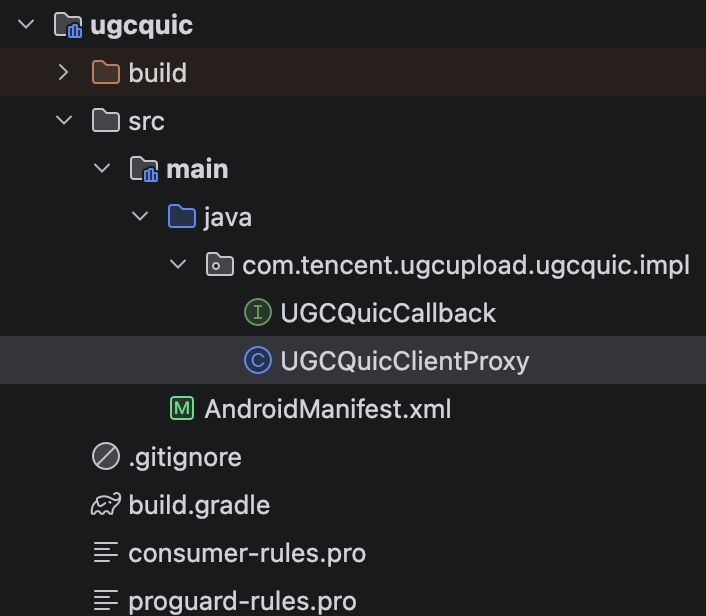
This module is used for QUIC protocol detection and acceleration for short video upload, and is a wrapper of the Tencent Cloud QUIC (TQUIC) SDK. It can detect whether the QUIC link is connected before short video upload, thereby improving the upload speed and success rate.
File/Directory | Description |
impl | QUIC protocol wrapper implementation, including the QUIC client proxy and callback interface. |
Related code:
Class Name | Description |
UGCQuicClientProxy.java | QUIC client proxy class, wraps the connection, request, cancel, and other operations of TnetQuicRequest, and forwards underlying callbacks. |
UGCQuicCallback.java | QUIC callback interface, defines callback methods for connection, network establishment, response header/data reception, completion, and closing. |
Note:
This module provides underlying QUIC capabilities through the
com.qcloud.cos:quic dependency. The upload module (the QuicClient in ugckit) calls this module's UGCQuicClientProxy / UGCQuicCallback through reflection to complete QUIC link detection before upload; when the business does not need QUIC acceleration, this module's dependency can be removed without affecting the main upload flow.フィードバック