ステップ2:EdgeOneエッジ関数がチャネル情報をAPKパッケージに書き込む
ダウンロード
フォーカスモード
フォントサイズ
EdgeOneエッジ関数を通じて、チャネル情報をAPKパッケージ内に動的に書き込むことができます。ユーザーはエッジ関数にバインドされたドメインにアクセスしてトリガー設定を行うだけで、そのエッジ関数をトリガーし、APKの動的パッケージングと配信の高速化を実現できます。
ステップ1:高速配信に使用する加速ドメイン名を追加する
加速ドメインの追加ガイドに従って加速ドメインを追加してください。例えば、
www.example.comで、オリジンサーバー設定はAndroid APKマスターパッケージが存在するCOSカスタムドメインにします。詳細はバケットのカスタムドメイン切り替えを参照してください。構成は下図のとおりです:
説明:
このドメインはAPKインストールパッケージへのアクセスとダウンロードに使用されます。
ステップ2:チャネル情報の書き込みをトリガーするエッジ関数を作成する
1. 関数管理ガイドに従ってエッジ関数を作成し、以下のコードを関数コード内にコピーしてください。
説明:
本関数は更新され、単一Rangeリクエストへの対応が追加されました。マルチスレッドダウンローダーや再開ダウンロードなどの分割ダウンロードシーンに適応します。これまでRangeリクエストは直接オリジンサーバーへ透過的に転送され、チャネル情報は書き込まれませんでしたが、更新後は正常に書き込まれるようになります。
bytes=start-end、bytes=start-、bytes=-suffixの3種類の単一Range形式をサポートします。リクエスト範囲がチャネル情報の書き込み領域と重なる場合でも、チャネル情報は正しく書き込まれ、206 Partial Contentと正しいContent-Length、Content-Rangeが返されます。満たせないRangeリクエストには416 Range Not Satisfiableが返されます。
非RangeリクエストのレスポンスにはAccept-Ranges: bytesが含まれ、ダウンローダーが分割ダウンロードを認識して有効にできるようになります。
現在、Multi-Range(例:bytes=0-99,200-299)には対応していません。このようなリクエストは直接オリジンサーバーへ透過的に転送され、チャネル情報は書き込まれません。一般的なダウンローダーのマルチスレッド分割は、複数の並行する単一Rangeリクエストであり、この制限の影響を受けません。
const CUSTOM_BLOCK_VALUE_LENGTH = 10240;const APK_SIGNING_BLOCK_MAGIC_LENGTH = 16;const APK_SIGNING_BLOCK_OFFSET_LENGTH = 8;const APK_COMMENT_LENGTH = 512;class EdgePack {totalSize;signVersion;centralDirectoryOffset;customBlockValueStart;customBlockValueEnd;rangeRelativeOffset;customInfo;constructor() {/** @type {number} */this.totalSize = null;this.signVersion = null;this.centralDirectoryOffset = null;this.customBlockValueStart = null;this.customBlockValueEnd = null;this.rangeRelativeOffset = null;/** @type {string} */this.customInfo = null;/** @type {string} */this.customName = null;/** @type {number[]} */this.customRange = null;/** @type {boolean} */this.invalidRange = false; // 不正なRangeかどうかをマークします}async handle(event) {const { request } = event;const headers = new Headers(request.headers);const modifiedRequest = new Request(request, { headers });if (!this.checkRequest(modifiedRequest)) {// 不正なRange形式を検出した場合、直接416を返しますif (this.invalidRange) {const responseHeaders = new Headers();// この時点ではまだtotalSizeを取得していないため、Content-Rangeを設定できません// responseHeaders.set("Content-Range", `bytes */0`);return event.respondWith(new Response("", {status: 416,statusText: "Range Not Satisfiable",headers: responseHeaders,}));}// その他の場合はパススルーしますreturn;}let response = null;try {const headHeaders = new Headers(modifiedRequest.headers);// Rangeヘッダーを削除し、正しいContent-Lengthを取得しますheadHeaders.delete("Range");const headRequest = new Request(modifiedRequest.url, {method: "HEAD",headers: headHeaders,});response = await fetch(headRequest, { redirect: "manual" });} catch (err) {const error = {code: "FETCH_ORIGIN_ERROR",message: err?.message,};response = new Response(JSON.stringify(error), {status: 590,});}if (!this.checkResponse(response)) {// 不正なRange(形式エラーまたは範囲エラー)の場合、416ステータスコードを返しますif (this.invalidRange && this.totalSize !== null) {const headers = new Headers();headers.set("Content-Range", `bytes */${this.totalSize}`);return event.respondWith(new Response("", {status: 416,statusText: "Range Not Satisfiable",headers: headers,}));}return event.respondWith(response);}if (!!this.customName) {response.headers.set("Content-Disposition",`attachment; filename="${this.customName}"`);}// 単一範囲のRangeリクエストを処理しますif (this.customRange) {const [rangeStart, rangeEnd] = this.customRange;let actualStart = rangeStart;let actualEnd = rangeEnd;let contentLength = this.totalSize;if (rangeStart === null && rangeEnd !== null) {// bytes=-suffix形式:最後のsuffixバイトactualStart = Math.max(0, this.totalSize - rangeEnd);actualEnd = this.totalSize - 1;contentLength = Math.min(rangeEnd, this.totalSize);} else if (rangeEnd !== null) {// bytes=start-end形式contentLength = rangeEnd - rangeStart + 1;actualEnd = rangeEnd;} else if (rangeStart !== null) {// bytes=start-形式actualEnd = this.totalSize - 1;contentLength = this.totalSize - rangeStart;}response.headers.set("Content-Range",`bytes ${actualStart}-${actualEnd}/${this.totalSize}`);response.headers.set("Content-Length", contentLength.toString());response.headers.set("Accept-Ranges", "bytes");response = new Response(null, {status: 206,statusText: "Partial Content",headers: response.headers,});}// 非Rangeリクエストを処理しますelse {// 非RangeリクエストでもRangeをサポートすることを宣言すべきですresponse.headers.set("Accept-Ranges", "bytes");}const streamResponse = new Response(await this.combineStreams(modifiedRequest),response);return event.respondWith(streamResponse);}getRelativeOffset(response) {const start = this.customBlockValueStart;const end = this.customBlockValueEnd;const range = response.headers.get("Content-Range");if (!range) return start;const match = range.match(/bytes\\s*(\\d*)-(\\d*)/i);if (!match || match?.length < 2) {return start;}const rangeStart = +match[1];const rangeEnd = +match[2];if (rangeEnd < start || rangeStart > end) {return null;}return start - rangeStart;}checkRequest(request) {if (request.method !== "GET") {// 非GETリクエストは、パススルーでオリジンサーバーへアクセスしますreturn false;}if (request.headers.has("Range")) {const range = request.headers.get("Range");// 複数Rangeリクエストかどうかをチェックしますif (range.includes(",")) {// Multi-Rangeリクエストは、パススルーでオリジンサーバーへアクセスしますconsole.log("Multi-Range detected, using passthrough");return false;}// 単一Rangeリクエストelse {// より正確な正規表現を使用します:bytes=start-endとbytes=-suffixをそれぞれマッチングします// キャプチャグループ:(1)start (2)end はstart-end形式に使用されます// (3)suffixは-suffix形式に使用されますconst match = range.match(/bytes=(?:(\\d+)-(\\d*)|-(\\d+))$/i);if (match) {// 3種類のRange形式を処理します:// 1. bytes=start-end: 範囲を指定します// 2. bytes=start-: startからファイル末尾まで// 3. bytes=-suffix: 最後のsuffixバイト// bytes=-suffix形式(3番目のキャプチャグループに値があるか)をチェックしますif (match[3] !== undefined) {// bytes=-suffix形式:最後のsuffixバイトconst suffix = +match[3];// bytes=-0は無効な範囲リクエストであり、416を返すべきですif (suffix === 0) {console.warn("Invalid Range: bytes=-0 is not satisfiable");this.invalidRange = true;return false;}this.customRange = [null, suffix];} else {// bytes=start-endまたはbytes=start-形式const start = match[1] ? +match[1] : null;const end = match[2] && match[2] !== "" ? +match[2] : null;// start > endの不正な状況を検出しますif (start !== null && end !== null && start > end) {console.warn("Invalid Range: start > end:", range);this.invalidRange = true;return false;}this.customRange = [start, end];}} else {console.warn("Invalid Range format:", range);this.invalidRange = true;return false;}}}const { pathname, searchParams } = new URL(request.url);// チャネル情報パラメータを取得し、commentパラメータに格納しますconst comment = searchParams?.get("comment");// APKファイルではない場合、またはチャネル情報パラメータがない場合は、passthroughを使用してオリジンにアクセスしますif (!pathname.endsWith(".apk") || !comment) {return false;}this.customInfo = comment;const filename = searchParams?.get("filename");if (filename) {this.customName = filename;}return true;}/*** @param {number} fileSize* @returns {boolean}*/validateRange(fileSize) {// 単一Rangeを検証しますif (!this.customRange) {return true;}const [rangeStart, rangeEnd] = this.customRange;// bytes=-suffix形式を処理しますif (rangeStart === null && rangeEnd !== null) {// suffixがファイルサイズを超えている場合、ファイルサイズに修正しますif (rangeEnd > fileSize) {this.customRange = [null, fileSize];return true;}return true;}// bytes=start-endおよびbytes=start-形式を処理しますif (rangeStart !== null) {// startがファイルサイズ範囲を超えている場合、不正としてマークしfalseを返しますif (rangeStart >= fileSize) {this.invalidRange = true;return false;}// startが範囲内であるが、endが範囲を超えている場合、start-に修正しますif (rangeEnd !== null && rangeEnd >= fileSize) {this.customRange = [rangeStart, null];return true;}}return true;}checkResponse(response) {if (response.status !== 200 && response.status !== 206) {return false;}const contentLength = response.headers.get("Content-Length");if (response.body === null || contentLength === null) {return false;}this.totalSize = Number(contentLength);if (this.customRange && !this.validateRange(this.totalSize)) {// Rangeリクエストが範囲を超えた場合、invalidRangeをマークしfalseを返します// invalidRangeはvalidateRange()で設定済みですreturn false;}const cosOffsetHeader = response.headers.get("x-cos-meta-edgepack-offset");const cosTypeHeader = response.headers.get("x-cos-meta-edgepack-type");if (!cosOffsetHeader || !cosTypeHeader) {return false;}this.signVersion = cosTypeHeader;this.centralDirectoryOffset = Number(cosOffsetHeader);if (this.signVersion === "v1") {this.customBlockValueStart = this.totalSize - APK_COMMENT_LENGTH;this.customBlockValueEnd = this.totalSize;} else {this.customBlockValueStart =this.centralDirectoryOffset -CUSTOM_BLOCK_VALUE_LENGTH -APK_SIGNING_BLOCK_MAGIC_LENGTH -APK_SIGNING_BLOCK_OFFSET_LENGTH;this.customBlockValueEnd = this.centralDirectoryOffset;}this.rangeRelativeOffset = this.getRelativeOffset(response);if (this.rangeRelativeOffset === null) {return false;}return true;}async combineStreams(request) {// 単一Rangeまたは完全なリクエストを処理しますlet contentLength = this.totalSize;if (this.customRange) {const [rangeStart, rangeEnd] = this.customRange;if (rangeStart === null && rangeEnd !== null) {// bytes=-suffix形式:最後のsuffixバイトcontentLength = Math.min(rangeEnd, this.totalSize);} else if (rangeEnd !== null) {// bytes=start-end形式contentLength = rangeEnd - rangeStart + 1;} else if (rangeStart !== null) {// bytes=start-形式contentLength = this.totalSize - rangeStart;}}const { readable, writable } = new FixedLengthStream(contentLength);this.handleStream(request, writable);return readable;}/*** 指定範囲のデータを書き込みます* pipeToを使用してパフォーマンスを最適化し、単一Rangeリクエストに適用します* @private*/async _writeRangeData(request, writable, actualStart, actualEnd) {const comment = this.customInfo;const encoder = new TextEncoder();const section = encoder.encode(comment);// Header部分:署名ブロックより前のデータif (actualStart < this.customBlockValueStart) {const apkHeader = await this.apkHeaderStream(request,actualStart,actualEnd);if (apkHeader !== null) {try {await apkHeader.pipeTo(writable, {preventClose: true,});} catch (e) {console.error("HEADER_STREAM_ERROR: ", e);}}}// Body部分:署名ブロック(チャネル情報注入領域)if (actualStart < this.customBlockValueEnd &&(actualEnd === null || actualEnd >= this.customBlockValueStart)) {const apkBody = await this.apkBodyStream(request,section,actualStart,actualEnd);if (apkBody !== null) {const apkBodyStream = apkBody.stream();try {await apkBodyStream.pipeTo(writable, {preventClose: true,});} catch (e) {console.error("BODY_STREAM_ERROR: ", e);}}}// Tail部分:署名ブロックより後のデータif (actualEnd === null || actualEnd >= this.customBlockValueEnd) {const apkTail = await this.apkTailStream(request,actualStart,actualEnd);if (apkTail !== null) {try {await apkTail.pipeTo(writable, {preventClose: true,});} catch (e) {console.error("TAIL_STREAM_ERROR: ", e);}}}}async handleStream(request, writable) {try {const [rangeStart, rangeEnd] = this.customRange || [0, null];let actualStart = rangeStart;let actualEnd = rangeEnd;if (rangeStart === null && rangeEnd !== null) {actualStart = Math.max(0, this.totalSize - rangeEnd);actualEnd = this.totalSize - 1;}await this._writeRangeData(request, writable, actualStart, actualEnd);} catch (err) {console.error("HANDLE_STREAM_ERROR: ", err);} finally {let writer = writable.getWriter();writer.close();writer.releaseLock();}}async apkHeaderStream(request, actualStart, actualEnd) {const headers = new Headers(request.headers);let headerStart = 0;let headerEnd = this.customBlockValueStart - 1;if (actualStart > 0) {headerStart = Math.max(headerStart, actualStart);}if (actualEnd !== null) {headerEnd = Math.min(headerEnd, actualEnd);}if (headerStart > headerEnd) {return null;}headers.set("Range", `bytes=${headerStart}-${headerEnd}`);// 署名ブロックより前の部分を取得します。const headResponse = await fetch(request, {headers: headers,});return headResponse.body;}async apkBodyStream(request,section = null,actualStart = 0,actualEnd = null) {const headers = new Headers(request.headers);let bodyStart = this.customBlockValueStart;let bodyEnd = this.customBlockValueEnd - 1;if (actualStart > this.customBlockValueStart) {bodyStart = Math.max(bodyStart, actualStart);}if (actualEnd !== null) {bodyEnd = Math.min(bodyEnd, actualEnd);}if (bodyStart > bodyEnd) {return null;}headers.set("Range", `bytes=${bodyStart}-${bodyEnd}`);const middleResponse = await fetch(request, {headers: headers,});const reader = middleResponse.body.getReader();let outputBuffers = [];try {let handledBytes = bodyStart;while (true) {const result = await reader.read();if (result.done) {console.log("APK_BODY_STREAM_DONE");break;}const startByteOffset = handledBytes;const buffer = result.value;handledBytes += buffer.byteLength;// 署名ブロック内におけるチャネル情報の絶対位置const channelAbsoluteStart = this.customBlockValueStart;const channelAbsoluteEnd = channelAbsoluteStart + section.byteLength;// 現在のbuffer内で置換が必要な範囲を計算します。const min = Math.max(startByteOffset, channelAbsoluteStart);const max = Math.min(channelAbsoluteEnd, handledBytes);if (min < max) {const bufferStart = min - startByteOffset;const sectionStart = min - channelAbsoluteStart;const sectionEnd = max - channelAbsoluteStart;const replacement = section.subarray(sectionStart, sectionEnd);new Uint8Array(buffer).set(replacement, bufferStart);}outputBuffers.push(buffer);}} catch (err) {console.error("APK_BODY_STREAM_ERROR: ", err);}return new Blob(outputBuffers);}async apkTailStream(request, actualStart, actualEnd) {const headers = new Headers(request.headers);let tailStart = this.customBlockValueEnd;let tailEnd = this.totalSize - 1;if (actualStart > this.customBlockValueEnd) {tailStart = Math.max(tailStart, actualStart);}if (actualEnd !== null) {tailEnd = Math.min(tailEnd, actualEnd);}if (tailStart > tailEnd) {return null;}headers.set("Range", `bytes=${tailStart}-${tailEnd}`);const tailResponse = await fetch(request, {headers: headers,});return tailResponse.body;}}async function handleEvent(event) {const edgepack = new EdgePack();await edgepack.handle(event);}addEventListener("fetch", handleEvent);
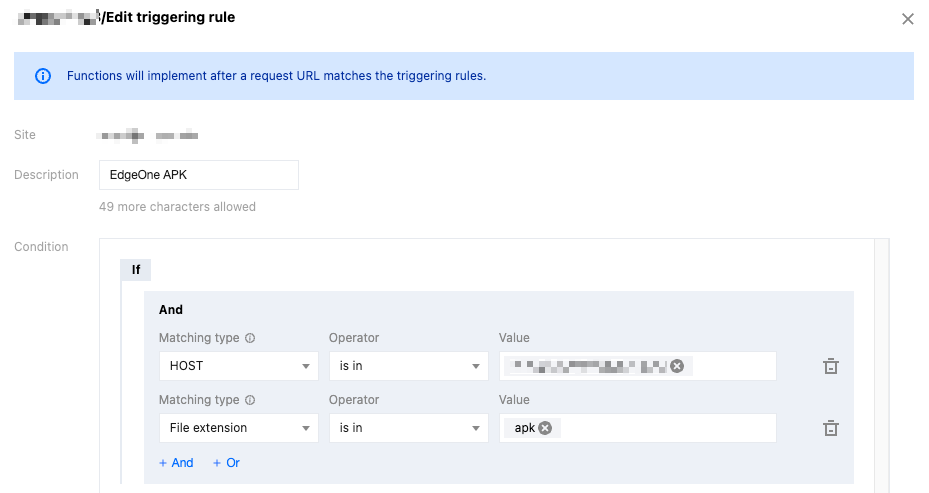
3. OKをクリックすると、トリガールールの作成が完了します。ユーザーがドメイン
www.example.com にアクセスし、ファイル拡張子が.apkである場合、エッジ関数がトリガーされ、動的パッケージングが実行されます。ステップ3:EdgeOneエッジ関数がチャネル情報をAndroid APKパッケージに書き込んだかどうかを検証する
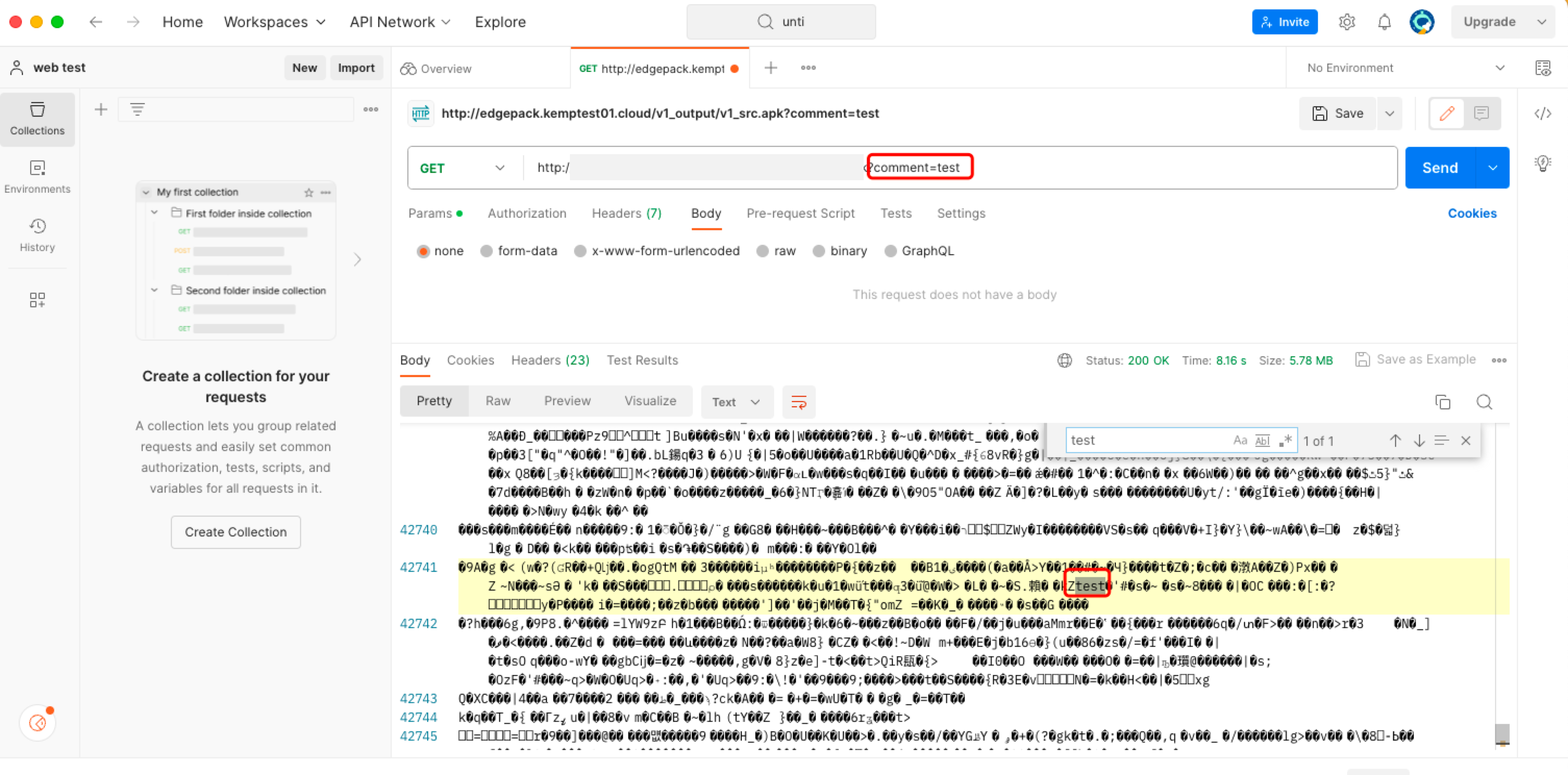
ブラウザにチャネル情報を含むURLを入力します。例:
http://www.example.com/v2_src.apk?comment=test。これによりエッジ関数がトリガーされ、チャネル情報が指定位置に動的に注入されます。ここで、commentはチャネル情報書き込みをトリガーするエッジ関数の作成で定義したチャネルパラメータです。v2-VasDolly方式を例にとると、VasDollyマルチチャネルパッケージングツールを使用して、動的に注入されたチャネル情報を読み取ることができます:
フィードバック