Python
ダウンロード
フォーカスモード
フォントサイズ
機能説明
ノード上でPythonコードを編集し、WeDataのワークフロースケジューリングシステムにコマンドを送信してスケジューリング実行することをサポートします。

パラメータの説明
パラメータ | 説明 |
Pythonバージョン | Python 2およびPython 3をサポートします。 |
secret_id & secret_keyを使用せずにSSM資格情報を取得する
利用シーン
secret_idとsecret_keyを隠しつつ、SSMに保存されている認証情報の値も取得できることを希望します。
使用方法1
システムにはsecret_valueを取得する関数が組み込まれており、Pythonタスクで直接使用できます。以下は使用例です。
wedatautils.get_secret_valueのパラメータを使用する場合、出力結果は暗号化されます。
import wedatautilssecret_name = "test_secret_name" #credential nameversion_id = "1.0" #Credential versionregion="ap-guangzhou" #The region where the certificate is locatedsecret_value = wedatautils.get_secret_value(secret_name,version_id,region) #Get credential contentprint("this is"+secret_value)
使用方法2
ステップ1:リソースグループに必要なPythonパッケージをインストールする
1. プロジェクト管理 > プロジェクト実行リソースグループ > スケジューリングリソースグループに入り、スケジューリングリソースグループを選択し、名前をクリックして詳細ページに入ります。
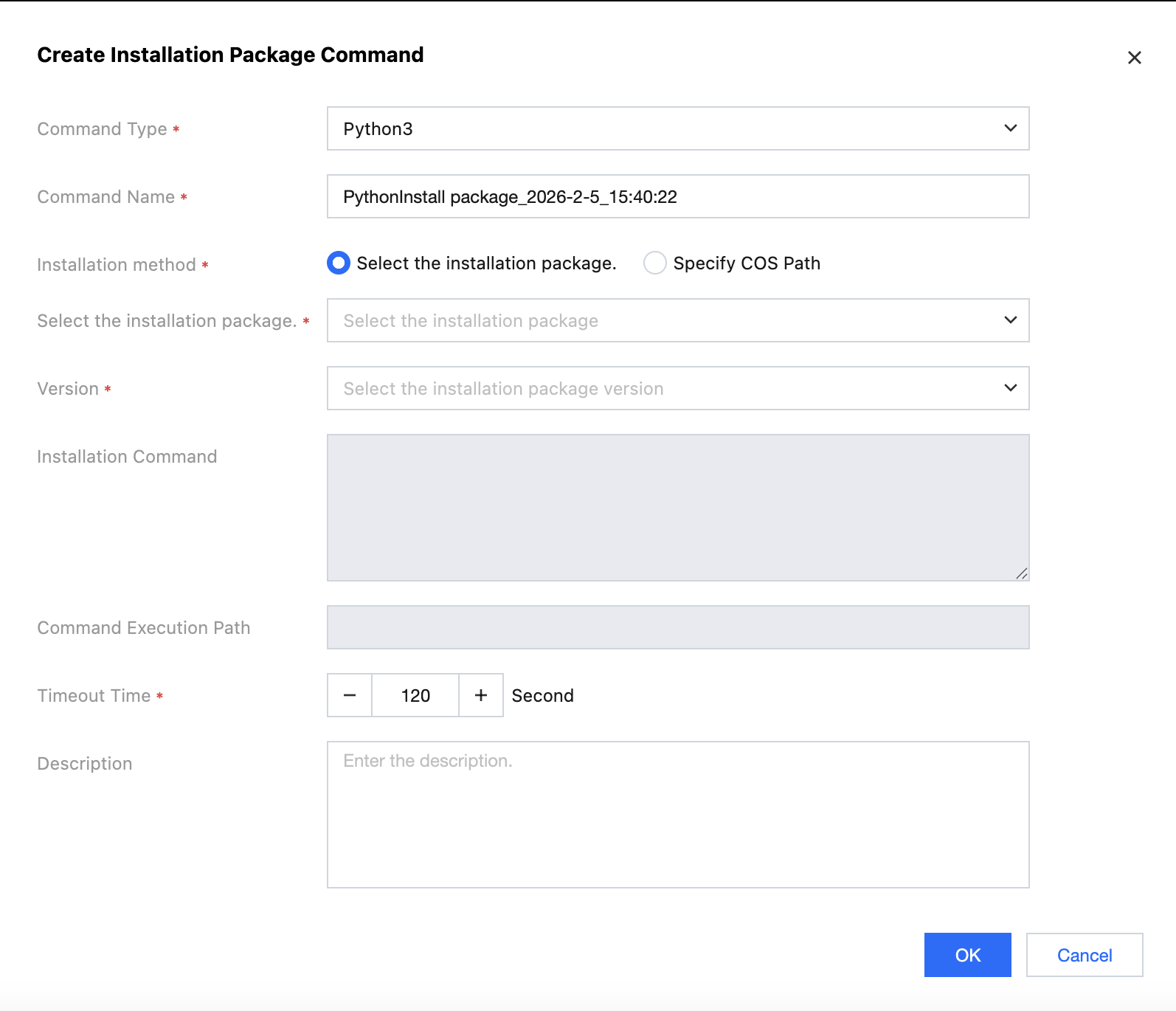
2. リソースグループの運用保守画面で、インストールパッケージコマンドを作成し、インストールが必要な以下の2つのインストールパッケージを選択し、確定をクリックします。
3. インストールコマンドリストの操作列で、実行をクリックしてステータスを更新して確認します。ステータスが実行成功であれば、インストール成功を意味します。
tencentcloud-sdk-python-common
tencentcloud-sdk-python-ssm
ステップ2:リソースファイルを設定する
1. オフライン開発 > リソース管理に入り、リソースを新規作成してリソースファイルをアップロードした後、確定をクリックします。
2. ローカルの.pyファイルを使用してリソースを新規作成します。例えば、リソース名をtest_ssmとし、リソース内容は以下の通りです。
import osfrom tencentcloud.common import credentialfrom tencentcloud.common.exception.tencent_cloud_sdk_exception import TencentCloudSDKExceptionfrom tencentcloud.ssm.v20190923 import ssm_client, modelsdef get_secret_value(secret_name, version_id, region):try:secret_id = os.environ.get('dynamic_secret_id', '')secret_key = os.environ.get('dynamic_secret_key', '')dynamic_token = os.environ.get('dynamic_token', '')# Initialize a credential objectcred = credential.Credential(secret_id, secret_key,dynamic_token)# Initialize the client object for the product (ssm)client = ssm_client.SsmClient(cred, region)# Initialize a request objectreq = models.GetSecretValueRequest()# Set the credential namereq.SecretName = secret_namereq.VersionId = version_id# Send requestresp = client.GetSecretValue(req)# Output JSON format response#print(resp.to_json_string())# Return the credential valuereturn resp.SecretStringexcept TencentCloudSDKException as err:print(f"Error occurred: {err}")return None
ステップ3:PythonタスクでSSM資格情報を取得する
Pythonタスクでこのリソースを参照します。
Pythonタスクコードで認証情報の内容を取得する方法は、以下のサンプルコードの通りです:
import osfrom test_ssm import get_secret_value #test_ssm is the resource namesecret_name = "test_lola" #Credential Nameversion_id = "1.0" #Credential Versionregion="ap-singapore" #the region of Credentialsecret_value = get_secret_value(secret_name,version_id,region) #Get the credential contentprint(secret_value)##@resource_reference("test_ssm")
フィードバック