Tripo-3D-Format API Guide
ダウンロード
フォーカスモード
フォントサイズ
Introduction
The Tripo format conversion API converts 3D models to other formats and supports optional mesh processing, texture baking, and export settings.
Integration Guide
1. Obtaining an API Key
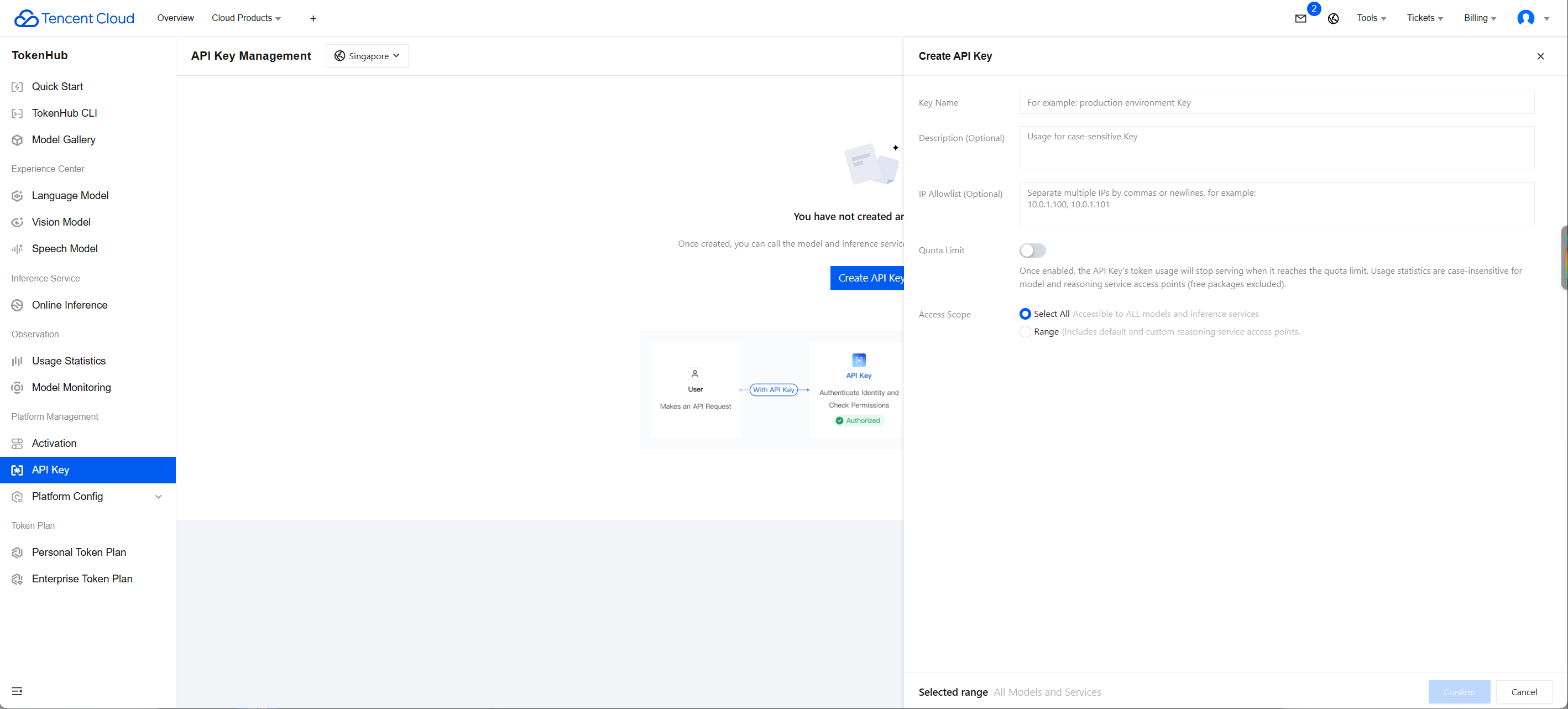
1. Go to the API Key Management page and click Create API Key. For detailed operations, see Create API Key.
2. After creation, be sure to copy and securely store the API Key. This information will be used in the subsequent process of configuring the tool.
Note:
The API key of each account can only be queried by that account. Sub-accounts cannot view the API key information of the main account. If a sub-account needs to call APIs, it must create its own API key.
If a sub-account cannot be created, the sub-account may not have permission to create API keys. In this case, the main account needs to grant authorization. After logging in, the main account user can click the user list, select authorization next to the corresponding sub-account, and a policy association dialog will appear. Enter the authorization policy name to search, select the corresponding policy, and click Confirm.
Authorization policy: QcloudTokenhubFullAccess
2. Concurrency Quota
Three concurrent tasks are provided by default, meaning that up to three submitted tasks can be processed simultaneously. Tasks that exceed the concurrency limit must wait until the preceding tasks are completed before they can start processing.
Concurrent tasks: the maximum number of tasks that can run simultaneously while the corresponding service is being called. While a task is in progress, you cannot submit the next task. After the task is completed, you can submit the next task.
API Documentation
Submitting a Tripo Format Conversion Task
Input parameters
Parameter Name | Required | Type | Parameter Description |
model | Yes | string | Model name, default: tripo-3d-format Example value: tripo-3d-format |
input | Yes | string | Model URL: publicly accessible direct link to the 3D model file. Example: https://example.com/model.glb Supported formats: GLB, GLTF, FBX, OBJ, STL Maximum file size: 150 MB |
format | Yes | string | Target export format. GLTF: Web viewers and WebGL engines. FBX: Unreal, Unity, and DCC tools. USDZ:Apple AR Quick Look. OBJ: a traditional interchange format without animation. STL: 3D printing, geometry only. 3MF: 3D printing with color support. Note: GLTF: Web viewers and WebGL engines (Three.js, Babylon.js). FBX: Unreal, Unity, and DCC tools (Maya, Blender). USDZ:Apple AR Quick Look,RealityKit. OBJ: a traditional interchange format that does not support animation. STL/3MF: 3D printing, geometry only. |
quad | No | boolean | Whether to output quad meshes (quadrilateral polygons) instead of triangular faces. If face_limit is not set, the default number of faces is 10,000. Default value: false Note: Enabling quad forces the output format to be FBX. |
force_symmetry | No | boolean | Forces symmetry. Effective only when quad is true. Default value: false |
face_limit | No | integer | Maximum number of faces in the output mesh during conversion. If not specified, the original model face quantity is retained. |
flatten_bottom | No | boolean | Flatten the bottom of the model. Default value: false |
flatten_bottom_threshold | No | float | Flattening depth threshold. Default value: 0.01 |
texture_size | No | integer | Diffuse map size (in pixels). Default value: 4096 |
texture_format | No | string | Texture image format. JPEG: the default format with the smallest file size. PNG: lossless with transparency support. WEBP: a modern Web format. BMP/DPX/HDR/OPEN_EXR/TARGA/TIFF: for professional use. Default value: JPEG |
bake | No | boolean | Bake advanced materials into base textures. Default value: true |
pack_uv | No | boolean | Pack all UVs into a unified layout. Default value: false |
export_vertex_colors | No | boolean | Include vertex colors. Valid only for OBJ and GLTF. Default value: false |
pivot_to_center_bottom | No | boolean | Move the pivot point to the bottom center. Default value: false |
scale_factor | No | float | Scale factor of the exported model. Default value: 1 |
with_animation | No | boolean | Include skeletal and animation data. Default value: true |
animate_in_place | No | boolean | In-place animation (without root bone displacement). Default value: false |
part_names | No | string[] | Names of parts to export, sourced from mesh/segmentation data. |
export_orientation | No | string | Export orientation (forward axis). +x: default, with the positive X-axis pointing forward. -x: the negative X-axis points forward. -y: the negative Y-axis points forward. +y: the positive Y-axis points forward. Default value: +x |
fbx_preset | No | string | FBX compatibility preset. (Effective only when an export to FBX is performed.) blender: optimized for Blender import. 3dsmax: optimized for 3ds Max import. mixamo: Mixamo-compatible rigging. Default value: blender. |
Note:
Advanced format conversion trigger (passing any non-default parameter below costs 10 points):
quad,face_limit,flatten_bottom,flatten_bottom_threshold,texture_size,texture_format,pivot_to_center_bottom,scale_factor
Output parameters
Parameter Name | Type | Description |
id | string | Task id (valid for 24 hours). Example value: 1315932989749215232 |
request_id | string | Unique request id generated by the server and returned for each request (if a request fails to reach the server for other reasons, no request_id is returned for that request). Provide the request_id of the request when locating issues. |
object | string | The type of the returned object. For 3d jobs, 3d_job is always returned. |
created_at | integer | Task creation time. |
status | string | completed: task succeeded, failed: task failed, in_progress: in progress, queued: waiting. Example value: completed |
Querying a Tripo Format Conversion Task
Input parameters
Parameter Name | Required | Type | Description |
model | Yes | string | Model name, default: tripo-3d-format Example value: tripo-3d-format |
id | Yes | string | Task id. Example value: 1357237233311637504 |
Output parameters
Parameter Name | Type | Description |
status | string | completed: task succeeded, failed: task failed, in_progress: in progress, queued: waiting. Example value: completed |
request_id | string | Unique request id generated by the server and returned for each request (if a request fails to reach the server for other reasons, no request_id is returned for that request). Provide the request_id of the request when locating issues. |
output | object | Output result (TripoResult, returned when the task is completed) |
output.model_url | string | Converted model download URL |
input | string | Input parameter echo |
object | string | The type of the returned object. For 3d jobs, 3d_job is always returned. |
created_at | integer | Task creation time. |
completed_at | integer | Task completion time. |
credits_consumed | number | Number of credits actually consumed by the current task. |
Examples
Submitting a Tripo Format Conversion Task
Input example
curl -X POST 'https://tokenhub-intl.tencentcloudmaas.com/v1/api/3d/submit' \\-H 'Authorization: Bearer YOUR_API_KEY' \\-H 'Content-Type: application/json' \\-H 'Accept: */*' \\-H 'Connection: keep-alive' \\-d '{"model": "tripo-3d-format","format":"GLTF","input": "https://example.com/test.fbx"}'
Output example
{"id": "14721*****320","request_id": "11f64379-bb0b-46b2-b89f-17d75fc12365","object": "3d_job","created_at": 1784885898,"status": "queued"}
Querying a Tripo Format Conversion Task
Input example
curl -X POST 'https://tokenhub-intl.tencentcloudmaas.com/v1/api/3d/query' \\-H 'Authorization: Bearer YOUR_API_KEY' \\-H 'Content-Type: application/json' \\-H 'Connection: keep-alive' \\-d '{"model": "tripo-3d-format","id": "14721*****320"}'
Output example
{"status": "completed","input": "{\\"format\\":\\"GLTF\\",\\"original_model_id\\":\\"XXXXX\\"}","object": "3d_job","output": {"model_url": "https://vcg-prod-1258344699.cos.ap-guangzhou.tencentcos.cn/**********12.glb"},"request_id": "XXXXX-c925-4dda-90f0-XXXXX","credits_consumed": 5,"created_at": 1785989483,"completed_at": 1785989483}
フィードバック