HY-3D-3.6 API Guide
ダウンロード
フォーカスモード
フォントサイズ
Introduction
It can quickly generate highly accurate and visually impressive 3D models from input images, with significant advantages in texture quality, detail representation, and structural precision.
Integration Guide
1. Obtaining an API Key
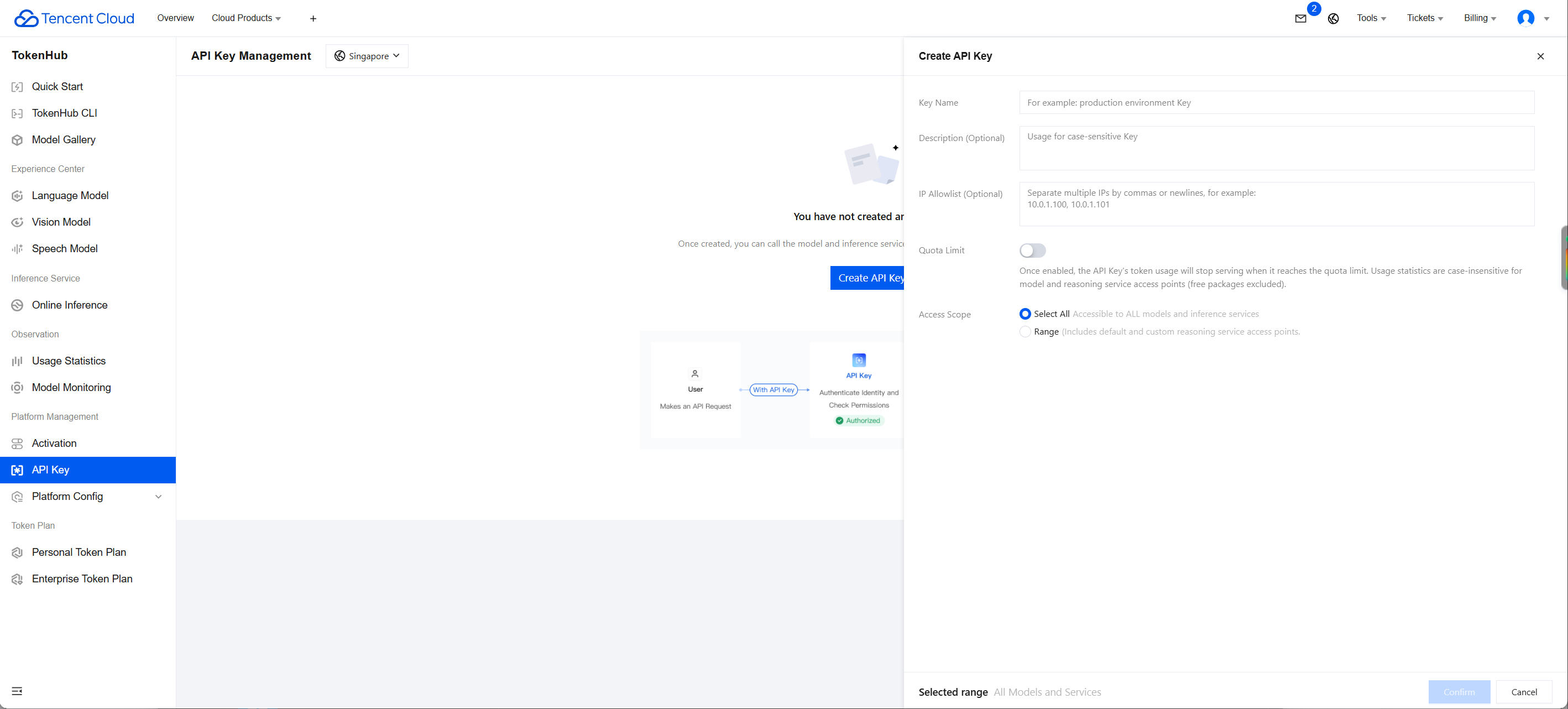
1. Go to the API Key Management page and click Create API Key. For detailed operations, see Create API Key.
2. After creation, be sure to copy and securely store the API Key. This information will be used in the subsequent process of configuring the tool.
Note:
The key of each account can only be queried by that account. The key information of the main account is invisible to sub-accounts. If a sub-account needs to call APIs, it must create its own key information.
If a sub-account cannot be created, the sub-account may not have permission to create keys. In this case, the main account needs to grant authorization. After the main account logs in, click the user list, select Authorization next to the corresponding sub-account, and a dialog box for associating policies will appear. Enter the authorization policy name to search, select the corresponding policy, and click Confirm.
Authorization policy: QcloudTokenhubFullAccess
2. Concurrency Quota
Three concurrent tasks are provided by default, meaning that up to three submitted tasks can be processed simultaneously. A new task can only start after the previous task is completed.
Concurrent tasks: the maximum number of tasks that can run during the period when the corresponding service is being called. While a task is not completed, the next task cannot be submitted. After the task is completed, the next task can be submitted.
API Documentation
Submitting an Image-to-3D Task
Input parameters
Parameter Name | Required | Type | Parameter Description |
model | Yes | string | Name of the Hunyuan 3d model. Default value: hy-3d-3.6. Example value: hy-3d-3.6 |
image_base64 | No | string | base64 data of the input image. Size: The resolution of each side must be no less than 128 and no greater than 5000, and the size must not exceed 6 MB (because base64 encoding increases the size by about 30%). Format: jpg, png, jpeg, webp. Either image_base64 or image_url is required, and they cannot coexist. Example value: /9j/4QlQaHR0c...N6a2M5ZCI |
image_url | No | string | url of the input image. Size: The resolution of each side must be no less than 128 and no greater than 5000, and the size must be less than 10 MB. Format: jpg, png, jpeg, webp. Either image_base64 or image_url is required, and they cannot coexist. For multiple images, image_url must also be passed in, and in this case image_url is the front view. Example value: https://cos.ap-guangzhou.myqcloud.com/image.jpg |
multi_view_images | No | array of view_image | Model images from multiple views. Reference values for views: For multiple images, image_url must also be passed in, and in this case image_url is the front view. back: rear view left: left view right: right view top: top view bottom: bottom view left_front: left front 45° view right_front: right front 45° view Each view is limited to one image. In addition to the front view, at least one other view must be provided. Image resolution limit: The resolution of each side must be less than 5000 and greater than 128. Supported image formats: jpg or png. |
generate_type | No | string | Generation task type. Default value: Normal. Normal: Generate a textured geometric model. Geometry: Generate a geometric model without textures (white model). Other values are not supported. Enum values are case-sensitive. In Geometry mode, enable_pbr, seam_less, tex_res, tex_fmt, bake_lighting, ao_strength, and enable_fbx_url do not take effect and are ignored if passed in. |
face_count | No | int | Target number of faces for generation. Default value: 2000000. Target number of faces for generating the geometric model. This parameter is a recommended value, ranging from 1000 to 2000000. |
face_strict_mode | No | bool | Whether to force generation based on the target number of faces. Otherwise, the model adjusts the number of faces based on geometric error. |
style | No | string | 3D model texture style. Default value: empty string "" (no style). Supported values: qinghuaci, china_style, sculpture, cartoon, cyberpunk. Supported for text input only. Available in both Normal and Geometry modes. Single-image or multi-image input is not supported. Requests are rejected when such input is passed in. |
enable_pbr | No | bool | Whether to generate PBR texture results. Default value: false. Supported only when generate_type=Normal. Does not take effect when generate_type=Geometry and is ignored if passed in. false does not mean pure geometry. Pure geometry is specified by generate_type=Geometry. |
seam_less | No | bool | Texture map generation preference. true: prioritize reducing seams. false: prioritize preserving details. Default value: false. Supported only when generate_type=Normal. Does not take effect when generate_type=Geometry and is ignored if passed in. |
tex_res | No | string | Texture map resolution. Supported values: 2k, 4k, 8k. Default value: 4k. Supported only when generate_type=Normal. Does not take effect when generate_type=Geometry and is ignored if passed in. |
tex_fmt | No | string | Texture map format. Supported values: png, jpeg, jpg, webp. Default value: jpeg. Supported only when generate_type=Normal. Does not take effect when generate_type=Geometry and is ignored if passed in. |
bake_lighting | No | bool | Whether to bake lighting effects from the input image into the texture. Default value: false. When this option is enabled, the texture retains the light and shadow from the input image, making the appearance closer to the original image. When this option is disabled, lighting effects are removed and an albedo texture is generated. Supported only when generate_type=Normal. Does not take effect when generate_type=Geometry and is ignored if passed in. |
ao_strength | No | float | AO (ambient occlusion) strength. Value range: [0, 1]. Default value: 0. Supported only for multi-image input when generate_type=Normal. Not supported for single-image or text input in Normal mode, and the request is rejected if this parameter is passed in. Does not take effect when generate_type=Geometry and is ignored if passed in. |
result_format | No | string | Format of the generated model. Only one format can be specified. By default, the generated model file group is returned in obj and glb formats (when generate_type is set to Geometry, the default format is glb). Optional values: stl, usdz, fbx. Example value: stl |
Output parameters
Parameter Name | Type | Description |
id | string | Task id (valid for 24 hours). Example value: 1315932989749215232 |
request_id | string | Unique request id generated by the server and returned for each request (if a request fails to reach the server for other reasons, no request_id is returned for that request). Provide the request_id of the request when locating issues. |
object | string | Object type returned. For 3d jobs, 3d_job is always returned. |
created_at | integer | Task creation time. |
status | string | completed: task succeeded, failed: task failed, in_progress: in progress, queued: waiting. Example value: completed |
Querying an Image-to-3D Task
Input parameters
Parameter Name | Required | Type | Description |
model | No | string | Name of the Hunyuan 3d model. Default value: hy-3d-3.6. Example value: hy-3d-3.6 |
id | Yes | string | Task id. Example value: 1357237233311637504 |
Output parameters
Parameter Name | Type | Description |
status | string | completed: task succeeded, failed: task failed, in_progress: in progress, queued: waiting. Example value: completed |
request_id | string | Unique request id generated by the server and returned for each request (if a request fails to reach the server for other reasons, no request_id is returned for that request). Provide the request_id of the request when locating issues. |
object | string | Object type returned. For 3d jobs, 3d_job is always returned. |
created_at | integer | Task creation time. |
completed_at | integer | Task completion time. |
data | array of object | List of generated results, including generated 3d model files and related resource information. For details, see the data data structure. |
Examples
Submitting an Image-to-3D Task
Input Example
curl --location --request POST 'https://tokenhub-intl.tencentcloudmaas.com/v1/api/3d/submit' \\--header "Authorization: Bearer ${APIKEY}" \\--header 'Content-Type: application/json' \\--data-raw '{"model": "hy-3d-3.6","image_url": "https://example.com/input.png"}'
Output Example
{"id": "14721*****320","request_id": "11f64379-bb0b-46b2-b89f-17d75fc12365","object": "3d_job","created_at": 1784885898,"status": "queued"}
Querying an Image-to-3D Task
Input Example
curl -X POST 'https://tokenhub-intl.tencentcloudmaas.com/v1/api/3d/query' \\-H 'Authorization: Bearer YOUR_API_KEY' \\-H 'Content-Type: application/json' \\-d '{"model": "hy-3d-3.6","id": "14721*****320"}'
Output Example
{"request_id": "ab3beaeb-b4aa-4387-b5aa-e2ec1bba4ef0","object": "3d_job","created_at": 1784884760,"completed_at": 1784884760,"status": "completed","data": [{"type": "obj","url": "https://hunyuan-prod-12583****d3272_0.zip","preview_image_url": "https://hunyuan-prod-1258*****ff1967a_0.png"},{"type": "glb","url": "https://hunyuan-prod-1258**********ec2ff1967a_0.glb","preview_image_url": "https://hunyuan-prod-12583*f1967a_0.png"}]}
Data Structure
multi_view_images
Multi-View Reference Images
Parameter Name | Required | Type | Parameter Description |
view_type | Yes | string | Viewpoint type of the reference image. |
view_image_url | Yes | string | URL of the reference image for the corresponding viewpoint. |
data
Generate a result object.
Parameter Name | Type | Description |
type | string | Type of the generated result file. Example value: obj |
url | string | Download URL of the generated result file. |
preview_image_url | string | Download URL of the generated result preview image. |
フィードバック