WAND Previs Video Generation API Guide
ダウンロード
フォーカスモード
フォントサイズ
Tencent Cloud WAND Vega Previs is a vertical scenario-based generation capability provided by Tencent Cloud for video generation. After a script or storyboard is provided, it can generate a 3D previsualization video built with pure geometric shapes. This video is mainly used to determine the video scene, character positions, shot sizes, structural proportions, object sizes, and camera movement directions. After the result is confirmed, the previs video is then used as a reference video for video generation. Previs elements are mostly made with simple geometric shapes. For example, characters are replaced with mannequins or cylinders, scenes only retain main structures such as walls, stairs, doors, tables, and chairs, and no materials or lighting are applied overall.
Advantages and Use Cases
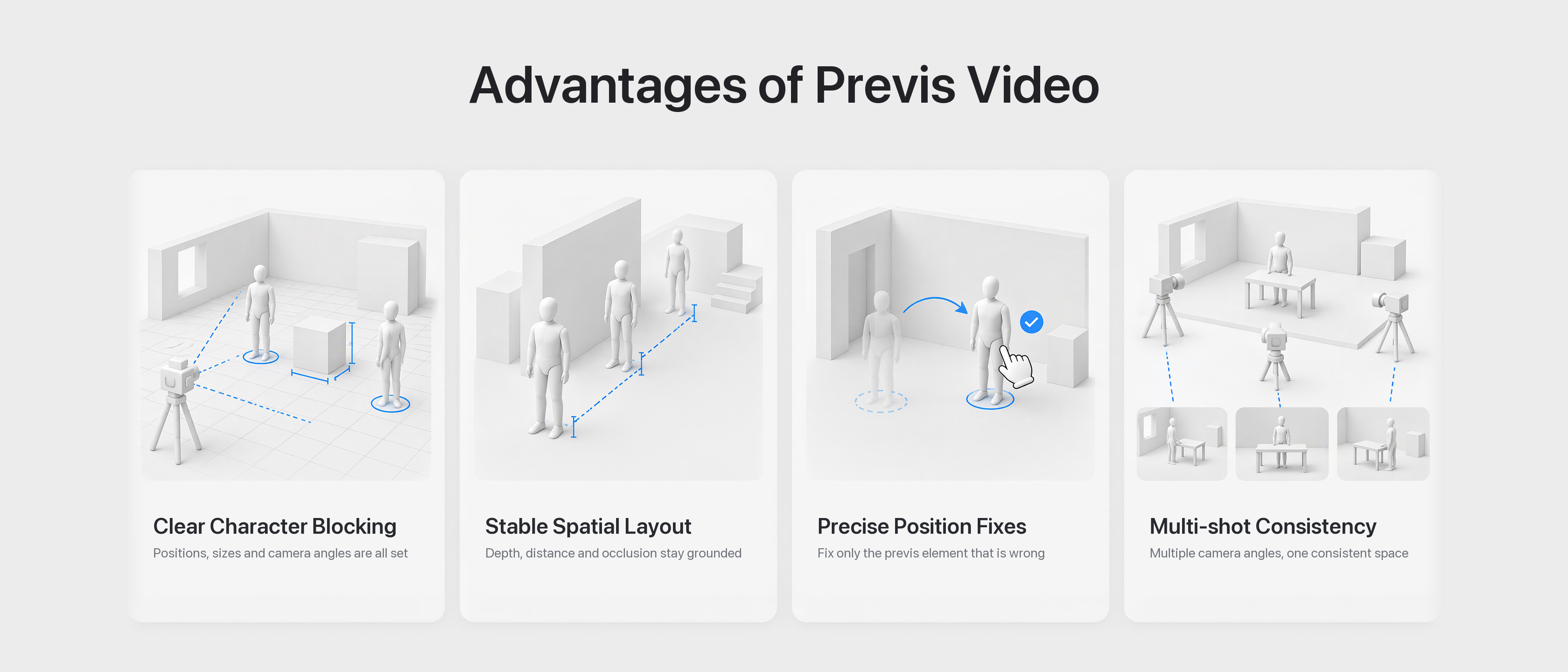
Clear character positioning: Keep character positions, object sizes, and camera angles stable to avoid positioning drift.
Stable spatial relationships: Maintain references for front-back positions, distances, and occlusions to prevent scene drift.
Precisely correct erroneous positions: When a position or camera angle is incorrect, you can precisely modify the corresponding previs details.
Multi-shot consistency: Videos output from different camera positions in the same scene can still maintain spatial consistency.
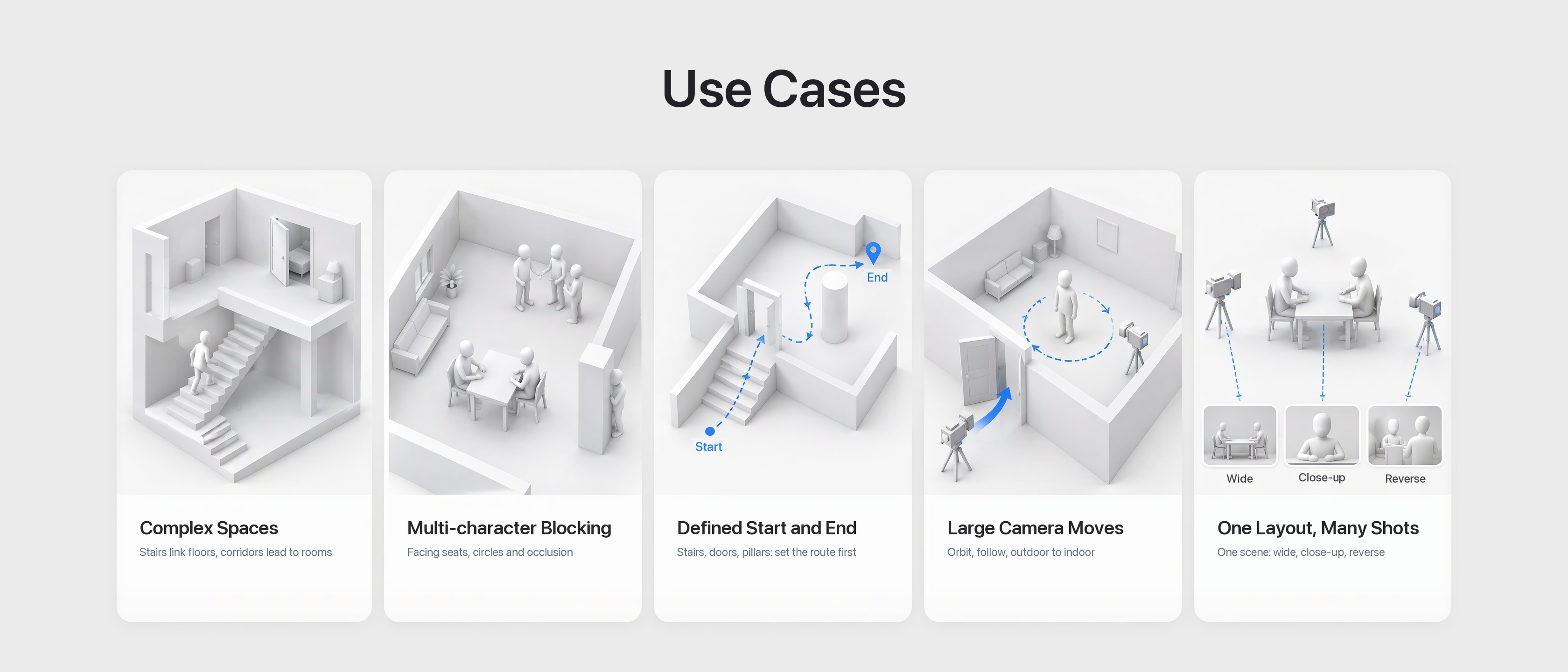
Complex spaces: Scenarios such as connecting multiple floors through staircases and accessing rooms through corridors.
Multi-person or multi-object positioning: Scenarios such as sitting across a table, standing in a group, and characters being occluded.
Determine the start and end points: For actions such as going upstairs, passing through doors, or walking around pillars, determine the start point, end point, and route first.
Significant camera movement changes: Shots such as orbiting, tracking, or entering a room from outside a door.
Shared layout across multiple shots: Wide shots, close-ups, and reverse shots are required within the same scene.
Creation Workflow
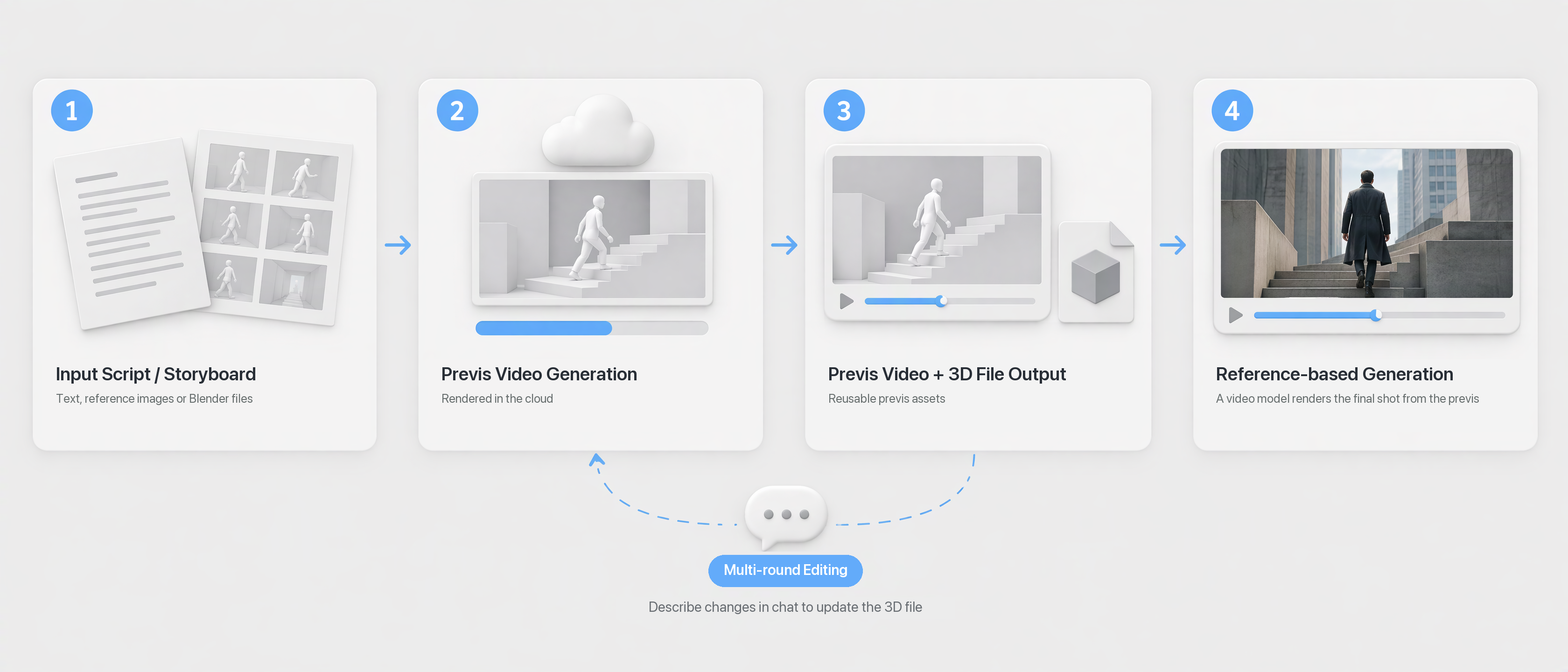
Prompt input: Enter the script or storyboard and reference images (if any) to generate a previs video, which is rendered in the cloud.
Output previs video files: Output the previs video, 3D files, previs models, and previs handoff documents. If further editing is needed, you can directly describe the adjustments in multi-turn conversations to edit and modify the 3D files.
Reference prompt expansion: Use the LLM or Agent to expand the reference video prompt.
Reference previs video generation: Submit the expanded reference video prompt and previs video to a video generation model for video generation (only video generation models that support reference video generation are supported).
Prerequisites
You have registered a Tencent Cloud account and activated the TokenHub service.
You have obtained the API Key in the TokenHub console.
Enable postpaid billing for the corresponding model in Console - Online Inference - Vision Models.
Note:
In all examples below, YOUR_API_KEY must be replaced with your own API Key. The authentication method is the request header Authorization: Bearer YOUR_API_KEY.
Call Process
3D Previs video generation is a time-consuming task, so the API uses an asynchronous call mode, which is divided into two steps:
1. Submit a task: Call
POST /v1/wand/videos/previs, which returns a task_id upon success.2. Poll for results: Call
POST /v1/wand/videos/previs/query with the task_id until the status is success or failed. Upon success, obtain the video URL from video_url and the Blender project file URL from blender_url.3. Multi-turn editing: To continue modifying based on the previous result, fill the
task_id from the previous round into settings.previous_task_id in the next submission.Model List
Model Name | Model (API Parameter) | Supported Input | Video Duration (s) | Recommended | Output |
WAND-Vega-Previs-1.0-pro | wand-vega-previs-1.0-pro | Text, reference images, and Blender project files | 60s | Suitable for high-quality video generation in cinematic and complex scenes, with refined polishing. | MP4 video, Blender project file, and previsualization description (brief.md) |
WAND-Vega-Previs-1.0-flash | wand-vega-previs-1.0-flash | Text, reference images, and Blender project files | 60s | Suitable for generating simple scenes such as short videos and short dramas, with a focus on speed and spatial/character positioning. | MP4 video, Blender project file, and previsualization description (brief.md) |
WAND-Vega-Previs-1.0-lite | wand-vega-previs-1.0-lite | Text and reference images | 60s | Suitable for scenes with small-space conversations and fewer characters, focusing on cost-effectiveness and lightweight use. The Lite version output provides only white-model videos. | MP4 video and previsualization description (brief.md) |
Note:
Video duration, aspect ratio, and resolution can all be customized in the input using natural language. If not specified, they are intelligently generated by the service.
Video Generation
1. API Description
Submit a previs video generation task. Text-to-video, reference-to-video (reference image / Blender project), and multi-turn follow-up share this API, distinguished by the type of elements in the contents array and settings.previous_task_id.
API:
POST https://tokenhub-intl.tencentcloudmaas.com/v1/wand/videos/previs2. Input Parameters
Parameter Name | Required | Type | Description |
model | Yes | string | Model name. Value: wand-vega-previs-1.0-pro wand-vega-previs-1.0-flash wand-vega-previs-1.0-lite |
contents | Yes | array[object] | Multimodal input array. It must contain at least one type=text element because text prompts are required for generation. For details, see contents array element parameters. |
settings | No | object | Generation settings. The entire object can be omitted. If not passed, it is equivalent to: first-round generation + PRO tier + default aspect ratio. For details, see settings object fields. |
Parameters of Elements in the contents Array
contents is an array distinguished by type. The structure of each element is as follows:Parameter Name | Required | Type | Description |
type | Yes | string | Element type. Valid values: text, image_url, blender_url. Other values return 400. |
text | Yes | string | Text prompt. Required. When multiple text elements exist, they are concatenated in array order to form the complete prompt, with a maximum of 100,000 characters after concatenation. |
image_url | No | string | Reference image URL. Up to 30 images can be passed in, and the URL can contain up to 2,048 characters. |
blender_url | No | string | Blender file URL. Up to one can be passed in, and it can only be passed in when the task is first created, not in multi-round editing. The URL can contain up to 2,048 characters. |
Fields of the settings Object
Parameter Name | Required | Type | Description |
settings.aspect_ratio | No | string | Aspect ratio. Recommended values are in the format of 16:9, 9:16, or 1:1. If not specified, the default ratio is used. Maximum 16 characters. Spaces or control characters are not allowed; otherwise, 400 is returned. Unsupported ratios are generated using the default ratio. |
settings.previous_task_id | No | string | In multi-turn follow-up scenarios, pass the task_id of the previous task. If not passed, the first-turn generation is assumed. Maximum 64 characters. The previous task must be created by the current account and have been generated successfully (status=success). |
Note:
Multi-turn follow-up does not inherit the aspect ratio from the previous round. To keep it consistent, pass settings.aspect_ratio again in the current round.
3. Example of a Text-to-Video Request
Generate a previs video using only text prompts. When the
contents array contains only type=text elements and no settings are passed, the video is generated with the default aspect ratio.curl -X POST 'https://tokenhub-intl.tencentcloudmaas.com/v1/wand/videos/previs' \\-H 'Content-Type: application/json' \\-H 'Authorization: Bearer YOUR_API_KEY' \\-d '{"model": "wand-vega-previs-1.0-pro","contents": [{"type": "text","text": "A robot slowly walks toward the camera on a rainy night street, with the camera slowly pushing in"}],"settings": {"aspect_ratio": "16:9"}}'
4. Example of a Reference-to-Video Request
Generate a previs video using a combination of text + reference images / Blender project files. Pass
type=image_url or type=blender_url elements in contents.Note:
Include at least one
type=text element to describe previsualization intent such as camera movement and character actions.The asset URL must be publicly accessible. Base64 inline content is not supported.
curl -X POST 'https://tokenhub-intl.tencentcloudmaas.com/v1/wand/videos/previs' \\-H 'Content-Type: application/json' \\-H 'Authorization: Bearer YOUR_API_KEY' \\-d '{"model": "wand-vega-previs-1.0-pro","contents": [{"type": "text","text": "Referring to the character design in the reference image, the character walks from the door to the window in the Blender scene, with the camera slowly pushing in"},{"type": "image_url","url": "https://example.com/character.png"},{"type": "blender_url","url": "https://example.com/scene.blend"}],"settings": {"aspect_ratio": "9:16"}}'
5. Example of a Multi-Turn Follow-Up Request
Continue modifying based on the result generated in the previous round. Fill the
task_id returned from the previous submission into settings.previous_task_id, and describe the modification requirements for this round in contents.Note:
The previous task must have been generated successfully (
status=success). If it is still in progress or has failed, a 409 error is returned.Follow-up is only allowed for tasks created by the current account. Otherwise, a 400 error is returned.
curl -X POST 'https://tokenhub-intl.tencentcloudmaas.com/v1/wand/videos/previs' \\-H 'Content-Type: application/json' \\-H 'Authorization: Bearer YOUR_API_KEY' \\-d '{"model": "wand-vega-previs-1.0-pro","contents": [{"type": "text","text": "Change the camera to pan from left to right"}],"settings": {"previous_task_id": "1300000000-WmVideo-d4906359699a3e8934e5a169c7500ec9","aspect_ratio": "16:9"}}'
6. Output Parameters
Note:
A successful submission is indicated by a response body that returns a
task_id and does not contain an error field.The submission API does not provide request-level idempotency: each submission generates a new task ID. Manage retries on your own using a business-side request identifier to avoid duplicate generation and billing.
Parameter Name | Type | Description |
task_id | string | Task ID, used to poll the task status and passed in as settings.previous_task_id during multi-turn follow-up questions. |
request_id | string | ID of the current request, used for troubleshooting. |
7. Response Example
{"task_id": "1300000000-WmVideo-d4906359699a3e8934e5a169c7500ec9","request_id": "req_5b0e1c9a3f2d4e6b8a7c1d2e3f4a5b6c"}
Querying the Task Result
1. API Description
Task query endpoint shared by all generation modes: After a task is submitted and a
task_id is returned, poll the task status through this API. Upon success, obtain the output URLs from video_url, blender_url, brief_url .API:
POST https://tokenhub-intl.tencentcloudmaas.com/v1/wand/videos/previs/query2. Input Parameters
Parameter Name | Required | Type | Description |
task_id | Yes | string | Task ID, which is the task_id returned when the task is submitted. Only tasks created by the current account can be queried. |
3. Sample Request
curl -X POST 'https://tokenhub-intl.tencentcloudmaas.com/v1/wand/videos/previs/query' \\-H 'Content-Type: application/json' \\-H 'Authorization: Bearer YOUR_API_KEY' \\-d '{"task_id": "1300000000-WmVideo-d4906359699a3e8934e5a169c7500ec9"}'
4. Output Parameters
Parameter Name | Type | Description |
status | string | Task status. Values: processing (generating), success (generation succeeded), failed (generation failed). |
video_url | string | Download URL of the generated video (MP4). Empty string when the output is not ready. |
blender_url | string | Download URL of the Blender project file, which can be imported into Blender for secondary editing. Empty string when the output is not ready. |
brief_url | string | Download URL of the previsualization description file (brief.md), which is a prompt file expanded from the original input prompt. Empty string when not ready. It can be used as a reference for prompt expansion in white-model-to-video generation. |
usage | object | Total Token usage of this session. This field is not returned when no usage is generated. |
usage.input_tokens | integer | Total number of input tokens, including tokens that miss the cache and tokens that hit the cache. |
usage.cached_read_tokens | integer | Number of tokens that hit the cache in the input, which is a subset of input_tokens. |
usage.cached_write_tokens | integer | Total number of tokens written to the cache. |
usage.output_tokens | integer | Total number of output tokens. |
error_message | string | Failure reason description, which is non-empty only when status=failed. |
Note:
When
status=processing, it is normal for video_url to already be non-empty: the output URL is written before the status update, so you can download it as soon as it is non-empty without waiting for status=success.The output URL is a temporary download address. Download it promptly after the task succeeds and transfer it to your own storage.
5. Sample Response
{"status": "success","video_url": "https://example.cos.ap-guangzhou.myqcloud.com/out.mp4","blender_url": "https://example.cos.ap-guangzhou.myqcloud.com/scene.blend","brief_url": "https://example.cos.ap-guangzhou.myqcloud.com/brief.md","usage": {"input_tokens": 135000,"cached_read_tokens": 90000,"cached_write_tokens": 28000,"output_tokens": 3200}}
Appendix
Unified Error Codes
Except for authentication failures, API errors are uniformly returned with an
http body status code of 200, and the error information is in the error field of the response body. A response body without the error field indicates a successful call.{"error":{"code":404,"message":"task not found"}}
error.code | Meaning | Handling Recommendation |
401 | Authentication failed: the Authorization header is missing, or the API Key is invalid / expired. This error is returned at the gateway layer, and the error code is subject to the gateway. | Check whether Authorization: Bearer <API Key> is correct and within its validity period. |
400 | Invalid request parameters: missing required fields, unsupported type, field length exceeded, settings.aspect_ratio contains spaces, the task referenced by settings.previous_task_id does not exist or does not belong to the current account, and so on. | Check the valid value range of each parameter in this document and retry. |
404 | The queried task does not exist or does not belong to the current account. | Confirm that task_id is correct and was created by the current account. |
409 | During multi-turn follow-up questions, the task referenced by settings.previous_task_id has not been generated successfully (it is still being generated or has failed). | Wait until the previous task reaches status=success before submitting. If the previous task failed, initiate a new first-turn generation. |
500 | An internal service error has occurred. | Retry. If the failure persists, contact technical support. |
Note:
When a request fails before entering business processing (for example, due to an unparsable request body, a timeout, or service overload), the HTTP status code is the corresponding 4xx / 5xx, and the response body structure remains unchanged.
FAQs
1. Can I Specify Video Duration and Resolution?
Yes, duration and resolution can both be specified in the text input using natural language, so no related parameters need to be passed in the request.
2. Will Multiple Rounds of Follow-up Questions Inherit the Context from the Previous Round?
Yes. In each round, the input is edited based on the file specified by the
previous_task_id passed in that round.3. What Should I Do If a 409 Error Is Returned When Multiple Rounds of Follow-up Questions Are Submitted?
A 409 error indicates that the previous task has not been generated successfully. Poll the previous task first and submit the follow-up only after
status=success. If the previous task has failed, initiate a new first-round generation.4. Why Does Querying with a Correct task_id Return a 404 Error?
You can only query and follow up on tasks created by the current account. Make sure that the API Key used for queries belongs to the same account as the one used to submit the task.
5. Will the Download Link for Generated Results Expire?
The output URLs will expire. They are temporary download addresses valid for 14 days. Download the video, Blender project files, and previsualization description promptly after the task succeeds, and transfer them to your own storage.
フィードバック