Hy Nomas API Guide
ダウンロード
フォーカスモード
フォントサイズ
Overview
Hy Real-Time World Model (Hy-Nomas) is a world generation model designed for free-form interaction, fusing language instructions, camera motion, and visual memory into a single continuously evolving world. After a world is created, video frames are received in real time over a persistent WebSocket connection. During operation, you can send text instructions or camera trajectories at any time to determine round by round what happens next and from which angle it is viewed, and output the final video upon completion.
This document describes how to call the Hy Nomas model, Hy-Nomas-v1.0, through TokenHub.
Core Capabilities
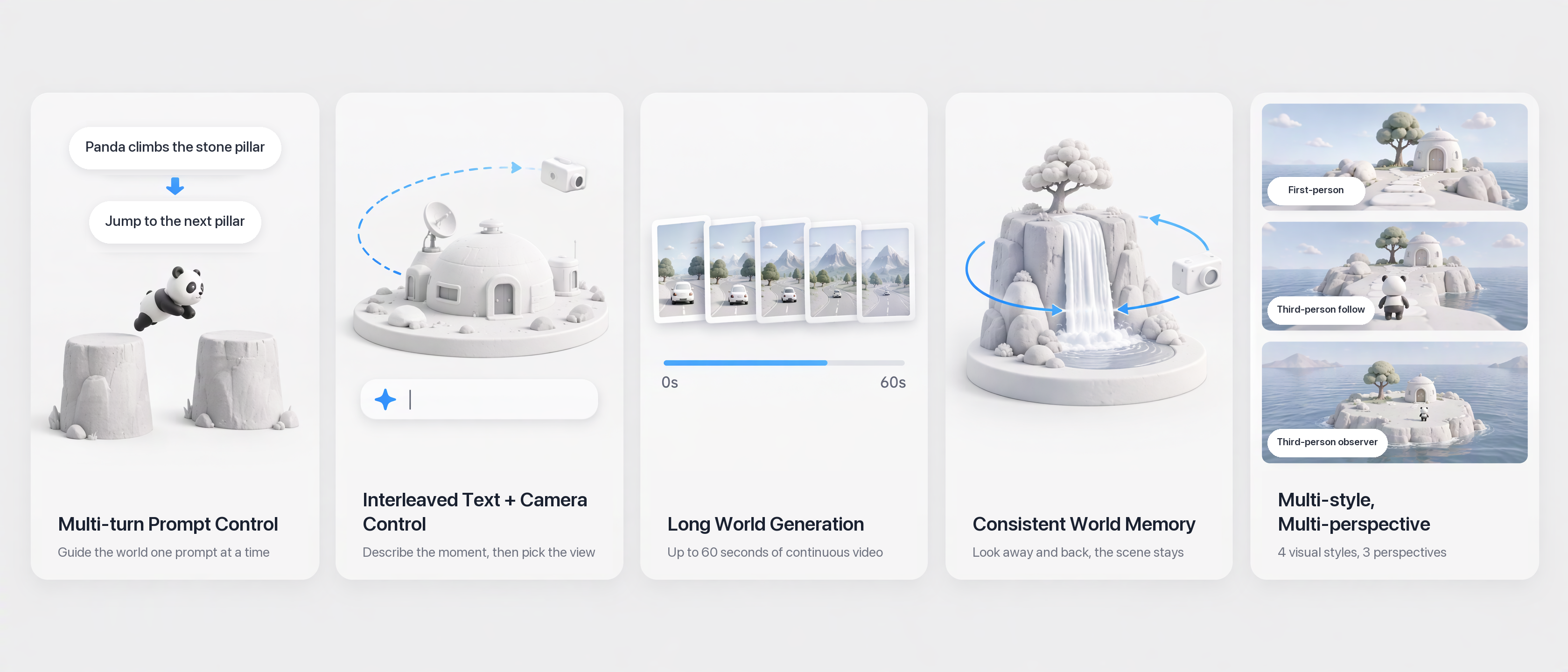
Capability | Description |
Multi-turn text control | Each new instruction brings new development. You can use continuous text instructions to guide subject actions, change scenes, and advance the visuals as if having an ongoing conversation with the world. |
Alternating text and camera control | You can continue describing the real-time video and freely switch between text instructions and camera trajectories within the same evolving world. |
Long-duration world generation | Supports continuous video generation of up to 60 seconds, and each interaction affects subsequent frames. |
Consistent world memory | When the camera moves away, travels farther, and then turns back, objects, environmental details, and spatial relationships remain consistent. |
Multiple styles and perspectives | Supports visual styles such as real footage, CG, game, and animation, as well as three perspectives: first-person, third-person follow, and third-person observer. |
Prerequisites
You have registered a Tencent Cloud account and activated the TokenHub service.
You have obtained the API Key in the TokenHub console.
Enable postpaid billing for the corresponding model in Console - Online Inference - Vision Models.
Note:
In all examples below, YOUR_API_KEY must be replaced with your own API Key. The authentication method is the request header Authorization: Bearer YOUR_API_KEY.
Call Process
Note:
A real-time world is a persistent connection session. Call it uniformly by following these steps:
1. Create a world: Call POST /create, which returns the task id and the WebSocket relative path upon success.
2. Establish a WebSocket connection: Connect to GET /ws/{id} within 20 seconds to continuously receive video frames and events.
3. Submit input (optional): Call POST /input/{id} while the world is running to send text evolution or camera trajectories.
4. Query status (optional): Call query APIs such as GET /query/{id} to obtain the world status, retrieve missed events, or preview frames.
5. End the world: Call POST /close/{id} to end the session and release the task.
Protocol | address |
HTTP | https://tokenhub-intl.tencentcloudmaas.com/v1/wand/hy-world/v1-nomas |
WebSocket | wss://tokenhub-intl.tencentcloudmaas.com, concatenate it with the websocket relative path returned after creating the world, and then use it. |
Model List
Model name | model Parameter Value | Supported Capability | Resolution Tier | Frame Rate | Maximum Duration |
Hy-Nomas-v1.0 | hy-nomas-v1.0 | Real-time video generation, multi-turn text control, and camera trajectory control | 480p, 720p (default), 1080p | 24 fps | 60 seconds |
Usage Rules
Project | Rule |
Concurrent world quantity | Each account can have at most 1 world at a time. End the current world before creating a new one. |
Connection establishment timeout | Establish a WebSocket connection within 20 seconds after creating the world. |
Idle timeout | The session ends after 180 seconds without input. |
Reconnection after disconnection | Not supported. The world ends immediately when the WebSocket connection is disconnected. |
Input queue | Text evolution and camera trajectory share a queue, with a maximum of 6 entries. |
Request method | Only POST / GET are supported. PUT / PATCH / DELETE are not supported. |
model parameter | All POST request bodies must include "model": "hy-nomas-v1.0"; GET requests and WebSocket connections do not need to include it. |
Request Body | Must be a JSON object, with a maximum size of 512 KiB. |
Video frame rate | 24fps |
Creating a World
1. API Description
Create a real-time world, which returns the task ID and the WebSocket connection path. After successful creation, you must establish the WebSocket connection within 20 seconds, otherwise the session ends.
API:
POST https://tokenhub-intl.tencentcloudmaas.com/v1/wand/hy-world/v1-nomas/create2. Input Parameters
Parameter Name | Required | Type | Description |
model | Yes | string | Model name. Value: hy-nomas-v1.0 |
world_prompt | Yes | string | World/scene description, 1 to 8000 characters in length. |
subject | Yes | string | Subject description, 1 to 2000 characters in length. |
perspective | No | string | Camera perspective. Values: first-person (first-person), third-person follow (third-person follow, default), third-person observer (third-person observer). |
resolution | No | string | Video resolution. Values: 480p, 720p (default), 1080p. |
jpeg_quality | No | integer | JPEG compression quality of video frames. Value range: an integer from 40 to 90. Default value: 80. |
Note:
When
1080p is selected, the first frame is generated more slowly, and real-time frame rates are not guaranteed.The actual output resolutions for each tier are:
480p = 864×480, 720p = 1280×704, 1080p = 1920×1088. The values in the response, video.width / video.height, prevail.3. Sample Request
curl -X POST 'https://tokenhub-intl.tencentcloudmaas.com/v1/wand/hy-world/v1-nomas/create' \\-H 'Content-Type: application/json' \\-H 'Authorization: Bearer YOUR_API_KEY' \\-d '{"model": "hy-nomas-v1.0","world_prompt": "A quiet coastal road at sunset","subject": "A silver SUV","perspective": "third-person follow","resolution": "480p"}'
4. Output Parameters
Note:
Successful creation is indicated by HTTP status code 201 + the returned
id.Parameter Name | Type | Description |
id | string | Task ID, used for connection establishment and subsequent API calls. |
websocket | string | WebSocket relative path. Concatenate it with wss://tokenhub-intl.tencentcloudmaas.com before use. |
state | string | World state. Possible values in order: assigned (assigned), initializing (initializing), active (active), closing (closing), closed (closed). |
initialized | boolean | Whether initialization is completed. |
attach_deadline_in | integer | Remaining seconds before the connection establishment deadline, initially 20. |
idle_deadline_in | integer | Remaining seconds before idle timeout, initially 180. |
video | object | Effective video specifications. For details, see video object fields below. |
last_event_id | integer | Current event cursor, which can be used to retrieve missed events. |
video Object Fields
Parameter Name | Type | Description |
video.width | integer | Video width (pixels). |
video.height | integer | Video height (pixels). |
video.fps | integer | Frame rate, fixed at 24. |
video.segment_frames | integer | Frames per segment, fixed at 120. |
video.segment_seconds | number | Segment duration in seconds, fixed at 5.0. |
video.resolution | string | Effective resolution tier. |
5. Sample Response
HTTP/1.1 201 CreatedContent-Type: application/json{"id": "1300000000-AigcVideo-d2b2c9a76aa24147b3cb9d815cf66e06","websocket": "/v1/wand/hy-world/v1-nomas/ws/1300000000-AigcVideo-d2b2c9a76aa24147b3cb9d815cf66e06","state": "assigned","initialized": false,"attach_deadline_in": 20,"idle_deadline_in": 180,"video": {"width": 864,"height": 480,"fps": 24,"segment_frames": 120,"segment_seconds": 5.0,"resolution": "480p"},"last_event_id": 0}
Establishing a WebSocket Connection
1. API Description
Establish a WebSocket long connection within 20 seconds after creating the world to continuously receive video frames and events. Each world allows only one WebSocket connection, and disconnection ends the world without reconnection support.
API:
GET wss://tokenhub-intl.tencentcloudmaas.com/v1/wand/hy-world/v1-nomas/ws/{id}The connection request must include the following request headers, and query parameters are not allowed in the URL:
Request header | Value |
Authorization | Bearer YOUR_API_KEY |
Connection | Upgrade |
Upgrade | websocket |
Sec-WebSocket-Version | 13 |
Sec-WebSocket-Protocol | hynomas |
Note:
The browser-native WebSocket cannot set the
Authorization request header. It is recommended to establish the connection on the server side and then forward video frames to the frontend, while avoiding exposing the API Key on the client side.2. Input Parameters
Parameter Name | Required | Type | Description |
id | Yes | string | Task ID (path parameter), which is the id returned when the world is created. |
3. Sample Request
The following Python example fully demonstrates the workflow of "creating a world → establishing a WebSocket connection to receive frames → ending the world", and depends on
requests and websockets (version 14 or later).import asyncioimport jsonimport requestsimport websocketsAPI_KEY = "YOUR_API_KEY"HTTP_BASE = "https://tokenhub-intl.tencentcloudmaas.com/v1/wand/hy-world/v1-nomas"WS_BASE = "wss://tokenhub-intl.tencentcloudmaas.com"HEADERS = {"Authorization": f"Bearer {API_KEY}"}def create_world():resp = requests.post(f"{HTTP_BASE}/create", headers=HEADERS, json={"model": "hy-nomas-v1.0","world_prompt": "A quiet coastal road at sunset","subject": "A silver SUV","resolution": "480p",}, timeout=30)resp.raise_for_status()return resp.json()def close_world(world_id):requests.post(f"{HTTP_BASE}/close/{world_id}", headers=HEADERS,json={"model": "hy-nomas-v1.0"}, timeout=30)async def main():world = create_world()try:async with websockets.connect(WS_BASE + world["websocket"],subprotocols=["hynomas"],additional_headers=HEADERS, # For websockets versions below 14, use extra_headers insteadmax_size=8 << 20,) as ws:async for message in ws:if isinstance(message, bytes):index = int.from_bytes(message[:8], "big") # Frame sequence numberjpeg = message[8:] # JPEG image data# Decode and display here, or write to a fileelse:event = json.loads(message)print(event)if event.get("type") == "closed":breakfinally:close_world(world["id"])asyncio.run(main())
4. Output Parameters
After the connection is established, the server pushes two types of messages over WebSocket:
Message Type | Format |
Binary message (video frame) | The first 8 bytes are a big-endian uint64 frame sequence number, followed by JPEG image data. The frame sequence number increments consecutively from 0 at 24 fps, with every 120 frames (5 seconds) forming a segment. |
Text message (event) | A JSON object that distinguishes event types through the type field. For details, see the table below. |
Event type:
type | Description |
segment_start / segment_end | Start or end of a video segment, including the index, frames, and kind fields. |
lease | Keepalive heartbeat that contains the current session status. |
accepted / input_accepted / camera_accepted | The input has been accepted. |
input_rejected | The input is rejected, including the code and message fields. |
closed | The session has ended, including the reason field. |
error | Service exception. |
5. Sample Response
HTTP/1.1 101 Switching ProtocolsConnection: UpgradeUpgrade: websocketSec-WebSocket-Protocol: hynomas
6. Status Codes
HTTP Status Code | Description |
101 | Connection established successfully. |
400 | Missing upgrade request header, subprotocol error, or query parameters in the URL. |
404 | Task does not exist. |
409 | A WebSocket connection already exists in this world. |
410 | The world has ended. |
Submitting Input
1. API Description
During world execution, text evolution or camera trajectories can be sent to change the visual content or camera perspective. They must be submitted only after the world
state=active and initialized=true.Text evolution and camera trajectories share the same input queue (up to 6 items) and are generated sequentially in the order received. You can also send JSON text messages with the same structure directly over the established WebSocket, sharing the same queue with this API.
API:
POST https://tokenhub-intl.tencentcloudmaas.com/v1/wand/hy-world/v1-nomas/input/{id}2. Input Parameters
Parameter Name | Required | Type | Description |
id | Yes | string | Task ID (path parameter). |
model | Yes | string | Model name. Value: hy-nomas-v1.0 |
type | Yes | string | Input type. Values: prompt (text evolution), camera (camera trajectory). |
text | Conditionally required | string | Required when type=prompt. Describes the frame evolution. Length: 1 to 8000 characters. Optional when type=camera. Describes the camera intent. |
c2ws | Conditionally required | array | Required when type=camera. Per-frame camera extrinsics (4×4 transformation matrix from camera to world coordinate system). Length: 1 to 720 frames. |
intrinsics | Conditionally required | array | Required when type=camera. Per-frame camera intrinsics (3×3 matrix). Length must be consistent with c2ws. |
type and field combinations:type | Required Field | Optional Field | Actual Use |
prompt | text | - | Text evolution: describe upcoming changes in the frame using natural language. |
camera | c2ws,intrinsics | text | Camera trajectory: control camera movement based on frame-by-frame camera parameters. |
3. Sample Request
Text evolution:
curl -X POST 'https://tokenhub-intl.tencentcloudmaas.com/v1/wand/hy-world/v1-nomas/input/1300000000-AigcVideo-d2b2c9a76aa24147b3cb9d815cf66e06' \\-H 'Content-Type: application/json' \\-H 'Authorization: Bearer YOUR_API_KEY' \\-d '{"model": "hy-nomas-v1.0","type": "prompt","text": "Gradually shift the sky to blue twilight."}'
Camera trajectory:
curl -X POST 'https://tokenhub-intl.tencentcloudmaas.com/v1/wand/hy-world/v1-nomas/input/1300000000-AigcVideo-d2b2c9a76aa24147b3cb9d815cf66e06' \\-H 'Content-Type: application/json' \\-H 'Authorization: Bearer YOUR_API_KEY' \\-d '{"model": "hy-nomas-v1.0","type": "camera","c2ws": [[[1,0,0,0],[0,1,0,0],[0,0,1,0],[0,0,0,1]],[[1,0,0,0],[0,1,0,0],[0,0,1,0],[0,0,0,1]]],"intrinsics": [[[0.9605,0,0.5],[0,0.9605,0.5],[0,0,1]],[[0.9605,0,0.5],[0,0.9605,0.5],[0,0,1]]]}'
4. Output Parameters
Note:
Successful submission is indicated by HTTP status code 202 +
accepted=true. The subsequent processing progress of the input is pushed through WebSocket events.Parameter Name | Type | Description |
accepted | boolean | Whether the input has been accepted. |
state | string | Input processing status. Values: accepted (accepted), processing (processing), generating (generating), ready (ready), returned (returned), failed (failed). |
5. Sample Response
HTTP/1.1 202 AcceptedContent-Type: application/json{"accepted": true,"state": "accepted"}
6. Status Codes
HTTP Status Code | Description |
202 | The input has been accepted. |
400 | Invalid parameters or incorrect matrix format. |
409 | The world is still initializing, and input cannot be submitted yet. |
410 | The world has ended. |
429 | The input queue is full (6 entries). |
Querying World State
1. API Description
Query the current world status, initialization progress, event cursor, and video specifications.
API:
GET https://tokenhub-intl.tencentcloudmaas.com/v1/wand/hy-world/v1-nomas/query/{id}2. Input Parameters
Parameter Name | Required | Type | Description |
id | Yes | string | Task ID (path parameter). |
3. Sample Request
curl -X GET 'https://tokenhub-intl.tencentcloudmaas.com/v1/wand/hy-world/v1-nomas/query/1300000000-AigcVideo-d2b2c9a76aa24147b3cb9d815cf66e06' \\-H 'Authorization: Bearer YOUR_API_KEY'
4. Output Parameters
Parameter Name | Type | Description |
id | string | Task ID. |
state | string | World state. Values are the same as those of state in the Create World API. |
initialized | boolean | Whether initialization is completed. |
last_event_id | integer | Current event cursor. |
video | object | Effective video specifications. Fields are the same as those of video in the Create World API. |
5. Sample Response
{"id": "1300000000-AigcVideo-d2b2c9a76aa24147b3cb9d815cf66e06","state": "active","initialized": true,"last_event_id": 6,"video": {"width": 864,"height": 480,"fps": 24,"segment_frames": 120}}
6. Status Codes
HTTP Status Code | Description |
200 | The query is successful. |
404 | The task does not exist or does not belong to the current account. |
410 | The world has ended. |
Other Query APIs
The following APIs are all GET requests and do not require the
model parameter. No other query parameters are accepted except for the after parameter of the event backfill API.API | Description |
GET /capabilities | Query supported resolutions, frame rates, segment lengths, and various upper limits. |
GET /events/{id}?after={event_id} | Pull events after event_id and return events, last_event_id, and earliest_event_id. Returns 410 when the cursor is earlier than earliest_event_id (expired). |
GET /frame/{id} | Obtain the latest JPEG preview frame (binary). The response header X-Frame-Index indicates the frame sequence number. Returns 409 when no frame has been generated yet. |
Example request (event backfill):
curl -X GET 'https://tokenhub-intl.tencentcloudmaas.com/v1/wand/hy-world/v1-nomas/events/1300000000-AigcVideo-d2b2c9a76aa24147b3cb9d815cf66e06?after=6' \\-H 'Authorization: Bearer YOUR_API_KEY'
Example request (obtain preview frames):
curl -X GET 'https://tokenhub-intl.tencentcloudmaas.com/v1/wand/hy-world/v1-nomas/frame/1300000000-AigcVideo-d2b2c9a76aa24147b3cb9d815cf66e06' \\-H 'Authorization: Bearer YOUR_API_KEY' \\-D - -o latest.jpg
Ending the World
1. API Description
End the world and release the concurrency quota. Once successful, you can immediately create the next world. This API is idempotent: repeated calls during the session record retention period all return 200.
API:
POST https://tokenhub-intl.tencentcloudmaas.com/v1/wand/hy-world/v1-nomas/close/{id}2. Input Parameters
Parameter Name | Required | Type | Description |
id | Yes | string | Task ID (path parameter). |
model | Yes | string | Model name. Value: hy-nomas-v1.0 |
Note:
The request body must be a valid JSON object and cannot be omitted.
3. Sample Request
curl -X POST 'https://tokenhub-intl.tencentcloudmaas.com/v1/wand/hy-world/v1-nomas/close/1300000000-AigcVideo-d2b2c9a76aa24147b3cb9d815cf66e06' \\-H 'Content-Type: application/json' \\-H 'Authorization: Bearer YOUR_API_KEY' \\-d '{"model": "hy-nomas-v1.0"}'
4. Output Parameters
Parameter Name | Type | Description |
id | string | Task ID. |
state | string | World state. After successful completion, the value is closed. |
5. Sample Response
{"id": "1300000000-AigcVideo-d2b2c9a76aa24147b3cb9d815cf66e06","state": "closed"}
6. Status Codes
HTTP Status Code | Description |
200 | Ended successfully (repeated calls also return 200). |
400 | The request payload is not a valid JSON object. |
404 | The task does not exist or the session record has expired. |
Appendix
Unified Error Codes
When an API call fails, the HTTP status code is the corresponding error code, and the response body structure is as follows:
{"error": {"code": "InvalidParameter","message": "invalid world request","type": "video_generation_user_error"}}
HTTP Status Code | error.code | Meaning | Handling Recommendation |
400 | InvalidParameter | Request parameters, paths, or query parameters are invalid. | Check the valid value range of each parameter in this document and retry. |
401 | AuthFailure.InvalidAuthorization | Authentication failed: the Authorization header is missing, or the API Key is invalid/expired. | Check whether Authorization: Bearer <API Key> is correct and within its validity period. |
404 | ResourceNotFound | The task does not exist or the request path is not supported. | Confirm that the path and task ID are correct and that the task belongs to the current account. |
405 | InvalidParameter | The request method is not supported. | Use only POST / GET and call the API by following the method required by each interface. |
409 | InvalidParameter | The world is not ready yet, or a WebSocket connection already exists in this world. | Wait until state=active and initialized=true before submitting input. Keep only one connection for the same world. |
410 | ResourceNotFound | The world has ended, or the event cursor has expired. | Recreate the world. When pulling events, use a cursor no earlier than earliest_event_id. |
413 | InvalidParameter | The request body exceeds 512 KiB. | Simplify the request body. If the camera trajectory is too long, split it into multiple submissions. |
429 | RequestLimitExceeded / ResourceInsufficient | The number of concurrent worlds exceeds the limit, resources are insufficient, or the input queue is full. | End the current world before creating a new one. Retry with backoff when resources are insufficient. When the queue is full, wait until existing inputs are processed before submitting. |
502 / 503 | InternalError | An internal service error occurred, or the service is temporarily unavailable. | Retry with backoff. If the failure persists, contact technical support. |
FAQs
1. What Should I Do If a 429 Error Is Returned When a World Is Created?
Each account can run at most 1 world concurrently. Call the end world API first to release the quota before creating a new world. If 429 is still returned when no world is running, it indicates that service resources are temporarily insufficient, so retry with backoff.
2. Can WebSocket Reconnect After Being Disconnected?
Not supported. When the WebSocket disconnects, the world ends and must be recreated. We recommend that you implement proper network exception handling on the business side and call the end world API after disconnection to confirm the quota is released.
3. When Will a World End Automatically?
The session ends in the following cases: the WebSocket is not established within 20 seconds after creation, there is no input for 180 consecutive seconds, or the WebSocket disconnects. You can check the remaining time through
attach_deadline_in and idle_deadline_in in the creation response.4. What Should I Do If No Video Frames Are Received for a Long Time After Connection?
Video frames are pushed only after the world is initialized. You can confirm whether
initialized is true through the lease event on the WebSocket or by querying the world status API. When 1080p is selected, the first frame is generated more slowly. For scenarios that require high real-time performance, we recommend using 480p or 720p.5. What Are the Causes of 409 or 429 Errors When Input Is Submitted?
409 indicates that the world is still initializing. Wait until
state=active and initialized=true before submitting. 429 indicates that the input queue is full (up to 6 entries). Wait until the existing input is processed before submitting.6. Can WebSocket Be Established Directly in a Browser?
The browser-native WebSocket cannot set the
Authorization request header, and using the API Key directly on the frontend poses a leakage risk. It is recommended to establish the connection on the server side and then forward video frames to the frontend for display.フィードバック