Obtaining Client URL Information
다운로드
포커스 모드
폰트 크기
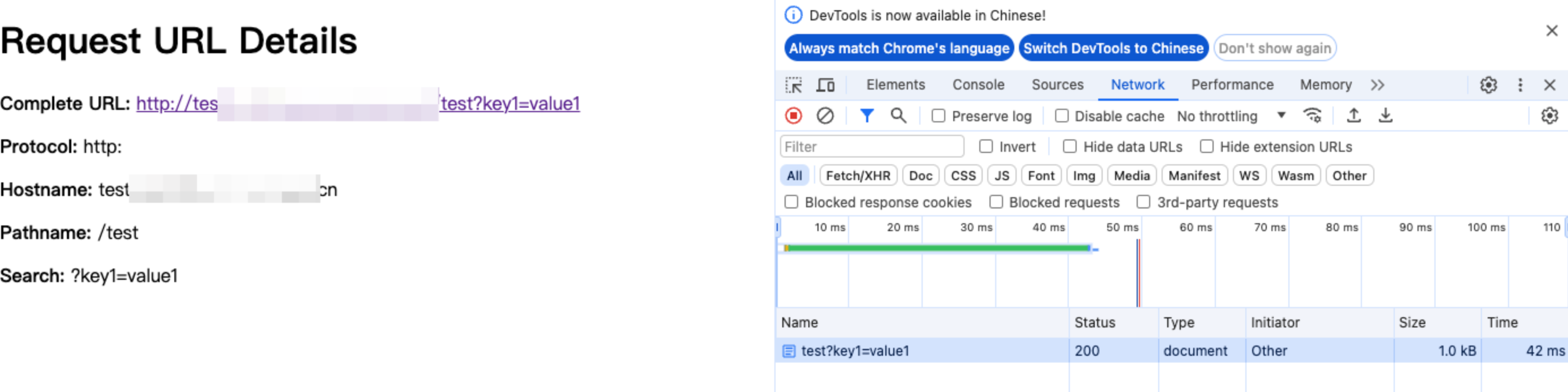
This example captures incoming HTTP requests and returns an HTML page displaying the detailed information about the request URL. It can be used for debugging and displaying the request parameters, paths, and sources.
Sample Code
// Add a fetch event listener, which is triggered when a request is incoming. It uses the handleRequest function to handle requests and return responses.addEventListener('fetch', event => {event.respondWith(handleRequest(event.request))})function handleRequest(request) {// Parse the request URL.const url = new URL(request.url)// Extract various components of the URL.const {href, // Full URLprotocol, // Protocol (e.g., http:)hostname, // Host name (e.g., example.com)port, // Port (if specified)pathname, // Path (e.g., /path)search, // Query string (e.g., ?query=123)hash // Fragment after the hash sign (e.g., #section)} = url// Construct the HTML response content.const htmlContent = `<!DOCTYPE html><html lang="en"><head><meta charset="UTF-8"><meta name="viewport" content="width=device-width, initial-scale=1.0"><title>Request URL Details</title></head><body><h1>Request URL Details</h1><p><strong>Complete URL:</strong> <a href="${href}">${href}</a></p><p><strong>Protocol:</strong> ${protocol}</p><p><strong>Hostname:</strong> ${hostname}</p>${port ? `<p><strong>Port:</strong> ${port}</p>` : ''}<p><strong>Pathname:</strong> ${pathname}</p><p><strong>Search:</strong> ${search}</p>${hash ? `<p><strong>Hash:</strong> ${hash}</p>` : ''}</body></html>`;// Return a response in HTML format.return new Response(htmlContent, {headers: {'Content-Type': 'text/html;charset=UTF-8'}})}
Sample Preview
In the address bar of the browser, enter a URL that matches a triggering rule of the edge function to preview the effect of the sample code.
Related References
피드백