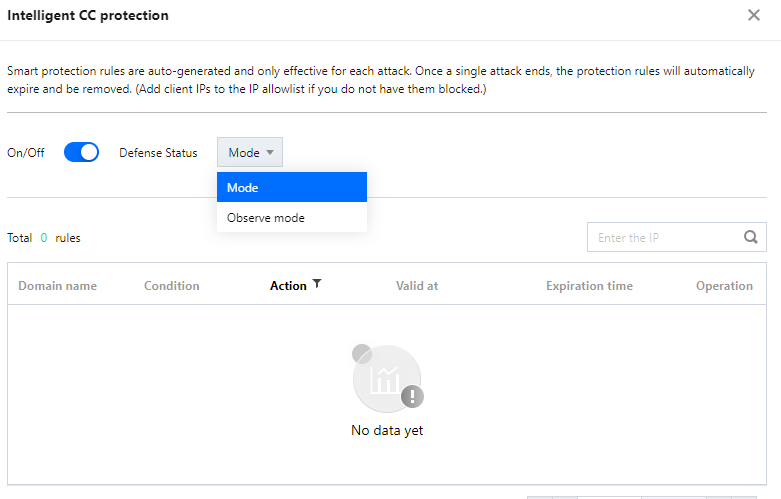
Intelligent CC protection is an AI-powered protection feature leveraging Tencent Cloud's big data capability. It provides a dynamic protection model to auto-generate rules for detecting and blocking malicious attacks based on website traffic patterns and algorithm-utilized attack analysis.
Directions
1. Log in to the new Anti-DDoS console, and click CC Protection on the left sidebar.
2. Select a domain name from the left list.
3. In the CC Protection and Cleansing Threshold section, click
to enable CC protection and set a cleansing threshold before enabling intelligent CC protection.
Note:
The cleansing threshold is a threshold for Anti-DDoS services to start cleansing traffic. If the number of HTTP requests sent to the specified domain name exceeds the threshold, CC protection will be triggered.
If the IP bound to the Anti-DDoS Pro instance is from WAF, you need to first enable CC protection for the IP in the WAF console. For more information, see CC Protection Rule Settings.
4. In the Intelligent CC Protection section, toggle on the
switch.
5. Click View to view the auto-generated protection rules. You can make changes to these rules if necessary.
Note:
When intelligent CC protection is enabled, the protection rules are auto-generated when an attack occurs.
Protect mode: Applies auto-generated protection rules to defend against each specific attack. After the attack ends, the rules are automatically deleted.
Observe mode: Rules are displayed but not activated.
6. To delete a rule, click Delete on the right of the rule you want to remove.