Account List
다운로드
포커스 모드
폰트 크기
This document introduces the fields and information related to the account management list.
Database account
After creating an SQL Server instance, you can create different database accounts under the instance and assign different accounts for database management according to business needs.
Viewing the Account List
1. Log in to the TencentDB for SQL Server console.
2. Find the target instance in the instance list, click Manage in the Operation column to enter the instance details page.
3. Click Account Management to go to the account management page, which opens on the Account List tab by default.

Tool Item
Tool | Description |
Search box | Filter in the search box. Fuzzy search by account name is supported to quickly find related accounts. |
Refreshing | Click the refresh button to refresh the list. |
Account List Fields
Field | Description |
Account Name | Display all account names that have been created under the instance. |
Account Type | Displays the types of accounts created under an instance. The account types supported for creation by different instance architectures are as follows: Two-node and multi-node Advanced privilege account: The instance admin account is granted owner permissions to all databases by default. Standard account: A non-admin account that can be granted read-write, read-only, or owner permissions for a specified database. Designated account: This special account can only access specified databases and is granted owner permissions for those databases. A designated account can be authorized for multiple databases, but a database can only be authorized to one designated account. Single-Node Instances (Formerly Basic Edition and Cloud Disk Edition) Admin account: The instance admin account, which has the highest sysadmin permissions and owner permissions for all databases. If you enable the admin account, the product will no longer guarantee the instance SLA. Advanced privilege account: The instance admin account is granted owner permissions to all databases by default. Standard account: A non-admin account that can be granted read-write, read-only, or owner permissions for a specified database. Designated account: This special account can only access specified databases and is granted owner permissions for those databases. A designated account can be authorized for multiple databases, but a database can only be authorized to one designated account. |
Status | Displays the status of the corresponding account. The status includes: Creating, Successful, Modifying, Resetting password, Disabled, Deleting. |
Creation Time | Display the account creation time, supporting sorting in ascending or descending order. |
Update Time | Display the time when account-related information was updated, supporting sorting in ascending or descending order. |
Last Successful Login Time | Displays the time when the corresponding account last logged in. Supports sorting in ascending and descending order. |
Password Update Time | Display the time when the account password was last reset, supporting sorting in ascending or descending order. |
Remarks | Display the remarks for the corresponding account. |
Operation | Removing the administrator: Privileged accounts and admin accounts are administrator accounts. If you need to delete an account, you should remove the administrator first. Setting database permissions: Read-write, read-only, or owner permissions of a specified database can be set for standard accounts and designated accounts. Reset password: Reset the password for an account. Delete account: Delete the corresponding account. Setting table permissions: Table-level permissions can be set for standard accounts and privileged accounts Disable account: Disable the account. The account cannot log in to the database while disabled. Enable account: Manually remove the disabled status from a disabled account. Enable CAM verification: Set CAM verification for the account. Login history: View the login details of an account. |
Note:
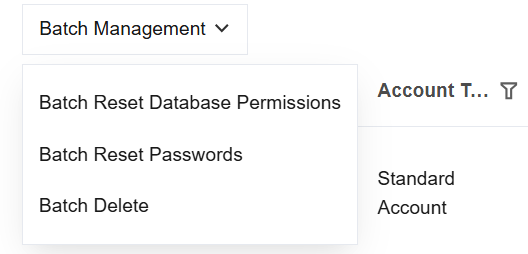
You can select multiple accounts and click Batch Management above the account list to reset database permissions, reset passwords, and delete accounts in batches.
Viewing Login Statistics
1. Log in to the TencentDB for SQL Server console.
2. Find the target instance in the instance list, click Manage in the Operation column to enter the instance details page.
3. Click Account Management > Login Statistics.

Tool Item
Tool | Description |
Filter by time | Supports filtering by the last 1 day, last 3 days, last 7 days, or a custom time range. |
Search box | Filter in the search box. Fuzzy search by account name is supported to quickly find related accounts. |
Refresh | Click the refresh button to refresh the list. |
Note:
On the Login Statistics page, after selecting a filter time range, you can display only the account details list for successful logins, failed logins, or logouts within the specified time range. Click the corresponding button to display only the relevant records.

Login Statistics List Fields
Field | Description |
Account Name | Database account name used for logging in to TencentDB for SQL Server. Supports sorting in ascending and descending order. |
Log-in successful | Number of successful logins by the account within the selected time range. Supports sorting in ascending and descending order. |
Login failed | Number of failed logins by the account within the selected time range. Supports sorting in ascending and descending order. |
Logout | Number of times the account actively logged out or the session ended within the selected time range. Supports sorting in ascending and descending order. |
Login failure rate | Ratio of login failures to total login attempts (login successes + login failures), reflecting the health of account logins. A value of 0% indicates that all logins were successful. Supports sorting in ascending and descending order. |
Login IP statistics | Number of distinct IP addresses used by the account for successful logins within the statistical period, which can be used to identify abnormal logins from multiple locations. Supports sorting in ascending and descending order. |
Last successful login time | Specific timestamp of the account's last successful login (for example, 2026-10-28 14:25:37.387). If the account has never logged in successfully, -- is displayed. |
Operation | View details: To view the login details of an account, click View Details in the row. |
Viewing Login Details (Login History)
1. Log in to the TencentDB for SQL Server console.
2. Find the target instance in the instance list, click Manage in the Operation column to enter the instance details page.
3. Click Account Management > Login Details.

Note:
On the Account List page, find the target account and click More > Login history in the Operation column to quickly go to the login history of the account.
On the Login statistics page, find the target account and click View details in the operation column to quickly go to the login history of the account.
Tool Item
Tool | Description |
Filter by time | Supports filtering by the last 1 day, last 3 days, last 7 days, or a custom time range. |
Search box | Filter in the search box. Fuzzy search by account name is supported to quickly find related accounts. |
Refresh | Click the refresh button to refresh the list. |
Login Details List Fields
Field | Description |
Account Name | Specific database account used for "login success/login failure/logout" events. |
Event Type | Login events of database accounts: Log-in success, login failed, and Logout. Filtering is supported. |
Event Time | Specific timestamp of the login event (accurate to milliseconds, for example, 2026-10-30 17:43:39.203). Events can be sorted by this column in descending/ascending order. The console displays time in Beijing time. |
Process ID | Process ID used by the server to handle this login connection. Login and logout records of the same session usually share the same process ID, facilitating correlation of the same connection. |
Client IP Address | Source IP address of the client that initiates the login request, used to identify the login source and troubleshoot abnormal remote logins. |
Client hostname | Hostname of the client machine that initiates the connection. If the system fails to resolve it or the client does not report it, - is displayed. |
Client Application Name | Name of the client program or driver that initiates the login (for example, Microsoft SQL Server Management Studio - Transact-SQL IntelliSense), used to determine the access method (management tool, application, driver, and so on). |
Execution Result | Final status of the event, displayed together with "Event Type" to show the result of this connection. |
Related Operations
Related APIs
API | Description |
This API is used to create an instance account. | |
This API is used to list instance accounts. | |
The ModifyAccountPrivilege API is used to modify instance account permissions. | |
The ModifyAccountRemark API is used to modify account remarks. | |
The ResetAccountPassword API is used to reset the password of an instance account. | |
This API is used to delete an instance account. | |
The DescribeDatabaseNames API is used to query the names of databases associated with an account. | |
This API is used to query the databases and permissions associated with an account. |
피드백