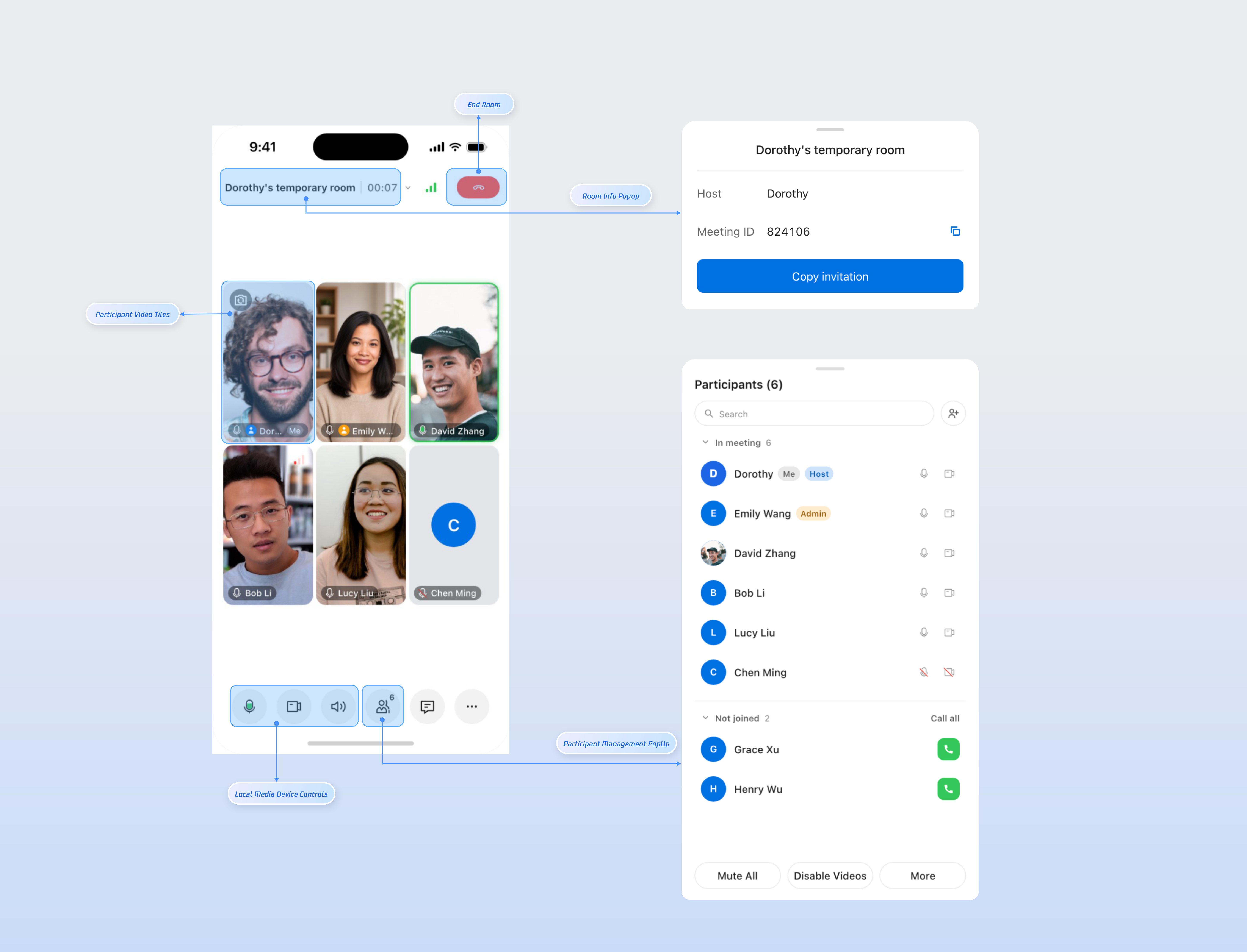
TUIRoomKit is a comprehensive multi-party audio and video conferencing solution built on TRTC. It provides a complete set of UI components along with all the core functionality you need to get up and running quickly.
This documentation walks you through integrating TUIRoomKit into your project to enable reliable multi-party audio/video conferencing. You'll also find step-by-step guides for customizing image assets, localizing UI text, and configuring other options—everything you need to build audio/video experiences that align with your brand.
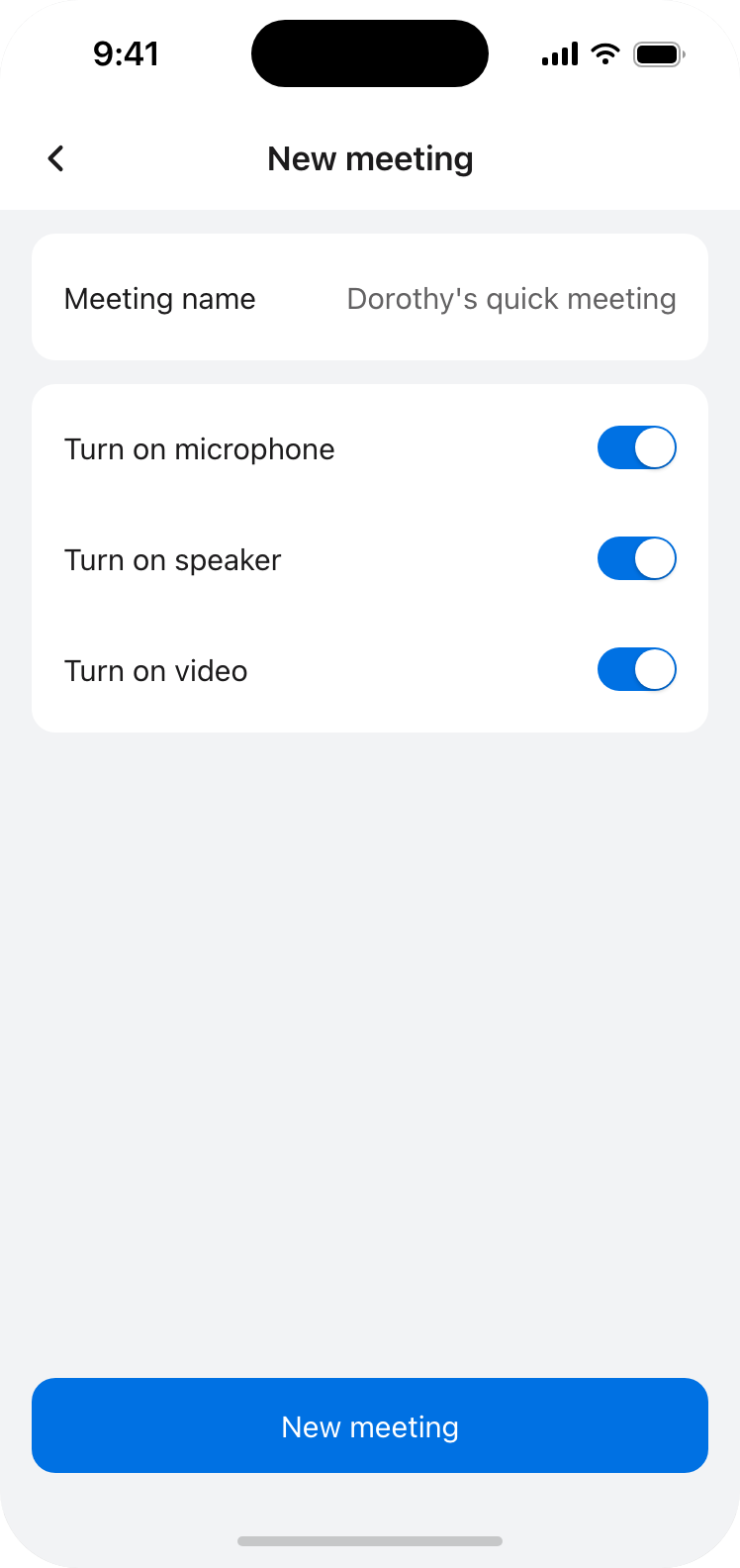
Room Preparation Page
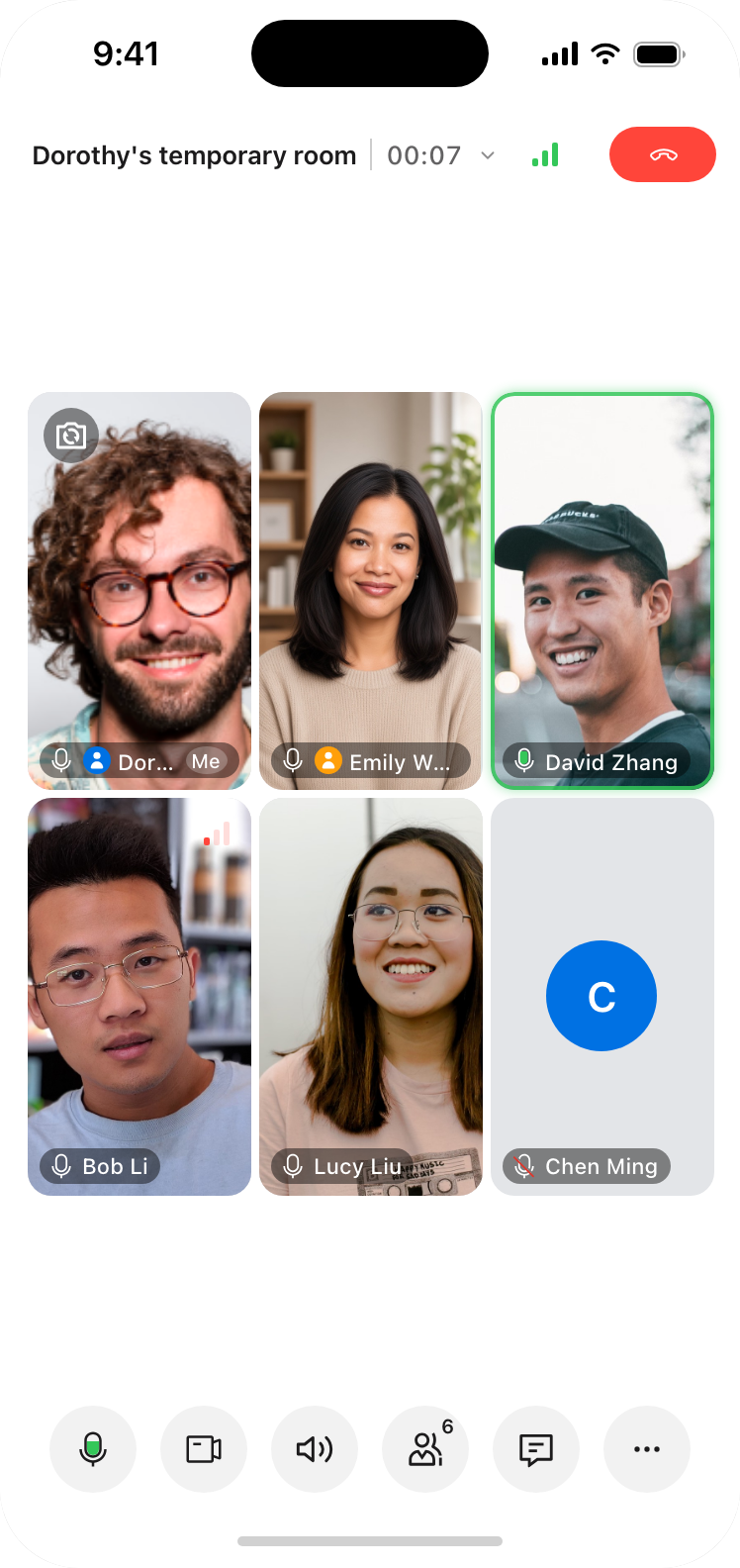
Room Main Page
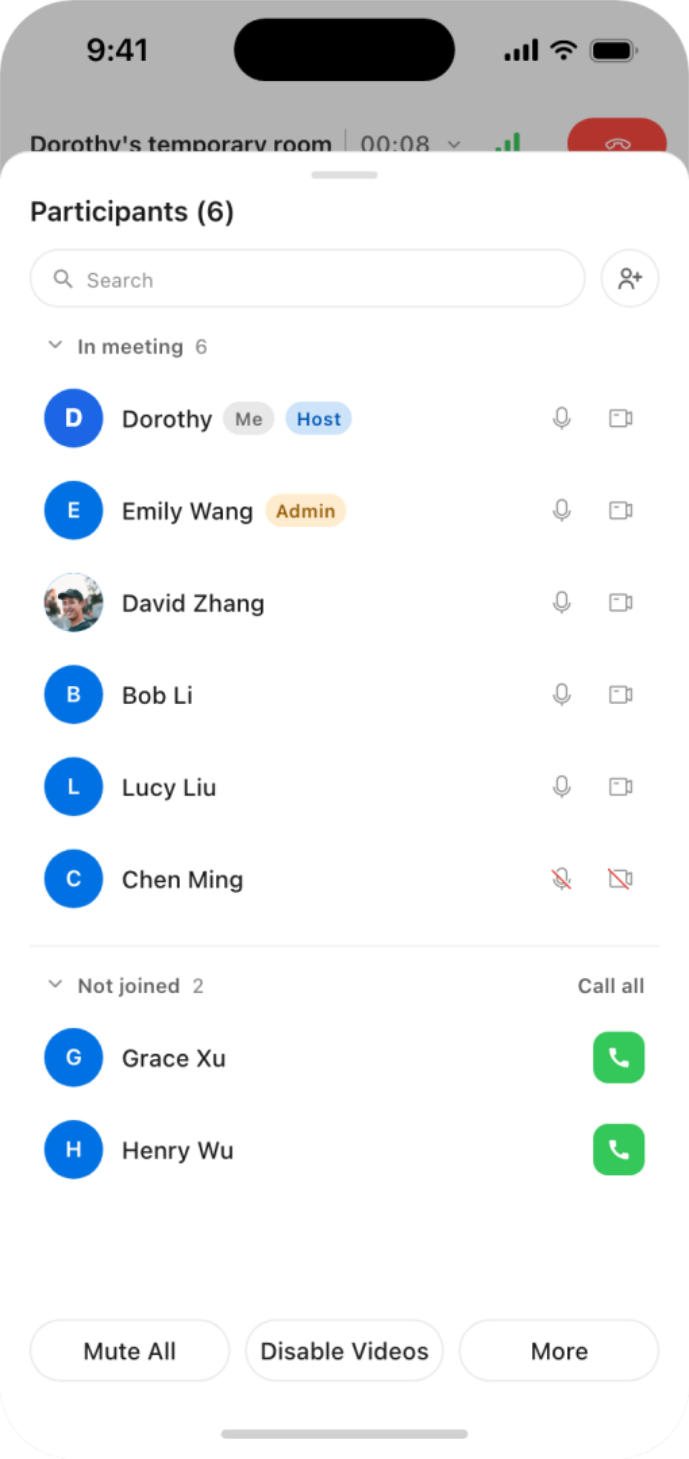
Member Management
Prerequisites
Activate the Service
To activate TUIRoomKit and obtain your trial version, follow the instructions at Activate the Service. You will need your SDKAppID and SDKSecretKey:
SDKAppID: Required application identifier. Tencent Cloud uses SDKAppID for billing and analytics.
SDKSecretKey: Application secret key for initializing configuration file secret information.
2. In Choose Package Options ,select the desired released version. See Apple Official Documentation for version selection rules.
3. Add TUIRoomKit to your App Target. If you use the sample code in this guide, also add the resolved dependencies AtomicXCore and SnapKit to your Target's Frameworks, Libraries, and Embedded Content. No need to add the repository again.
1. Run the following command in your terminal to install CocoaPods. Skip this step if CocoaPods is already installed.
sudo gem install cocoapods
2. In your project root directory, run pod init to create a Podfile. Edit and save it as follows:
platform :ios,'14.0'
# Change 'App' to your project's name
target 'App'do
pod 'AtomicXCore',:podspec=>'https://sdk-liteav-1252463788.cos.ap-hongkong.myqcloud.com/app/tuikit/download/latest/AtomicXCore.podspec'
# Official default version address
pod 'TUIRoomKit',:podspec=>'https://sdk-liteav-1252463788.cos.ap-hongkong.myqcloud.com/app/tuikit/download/latest/TUIRoomKit.podspec'
end
3. Run the following command in your terminal to install the SDK.
pod install
Note:
Be sure to include the external podspec for AtomicXCore; other dependencies are resolved automatically by CocoaPods. After installation, open the .xcworkspace project. The two default version addresses updatndependently. For production, use the paired versioned addresses as described in the FAQs.
Choose only one integration method to avoid duplicate SDK imports. Available SwiftPM versions are listed at RoomKit_SwiftPM Tags. API examples in this guide are based on your selected version.
Step 2: Configure the Project
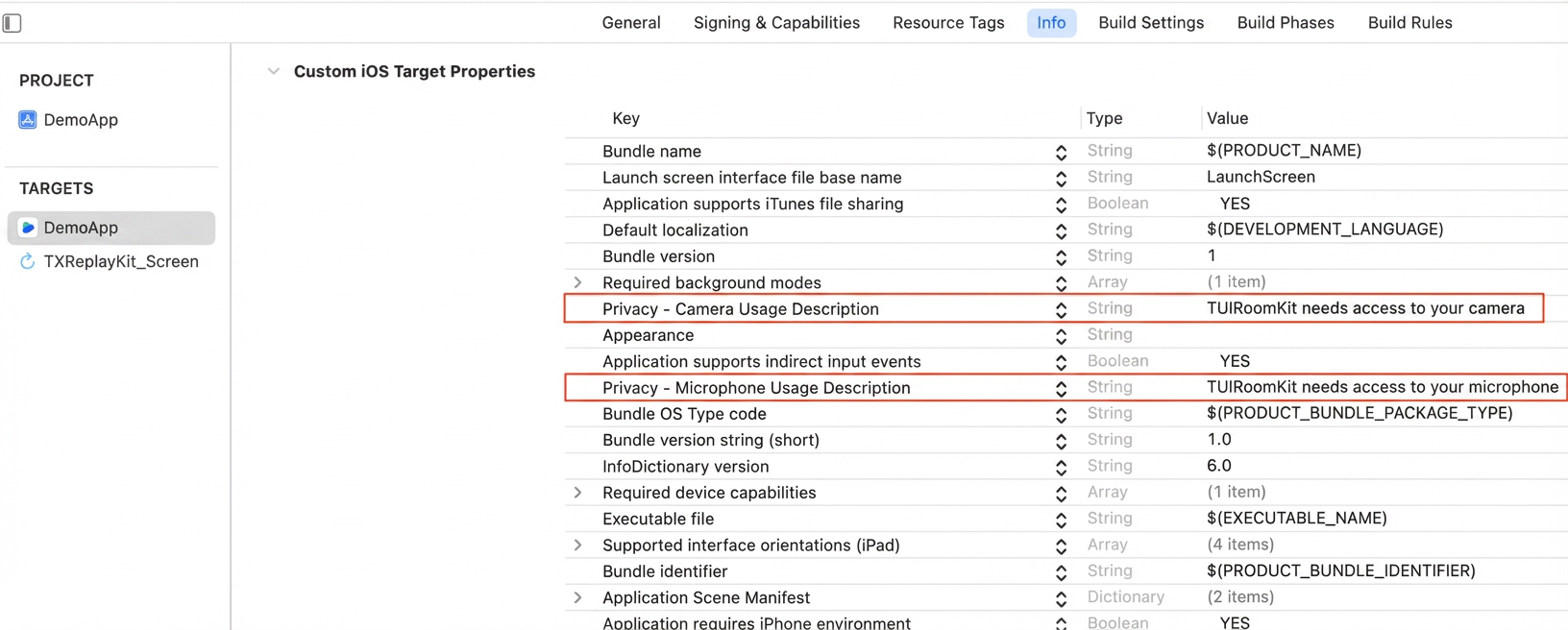
To enable audio/video features, your app must request microphone and camera permissions. Add the following keys and usage descriptions to your Info.plist file. These descriptions will be displayed when the system prompts users for permission:
<key>NSCameraUsageDescription</key>
<string>TUIRoomKit requires access to your camera</string>
<key>NSMicrophoneUsageDescription</key>
<string>TUIRoomKit requires access to your microphone</string>
Step 3: Log In
After integrating the code, complete the login process. This step is required to use TUIRoomKit. You must log in successfully before accessing any features. Verify that all parameters are correctly configured:
Note:
In the sample code, login is handled in the didFinishLaunchingWithOptions method. In real-world projects, call the AtomicXCore login service only after your own user authentication and login procedures have completed. This prevents business logic conflicts and ensures seamless integration with your user management and permission systems.
Unique user identifier. Use only English letters, numbers, hyphens, and underscores. Avoid using simple IDs like 1 or 123 to prevent multi-device login conflicts.
userSig
String
Authentication ticket for Tencent Cloud.
For development: Use GenerateTestUserSig.genTestSig or the UserSig Assistant Tool for a temporary UserSig.
Callback for the result of setting user info. Returns error code and message if failed.
Step 5: Create a Room
MeetingView is the primary interface in TUIRoomKit for multi-party audio/video conferencing. The following example shows how to integrate MeetingView as a room owner.
Implementation
1.
Conform to the Routing Navigation Protocol: TUIRoomKit uses the RouterContext protocol to manage page navigation. The host view controller must implement this protocol to handle internal navigation actions such as ending a room or returning to a previous page.
2. Lazy Load the View: Instantiate MeetingView lazily in your controller and set its routerContext property so it can invoke navigation methods via the protocol.
3.
Configure Room Entry Settings: Specify whether to automatically enable audio/video devices on entering the room.
4. Initialize the Room Main Page: Initialize MeetingView as a room owner.
5. Add the View to Your Controller: In viewDidLoad, add MeetingView to your view hierarchy and use constraints to fill the controller's view.
Note:
TUIRoomKit's internal navigation is based on standard UINavigationController methods (push/pop). Ensure your view controller is either the root controller of a UINavigationController or part of its stack. If not, SDK navigation will fail due to the absence of a valid navigation context, resulting in page switching issues.
Sample Code
importUIKit
importTUIRoomKit
importSnapKit
importAtomicXCore
// YourMainViewController loads the room main page
// 1. YourMainViewController must conform to RouterContext in TUIRoomKit
Once you've integrated MeetingView, your application will offer a full-featured multi-party audio/video conference interface, including member management, device controls, room information display, and more. This is the central functionality of TUIRoomKit.
Customize UI
Note:
Do not modify dependency caches directly, as changes may be overwritten when dependencies are re-downloaded. For SwiftPM customization, clone or fork RoomKit_SwiftPM and use a local package. For CocoaPods customization, use the component source directory containing TUIRoomKit.podspec and import via :path. The SwiftPM wrapper repository cannot be used directly as a CocoaPods local dependency.
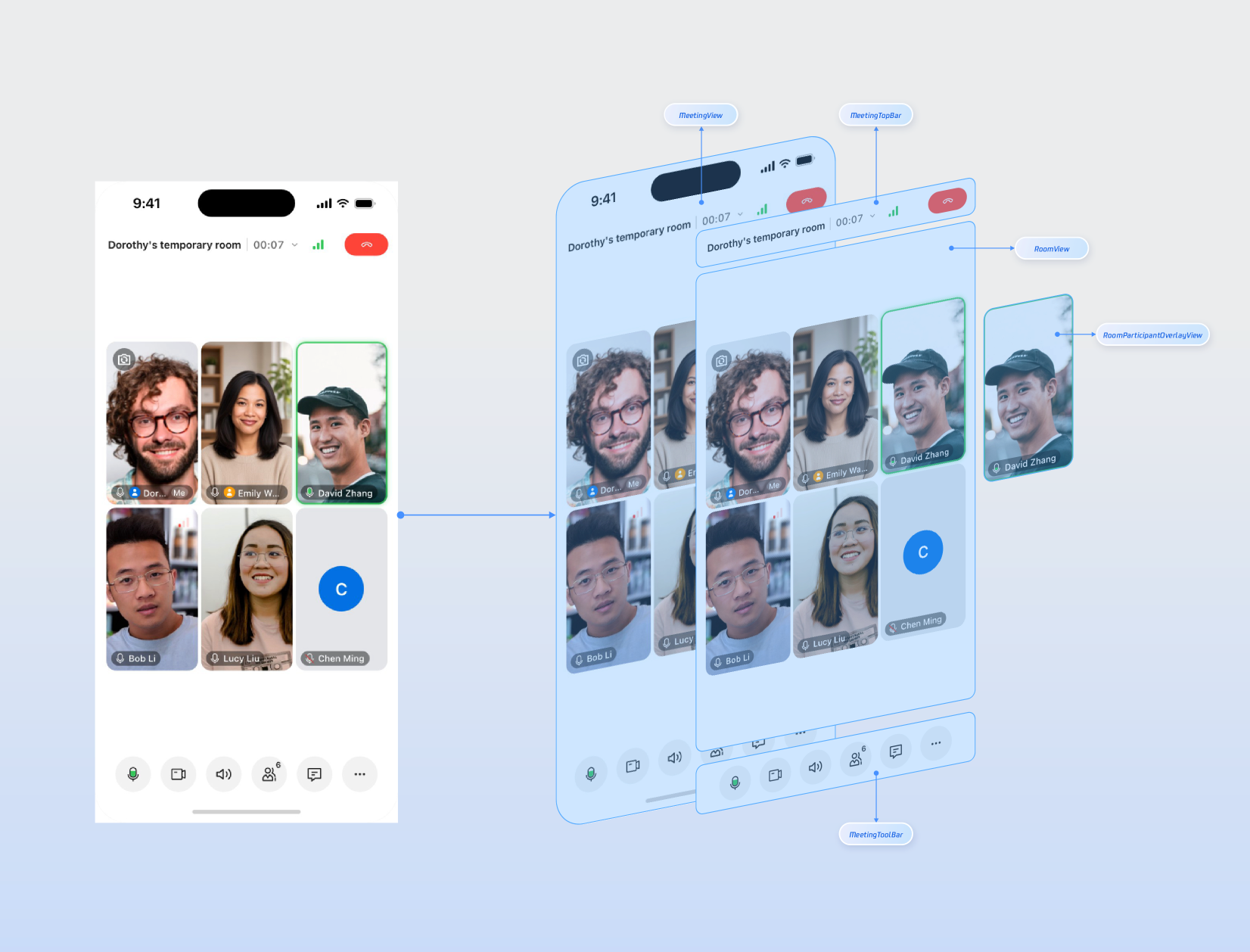
The MeetingView main page is highly customizable. You can modify the UI to fit your product requirements and interaction scenarios. The following overview details the view components within MeetingView to help you make quick adjustments.
Bottom toolbar for microphone, camera, and member management.
Rearrange buttons, modify styles (color, size), add business features (screen sharing, in-meeting call, beauty filter).
Customize Icons
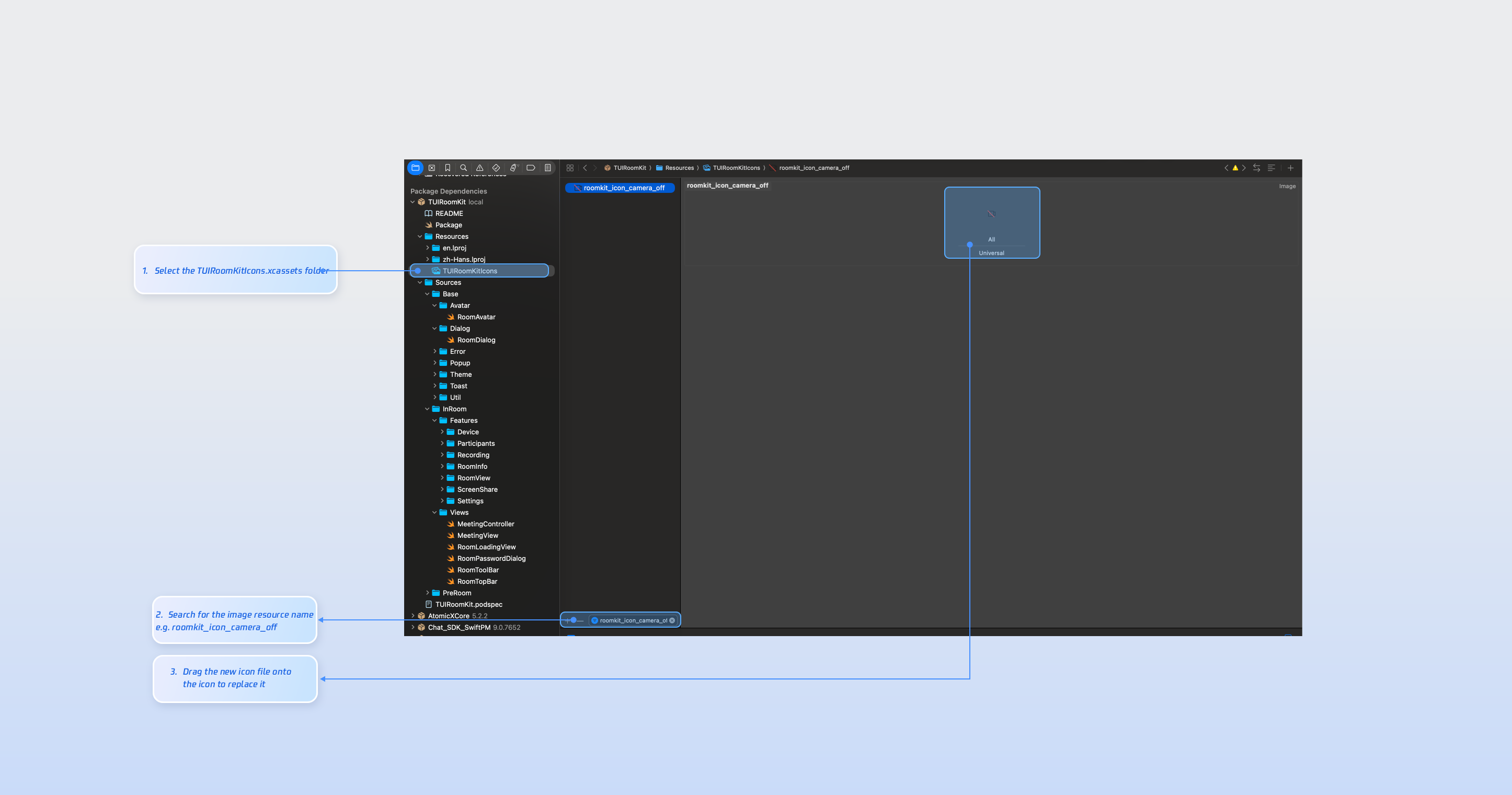
After integrating TUIRoomKit, you can directly replace icon assets in the component to better match your UI and business needs.
TUIRoomKit manages UI image resources in TUIRoomKitIcons.xcassets. Use Xcode's graphical tools to quickly modify custom icons.
Common Icon Files
Icon
Filename
Description
roomkit_icon_camera_off.svg
Camera off icon.
roomkit_icon_camera.svg
Camera on icon.
roomkit_icon_microphone_off.svg
Microphone off icon.
roomkit_icon_microphone.svg
Microphone on icon.
roomkit_icon_screen_share.svg
Room owner badge icon.
Customize Texts
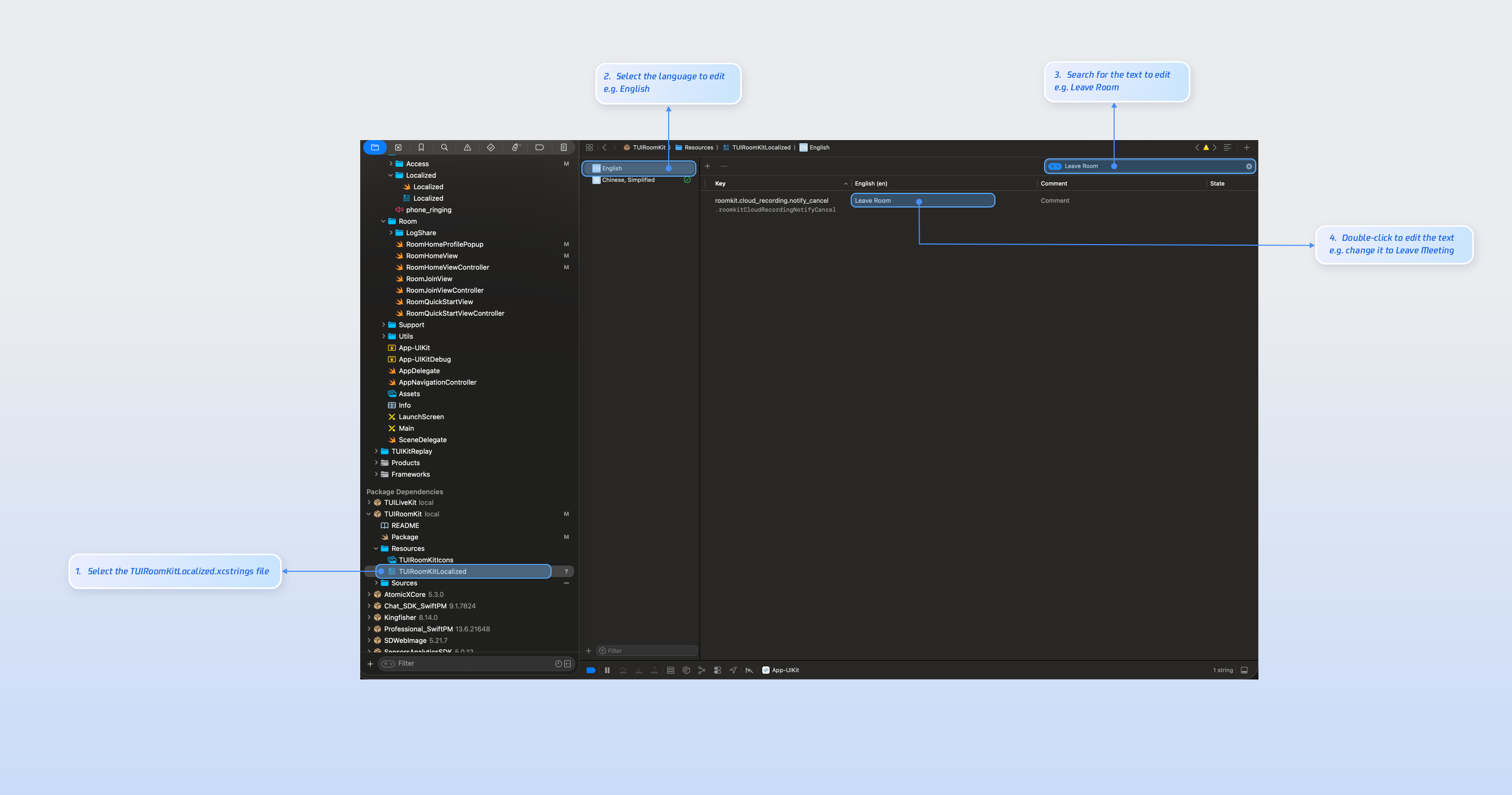
TUIRoomKit uses the Apple Strings Catalog tool to manage UI text. You can easily adjust text using Xcode's visual tools.
Note:
The Apple Strings Catalog (.xcstrings) format, introduced in Xcode 15, streamlines localization management. It supports structured formats for plurals, device-specific variants, and more, and is now the recommended localization approach for iOS and macOS apps.
FAQs
How to lock a version?
SwiftPM: In Xcode's Package Dependencies, select the released version and use Exact Version to lock the version.
External Pods: Replace the two default addresses with paired versioned podspec addresses. ROOM_VERSION and CORE_VERSION are component versions; ROOM_MAJOR_MINOR and CORE_MAJOR_MINOR are the first two segments of each version number. Replace accordingly; do not assume both components share the same version number.
pod 'AtomicXCore', :podspec =>'https://sdk-liteav-1252463788.cos.ap-hongkong.myqcloud.com/app/tuikit/download/release/CORE_MAJOR_MINOR/AtomicXCore_CORE_VERSION.podspec'
pod 'TUIRoomKit', :podspec =>'https://sdk-liteav-1252463788.cos.ap-hongkong.myqcloud.com/app/tuikit/download/release/ROOM_MAJOR_MINOR/TUIRoomKit_ROOM_VERSION.podspec'
How to upgrade External Pods?
Open the two default addresses to check each s.version for the default version. Before upgrading, confirm compatibility between the two components. When specifying a version, update to the paired podspec address, then run:
pod update TUIRoomKit AtomicXCore
pod install typically retains the version in Podfile.lock and does not upgrade proactively. Submit the updated Podfile.lock; do not delete the entire lock file to upgrade the SDK.
What if integration or compilation fails?
SwiftPM resolution failure: Check your network, run Resolve Package Versions in File > Packages. If it still fails, try Reset Package Caches.
requires Swift tools version 6.0: Use Xcode 16 or higher.
No such module: For SwiftPM, ensure your App Target includes TUIRoomKit, AtomicXCore, SnapKit. For CocoaPods, confirm both podspecs are added and open the project via .xcworkspace.
AtomicXCore missing API: Check if the selected version is compatible with TUIRoomKit. If needed, use the paired versioned address.
Do I need to call login every time I enter a room?
No. Typically, you only need to call LoginStore.shared.login once. It's best to tie login and logout to your own authentication logic.
How to update Package.swift for SwiftPM projects?
The following is a configuration snippet, not a complete manifest. Replace ROOM_VERSION with the released version, and add to your package's dependencies:
package: uses the package identity RoomKit_SwiftPM, not the module name TUIRoomKit. If your business code directly imports AtomicXCore or SnapKit, declare their repository dependencies in your package manifest and add their product names to the target. Version requirements should match the Package.swift under your selected RoomKit_SwiftPM tag.
Contact Us
If you have any questions or suggestions during integration or use, contact info_rtc@tencent.com for support.