This document describes how to quickly implement basic audio and video calls using the TRTC Flutter SDK (tencent_rtc_sdk).
Supported Platforms
Platform
Android
iOS
Windows
macOS
Supported
Prerequisites
Activate the Service
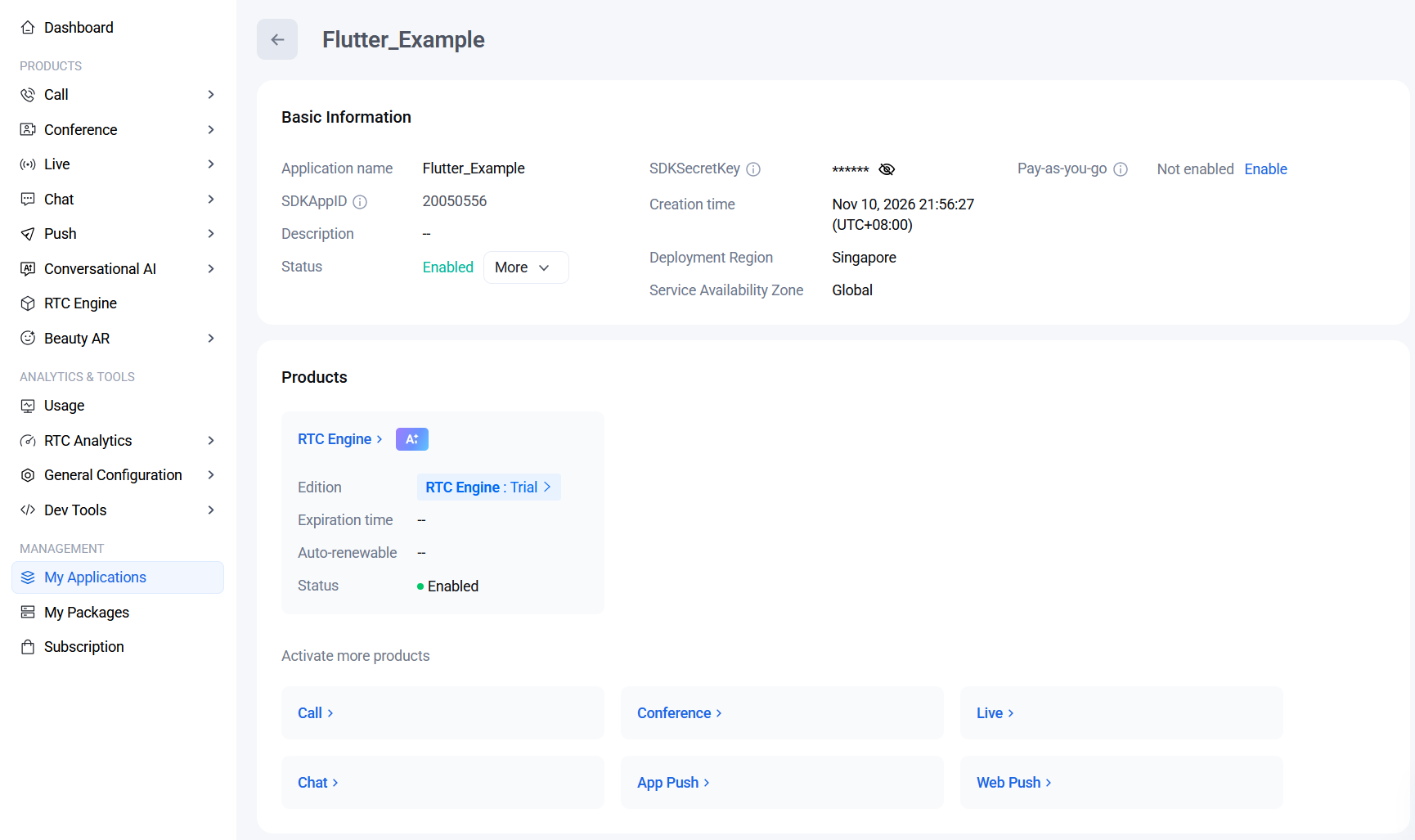
1. Log in to the TRTC Console and click Create Application. If you have already created an application, you can skip this step.
2. After the application is created, you can obtain your SDKAppID and SDKSecretKey in Application Management.
SDKAppID: The unique identifier of the TRTC application created in the console.
SDKSecretKey: Used to calculate UserSig (the authentication credential for a user to enter an audio/video room).
Obtain UserSig
Debugging stage: You can enter a userId in the UserSig generation tool under Auxiliary Tools in the console to generate a temporary UserSig. You can also calculate it locally by referring to User Authentication.
Production environment: UserSig must be calculated by your business server and delivered to the client.
Note:
Do not write the SDK secret key into client code or package it into your app. Otherwise, the key may be stolen through decompilation, and your traffic may be misused.
Environment Requirements
Flutter 3.22 or later.
Android development:
The latest stable version of Android Studio.
The app requires devices running Android 5.0 (API level 21) or later.
iOS development:
Xcode 15 or later. The app requires devices running iOS 12.0 or later.
Make sure a valid developer signature is configured for your project.
Windows development:
Visual Studio 2022 or later, with the "Desktop development with C++" workload selected.
macOS development:
Xcode 15 or later. The app requires macOS 10.14 or later.
Step 1: Import the SDK
Option 1: Add via command line (recommended)
Option 2: Add manually
1. Install the tencent_rtc_sdkcomponent using the following command:
flutter pub add tencent_rtc_sdk
2. To request microphone and camera runtime permissions on Android / HarmonyOS, add the permission_handler dependency:
flutter pub add permission_handler
1. Open the pubspec.yaml file and add the tencent_rtc_sdk (to find the latest version, see https://pub.dev/packages/tencent_rtc_sdk) and permission_handler dependencies:
dependencies:
# TRTC Flutter SDK dependency. Replace it with the latest version on pub.dev
tencent_rtc_sdk: ^<latest version>
# Permission handling plugin dependency
permission_handler: ^11.0.0
2. After adding the dependencies and saving the file, open a terminal and run the following command in the root directory of your Flutter project (the directory that contains pubspec.yaml):
flutter pub get
Step 2: Configure the Project
iOS
Android
macOS
Windows
Add microphone and camera permission descriptions
1. Add the camera and microphone permission descriptions under the top-level <dict> in ios/Runner/Info.plist. When the SDK accesses the camera and microphone for the first time, the system automatically displays an authorization dialog:
<key>NSCameraUsageDescription</key>
<string>Camera permission is required for video calls</string>
<key>NSMicrophoneUsageDescription</key>
<string>Microphone permission is required for voice calls</string>
2. (Optional) If you also want to use permission_handler to request permissions proactively on iOS, you need to enable the corresponding permission compilation macros. Otherwise, Permission.camera.request() returns "denied" directly without showing the system authorization dialog. Merge the following content into the existingpost_install in ios/Podfile, and do not declare post_install again:
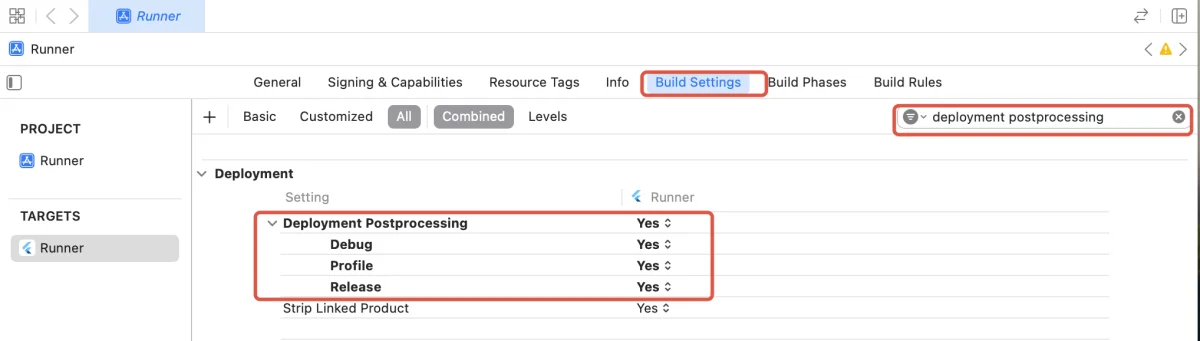
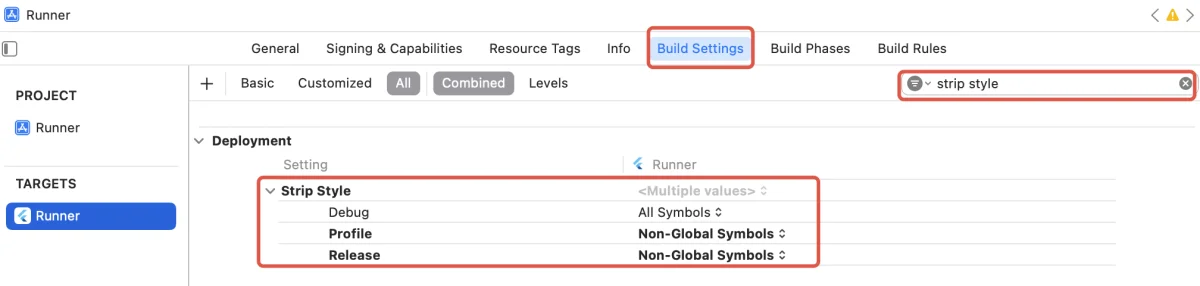
The SDK looks up TRTC C symbols by name at runtime through Dart FFI. By default, Xcode strips these global symbols when building a Release package, which causes a symbol not found error at runtime in Release while Debug works normally. In Xcode, choose Runner > TARGETS > Runner > Build Settings, and change the following two settings under the Release configuration:
In the project's Build Settings, find Deployment Postprocessing and set it to Yes.
In the project's Build Settings, find Strip Style and set its Release value to Non-Global Symbols.
Add microphone and camera permission requests
1. Open the android/app/src/main/AndroidManifest.xml file.
If multiple dependencies in your project contain libliteavsdk.so, a duplicate .so error occurs at build time. Add the following to android/app/build.gradle (or build.gradle.kts):
// build.gradle (Groovy)
android {
packagingOptions {
pickFirst 'lib/**/libliteavsdk.so'
}
}
// build.gradle.kts (Kotlin DSL)
android {
packaging {
jniLibs {
pickFirsts += "lib/**/libliteavsdk.so"
}
}
}
Obfuscation configuration
If obfuscation is enabled for the release package (minifyEnabled true), add the following rule to android/app/proguard-rules.pro, and make sure proguardFiles in buildTypes.release references this file:
-keep class com.tencent.** { *; }
Add microphone and camera permission descriptions
Add the camera and microphone permission descriptions under the top-level <dict> in macos/Runner/Info.plist:
<key>NSCameraUsageDescription</key>
<string>Camera permission is required for video calls</string>
<key>NSMicrophoneUsageDescription</key>
<string>Microphone permission is required for voice calls</string>
Configure sandbox permissions (required)
Flutter macOS projects have App Sandbox enabled by default. Add the following content to bothmacos/Runner/DebugProfile.entitlements and macos/Runner/Release.entitlements. Otherwise, the app cannot access the camera, microphone, and network:
<key>com.apple.security.device.camera</key>
<true/>
<key>com.apple.security.device.audio-input</key>
<true/>
<key>com.apple.security.network.client</key>
<true/>
Add the system dependency library for screen sharing (optional; required only when using screen sharing; requires macOS 12.3 or later)
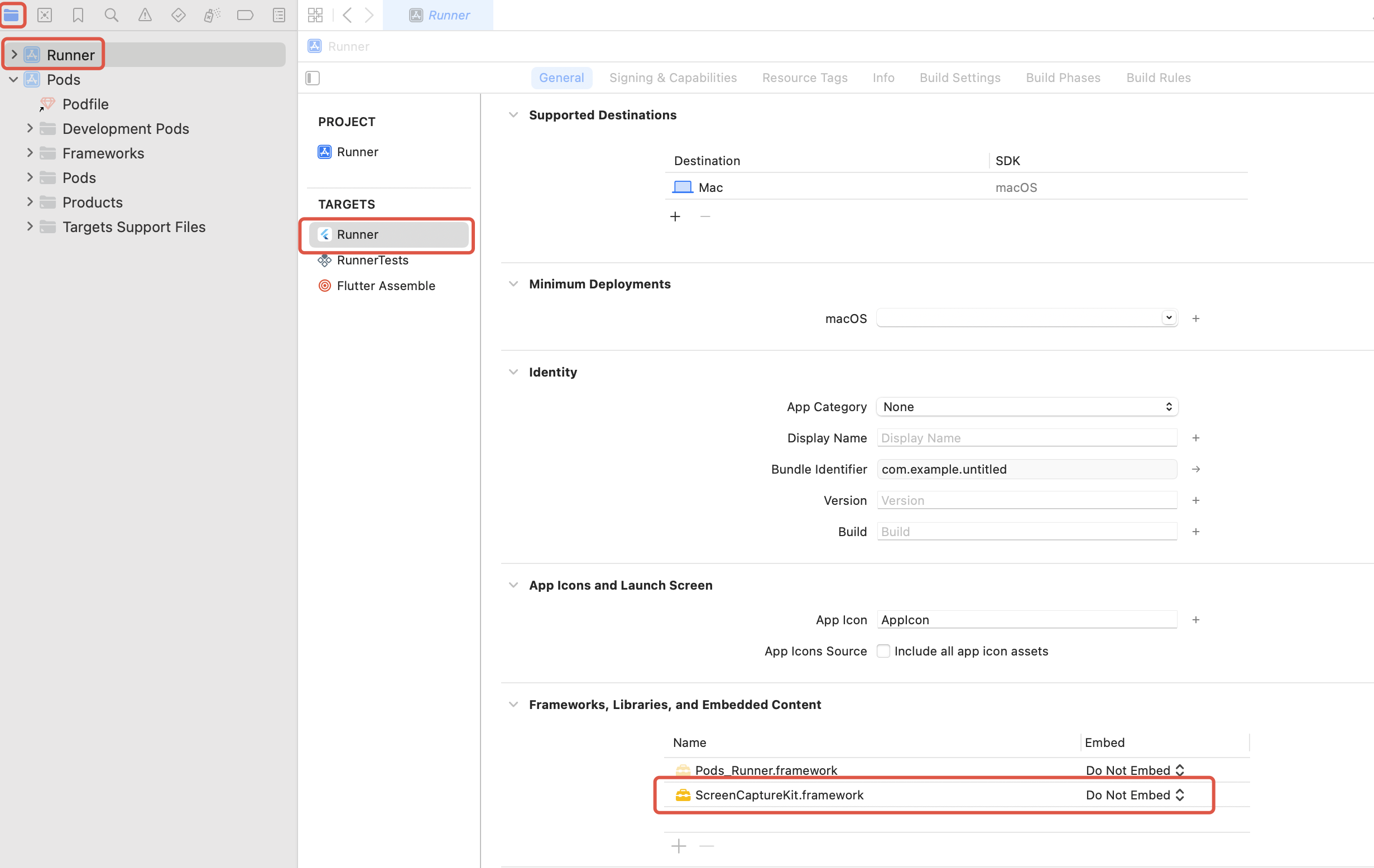
1. After opening the .xcworkspace project file, click Project Navigator on the left side of the Xcode navigation bar, click Runner, and make sure the correct TARGETS is selected in the editor area.
2. On the General tab, add ScreenCaptureKit.framework to the Frameworks, Libraries, and Embedded Content section.
No additional configuration is required.
Step 3: Create a TRTC Instance and Register Event Listeners
1. Import the required files and declare member variables:
2. In an asynchronous method (for example, an initialization method called from initState), create the TRTC instance and register event listeners. We recommend registering all required callbacks at once before entering the room:
Future<void> initTRTC() async {
// Create the TRTC instance (singleton)
trtcCloud = await TRTCCloud.sharedInstance();
// Create a TRTCCloudListener instance and implement the required callbacks
listener = TRTCCloudListener(
// Unrecoverable SDK errors, such as room entry failure or device open failure
onError: (errCode, errMsg) {
debugPrint('onError: $errCode, $errMsg');
},
// Room entry result: result > 0 means success (the value is the time taken, in ms); result < 0 is an error code
onEnterRoom: (result) {
debugPrint(result > 0 ? 'Entered room successfully' : 'Failed to enter room: $result');
},
// A remote user turns video on / off. See Step 7 for details
onUserVideoAvailable: (userId, available) {
onRemoteVideoChanged(userId, available);
},
// Room exit completed. See Step 9 for details
onExitRoom: (reason) {
releaseTRTC();
},
);
// Register the listener and bind it to the trtcCloud instance
trtcCloud.registerListener(listener);
}
Step 4: Enter a Room
1. On Android and HarmonyOS devices, you must request the CAMERA and MICROPHONE permissions before entering a room. On iOS and macOS, the system automatically displays an authorization dialog when the SDK accesses the devices for the first time.
The third-party package permission_handler is used here to request permissions.
2. Obtain the SDKAppID of your application from the TRTC Console, and obtain the UserSig by referring to User Authentication.
3. After setting the room entry parameters in TRTCParams, call enterRoom to enter the room.
Parameter
Type
Description
sdkAppId
int
The SDKAppID of the application you created in the TRTC Console.
userId
String
The user ID you specify. It must be unique within the same room.
userSig
String
The user signature corresponding to userId. For details, see UserSig.
strRoomId / roomId
String / int
The room ID. Specify one of the two. If both are specified, roomId takes precedence. The value range of roomId is 1 to 4294967294. strRoomId can be up to 64 bytes long and supports only the following characters: uppercase and lowercase letters (a-z, A-Z), digits (0-9), spaces, and !#$%&()+-:;<=.>?@[]^_{}|~,. Including other characters, such as Chinese characters, causes room entry to fail.
scene
TRTCAppScene
The application scenario, which is the second parameter of enterRoom. For audio/video calls, use videoCall / audioCall. For interactive live streaming, use live / voiceChatRoom, and specify the anchor or audience role through TRTCParams.role.
trtcCloud.enterRoom(
TRTCParams(
sdkAppId: sdkAppId, // Replace with your SDKAppID
userId: userId, // Replace with your userId
userSig: userSig, // Replace with the UserSig corresponding to this userId
strRoomId: roomId, // Replace with your room ID
),
TRTCAppScene.videoCall,
);
Note:
For multiple clients to communicate with each other, they must use the same sdkAppId, the same room ID, and different userId values (using the same userId on multiple devices to enter the same audio/video room at the same time is not supported).
Under the same sdkAppId, use either numeric room IDs or string room IDs consistently, and do not mix them: the number 123 and the string "123" are two different rooms.
enterRoom must be paired with exitRoom.
Step 5: Turn On the Camera
1. Add the local video rendering widget TRTCCloudVideoView to the build method of your page. After obtaining the viewId in the onViewCreated callback, call startLocalPreview to start the camera preview:
// true: front camera; false: rear camera (choose one; mobile only)
trtcCloud.startLocalPreview(true, viewId);
},
),
Note:
viewId is the unique identifier of the video rendering widget TRTCCloudVideoView. It is available only after the onViewCreated callback, so startLocalPreview must be called in (or after) this callback.
Build TRTCCloudVideoView only after TRTCCloud.sharedInstance() completes. The SDK determines the rendering method when the instance is created (macOS / Windows use texture rendering), so a widget created too early may fail to display video correctly.
2. (Optional) Before calling startLocalPreview to start the camera preview, you can call setLocalRenderParams to set the rendering parameters of the local preview:
Parameter
Parameter Description
Value
Value Description
rotation
The clockwise rotation angle of the image. Rotation angles of 90, 180, and 270 degrees are supported. Default value: TRTCVideoRotation.rotation0.
TRTCVideoRotation.rotation0
No rotation.
TRTCVideoRotation.rotation90
Rotate 90 degrees clockwise.
TRTCVideoRotation.rotation180
Rotate 180 degrees clockwise.
TRTCVideoRotation.rotation270
Rotate 270 degrees clockwise.
fillMode
The image fill mode: fill (the image may be stretched and cropped) or fit (the image may have black bars). Default value: TRTCVideoFillMode.fill.
TRTCVideoFillMode.fill
Fill mode: the image is centered and scaled proportionally to fill the entire display area. Any part beyond the display area is cropped, so the image may be incomplete in this mode.
TRTCVideoFillMode.fit
Fit mode: the image is scaled according to its longer side to fit the display area, and the shorter side is filled with black. The image is complete in this mode but may have black bars.
TRTCVideoFillMode.scaleFill
Scale-fill mode: regardless of the aspect ratio, the image is stretched or compressed to completely fill the display area. The aspect ratio may change in this mode, causing the rendered image to be distorted.
mirrorType
The image mirror mode. Default value: TRTCVideoMirrorType.auto.
TRTCVideoMirrorType.auto
Auto mode: mirroring is enabled when the front camera is in use and disabled when the rear camera is in use (applicable to mobile devices only).
TRTCVideoMirrorType.enable
Mirroring is forcibly enabled, regardless of whether the front or rear camera is in use.
TRTCVideoMirrorType.disable
Mirroring is forcibly disabled, regardless of whether the front or rear camera is in use.
// Set the rendering parameters of the local preview
trtcCloud.setLocalRenderParams(
TRTCRenderParams(
fillMode: TRTCVideoFillMode.fill,
mirrorType: TRTCVideoMirrorType.auto,
rotation: TRTCVideoRotation.rotation0,
),
);
Call stopLocalPreview to turn off the camera preview and stop publishing local video.
trtcCloud.stopLocalPreview();
3. (Mobile only) You can use the TXDeviceManager class to implement extended device features such as "switch between front and rear cameras", "set focus mode", and "flashlight".
// Turn on the flashlight (effective only when the rear camera is in use)
manager.enableCameraTorch(true);
// Turn off the flashlight
manager.enableCameraTorch(false);
Step 6: Turn On the Microphone
Call startLocalAudio to start microphone capture. Based on your needs, choose one of the following audio quality parameters:
Parameter
Description
TRTCAudioQuality.speech
Speech mode: mono; encoding bitrate: 16 kbps; it has the strongest weak-network resilience among the modes and is suitable for scenarios dominated by voice, such as online meetings and voice calls.
TRTCAudioQuality.defaultMode
Default mode: mono; encoding bitrate: 50 kbps; a level between speech and music, and the SDK default. Recommended.
TRTCAudioQuality.music
Music mode: full-band stereo; encoding bitrate: 128 kbps; suitable for scenarios that require high-fidelity music transmission, such as online karaoke and music live streaming.
// Start microphone capture with the default audio quality (recommended)
Call stopLocalAudio to turn off microphone capture and stop publishing local audio.
trtcCloud.stopLocalAudio();
Step 7: Play/Stop Video Streams
1. Handle the onUserVideoAvailable callback in the listener registered in Step 3. When onUserVideoAvailable(userId, true) is received, it means playable video frames from that user have arrived, and you can add a rendering widget for that user. When false is received, stop playback and remove the widget.
2. In the build method, create a TRTCCloudVideoView for each remote user, and call startRemoteView in the onViewCreated callback to play that user's video:
for (final userId in remoteUsers)
TRTCCloudVideoView(
key: ValueKey('remote_$userId'),
onViewCreated: (viewId) {
// Play the remote user's primary (big) video stream
3. You can also call stopAllRemoteView to stop playing the videos of all remote users.
// Stop playing the video of all remote users
trtcCloud.stopAllRemoteView();
Step 8: Play/Stop Audio Streams
By default, the SDK automatically plays the audio of remote users, and you do not need to call any API.
To mute or unmute remote audio, call muteRemoteAudio / muteAllRemoteAudio:
// Mute a specific remote user (remoteUserId is the userId of the remote user)
trtcCloud.muteRemoteAudio(remoteUserId, true);
// Mute all remote users
trtcCloud.muteAllRemoteAudio(true);
// Unmute a specific remote user
trtcCloud.muteRemoteAudio(remoteUserId, false);
// Unmute all remote users
trtcCloud.muteAllRemoteAudio(false);
Step 9: Exit the Room
Call exitRoom to exit the current room:
trtcCloud.stopLocalPreview();
trtcCloud.stopLocalAudio();
trtcCloud.exitRoom();
After the room exit completes, the TRTC SDK notifies you through the onExitRoom callback registered in Step 3. In this callback, you can unregister the listener and destroy the instance:
void releaseTRTC() {
trtcCloud.unRegisterListener(listener);
TRTCCloud.destroySharedInstance();
}
Note:
exitRoom is asynchronous. The SDK triggers onExitRoom after it releases device resources such as the camera and microphone. To enter a room again, call enterRoom after receiving onExitRoom. Otherwise, issues such as devices being occupied may occur.
Step 10: Complete Example
The following is a single-page example that can be run directly. Replace the constants at the top with your own information, and then use different userId values on two devices to enter the same room.