LogListener Installation Guide (Linux Version)
Baixar
Modo Foco
Tamanho da Fonte
LogListener is a dedicated log collector provided by the Cloud Log Service (CLS) of Tencent Cloud. It can be installed and deployed on the server to quickly collect logs into the CLS.
Installation Environment
This document describes the installation of LogListener on Linux operating systems. For Windows operating systems, see the LogListener Installation Guide (Windows).
Note:
LogListener installation packages (Linux) are available for x64 and ARM64 architectures. Do not mix them up. Download the corresponding installation package based on the processor architecture of your server.
If installation fails in environments with other versions, please submit a ticket to contact us.
Processor Architecture | Operating System Category | Supported Installation Environment |
x64/ARM64 | TencentOS Server | TencentOS Server 2.4,TencentOS Server 3.1,TencentOS Server 4 |
| CentOS (64-bit) | CentOS_7.2_64-bit, CentOS_7.6_64-bit |
| Ubuntu (64-bit) | Ubuntu Server_16.04.1_LTS_64-bit, Ubuntu Server_18.04.1_LTS_64-bit, Ubuntu Server 20.04 LTS 64-bit, Ubuntu Server 22.04 LTS 64-bit |
| Debian (64-bit) | Debian_8.2_64-bit, Debian_9.0_64-bit, Debian_10.2_64-bit, Debian_11.1_64-bit, Debian_11.4_64-bit |
| openSUSE (64-bit) | openSUSE leap15.1,openSUSE leap15.4 |
| CentOS Stream | CentOS Stream 8 64-bit, CentOS Stream 9 64-bit |
| AlmaLinux | AlmaLinux 9.2 64-bit |
| OpenCloudOS | OpenCloudOS Server 9 |
| Rocky Linux | Rocky Linux 9.3 64-bit |
For the installable operating systems listed above, install LogListener by following Step 1: Install LogListener in this document. For detailed version feature changes of LogListener, see LogListener Version Changes.
Network and Port Description
LogListener proactively connects to the CLS server domain name as a client to report logs. By default, it uses TCP port 80 (HTTP). If HTTPS encrypted transmission is enabled, it uses TCP port 443. The local source port is automatically assigned by the operating system from the ephemeral port range, so you do not need to manually fix or open it. Ensure that the outbound rules of the server security group or firewall allow access to ports 80/443 of the CLS server domain name. Otherwise, logs cannot be reported.
Preparations
You need to download the loglistener_operator script first.
Private Network Download URL:
wget https://mirrors.tencentyun.com/install/cls/script/loglistener/loglistener_operator && chmod u+x loglistener_operator
Public Network Download URL:
wget https://mirrors.tencent.com/install/cls/script/loglistener/loglistener_operator && chmod u+x loglistener_operator
Operation Steps
Step 1: Install LogListener
Execute the script using the root user with the following command:
Install with SecretId and SecretKey (Strong Authentication)
# Private Network Access./loglistener_operator install -s ${secret_id} -k ${secret_key} -r ${region}# Public Network Access./loglistener_operator install -s ${secret_id} -k ${secret_key} -r ${region} -n internet
# Private Network Access./loglistener_operator install -s ${secret_id} -k ${secret_key} -r ${region} --version ${version}# Public Network Access./loglistener_operator install -s ${secret_id} -k ${secret_key} -r ${region} --version ${version} -n internet
Note:
The script only supports installing packages of version 3.4.0 and above.
# Private Network Access./loglistener_operator install -s ${secret_id} -k ${secret_key} -r ${region} --package_path ${package_path}# Public Network Access./loglistener_operator install -s ${secret_id} -k ${secret_key} -r ${region} --package_path ${package_path} -n internet
Note:
LogListener installation packages are distinguished by CPU architecture. The download URLs for x64 and ARM64 are different. The ARM64 installation package is located in the arm/ subdirectory and is named loglistener-linux-arm64. Do not mix them up.
The download URL format of the installation package is fixed. Replace the version number in the URL with the desired version. For example, for version 3.6.7:
x64 private network: https://mirrors.tencentyun.com/install/cls/packages/loglistener-linux-x64-3.6.7.tar.gz
x64 public network: https://mirrors.tencent.com/install/cls/packages/loglistener-linux-x64-3.6.7.tar.gz
ARM64 private network: https://mirrors.tencentyun.com/install/cls/packages/arm/loglistener-linux-arm64-3.6.7.tar.gz
ARM64 public network: https://mirrors.tencent.com/install/cls/packages/arm/loglistener-linux-arm64-3.6.7.tar.gz
Upload the installation package to the target server. Then specify the full path of the installation package, including the file name, using --package_path, for example, /root/loglistener-linux-x64-3.6.7.tar.gz.
# Private Network Access./loglistener_operator install -s ${secret_id} -k ${secret_key} -r ${region} --url https://xxx.tar.gz# Public Network Access./loglistener_operator install -s ${secret_id} -k ${secret_key} -r ${region} --url https://xxx.tar.gz -n internet
Note:
LogListener installation packages are distinguished by CPU architecture. The download URLs for x64 and ARM64 are different. The ARM64 installation package is located in the arm/ subdirectory and is named loglistener-linux-arm64. Do not mix them up. You can run uname -m on the server to check the architecture. A return value of x86_64 indicates the x64 architecture, and a return value of aarch64 indicates the ARM64 architecture.
The download URL format of the installation package is fixed. Replace the version number in the URL with the desired version. For example, for version 3.6.7:
x64 private network: https://mirrors.tencentyun.com/install/cls/packages/loglistener-linux-x64-3.6.7.tar.gz
x64 public network: https://mirrors.tencent.com/install/cls/packages/loglistener-linux-x64-3.6.7.tar.gz
ARM64 private network: https://mirrors.tencentyun.com/install/cls/packages/arm/loglistener-linux-arm64-3.6.7.tar.gz
Install with UIN (Weak Authentication)
To avoid configuring long-term TencentCloud API keys on the server, LogListener supports weak authentication based on the account UIN. You can choose either weak authentication installation or SecretId and SecretKey installation based on your business security requirements. Weak authentication does not verify the real identity of the requester, which poses the risk of request forgery or replay. Use it only in scenarios where you can accept this risk. For businesses with higher security requirements, continue to use SecretId and SecretKey or CVM role authentication.
Installation Steps
1. Go to the Tencent Cloud console to obtain the UIN of the current Tencent Cloud account (the root account ID), and confirm the region where CLS is located.
2. On the Basic Information page of the target log topic, enable Anonymous Upload in Advanced Settings, and select API/SDK Log Upload in the anonymous operation.
3. Select the corresponding installation method and run the command.
# Private Network Access./loglistener_operator install --uin ${uin} -r ${region}# Public Network Access./loglistener_operator install --uin ${uin} -r ${region} -n internet
# Private Network Access./loglistener_operator install --uin ${uin} -r ${region} --version ${version}# Public Network Access./loglistener_operator install --uin ${uin} -r ${region} --version ${version} -n internet
Note:
The script only supports installing packages of version 3.4.0 and above.
./loglistener_operator install --uin ${uin} -r ${region} --package_path ${package_path}# Public Network Access./loglistener_operator install --uin ${uin} -r ${region} --package_path ${package_path} -n internet
Note:
LogListener installation packages are distinguished by CPU architecture. The download URLs for x64 and ARM64 are different. The ARM64 installation package is located in the arm/ subdirectory and is named loglistener-linux-arm64. Do not mix them up.
The download URL format of the installation package is fixed. Replace the version number in the URL with the desired version. For example, for version 3.6.7:
x64 private network: https://mirrors.tencentyun.com/install/cls/packages/loglistener-linux-x64-3.6.7.tar.gz
x64 public network: https://mirrors.tencent.com/install/cls/packages/loglistener-linux-x64-3.6.7.tar.gz
ARM64 private network: https://mirrors.tencentyun.com/install/cls/packages/arm/loglistener-linux-arm64-3.6.7.tar.gz
ARM64 public network: https://mirrors.tencent.com/install/cls/packages/arm/loglistener-linux-arm64-3.6.7.tar.gz
Upload the installation package to the target server. Then specify the full path of the installation package, including the file name, using --package_path, for example, /root/loglistener-linux-x64-3.6.7.tar.gz.
# Private Network Access./loglistener_operator install --uin ${uin} -r ${region} --url https://xxx.tar.gz# Public Network Access./loglistener_operator install --uin ${uin} -r ${region} --url https://xxx.tar.gz -n internet
Note:
LogListener installation packages are distinguished by CPU architecture. The download URLs for x64 and ARM64 are different. The ARM64 installation package is located in the arm/ subdirectory and is named loglistener-linux-arm64. Do not mix them up. You can run uname -m on the server to check the architecture. A return value of x86_64 indicates the x64 architecture, and a return value of aarch64 indicates the ARM64 architecture.
The download URL format of the installation package is fixed. Replace the version number in the URL with the desired version. For example, for version 3.6.7:
x64 private network: https://mirrors.tencentyun.com/install/cls/packages/loglistener-linux-x64-3.6.7.tar.gz
x64 public network: https://mirrors.tencent.com/install/cls/packages/loglistener-linux-x64-3.6.7.tar.gz
ARM64 private network: https://mirrors.tencentyun.com/install/cls/packages/arm/loglistener-linux-arm64-3.6.7.tar.gz
Use Limits
Weak authentication and SecretId/SecretKey strong authentication are mutually exclusive and cannot be configured at the same time during installation.
This feature is applicable to Linux servers and currently does not support container collection scenarios such as Docker, EKS, or Kubernetes.
If LogListener uses local collection configuration, after enabling weak authentication, update
outputs[].detail.Uin in the local JSON configuration under <installation directory>/conf/user_config/ to the current account UIN, and ensure it is consistent with the --uin parameter in the installation command.Note:
If the root account has granted read/write permissions for the CLS to the collaborator, it is recommended to use the collaborator's key.
-r specifies the region of the CLS service you use, not the region where your business servers are located. When the region of the CLS service you use differs from that of your business servers, configure the -network parameter to internet, which indicates public network access.
When the Cloud Virtual Machine (CVM) and the logset are in the same region, it is recommended to access the service domain name via the private network. Conversely, if they are located in different regions, it is recommended to access the service domain name via the public network.
For details about log collection permissions, see LogListener log collection permission.
After the preceding two installation methods are completed, the returned results are as follows:
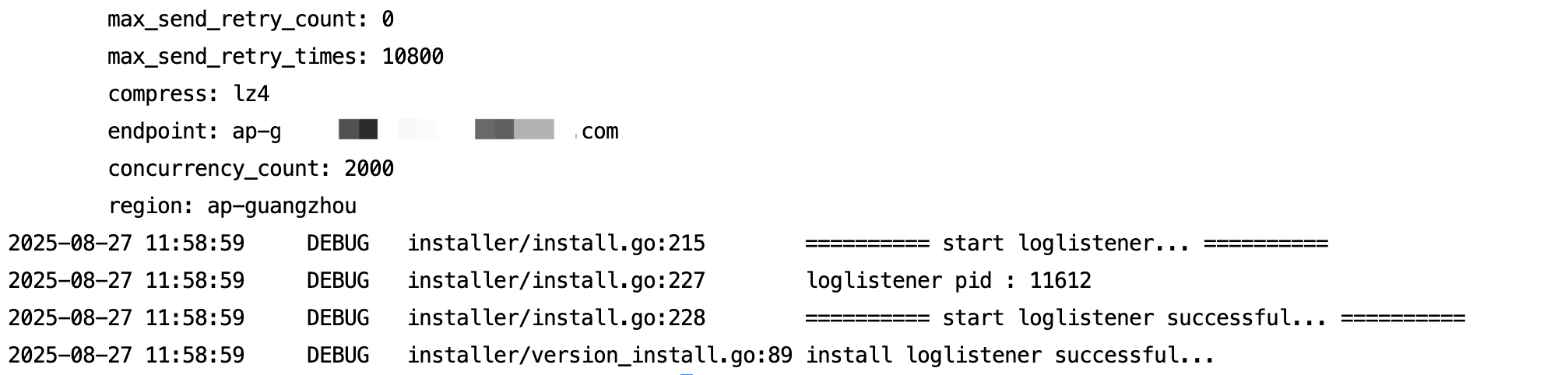
Parameter Description
Parameter Name | Required | Description |
-s | Required when SecretId and SecretKey are used for installation. | Part of the Cloud API Key, which is used to identify the API caller. Ensure that the account associated with the Cloud API key has the appropriate LogListener log collection permission. |
-k | Required when SecretId and SecretKey are used for installation. | TencentCloud API Key consists of two parts. SecretKey is the key used to encrypt signature strings and verify signature strings on the server side. Ensure that the account associated with the TencentCloud API Key has the corresponding LogListener log collection permission. |
--uin | Required when UIN (weak authentication) is used for installation. | Tencent Cloud account UIN. This parameter is mutually exclusive with SecretId and SecretKey and cannot be configured at the same time. |
-n | No | Specifies how LogListener accesses the service domain name. Valid values: internal (private network access, default), internet (public network access). Private network access: Applicable to Tencent Cloud servers located in the same region as the machine group. Public network access: Applicable to non-Tencent Cloud servers or to servers located in regions that do not match those of the machine group. |
-r | Yes | region indicates the region where the CLS is deployed. Enter the appropriate domain name abbreviation, such as ap-beijing or ap-guangzhou. |
-d | No | Indicates the domain name of the region where the CLS service is located, such as ap-beijing.cls.tencentyun.com, ap-guangzhou.cls.tencentyun.com, and so on. Note: When the region of the CLS service you use differs from that of your business servers, configure the public network domain name, for example, ap-beijing.cls.tencentcs.com. |
-i | No | IP address of the machine. A machine group can be associated with this machine through the configured IP address. For details, see Machine Group. If not specified, LogListener will automatically obtain the IP address of the machine. |
-l | No | Machine id. After the machine id is configured, the machine will be associated with machine groups that have the same machine id. For details, see Machine Group. Multiple ids should be separated by commas. Note: If a machine label is configured, the machine can only be associated with the machine group using the machine label instead of the IP address; if not configured, the machine group can only be associated with the machine using the IP address. |
-p | No | Port, default 80. If HTTPS encrypted transmission is required, specify 443. |
-u | No | By default, machine id is not uploaded to CLS. |
--base_dir | No | LogListener installation path. By default, it is installed in the /opt directory. |
--package_path | No | When installing with a local package, specify the full path of the local installation package ( .tar.gz file), including the file name, for example, /tmp/loglistener.tar.gz. Specifying a directory path will not be recognized. The local installation package can be downloaded from the official CLS repository. The naming format is loglistener-linux-<processor architecture>-<version>.tar.gz (use the full installation package without the -update suffix). For details, see the download address in Install LogListener - Install with a local package. |
--url | No | Specify the URL of the mirrors repository when installing via URL. |
--version | No | Specify the version number to install; the latest version is installed by default. |
--dynamic_ip | No | Controls whether to enable the dynamic IP address auto-detection capability. Default: false. If set to true, updates can be applied in real time when the IP address changes (supported only in machine id scenarios; not available for IP address association scenarios). Note: This parameter is supported only in LogListener version 3.5.7 and above. |
--switch_endpoint | No | Enable backup domain. Default: false. If set to true, the backup domain will be used when the primary domain network fails. When the input parameter is set to true, the configuration file adds a backup_endpoints field (backup domain), and the system will automatically populate the backup domain. If the user accesses via the private network, the backup_endpoints field is automatically populated with the public network domain. If the user accesses via the public network, the backup_endpoints field is automatically populated with the private network domain. You can also manually modify the backup domain in the configuration file (multiple entries are supported). If the primary domain is inaccessible, LogListener will attempt each backup domain in sequence until successful. Note: This parameter is supported only in LogListener version 3.5.7 and above. |
--skip_os_support_check | No | Supported only by LogListener version 3.6.4 and above. When the parameter is enabled, it allows installation to proceed by skipping the system allowlist verification in non-standard OS environments. |
Note:
For more details, use
./loglistener_operator install --help.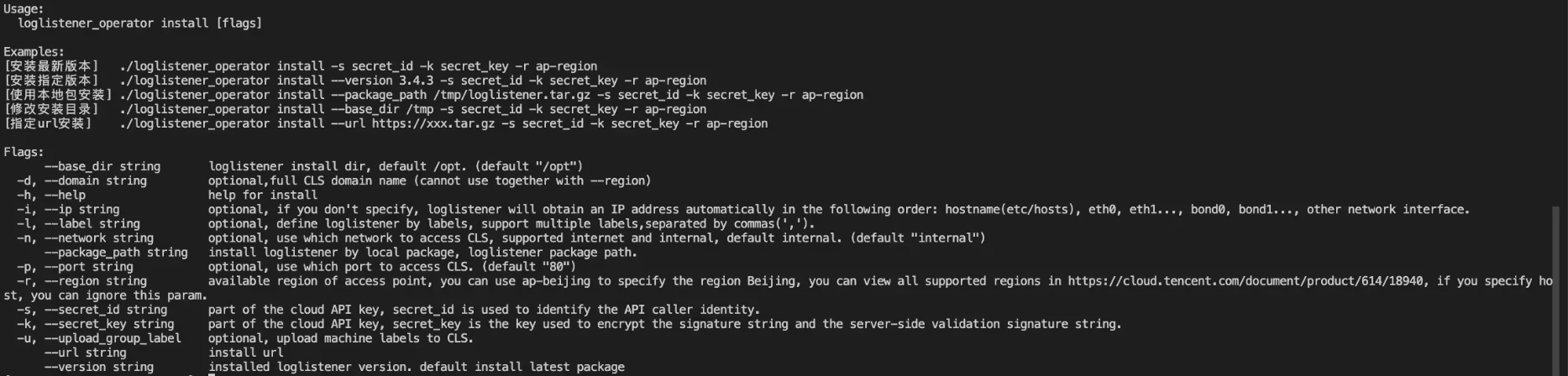
If you need to adjust the configuration and keys for Loglistener, see the Loglistener Configuration Guide.
Step 2: Start LogListener
systemctl start loglistener
Run
systemctl check loglistener to check whether it has started successfully:
Step 3: Add to a machine group
After LogListener is installed and started, you need to create or select an existing machine group in the CLS console and add the server to the machine group. You can add the server to the machine group in either of the following ways:
Step 4: Collect logs
After the server is added to the machine group, you can then configure the collection of text logs on the server.
Common LogListener Operations
Check the LogListener version: To check the version, run the following command in the LogListener installation directory (the default installation directory is
/opt/loglistener)../loglistener -v
Check the LogListener help documentation: To view the help information, run the following command in the LogListener installation directory (the default installation directory is
/opt/loglistener)../loglistener -h
Stop LogListener:
systemctl stop loglistener
Restart LogListener:
systemctl restart loglistener
Run
systemctl check loglistener to check whether it has restarted successfully.Check the LogListener process status:
systemctl status loglistener
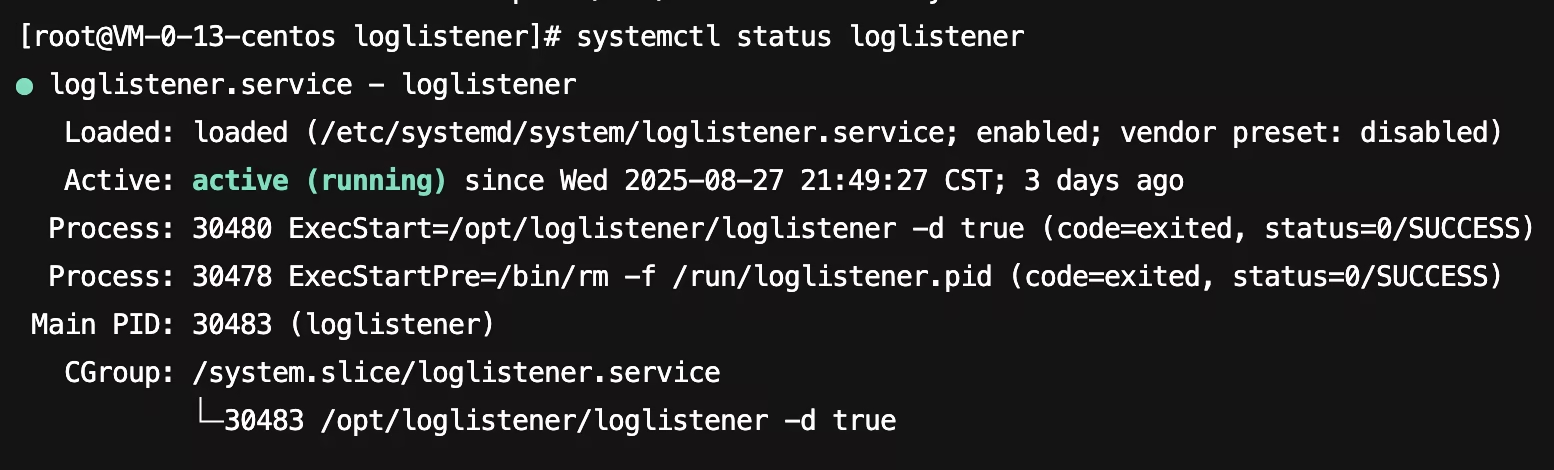
Check LogListener heartbeat and configuration:
systemctl check loglistener
Switch the authentication method: LogListener 3.6.6 or later supports switching between strong authentication using SecretId and SecretKey and weak authentication using UIN. To switch, run the following command in the LogListener installation directory (the default installation directory is
/opt/loglistener).# Switch from strong authentication to weak authentication/opt/loglistener/loglistener convert_auth --auth_mode --uin ${uin}# Switch from weak authentication to strong authentication/opt/loglistener/loglistener convert_auth --auth_mode -s ${secret_id} -k ${secret_key}
Note:
Authentication switching is supported only in single-account scenarios. Switching the authentication method is not currently supported in multi-account scenarios.
Uninstall LogListener:
1.1 Use the stop command
systemctl stop loglistener to stop running the old version of LogListener.systemctl stop loglistener
1.2 To uninstall, run the uninstall command with administrator privileges in the
/opt/loglistener/tools directory under the LogListener installation directory (the default installation directory is /opt/loglistener)../loglistener_operator uninstall
Check the LogListener version:
/etc/init.d/loglistenerd -v
Check the LogListener help documentation:
/etc/init.d/loglistenerd -h
Stop LogListener
:Execute via systemd. This applies to LogListener 2.8.3 or later, and requires the operating system to have systemd.
systemctl stop loglistenerd
Execution is not performed via systemd. This applies to LogListener 2.8.3 or earlier, or LogListener 2.8.3 or later, but without systemd in the operating system.
/etc/init.d/loglistenerd stop
Restart LogListener:
Execute via systemd. This applies to LogListener 2.8.3 or later, and requires the operating system to have systemd.
systemctl restart loglistenerd
Run
/etc/init.d/loglistenerd check to check whether the restart is successful.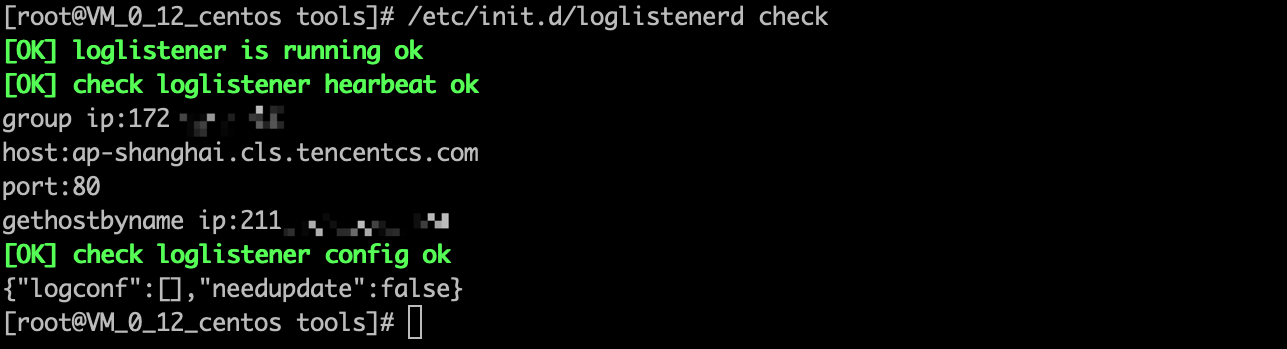
Execution is not performed via systemd. This applies to LogListener 2.8.3 or earlier, or LogListener 2.8.3 or later, but without systemd in the operating system.
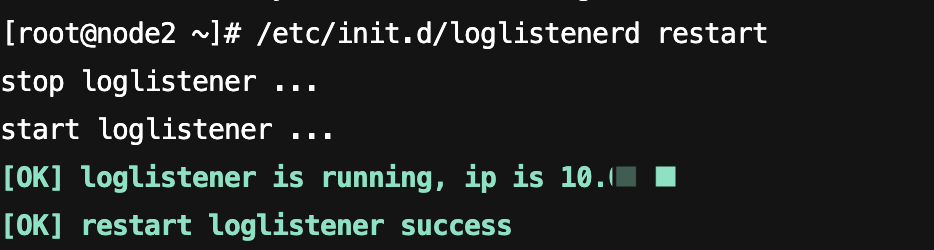
/etc/init.d/loglistenerd restart
Return sample of successful reboot
Check the LogListener process status:
/etc/init.d/loglistenerd status
LogListener normally runs two processes:

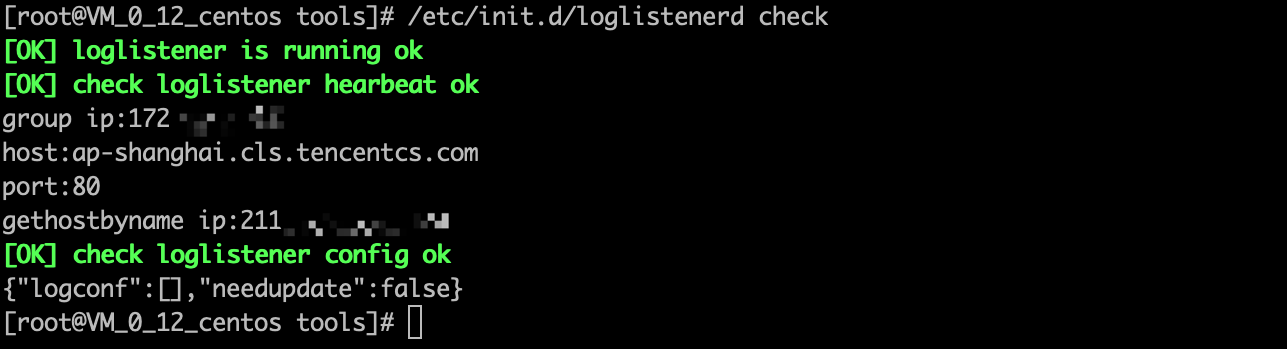
Check LogListener heartbeat and configuration:
/etc/init.d/loglistenerd check
Modify LogListener Configuration: See LogListener Configuration Guide.
Uninstall LogListener
:1.1 Use the stop command to stop running the old version of LogListener.
1.2 Using the installation path
/usr/local/ as an example, execute the uninstall command with administrator privileges in the /usr/local/loglistener/tools directory:./loglistener.sh uninstall
Manually Update LogListener:
Reuse checkpoint files (logs will not be collected repeatedly):
1.1 Use the stop command to stop running the old version of LogListener.
1.2 Using the installation directory
/usr/local/loglistener as an example, navigate to the installation directory and back up the checkpoint file directory ./data from the old version. For instance, back up the old version's checkpoint files to the /tmp/loglistener-backup directory.cp -r ./data /tmp/loglistener-backup/
1.3 Use the uninstall command to uninstall the old version of LogListener.
1.4 Download and install the latest version of LogListener.
1.5 Using the installation directory
/usr/local/loglistener as an example, copy the backed-up checkpoint file directory (Step 2) to the new version LogListener directory.cp -r /tmp/loglistener-backup/data ./
1.6 Use the start command to start the new version of LogListener.
Do not reuse checkpoint files (logs may be collected repeatedly):
1.7 Use the stop command to stop running the old version of LogListener.
1.8 Use the uninstall command to uninstall the old version of LogListener.
1.9 Download and install the latest version of LogListener.
1.10 Use the start command to start the new version of LogListener.
Upgrade Guide
Ajuda e Suporte
Esta página foi útil?
Você também pode entrar em contato com a Equipe de vendas ou Enviar um tíquete em caso de ajuda.
comentários