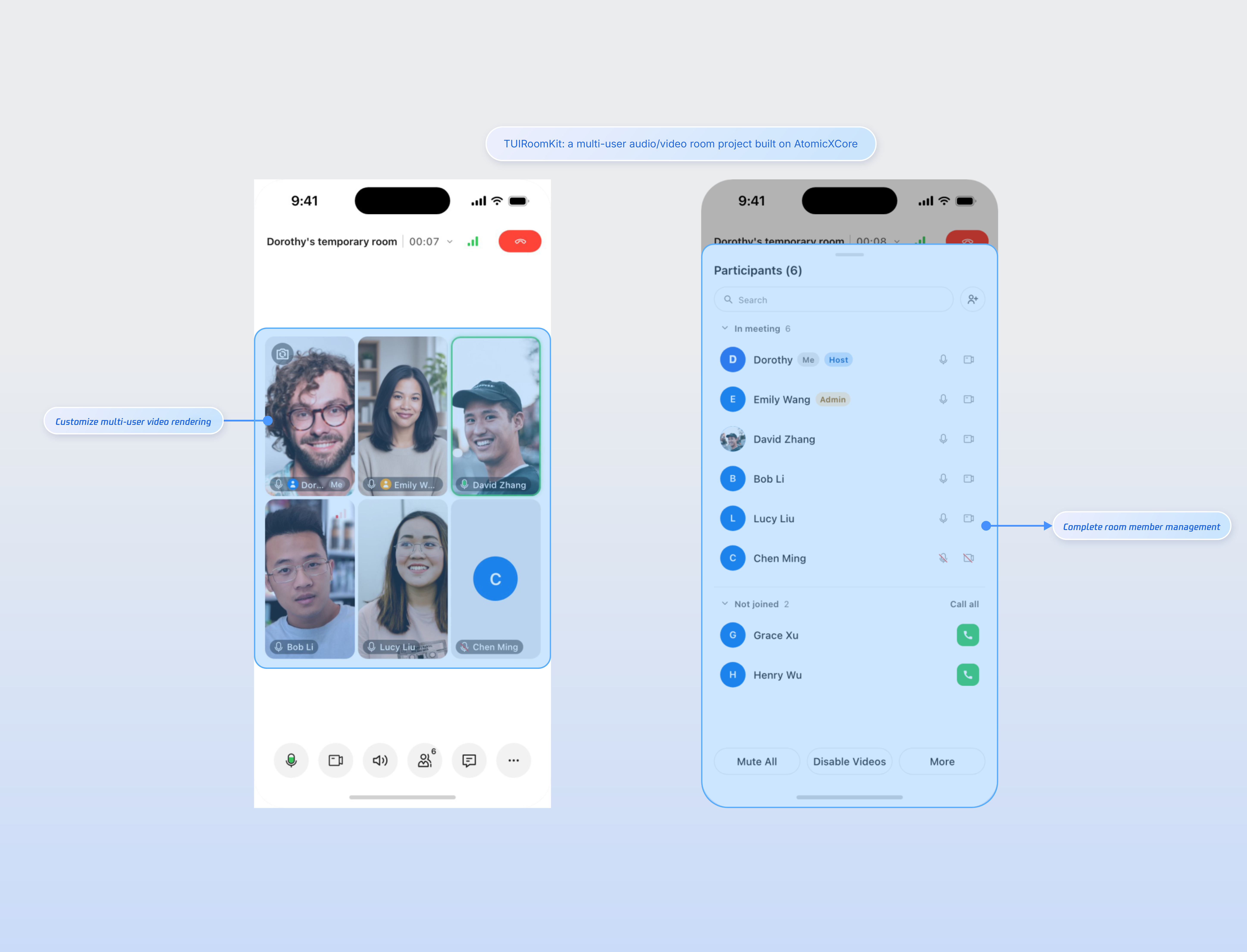
This guide explains how to integrate AtomicXCore using either Swift Package Manager or External Pods (CocoaPods) to enable multi-party audio/video conferencing. The SDK offers APIs for room management, participant management, and video view rendering, allowing you to build custom business UIs.
Key Features
AtomicXCore offers three essential modules for developing multi-party audio/video conference rooms:
RoomStore: Centralized room management, including scheduling, creating, joining rooms, and in-room calling.
RoomParticipantStore: Participant management within a room, covering admin settings, host transfer, removing participants, device control, and more.
RoomParticipantView: Video view for displaying participant streams within the room.
Xcode: Swift Package Manager integration requires Xcode 16 or later; External Pods (CocoaPods) integration requires Xcode 15 or later.
iOS System: Set your app’s minimum deployment target to iOS 14.0 or higher. Test devices must also meet this requirement.
Dependency Management Tools: Swift Package Manager is built into Xcode, so CocoaPods installation is not required for SwiftPM. For External Pods integration, install CocoaPods first. See CocoaPods Installation Guide.
Step 3: Integrate the AtomicXCore SDK
1. Add SDK Dependency: Choose one integration method. Do not import the SDK and its dependencies via both SwiftPM and CocoaPods, and do not manually add the framework to your project.
Swift Package Manager Integration
External Pods (CocoaPods) Integration
1. Open your app project in Xcode. Go to File > Add Package Dependencies... and enter the repository URL:
2. Select the desired version and click Add Package. Find available versions at AtomicXCore_SwiftPM Tags. To lock a specific version, choose Exact Version.
3. On the product selection page, add AtomicXCore to the app target where it will be used. If the repository is already added but the product is not selected, add AtomicXCore in the target’s General > Frameworks, Libraries, and Embedded Content section.
4. Wait for dependency resolution. If it doesn’t start automatically, select File > Packages > Resolve Package Versions. If fetching fails, see the troubleshooting section below.
Note:
The AtomicXCore product automatically includes required IM and TRTC dependencies. You do not need to add their repositories separately. This guide uses the pure API SDK and does not require TUIRoomKit or SnapKit. If you integrate only via SwiftPM, you do not need to run pod install; continue using your original app project.
1. In the terminal, navigate to the directory containing your .xcodeproj file (not inside the .xcodeproj package). If there is no Podfile, run:
pod init
2. Edit the Podfile, replacing YourProjectTarget with your actual app target name. If you already have a Podfile, keep other configurations and dependencies, merge the following external podspec declaration into the corresponding target, and remove any old declarations for the same SDK.
platform :ios, '14.0'
target 'YourProjectTarget'do
pod 'AtomicXCore', :podspec =>'https://sdk-liteav-1252463788.cos.ap-hongkong.myqcloud.com/app/tuikit/download/latest/AtomicXCore.podspec'
end
3. In the directory containing the Podfile, run:
pod install
4. After installation completes, open the generated .xcworkspace file in Xcode. Build your project from this workspace, not the .xcodeproj file.
Note:
External Pods use :podspec => to specify the official external podspec URL, not the standard pod 'AtomicXCore' declaration. IM and TRTC dependencies are resolved automatically by CocoaPods. The latest URL is for quick integration; see the troubleshooting section below for version locking and upgrade methods in production.
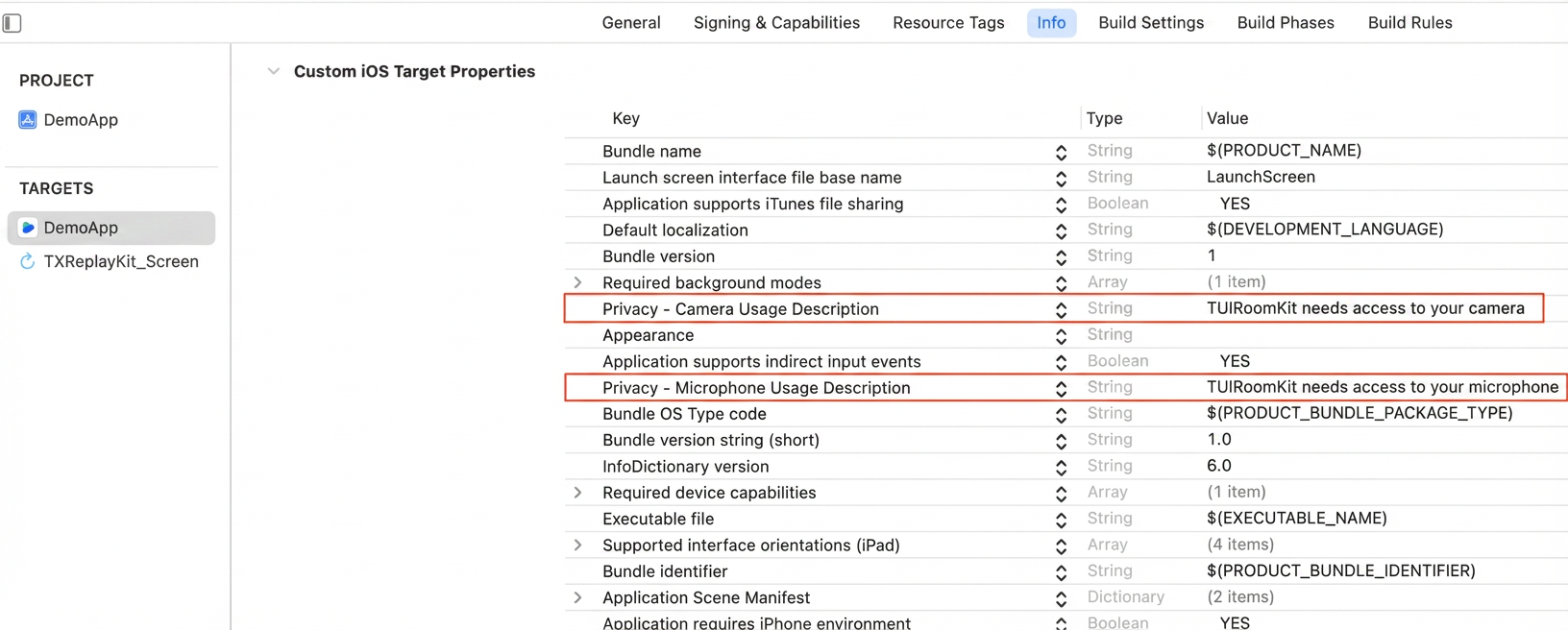
2. Configure App Permissions: Add camera and microphone usage descriptions to your app's Info.plist file.
<key>NSCameraUsageDescription</key>
<string>TUIRoomKit needs access to your camera</string>
<key>NSMicrophoneUsageDescription</key>
<string>TUIRoomKit needs access to your microphone</string>
Step 4: Implement Login Logic
Call LoginStore.shared.login in your project to complete login. This step is required before using any feature of AtomicXCore.
Important:
For best results, call LoginStore.shared.login only after your own user account login is successful. This ensures clarity and consistency in your login flow.
importAtomicXCore
funclogin(){
LoginStore.shared.login(sdkAppID:1400000001,// Replace with your project's sdkAppID
userID:"test_001",// Replace with your project's userID
userSig:"xxxxxxxxxxx"){ result in// Replace with your project's userSig
Unique user identifier. Use only English letters, numbers, hyphens, and underscores. Avoid using simple IDs like 1 or 123 to prevent multi-device login conflicts.
userSig
String
Authentication ticket for Tencent Cloud.
For development: Use GenerateTestUserSig.genTestSig or the UserSig Assistant Tool for a temporary UserSig.
Completion callback. Returns the result of enabling the camera. If enabling fails, returns error code and message.
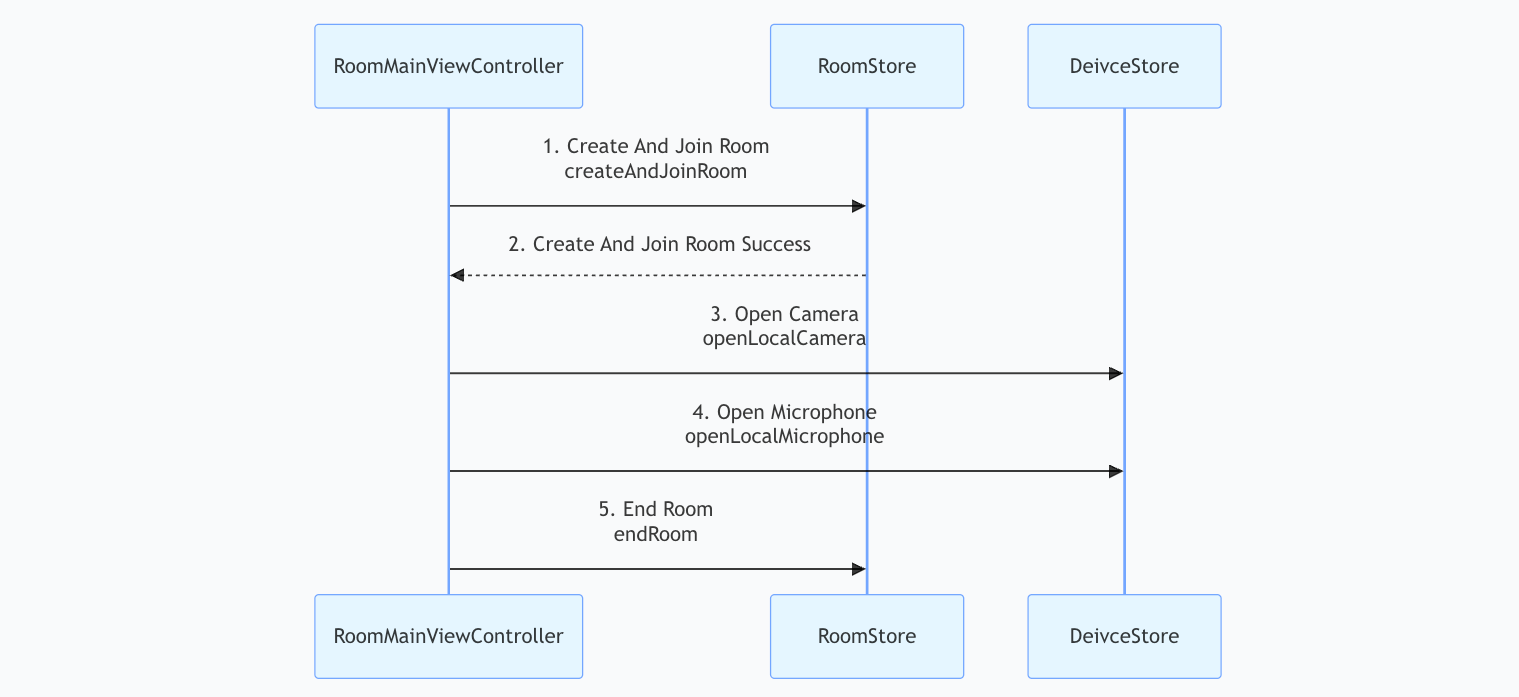
3. End a Room
To end a room, call the endRoom API from RoomStore. All participants will receive a room ended event.
importUIKit
importAtomicXCore
// RoomMainViewController represents the main view controller of the room
classRoomMainViewController:UIViewController{
privatelet roomID:String
publicinit(roomID:String){
self.roomID = roomID
super.init(nibName:nil, bundle:nil)
endRoom()
}
requiredinit?(coder:NSCoder){
fatalError("init(coder:) has not been implemented")
}
// End the room
privatefuncendRoom(){
// endRoom API permanently ends the current room.
// Note: Typically, only the host (owner) can perform this operation. After execution, all members are removed from the room and audio/video capture is forcibly stopped.
RoomStore.shared.endRoom {[weakself] result in
guardletself=selfelse{return}
switch result {
case.success():
print("Room ended successfully")
case.failure(let error):
print("Failed to end room [Error code: \\(error.code)]: \\(error.message)")
}
}
}
}
Step 2: Participant Joins a Room
Participants can join a room in just a few steps to interact with others in real-time audio/video.
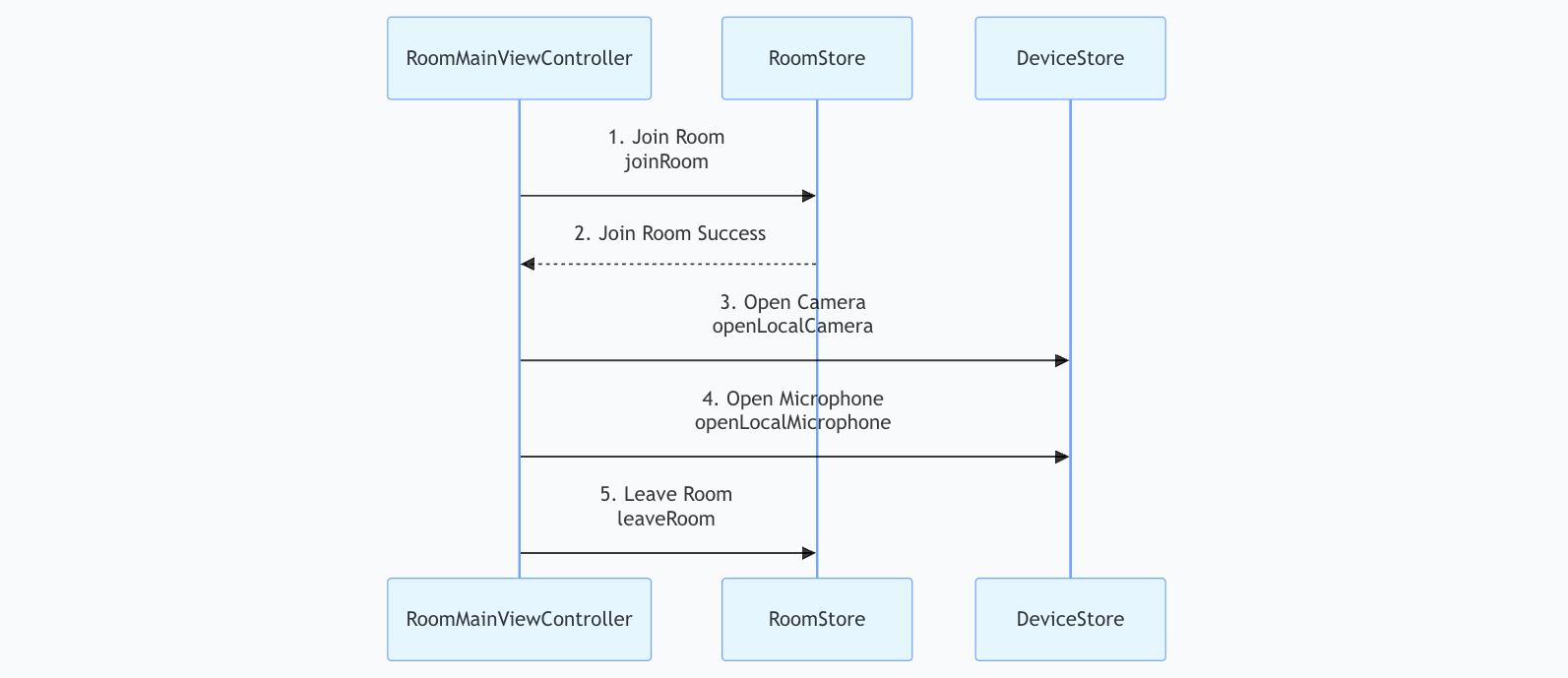
1. Join a Room
To join a room, call the joinRoom API from RoomStore. Other participants will receive a participant joined event notification.
importUIKit
importAtomicXCore
// RoomMainViewController represents the main view controller of the room
classRoomMainViewController:UIViewController{
publicinit(roomID:String, roomType:RoomType){
super.init(nibName:nil, bundle:nil)
joinRoom(roomID: roomID, roomType: roomType)
}
requiredinit?(coder:NSCoder){
fatalError("init(coder:) has not been implemented")
To leave a room, call the leaveRoom API from RoomStore. Other participants will receive a participant left event notification.
importUIKit
importAtomicXCore
// RoomMainViewController represents the main view controller of the room
classRoomMainViewController:UIViewController{
privatelet roomID:String
publicinit(roomID:String){
self.roomID = roomID
super.init(nibName:nil, bundle:nil)
leaveRoom()
}
requiredinit?(coder:NSCoder){
fatalError("init(coder:) has not been implemented")
}
// Leave the current room
privatefuncleaveRoom(){
// 1. Business logic
// leaveRoom API is used for regular members or host to leave the room.
// Unlike endRoom, when the host calls leaveRoom, only they leave; the room remains.
// 2. Call RoomStore leaveRoom API
// This operation stops audio/video streaming and notifies the server to remove the current user from the room
RoomStore.shared.leaveRoom {[weakself] result in
guardletself=selfelse{return}
switch result {
case.success():
print("Left room successfully")
case.failure(let error):
print("Failed to leave room [Error code: \\(error.code)]: \\(error.message)")
}
}
}
}
Step 3: Bind Video View
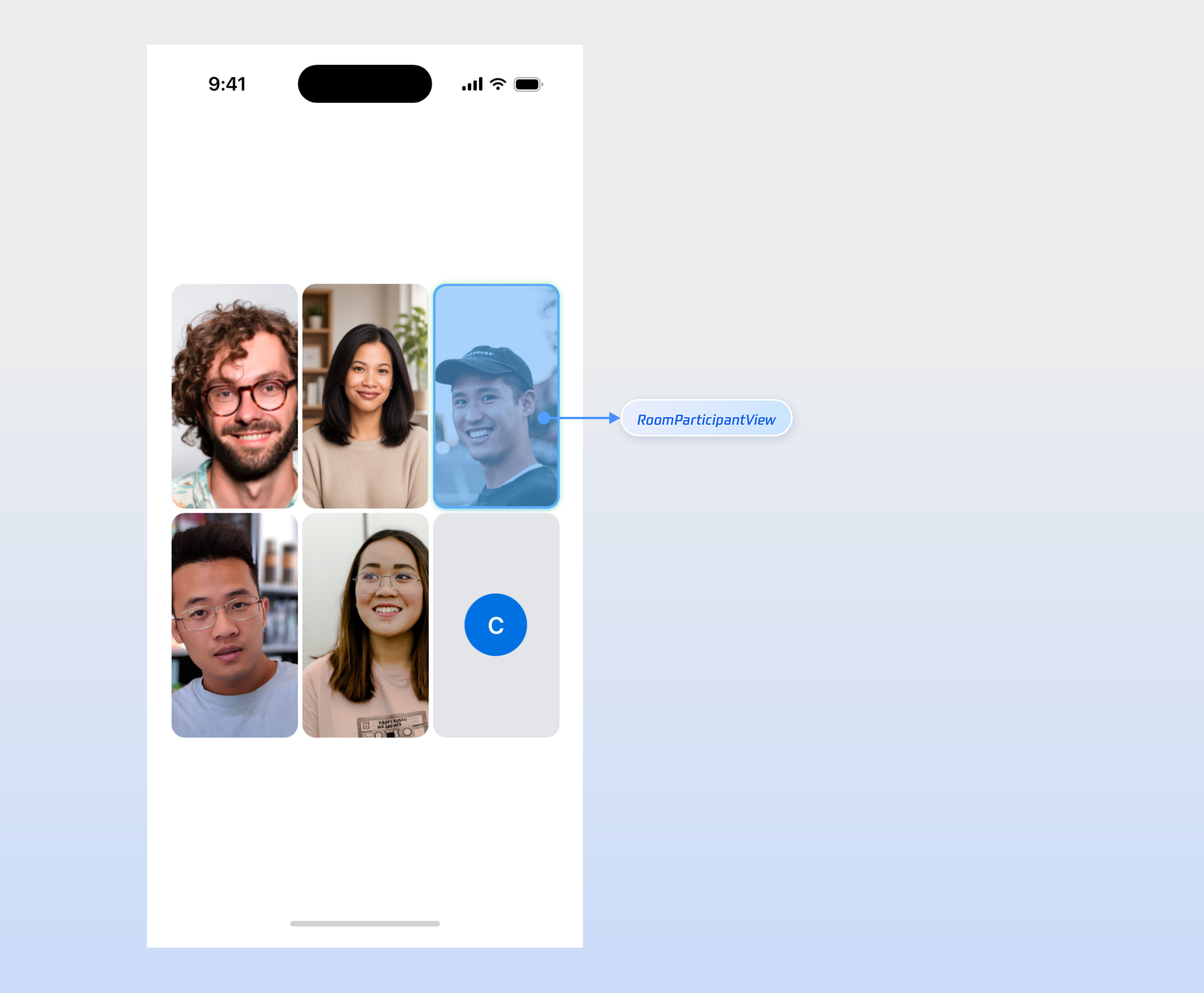
The RoomParticipantView component in AtomicXCore SDK provides a complete solution for video rendering. It supports real-time display of both local camera feeds and remote participant streams, and is easy to integrate.
Tip:
RoomParticipantView is the core view component for rendering participant video streams in the room. For more flexible video layout options, see TUIRoomKit open source project, specifically RoomView.swift.
Implementation:
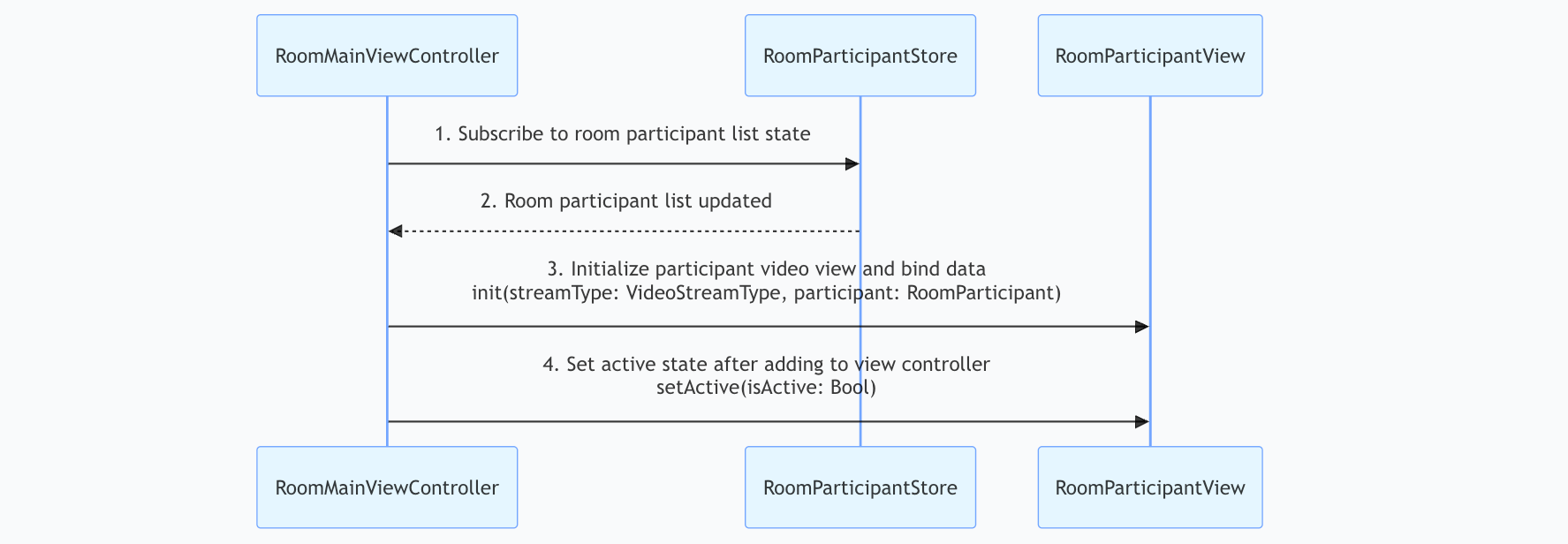
1. Subscribe to Data Layer: Listen to RoomParticipantStore.state.participantList for participant state changes.
2. Automatic State Sync: When the participant list updates, the system automatically syncs the participantList state.
3. Initialize View: Create RoomParticipantView instances based on participant data and bind video rendering logic.
The host can manage other participants in the room, such as setting admins, removing participants, and controlling individual participant audio/video status.
Complete room lifecycle management: create and join / join / leave / end room / update and get room info / schedule room / call external members / listen to passive room events (such as room dissolution, room info update, etc.).
Participant management within the room: set admin / transfer host / get participant list / remove from room / participant device control (invite to enable camera, microphone, etc.) / request to enable device (e.g., request to enable camera, microphone, etc.).
SwiftPM: In Xcode’s Package Dependencies, use Exact Version to select a published version and include Package.resolved in version control. To upgrade, modify the version rule, run Resolve Package Versions, verify compilation and room functionality, and commit the updated lock file.
External Pods: For production, replace latest with a fixed podspec URL and include Podfile.lock in version control. For version 5.3.2, use the corresponding release URL for other versions:
pod 'AtomicXCore',:podspec=>'https://sdk-liteav-1252463788.cos.ap-hongkong.myqcloud.com/app/tuikit/download/release/5.3/AtomicXCore_5.3.2.podspec'
pod install uses the version in Podfile.lock and does not upgrade automatically. To upgrade, update the fixed URL or keep latest, then run a targeted update in the Podfile directory:
pod update AtomicXCore
After updating, check version changes for SDK and dependencies in Podfile.lock, recompile, and verify login, room entry/exit, and audio/video features. Do not delete the entire lock file to upgrade SDK, and do not update unrelated dependencies.
SwiftPM Resolve Shows failed to fetch
failed to fetch means dependency fetching failed. Troubleshoot using the repository URL and error details:
Timeout, disconnection, or DNS resolution failure: Check or switch networks; if using a proxy, ensure both terminal and Xcode can access GitHub. Browser access does not guarantee dependency download.
Repository not found or authentication failure: Verify repository address and access permissions. The official public dependencies used here do not require a GitHub Token.
1.3 Repository accessible but Xcode still fails: Run File > Packages > Reset Package Caches, then Resolve Package Versions; restart Xcode if necessary. Clearing cache will re-download dependencies; do not repeatedly clear cache if the network is down.
1.4 Use system Git for resolution: If terminal can access the repository but Xcode still fails, run the following command in your project directory. Replace YourProject.xcodeproj and YourApp with your actual project file and app scheme; if using a workspace, change -project YourProject.xcodeproj to -workspace YourProject.xcworkspace and use your actual workspace file name.
xcodebuild -resolvePackageDependencies\\
-project YourProject.xcodeproj \\
-scheme YourApp \\
-scmProvider system
-scmProvider system uses system Git for this command only and does not permanently change Xcode’s GUI configuration.
1.5 Verify recovery: After a successful command, reopen the original project or workspace, wait for dependency resolution, select your app scheme, and press Command + B to build. If dependencies resolve and compilation succeeds, proceed with integration. If still failing, contact technical support as described below.
If failure occurs during binary SDK download, check the actual download URL in the log, not just GitHub. requires Swift tools version 6.0 means Xcode 16 or later is required.
External Pods Installation Fails or Shows No such module 'AtomicXCore'
podspec or SDK download failure: Verify the full :podspec => URL, check if the actual download address in the log is accessible, retry pod install after restoring network. For fixed versions, confirm the release URL exists.
Dependency spec not found: If the log shows IM or TRTC dependency spec not found, run pod install --repo-update in the Podfile directory to update index and reinstall. This does not fix network failures.
Version conflict: Check the log for listed components and version constraints. Ensure your project does not have other IM or TRTC SDK declarations to avoid importing different types of TRTC packages. Use compatible versions before installing; do not delete all locked dependencies.
Module import failure: For SwiftPM, check if the target using the SDK has added the AtomicXCore product; for External Pods, check if installation succeeded, dependencies are declared in the correct target, and you are opening .xcworkspace.
After correction, re-resolve or reinstall dependencies, then build with Command + B. If Swift module fails to load, check the first error above, distinguish missing dependencies from toolchain issues, and do not change Xcode based only on subsequent compiler version prompts.
Contact Technical Support
Please use the support channels in Contact Us, stating you are using the iOS AtomicXCore pure API SDK, and provide:
Xcode and macOS version, and whether you use SwiftPM or External Pods.
SDK version, failed repository or download URL, complete error output, and steps already attempted.
Dependency configuration and version info from Package.resolved or Podfile.lock related to the issue.
Before submitting, remove tokens, keys, and other sensitive information. You do not need to provide SECRETKEY or UserSig.
CocoaPods Build Fails Due to rsync Permission Issues During Resource Copying
This issue mainly involves CocoaPods resource or framework copy scripts. AtomicXCore does not depend on SnapKit; if your project brings in SnapKit via other components, you may encounter the following error. Do not use this solution for SwiftPM repository fetch failures:
rsync(xxxx):1:1: SnapKit.framework/SnapKit_Privacy.bundle/: mkpathat: Operation not permitted
Cause
If the build log also shows Sandbox: rsync ... deny, it is usually Xcode's user script sandbox restricting copy script access to resource files. Operation not permitted alone does not confirm the cause.
Solution Steps
1. If the log shows script sandbox access denial, search for User Script Sandboxing (ENABLE_USER_SCRIPT_SANDBOXING) in the affected target’s Build Settings and set it to NO. This disables build script sandboxing only for the affected target; do not disable for all targets. Only use trusted build scripts.
2. Run Product > Clean Build Folder, then rebuild. If resource copying no longer errors and compilation succeeds, run again. If still failing, keep the full build error and contact support as above. Do not broaden file permissions.
RoomParticipantView Is Bound to Participant Info and Video Stream Type Is Set Correctly, but Video Is Not Displayed?
Check setActive: Ensure the current RoomParticipantView is visible on screen and RoomParticipantView.setActive(true) is called correctly.
Check RoomParticipant: Ensure the cameraStatus of the RoomParticipant set in RoomParticipantView is on.
Check network: Ensure the device network connection is normal.
Contact Us
If you have any questions or suggestions during integration or usage, please contact info_rtc@tencent.com to submit feedback.