Signing Up
Unduh
Mode fokus
Ukuran font
Before you start using Tencent Cloud services, you need to register a Tencent Cloud account. Before registration, we recommend that you first understand the Tencent Cloud account restrictions.
After you have a Tencent Cloud account, you can log in to the Tencent Cloud website or console to purchase and use the cloud products and services you need.
Note:
Going to the Registration Page
Step 1: Signing Up for an Account
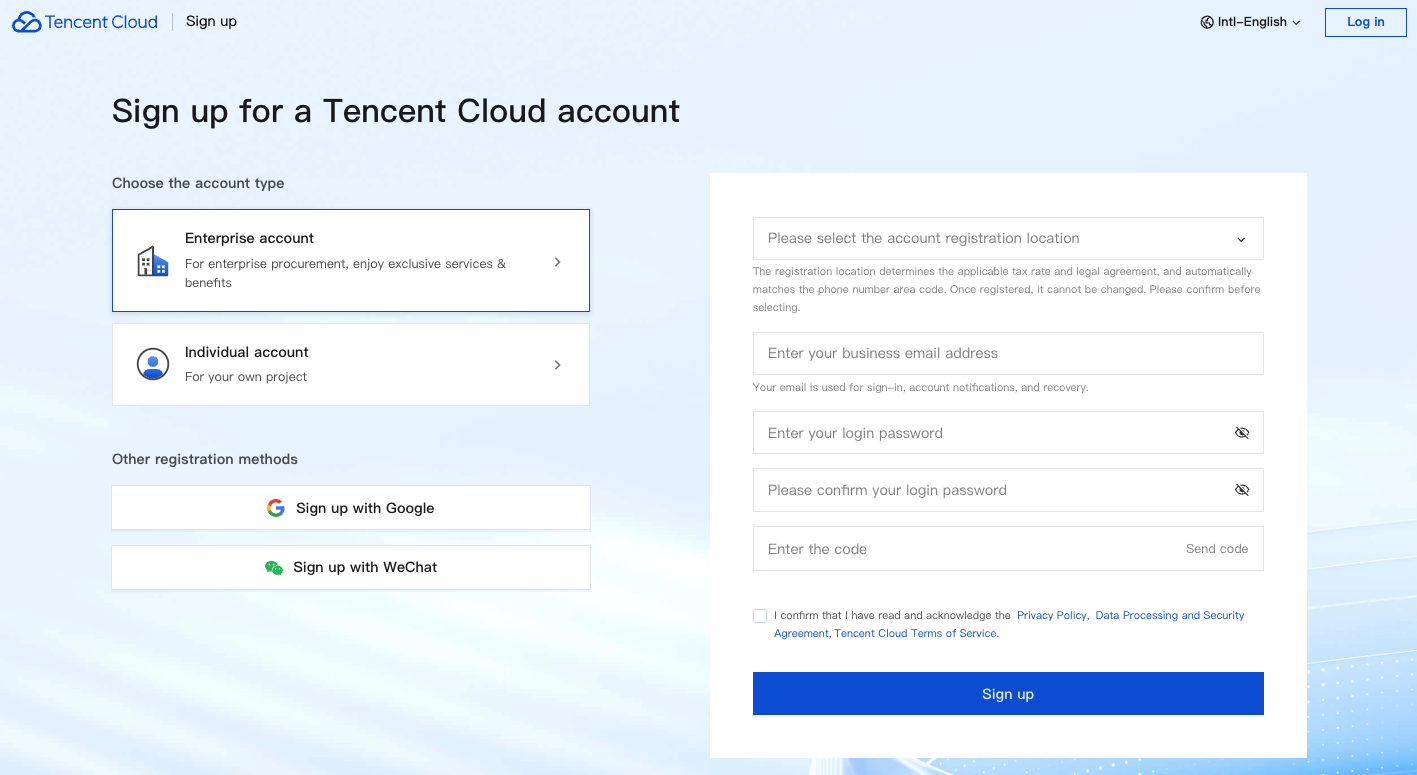
Tencent Cloud accounts can be registered using an email address, a Google account, or WeChat (you can choose any one of these methods to sign up):
Account Type Description:
If you plan to use the account for business purposes, we recommend that you register with a corporate email address to avoid issues where the account cannot be logged in after some employees leave the company.
If you plan to use an account for personal purposes, you can register using a personal email address or a Google account.
Registration location notes:
The account registration location determines the applicable tax rate for the account and is bound to the phone number area code and identity verification in the subsequent steps.
For an enterprise account, select the country/region where the enterprise is located. For an individual account, select the country/region where you are located.
Once an account is registered, the account registration location cannot be changed. Please choose carefully.
Registration Method | Description |
Register for Tencent Cloud with an email address to help enterprise customers maintain their accounts. | |
Use your Google account to authorize registration for Tencent Cloud. You can then use your Google account to authorize login. | |
Use your WeChat QR code to quickly authorize registration for Tencent Cloud. You can then use the WeChat QR code to log in. |
Email Signup
1. Go to the Tencent Cloud website and click Sign Up Free in the upper right corner.
2. Select the account registration location. The page will recommend a location based on your current country/region of access. If you are accessing from a different country/region, please select it again.
3. Enter your email address and login password. After registration, this email address will also be used for account protection verification (including login protection and operation protection) and for receiving account security notifications.
4. Click Send code, then enter the verification code received by your registered email address.
5. Please read the Terms of Service carefully. If you agree, select the checkbox and click Sign Up to go to Step 2: Complete account information.
Google Account Signup
1. Go to the Tencent Cloud website and click Sign Up Free in the upper right corner.
2. Choose Other registration methods > Sign in with Google.
3. Log in to your Google account using your email address or phone number.
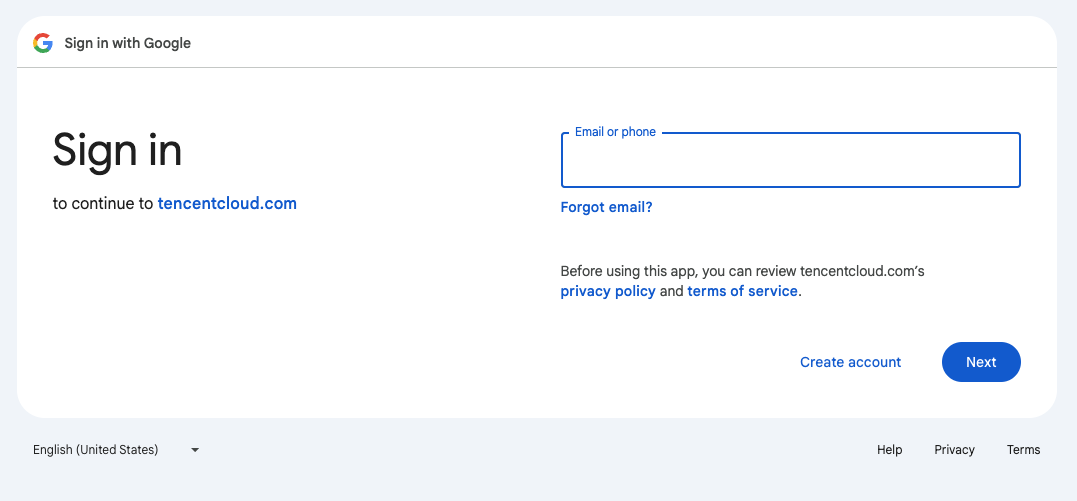
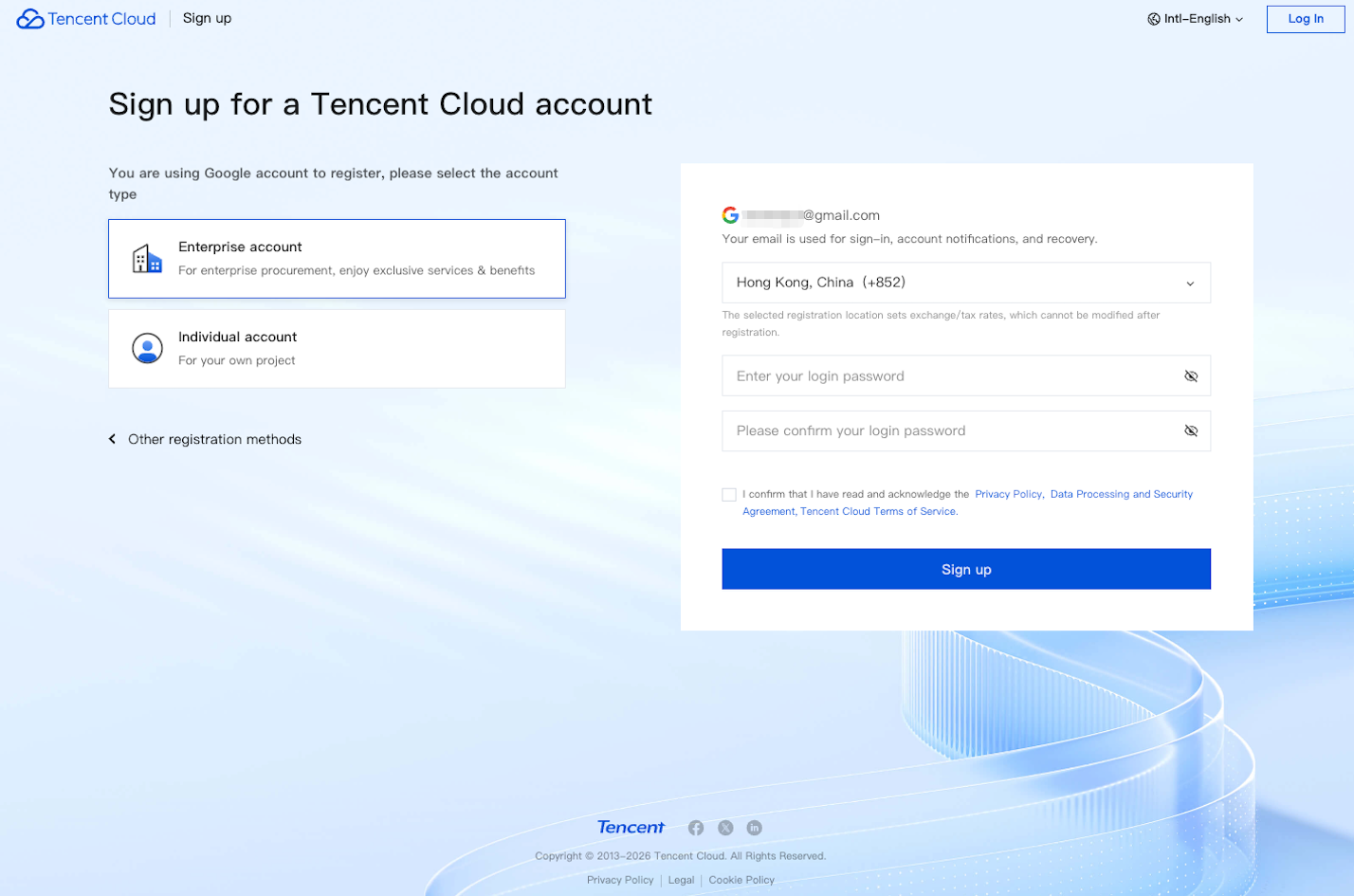
4. After logging in, choose to register an enterprise account or an individual account based on your usage scenario. If the account completes identity verification later, the account type will be updated automatically to match the verified identity type.
5. Select the account registration location. The page will recommend a location based on your current country/region of access. If you are accessing from a different country/region, please select it again.
6. Set a login password (optional).
Set a password: After registration, you can log in with your Google account, or use your Google account email + password to log in to Tencent Cloud.
Do not set a password: After registration, you can only log in to Tencent Cloud with your Google account.
Note:
Whether or not you set a login password, the email address of your Google account will be used after registration for account protection verification (including login protection and operation protection) and for receiving account security notifications.
If you skip setting a password, you will not be able to log in or recover your account using a password if your Google account becomes unavailable due to authorization failure or cancellation. We recommend that you set a login password as a backup login method.
If you skip setting a password, you can go to the Account Center > Account Information page to set a login password after registration is complete.
7. Please read the Terms of Service carefully. If you agree, select the checkbox and click Sign Up to go to Step 2: Complete account information.
WeChat Signup
Note:
WeChat account registration is for users who already have a WeChat account. After successful registration, the WeChat account will be automatically linked to your Tencent Cloud account. You can then log in to this account using your email address or WeChat.
Each WeChat account can be linked to a maximum of 50 Tencent Cloud accounts.
To change or unlink a WeChat account, go to the Account Center console to manage it.
1. Go to the Tencent Cloud website and click Sign Up Free in the upper-right corner.
2. Choose Other registration methods > Sign up with WeChat. On the WeChat authorization QR code page, open the WeChat app on your phone and scan the QR code.
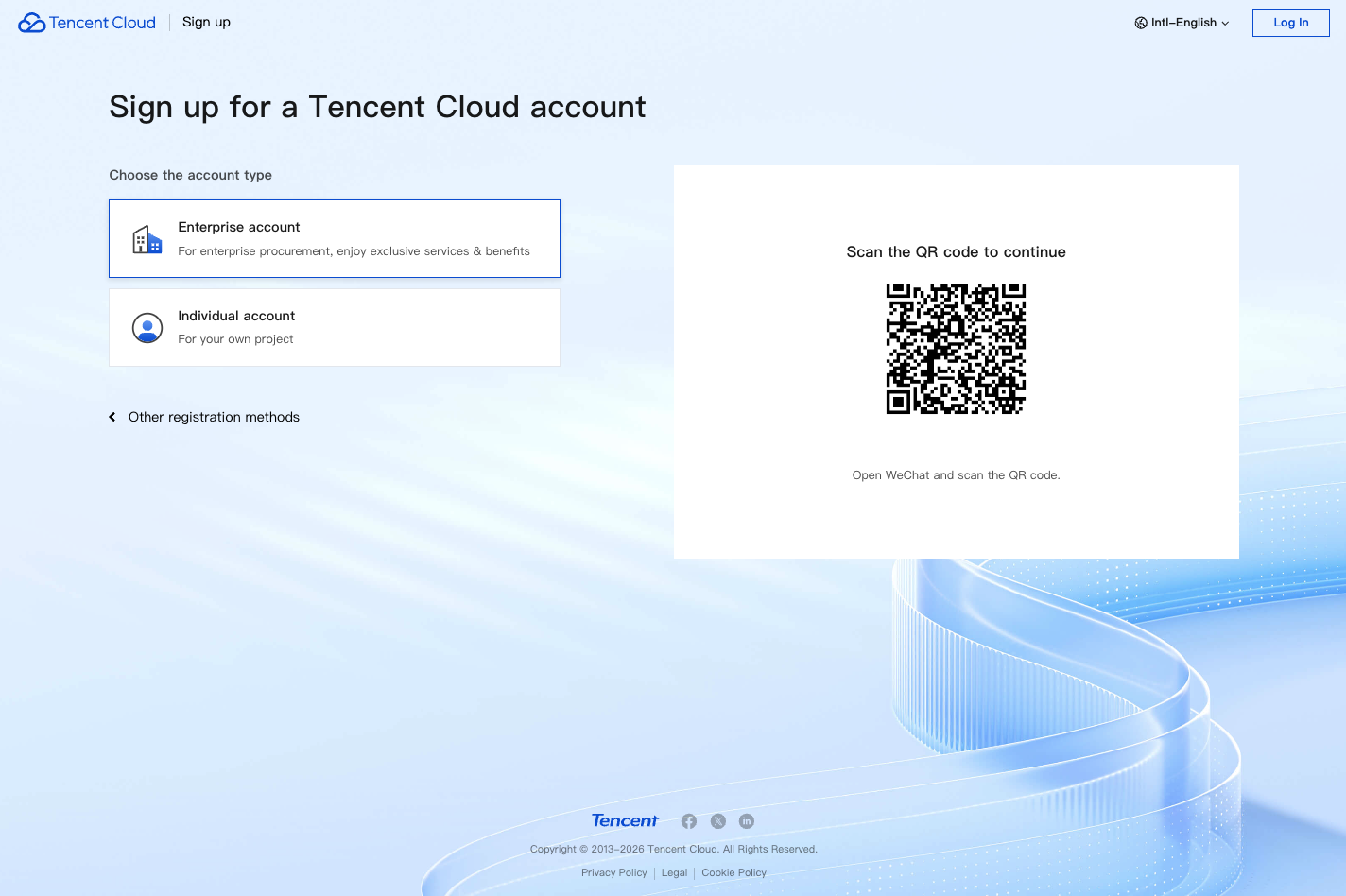
3. On your phone, click Allow to authorize Tencent Cloud to obtain your WeChat basic information, such as your nickname and profile picture.
4. After authorization is complete, the Tencent Cloud account registration page automatically proceeds to the next step. Select Create a new account.
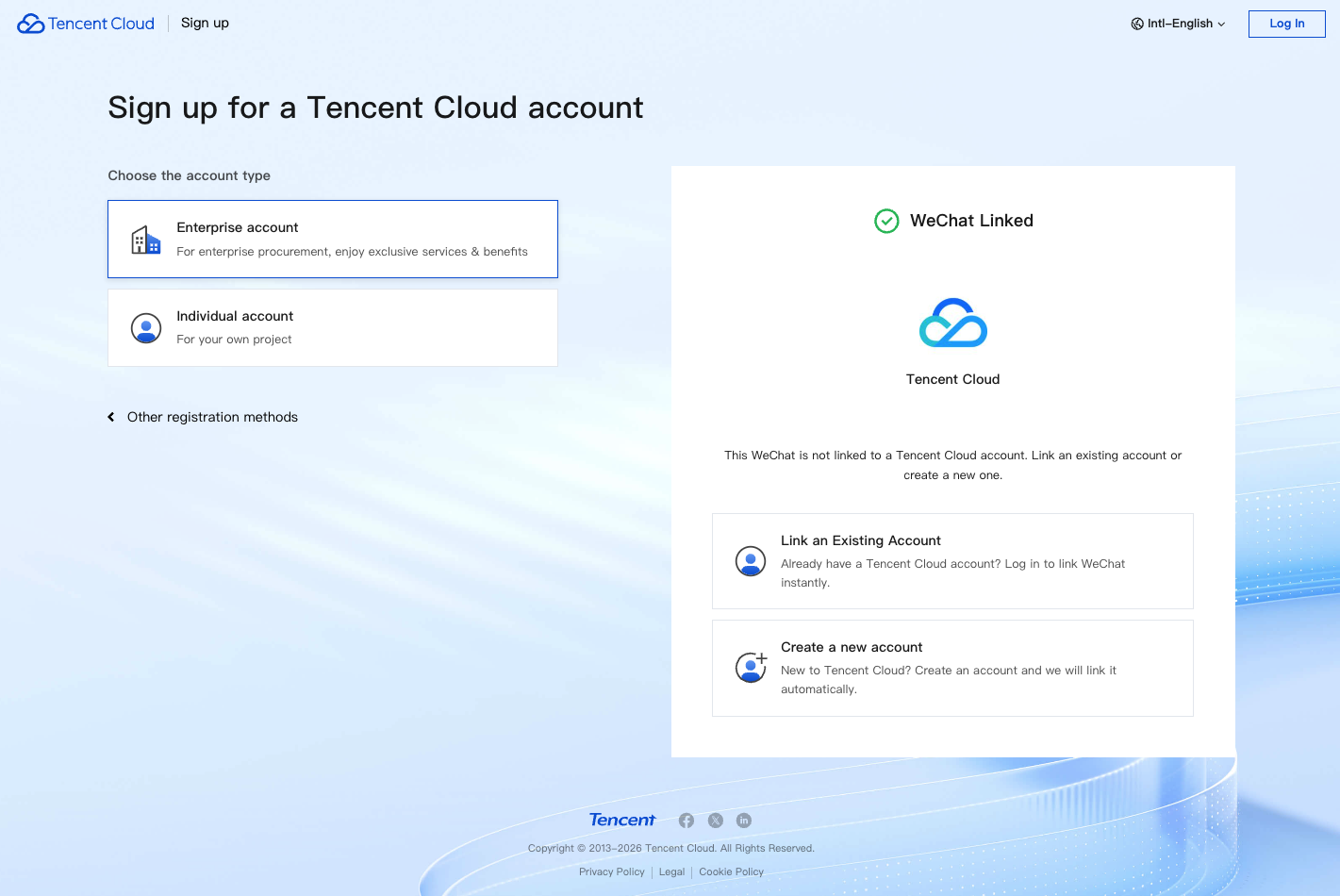
5. Choose to register an enterprise account or an individual account based on your usage scenario. If the account completes identity verification later, the account type will be updated automatically to match the verified identity type.
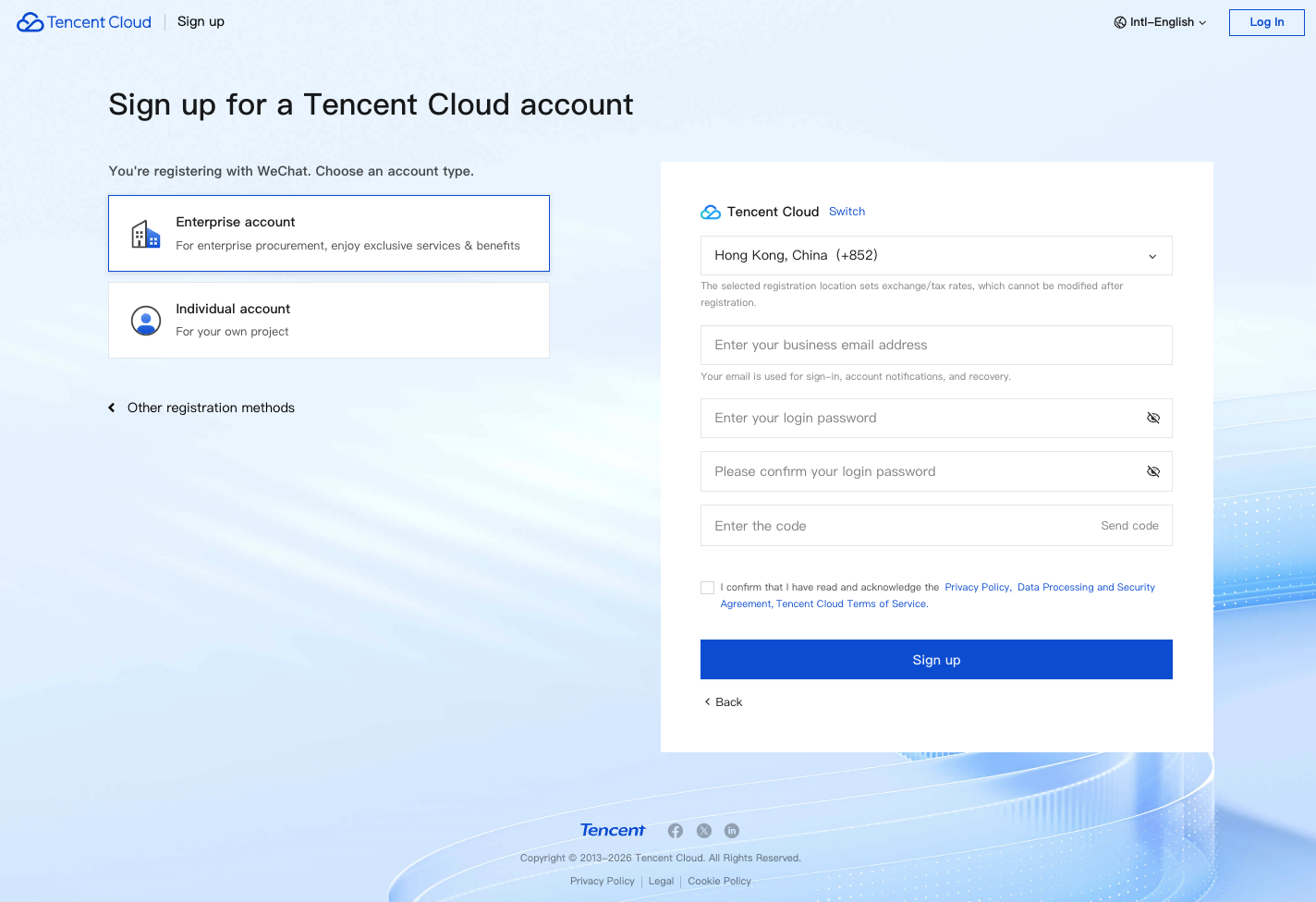
6. Select the account registration location. The page will recommend a location based on your current country/region of access. If you are accessing from a different country/region, please select it again.
7. Enter your email address and login password. After registration, this email address will also be used for account protection verification (including login protection and operation protection) and for receiving account security notifications.
8. Click Send code, then enter the verification code sent to your email address.
9. Please read the Terms of Service carefully. If you agree, select the checkbox and click Sign Up to go to Step 2: Complete account information.
Step 2: Completing Account Information
1. On the Complete information page, enter the account name. For enterprise accounts, fill in the enterprise entity name. For individual accounts, fill in the individual name.
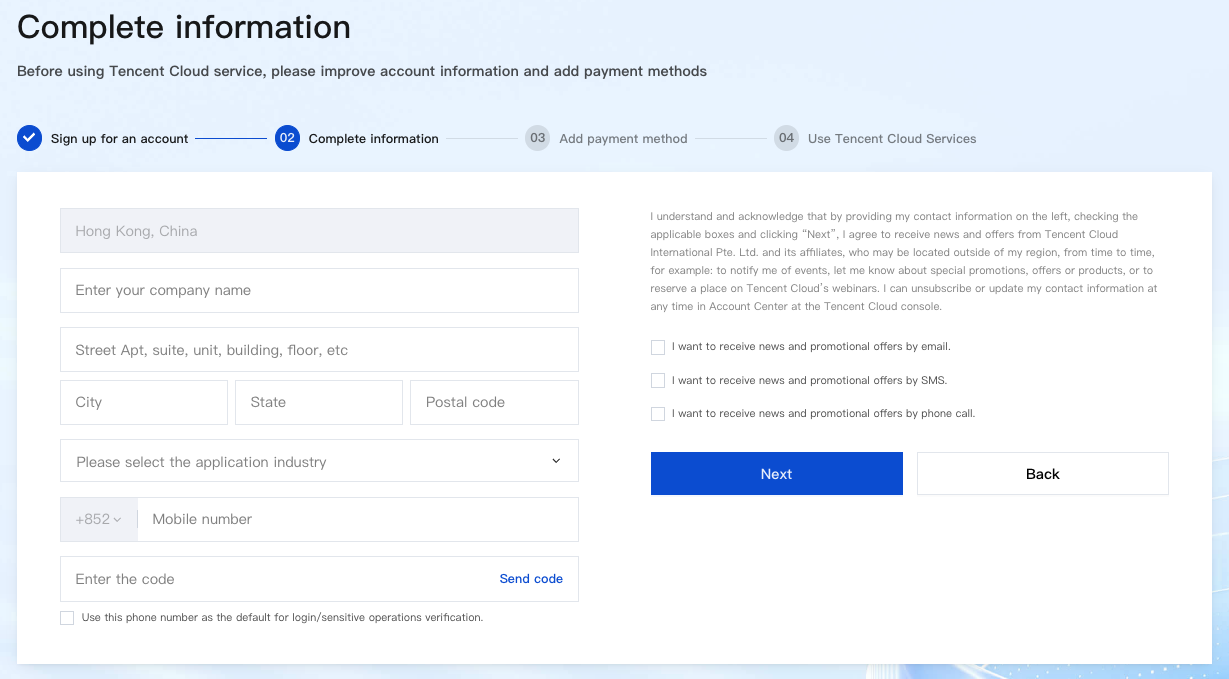
2. Enter address information. For enterprise accounts, fill in the enterprise address. For individual accounts, fill in the individual address.
3. Select the industry.
4. Enter your mobile number. The system will automatically populate the country code based on the account registration location.
Note:
The mobile number area code is determined by the account registration location and matches it by default. It cannot be modified separately. If the registration location is incorrect, click Go back to change it.
A single mobile number can be used to register up to 5 Tencent Cloud accounts. If you reach this limit, use a different mobile number and try again.
5. Obtain and enter the verification code sent to your mobile number.
6. If you select Use this mobile number as the default verification method for account login protection and operation protection, the entered mobile number will be used to enable account protection (including login protection and operation protection) after registration.
7. After confirming that the entered information is correct, click Next.
Step 3: Adding a Payment Method
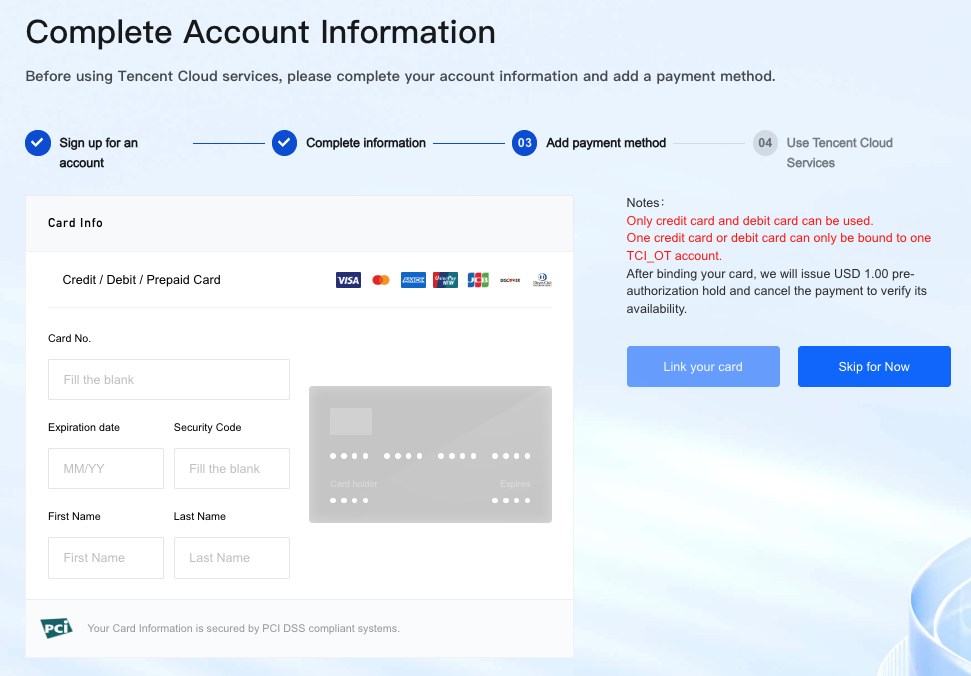
Enter your card information correctly to complete the card binding. Seven types of credit cards/debit cards/prepaid cards are supported: VISA, MasterCard, AMEX, UnionPay, JCB, DISCOVER, and Diners Club.
Note:
During the bank card binding process, the system will issue a 1.00 USD pre-authorization on your bound bank card to verify its validity. Upon successful verification, the bank card will be added, and the pre-authorization will be automatically canceled. Generally, the pre-authorization will be canceled, and the amount will be refunded within 1 to 5 business days.
Tencent Cloud does not support virtual cards or gift cards, and it does not support binding corporate accounts. Some card brands may not support debit cards. If you cannot complete the binding, we recommend that you use a different new card.
NICEPAY payment service is available to users in South Korea. The supported types of cards include BC card, KB Kookmin card, KEB Bank card, SAMSUNG card, SHINHAN card, HYUNDAI card, LOTTE card, HANMI card, CITI card, NH card, SUHYUP card, SHINHYUP card, WOORI card, HANA SK card, KWANGJU card, JEONBUK card, JEJU card, KDB Capital card, Post card, Savings Bank card, MG card, KDB Bank card, Kakao Bank card, and KBank card.
For users who register after September 24, 2026, the system will automatically enable the auto repayment feature by default after binding a default payment method. To learn more about auto repayment, see Auto-payment.
Bantuan dan Dukungan
Apakah halaman ini membantu?
Anda juga dapat Menghubungi Penjualan atau Mengirimkan Tiket untuk meminta bantuan.
masukan