Connecting to CloudApp via MCP
ダウンロード
フォーカスモード
フォントサイズ
This document describes how to use the MCP Server provided by CAR to enable your AI Agent to directly operate applications running on CAR concurrent instances: it can call the MCP tools exposed by the applications themselves, or operate the application UI like a real user through common interaction tools such as screenshots, mouse, and keyboard.
Prerequisites
1. You have activated the CAR service and completed application upload, project creation, and concurrent instance purchase in Getting Started.
2. You have obtained the SecretId and SecretKey in API Key Management.
3. Your Agent framework supports MCP remote services (Streamable HTTP transport) and allows custom request headers, such as WorkBuddy, CodeBuddy, Cursor, or self-developed Agents based on the official MCP SDK.
Use Cases
Connect to the Blender CloudApp through MCP. The Agent understands the input script and automatically builds geometry, arranges scenes, sets character actions and camera movements in Blender, and finally renders a white-model preview video. Then, the video generation model uses the white-model video as a reference to render the complete final video.
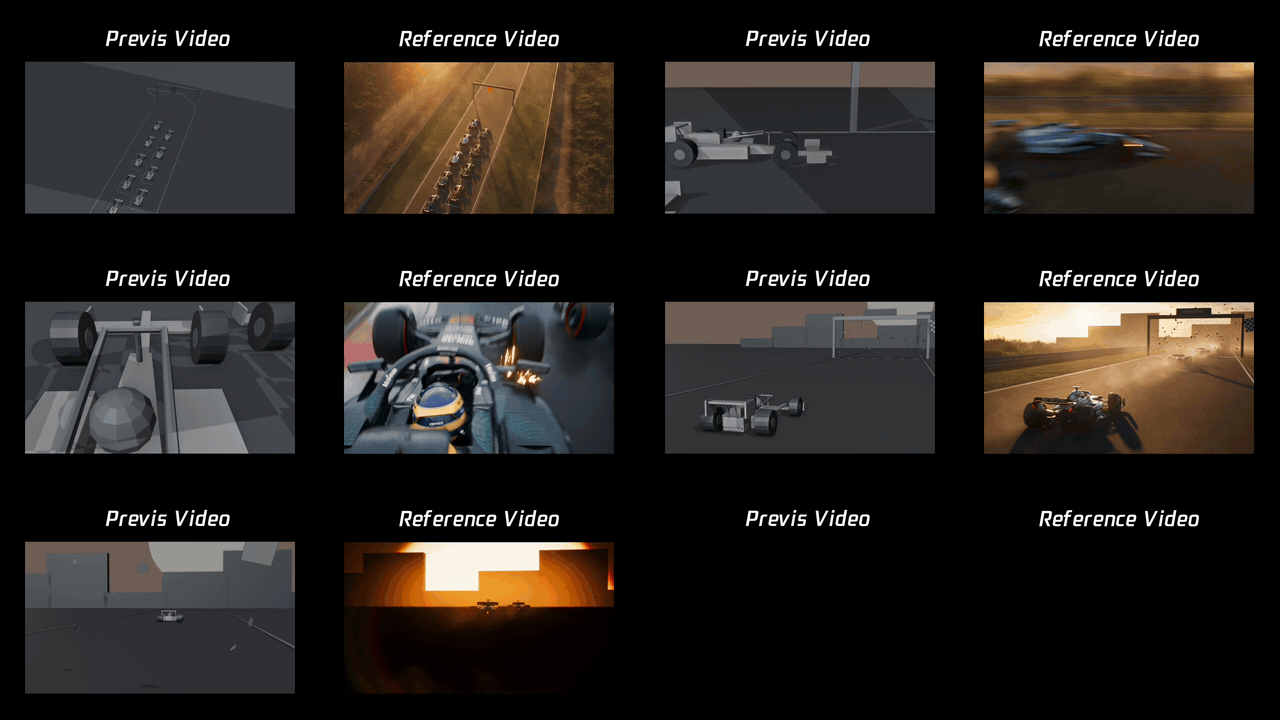
Scenarios
Scenario | Description |
Agent automated operations | Deploy applications and runtime environments in the cloud. All devices can be called by the Agent. After understanding natural language and device screens, the Agent automatically breaks down tasks and operates software, covering multiple scenarios such as open source software creation and industrial-grade software, and completes tasks such as scenario editing. |
Overall Architecture
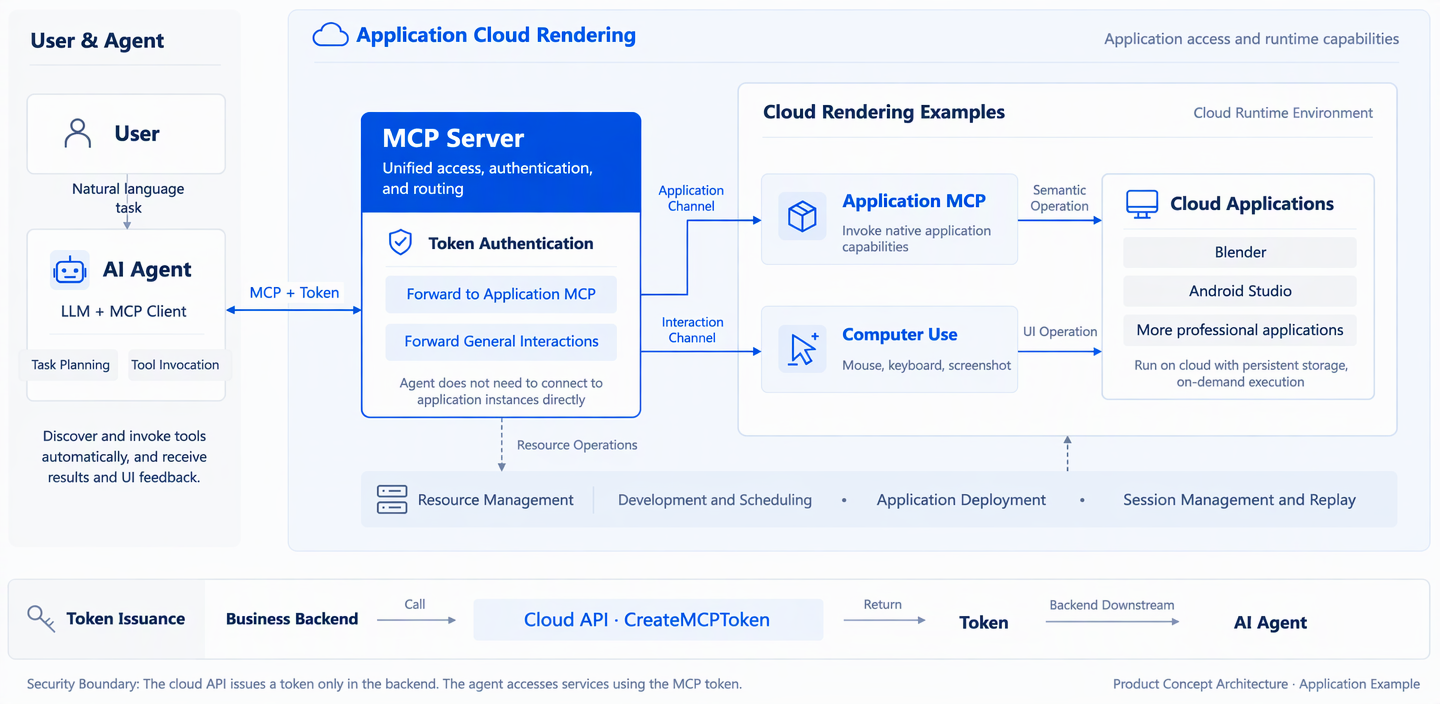
The architecture is shown in the following figure:
Basic Concepts
Concept | Description |
MCP | Model Context Protocol, an open protocol for AI agents to call external tools. An Agent acts as an MCP Client, discovering tools through tools/list and calling tools through tools/call. |
Cloud rendering MCP Server | A public network MCP service provided by CAR that Agents directly connect to. It routes requests to corresponding concurrent instances and exposes two types of tools: application MCP tools and general interaction tools. |
Application MCP | An MCP Server started by the application within a concurrent instance exposes business semantic tools. The cloud rendering MCP Server is responsible for proxying them to the Agent. |
General interactive tools | Built-in platform tools available to all applications: screenshots, mouse movement/click/drag/scroll, keyboard key press/text input, and more, without requiring any application modifications. |
MCP Token | An authentication credential for Agents to access the cloud rendering MCP Server. It is created by the business backend through the TencentCloud API CreateMCPToken and can be bound to a specific user session (UserId). |
Attention:
The Agent holds only the MCP Token and never holds the TencentCloud API keys (SecretId / SecretKey). Concurrent application, session creation, and Token issuance should all be completed in the business backend.
Operation Steps
Step 1: Calling CreateMCPToken to Create an Access Credential
Call CreateMCPToken through the TencentCloud API to issue a Token for this session.
Input parameters (example):
Parameter Name | Required | Type | Description |
ExpireSeconds | Yes | Integer | Token expiration time. |
UserId | No | String | User ID. Use this UserId to operate cloud rendering concurrent resources. |
TokenName | No | String | Token name (note). |
Output parameters (example):
Parameter Name | Type | Description |
Token | String | MCP access credential. |
TokenId | String | TokenId. |
RequestId | String | Unique request ID, provided when issues are located. |
Step 2: Connecting an Agent to the Cloud Rendering MCP Server
The CAR MCP Server uses Streamable HTTP transport, with authentication performed through the request header
Authorization: Bearer <Token>.{"mcpServers": {"tencent-car": {"type": "streamableHttp","url": "https://car-mcp-server.crtrcloud.com/mcp","headers": {"Authorization": "Bearer <Token returned by CreateMCPToken>"}}}}
Note:
This method is suitable for debugging. In production environments, Tokens have a validity period and are bound to sessions, so they should be dynamically issued by the business backend rather than hardcoded in configuration files.
Practice: Prioritizing MCP with Keyboard and Mouse as a Fallback
Dimension | Application MCP | Screenshot + Keyboard and Mouse |
Determinism | High, directly invokes business logic. | Medium, relying on visual recognition and coordinates. |
Speed/Cost | A single call completes the task. | Multiple rounds of "screenshot-reasoning-operation" result in high Token consumption. |
Applicable scenarios | High-frequency, core operations that require result assertion. | Long-tail operations, existing applications, and visual verification. |
FAQs
What Should I Do If Authentication Fails When Calling a Tool?
Check that the request header format is
Authorization: Bearer <Token>, and confirm that the Token has not expired.What Should I Do If the Mouse Click Position Does Not Match the Expected Position?
Confirm that the coordinates are based on the latest screenshot. Check whether the application is in full screen and whether DPI scaling is enabled. Check whether the screen has changed after the screenshot and before the click.
What Are the Differences Between Applying MCP and Data Channels?
The data channel is used for custom message passthrough between the terminal SDK and cloud applications, which requires the terminal to integrate the SDK. Application MCP is designed for AI Agents and uses the standard MCP protocol, allowing Agents to invoke it without integrating the SDK. Both can be used simultaneously.
Is There an Additional Charge for Agents Using MCP?
Concurrency is billed normally according to the billing instructions, and it is occupied for the duration of the session.
フィードバック