Purchase Guide
ダウンロード
フォーカスモード
フォントサイズ
WAF covers both Chinese mainland and non-Chinese mainland regions, and supports two billing modes: yearly/monthly subscription and pay-as-you-go.
This document describes how to purchase WAF instances under the two billing modes, and how to scale specifications for yearly/monthly subscription instances.
Yearly/Monthly Subscription
Purchasing a WAF Instance
1. Go to the WAF purchase page and select basic configurations such as instance type, region, and plan based on actual requirements.
Parameter Name | Description | |
Billing Mode | | Select Yearly/Monthly subscription. |
Instance type | | WAF provides two product forms: SaaS WAF and Cloud Native WAF. For specific differences, see Product Classification. |
Region | | The region to which the WAF belongs. For details about the regions supported by SaaS WAF and Cloud Native WAF, see Supported Regions. Note: Select a WAF cluster region close to the origin server. The region cannot be changed after selection. |
Package | Premium Edition | Customized protection for small and medium-sized ordinary business sites and medium and large-sized official websites. |
| Enterprise Edition | Suitable for large and extra-large business websites and complex business sites. |
| Ultimate Edition | Customized protection for business sites. |
| Exclusive Edition | Customized protection for large and extra-large business websites and complex business sites. Note: |
2. Select value-added features for WAF based on actual requirements:
Add-ons Name | Add-ons Configuration Description |
BOT management | Effectively identify and classify friendly and malicious bot programs to address issues such as resource consumption, information leakage, and ineffective marketing caused by malicious BOT crawling. After activation, the Business Expansion Package and elastic billing will be increased. For details, see Billing Overview. |
API security | To comprehensively discover and organize API assets, facilitate API asset analysis, and mitigate risks of sensitive data leakage. After activation, the Business Expansion Package and elastic billing will be increased. For details, see Billing Overview. |
LLM security | Fully support detecting and intercepting large model computing power misuse, prompt content attacks, sensitive information, and data leakage risks. Enable with a monthly subscription package. Excess usage after the monthly package is exhausted will be billed based on usage. For details, see Billing Overview. |
Note:
The value-added features supported by different specifications vary. For specific supported features, refer to the information displayed on the Purchase page.
3. Select extended configurations for WAF based on actual requirements:
Extended Configuration Name | Extended Configuration Description |
Extra domain package | A domain package includes 10 domain protections (including 1 primary domain and 9 subdomain protections under that primary domain). Up to 500 extension packs can be purchased at a time. |
Extra capacity package | If the request or bandwidth peak of the accessed service exceeds the default specification of the package edition, you can supplement the capacity by purchasing a business expansion pack or enabling elastic billing. Each business expansion pack supports an additional 1000 QPS service peak and 25 Mbps bandwidth peak. Note: After BOT management or API security value-added capabilities are enabled, the unit price of the Extra capacity package will increase accordingly. For details, see Billing Overview. |
Hybrid cloud node | The configurable range is 1-1000 nodes. For each additional node, 5000 QPS of business protection is added to the local cluster by default, and the local cluster is extended with 10 domain packages. Note: Only cloud-native WAF instances with the Enterprise Edition or above support purchasing hybrid cloud nodes. One hybrid cloud node is included by default upon purchase. To use the hybrid cloud management feature, submit a ticket to apply for purchasing additional hybrid cloud nodes. When the number of hybrid cloud nodes > 2, the console automatically enables the hybrid cloud management feature. |
Elastic protection | If there are short-term business activities or unexpected abnormal peak traffic causing an increase in service QPS or bandwidth peaks, it is recommended that you enable elastic service QPS and bandwidth billing. After enabling, postpaid billing for exceeded QPS or bandwidth is supported to prevent instances from entering sandbox mode or bandwidth throttling due to overusage, ensuring normal business operations. Note: If both BOT management and API security are enabled, the unit price for elastic billing will increase accordingly. For details, see Billing Overview. |
Exclusive IP | Exclusive IP resources can be allocated to specific domains to meet customized requirements for business stability, network performance, and resource exclusivity. Exclusive IP does not guarantee a fixed VIP, and each enable or disable operation may result in VIP address changes. Note: Only SaaS WAF supports Exclusive IP. To enable this feature, submit a ticket or contact your dedicated account manager to apply for purchase. |
Auto-renewal | After selecting, if the account balance is sufficient, automatic monthly renewal will be performed upon expiration. |
Instance name | Customize a name for the WAF instance. The name should not exceed 60 characters and can only contain letters, numbers, underscores (_), hyphens (-), or periods (.). If left blank, the system will automatically generate one. |
Log storage package | The security log service package provides 1 TB of storage capacity and supports access log search and download for up to 184 days. If the log volume exceeds 1 TB, only the service within the 1 TB capacity is guaranteed. Click Activate now or Upgrade now to go to the activation or upgrade page and complete the configuration. |
Log shipping | After the target delivery configuration is enabled, you can enable the access log shipping capability for domain names. Click Activate now to go to the activation page and complete the configuration. Note: |
Note:
The extended configurations supported by different specifications vary. For specific supported features, refer to the information displayed on the Purchase page.
4. Select the required duration for WAF based on actual needs.
Note:
Duration:
Advanced Edition: 3 months, 6 months, 1 year, 2 years, 3 years, 5 years.
Enterprise Edition, Ultimate Edition, Exclusive Edition: 1 month, 2 months, 3 months, 6 months, 1 year, 2 years, 3 years, 5 years.
To learn about detailed configuration instructions and pricing information, see Billing Overview.
5. After configuration is completed, click Buy now. After payment is made, you can complete the purchase of the instance package.
Scaling a WAF Instance
Add-ons Page
Take API security as an example. If you did not select API security when purchasing the WAF instance, you can purchase this value-added configuration on demand. The same applies to the purchase of other value-added configurations such as BOT Management:
1. Log in to the WAF console and choose API Security in the left sidebar.
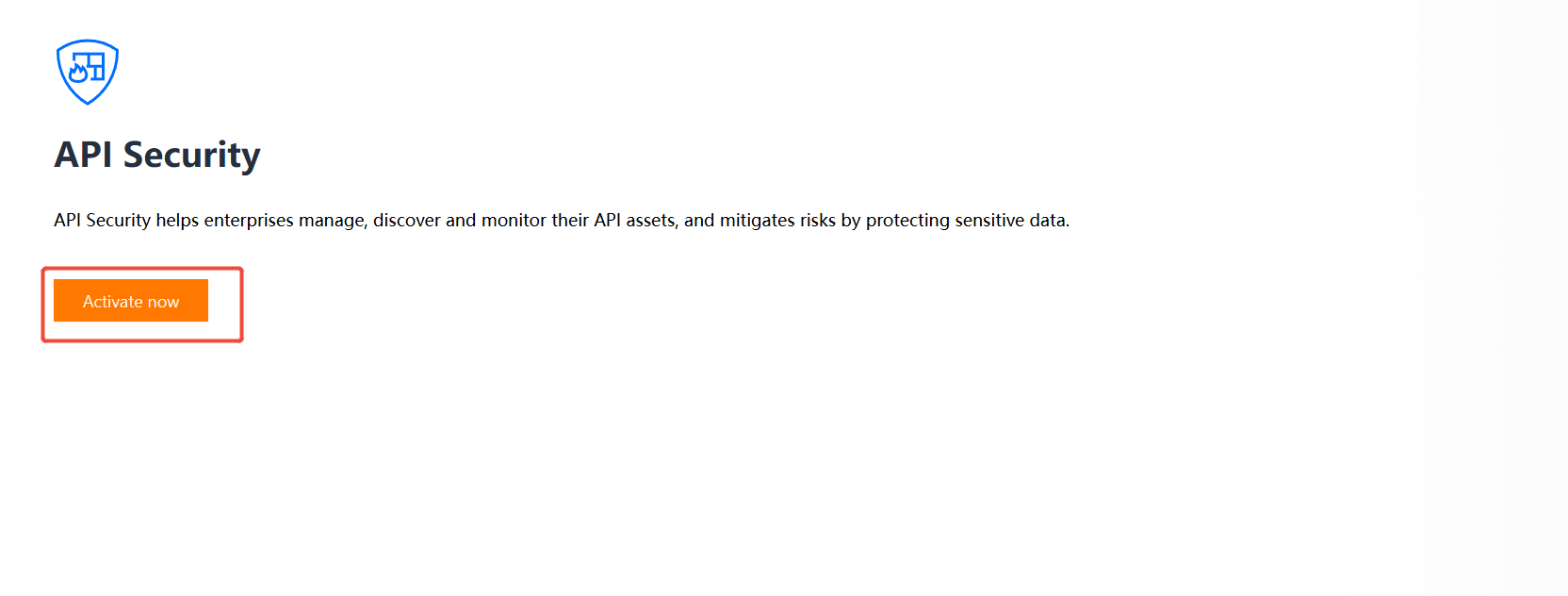
2. On the API Security page, click Activate Now.
3. Based on your requirements, select the appropriate protection configuration.
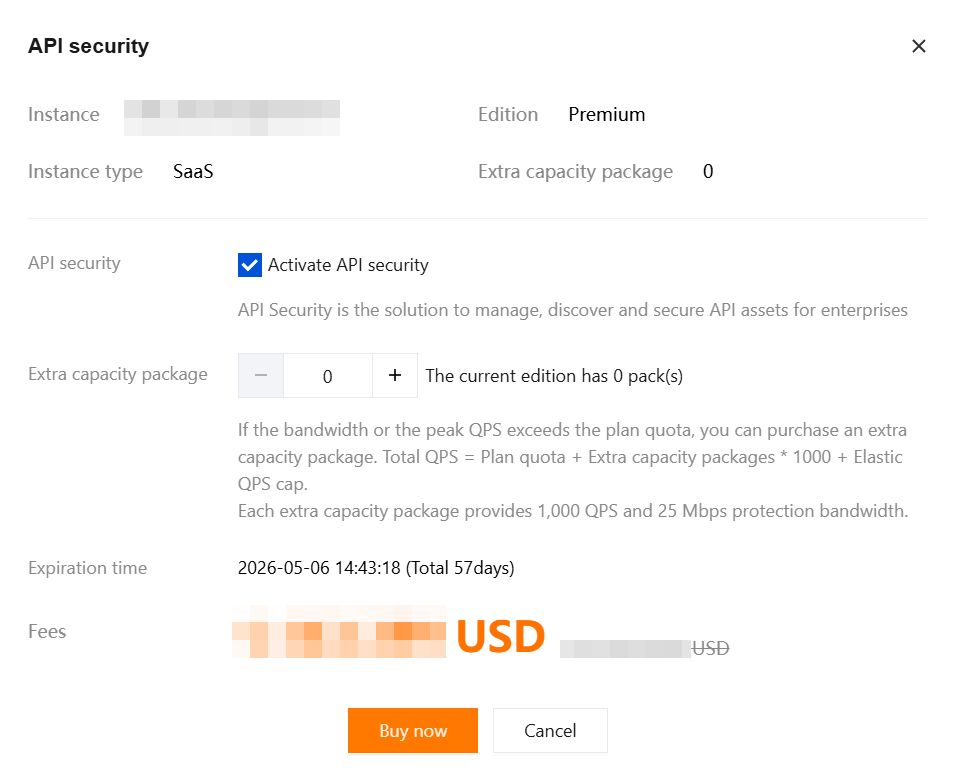
Note:
The value-added features supported by different specifications vary. For specific supported features, refer to the information displayed on the Purchase page.
4. After configuration is completed, click Buy now. After payment is made, you can complete the purchase of the value-added configuration.
Instance Page
1. Log in to the WAF console and choose Access Management > Instance Management in the left sidebar.
2. On the Instance Management page, select the target instance and click More. For details about related configurations, see Add-ons Table and Extended configuration Table.
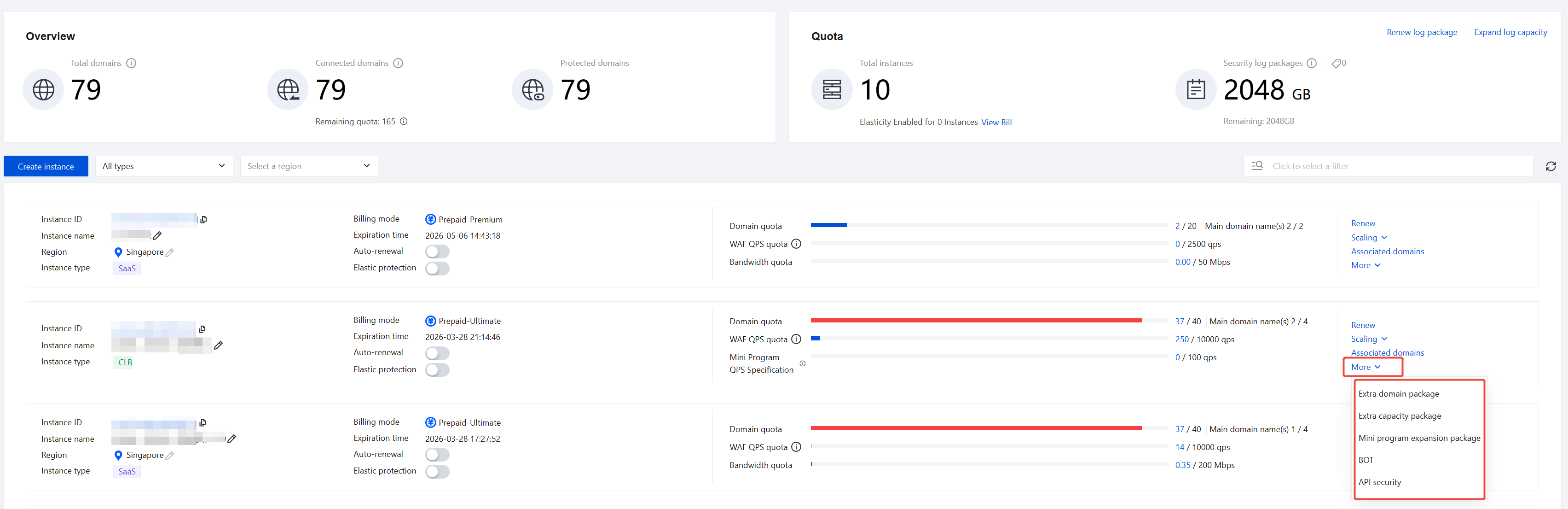
3. Click the configuration that requires scaling or value-added features to go to the purchase page for configuration.
4. After configuration is completed, click Buy now. After payment is made, you can complete the purchase of the value-added configuration or scaling configuration.
Pay-As-You-Go
1. To purchase a pay-as-you-go instance, contact your account manager through Pre-Sales Consultation to apply for activation. After activation, go to the WAF purchase page and select basic configurations such as Instance Type and Region based on your actual requirements.
Parameter Name | Description |
Billing Mode | Select Pay-as-you-go. |
Instance type | WAF provides three product forms: SaaS, Cloud Native, and SDK. For details about the differences between SaaS WAF and cloud-native WAF, see Product Category. SDK-based WAF supports only LLM security protection and is suitable for SDK/API business access scenarios. |
Region | The region to which the WAF instance belongs. For details about the regions supported by SaaS WAF and Cloud Native WAF, see Supported Regions. |
2. After confirming the basic configuration, select extended configurations as needed:
Extension Configuration Name | Extension Configuration Description |
Sandbox threshold | Within the same natural day, when the peak service QPS of an instance exceeds the sandbox threshold for a cumulative total of 3 times (inclusive), the instance enters the sandbox isolation status and SLA is no longer guaranteed. For details, see Sandbox Isolation Status. |
3. Review the configuration summary and instance list. After confirming that they are correct, click Buy now. After payment is made, you can complete the purchase of the instance package.
Note:
Following Steps
After completing the WAF purchase, you can see Quick Start to get started with SaaS WAF and cloud-native WAF.
フィードバック