Rule Engine
ダウンロード
フォーカスモード
フォントサイズ
This section describes how to configure protection rules through WAF to protect against web attacks.
Background Information
The WAF rule protection engine provides expert rule sets based on the accumulated web threats and threat intelligence, automatically protecting against OWASP top 10 attacks. Currently, it protects against 25 common types of web attacks, including SQL injection, XSS, command injection, server-side request forgery, and Trojan backdoors. The newly upgraded rule engine supports more granular rule classification management and more refined rule operation capabilities. Optimizations include:
The rule engine protection latency is reduced, optimizing the access experience;
The rule engine classification is more detailed, which is beneficial for refined security operations;
Rule allowlists are more granular, supporting scheduled and periodic effectiveness.
Operation Step
Rule Management
1. Log in to the WAF console, and at the top of the left sidebar, switch the console to the region where the instance is located (Chinese mainland/non-Chinese mainland).
2. In the left sidebar, choose Protection Policy > Basic Security.
3. On the Basic Security page, select the target domain name and click WEB security. The WEB Security page displays the status of different attack type rulesets in a consolidated manner and provides a unified configuration management feature, as detailed below:
Rule Update Mode: Controls how new version rules take effect after release, supporting the following three modes:
Enable: New rules take full effect, and corresponding protection actions (Blocking or Observation) are executed when matched rules are triggered.
Disable: New rules do not take effect. When a rule is matched, no action is taken, nor are attack logs recorded.
Observe: New rules run in observation mode. When rules are matched, no protection action is executed, but attack logs are recorded to facilitate evaluation of the new rules' impact.
Note:
Rule update mode switching takes effect in real time with a delay of no more than 1 minute.
If the current domain name has applied a batch protection template, the rule update mode remains in alignment with the template and cannot be modified separately.
Number of enabled rules: Displays the total number of rules in the corresponding attack type ruleset and the number of currently enabled rules. This helps users understand the current security protection status and adjust rule activation as needed. All rules are enabled by default.
Action: Supports one-click selection of Observation or Blocking mode to improve management efficiency. Blocking mode is the default.
Protection Level: Supports selecting rules of different protection levels, including Loose, Normal, Strict, and Super Strict. The Normal level includes Loose rules, the Strict level includes Normal and Loose rules, and the Super Strict level includes all rules. The default level is Strict.
On/Off: Allows users to configure with one click whether specific attack type rulesets take effect, enabling rapid security policy adjustments on demand.
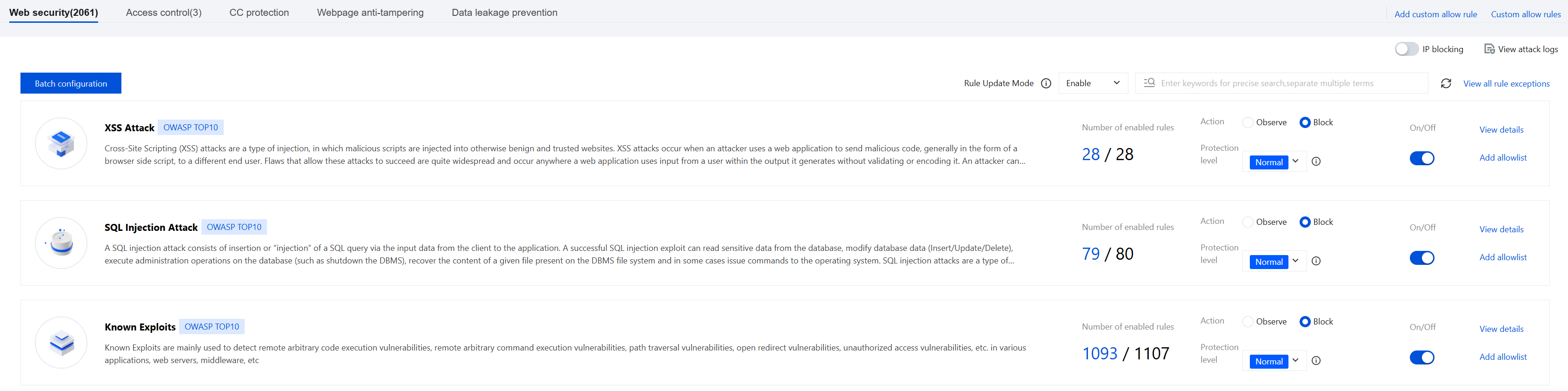
4. Click Batch configuration in the upper-left corner to select rulesets and configure protection modes and levels in batches as needed. Click Apply to complete the configuration successfully.

5. Click View details to view the corresponding attack type ruleset information and set the status of a single rule, supporting three states: disable, enable, and observation only.
The Observation Only state means only attacks triggering rules are delivered to attack logs without executing other actions. The status of individual rules takes precedence over subtype and global settings, locking upon configuration; it can be manually unlocked, after which it synchronizes with subtype or global settings. All rules are enabled by default.
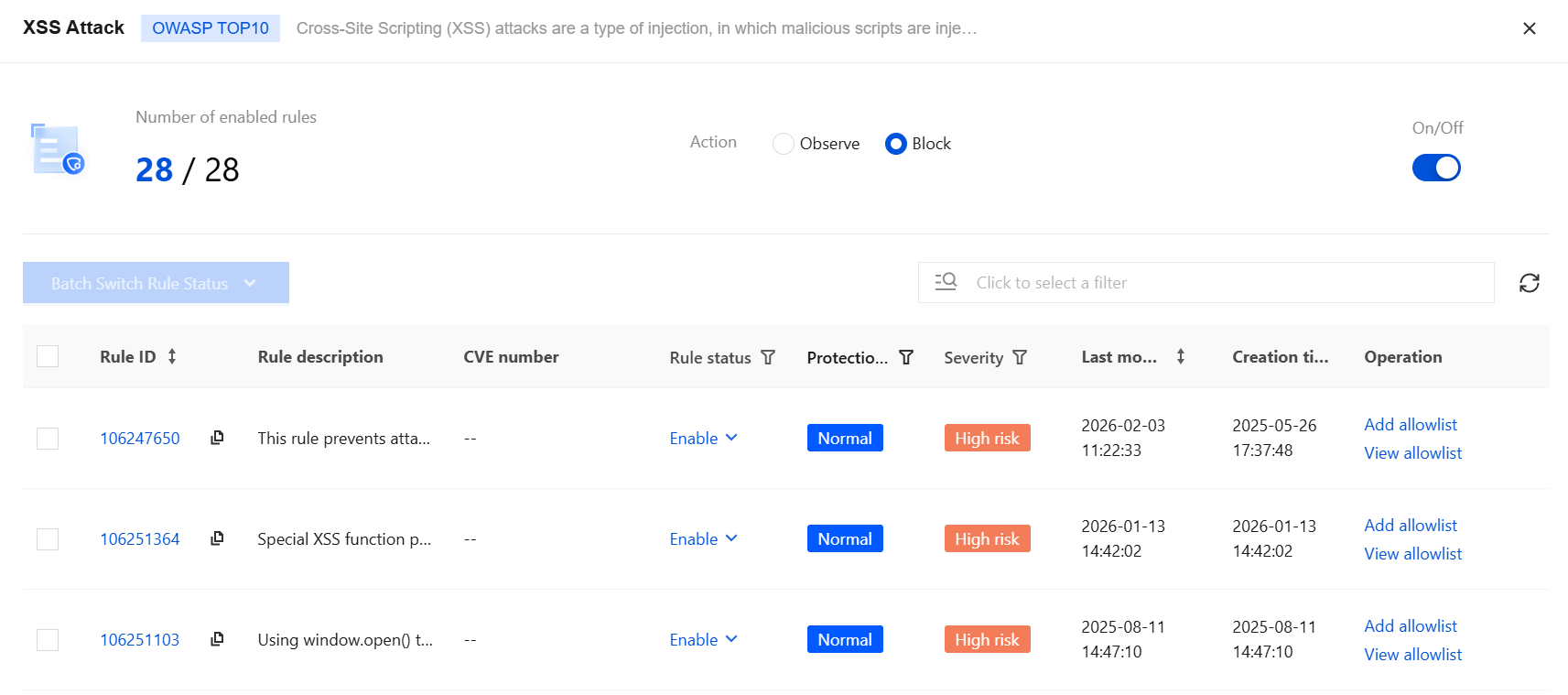
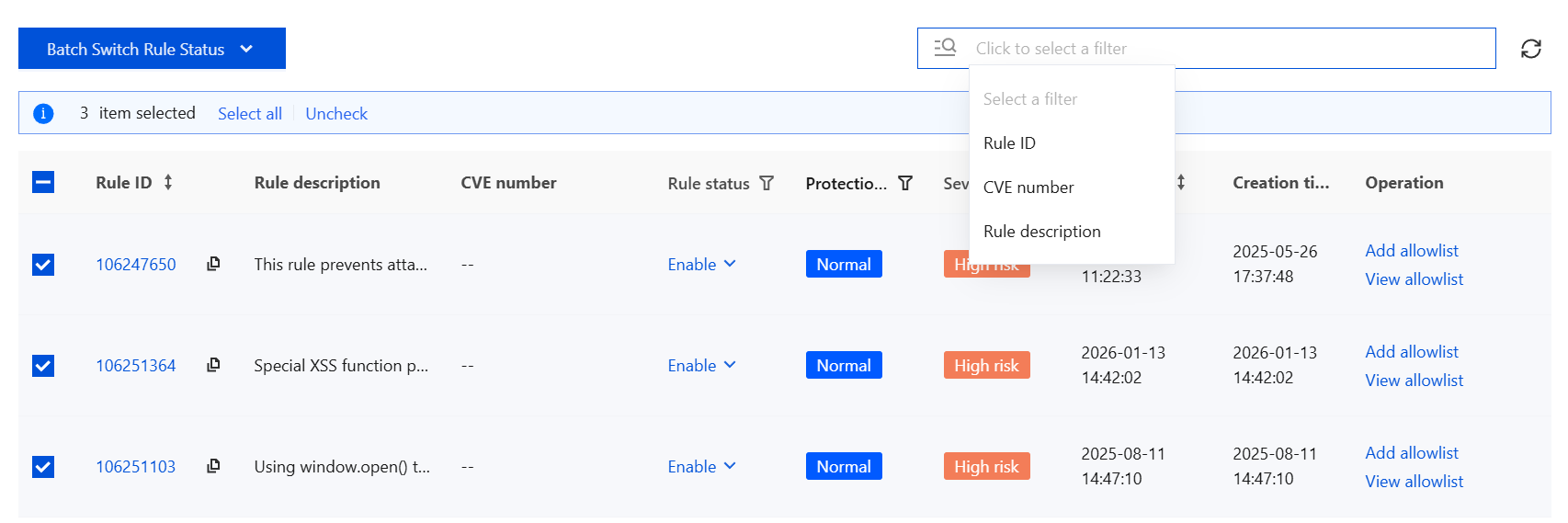
6. Users can enter "Rule ID, CVE number, Rule description" to search for rulesets, view and manage specific rules. While also being able to click Batch Switch Rule Status in the upper-left corner to modify the status of multiple rules at once.
Preset Rule Exception or False Positive Handling
View Rule Category
1. Log in to the WAF console, and at the top of the left sidebar, switch the console to the region where the instance is located (Chinese mainland/non-Chinese mainland).
2. In the left sidebar, choose System Management > Web Rule Library.
3. In the "Rules" tag on the Web Rule Library page, descriptions of attack classifications protected by the current WAF and rule update dynamics can be viewed.
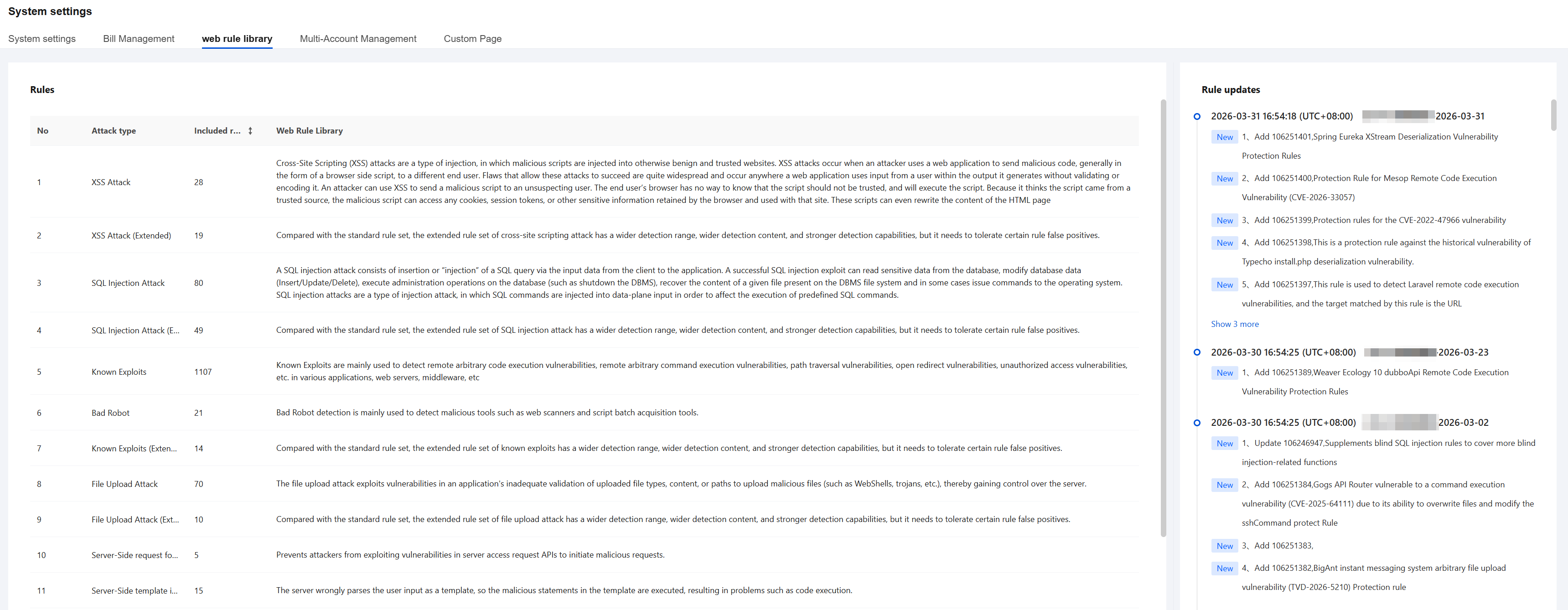
The attack classifications supported by the current WAF for protection are as follows:
Attack Classification | Attack Description |
XSS attack | Cross-site scripting (XSS) is an injection attack where malicious code (typically in the form of client-side scripts) is delivered to end users via a Web application. The end user's browser cannot recognize that the script is untrusted and will execute it, potentially leading to sensitive information leakage or tampering with HTML page content. |
XSS Attack (Extended) | |
SQL injection attack | SQL injection attacks work by inserting SQL queries into client input data, affecting the execution of predefined SQL commands. This may lead to sensitive data leakage, tampering with database records, performing database management operations, or issuing commands to the operating system. |
SQL Injection Attack (Extended) | |
Known weakness | Primarily used to detect vulnerabilities such as remote arbitrary code execution, remote arbitrary command execution, path traversal, open redirect, and unauthorized access in applications, Web servers, middleware, and so on. |
Known Weakness (Extended) | |
File Upload Attack | Exploits vulnerabilities in lax validation of uploaded file types, content, or paths to upload malicious files (such as WebShells, Trojans, and so on), thereby gaining control of the server. |
File Upload Attack (Extended) | |
Server-Side Template Injection Vulnerability | Server-side template injection vulnerabilities occur when user input is incorrectly parsed as templates, leading to the execution of malicious statements, which may result in consequences such as code execution. |
Server-Side Template Injection Vulnerability (Extended) | |
Unauthorized Access Vulnerability | Some management backends or debug pages do not perform permission verification on requesting users, and attackers may exploit system features to cause sensitive information leakage or code execution. |
Unauthorized Access Vulnerability (Extended) | |
Trojan Backdoor Attack | WebShell is a malicious script implanted on a Web server. Attackers upload WebShell scripts to the server by exploiting file upload vulnerabilities or other security flaws, enabling them to execute commands, steal data, or establish a foothold for persistent attacks. |
Trojan Backdoor Attack (Extended) | |
XML Injection Attacks | XXE attacks exploit vulnerabilities in XML parsers when external entities are processed. By crafting malicious XML documents, attackers can read local server files, initiate remote requests, or cause denial of service. |
XML Injection Attacks (Extended) | |
Non-Compliant Protocol | Attackers carry out attacks by constructing malformed HTTP request packets. |
Non-Compliant Protocol (Extended) | |
Illegal Access to Core Files | Attackers bypass application restrictions by constructing special paths or parameters to read or download arbitrary files on the server (such as configuration files and database credentials). This vulnerability is often caused by unvalidated user input paths. The protection scope includes, but is not limited to, detecting behaviors that may lead to sensitive information leakage, such as probing for SVN, Git sensitive files, database files, or other accessible paths. |
Illegal Access to Core Files (Extended) | |
Command Injection Attacks | Attackers craft malicious inputs (such as system commands or code) to exploit vulnerabilities in how target programs handle user input. This causes the system to erroneously execute injected code or commands, potentially leading to data leakage, service disruption, or even complete system compromise. |
Command Injection Attacks (Extended) | |
Server-Side Request Forgery | Prevents attacks where attackers exploit flaws in server request interfaces to initiate malicious requests. |
Malicious Bot Detection | Primarily used to detect malicious tools such as Web scanners and script batch retrieval tools. |
LDAP Injection Attacks | Attackers insert malicious LDAP query statements into client input data, tampering with predefined LDAP query logic. This may compromise sensitive information in directory services through unauthorized access, and could even modify or delete directory data. |
Note:
Extended rule sets for each attack type offer broader coverage, wider scope, and enhanced detection capabilities compared to standard rule sets, but require tolerance for a certain level of false positives.
フィードバック