A WAF instance enters the sandbox isolation status when the service QPS continuously exceeds the specification. This document describes the trigger conditions for isolation, the impact on services, and how to lift the isolation.
Yearly/Monthly Subscription
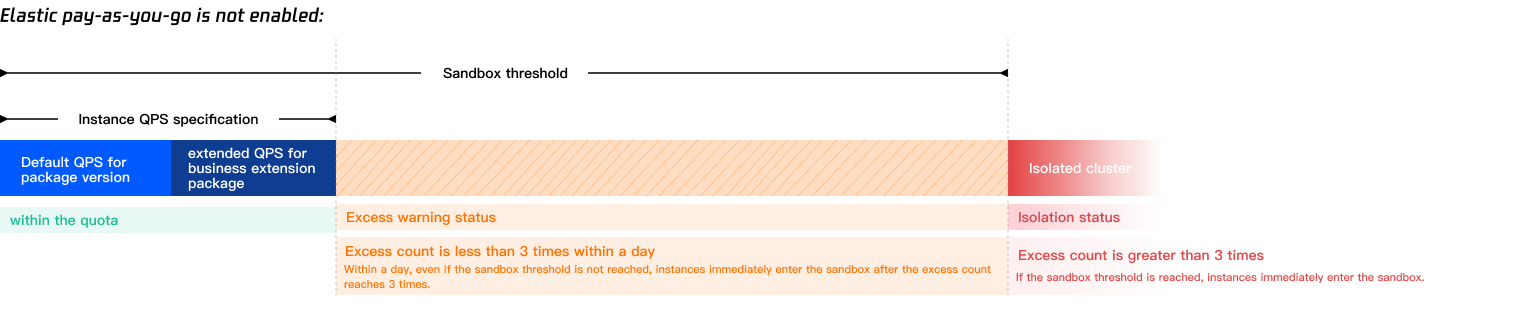
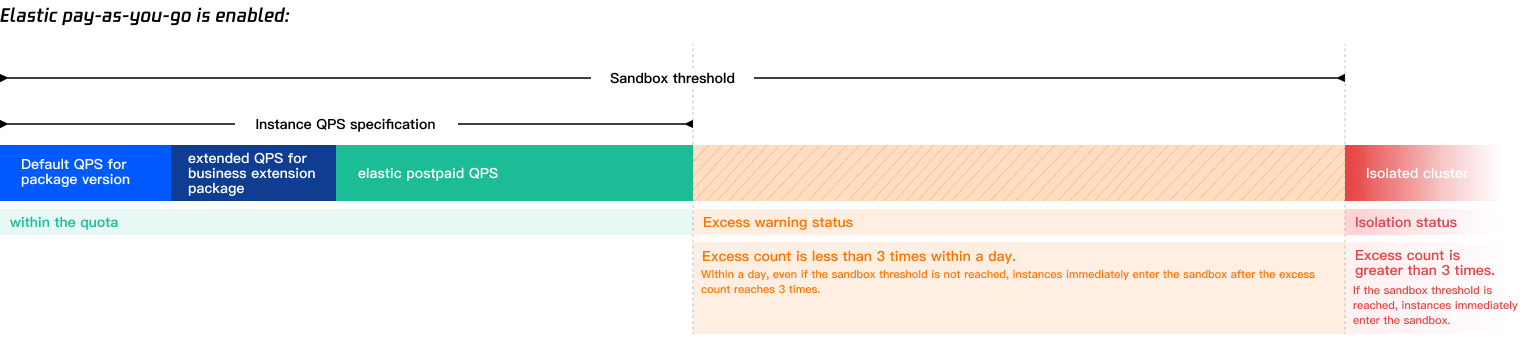
Within the same calendar day, if the peak service QPS of an instance exceeds the instance specification value but does not reach the sandbox isolation threshold for a total of 3 times (inclusive), or if the peak QPS exceeds the sandbox isolation threshold once (inclusive), the instance will immediately enter the sandbox isolation status and will no longer be covered by the SLA.
1. Overview of the Isolated Cluster
When the peak QPS of an instance exceeds the specification value, WAF schedules the instance to run in an independent isolated cluster, separate from normal cluster resources.
Instance QPS Traffic Specification Value
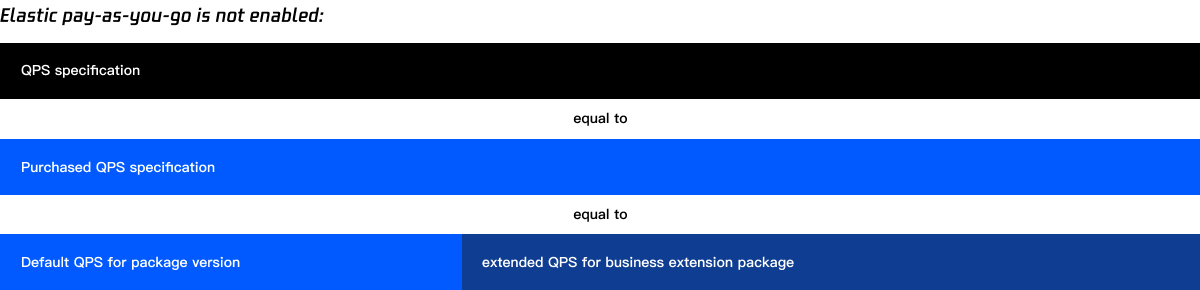
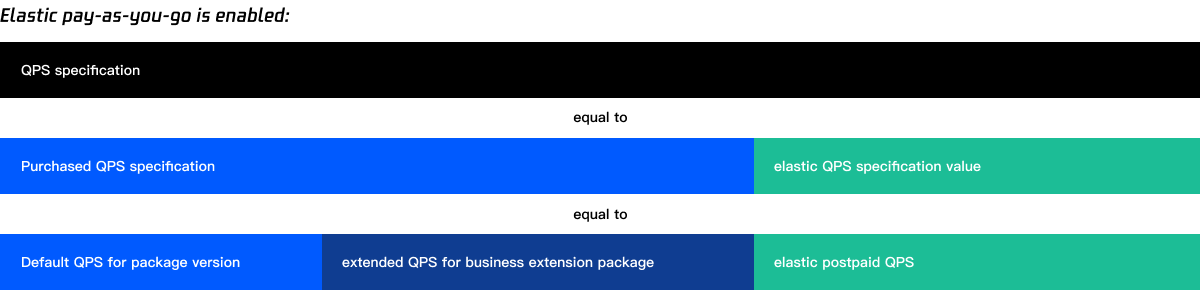
The instance QPS traffic specification value is the sum of the QPS specification value of the edition, the extended QPS specification value, and the elastic postpaid QPS value. It is calculated as follows:
Instances with Elastic Postpaid Billing Disabled
Instance QPS specification value = purchased QPS specification value = default QPS for the package version + extended QPS for the business extension package
Instances with Elastic Postpaid Billing Enabled
Instance QPS specification value = purchased QPS specification value + elastic QPS specification value = default QPS for the package version + extended QPS for the business extension package + elastic postpaid QPS
Sandbox Isolation Threshold
The sandbox isolation threshold is the maximum protective QPS that a WAF instance can handle in the short term under different QPS specifications. When the QPS exceeds this threshold, the instance immediately enters the isolated cluster. The calculation methods for different scenarios are as follows:
Instances with Elastic Postpaid Billing Disabled and No Custom Business Expansion Package Purchased
Instance QPS sandbox isolation threshold = purchased QPS specification value x 3
Example: If an Enterprise Edition SaaS WAF instance in a Chinese mainland region has purchased 3 extension packages, the QPS sandbox isolation threshold of the instance is (5,000 + 3 x 1,000) x 3.
Instances with Elastic Postpaid Billing Disabled and Custom Business Expansion Package Purchased
Instance QPS sandbox isolation threshold = take the maximum value among [instance QPS specification value, maximum QPS sandbox isolation threshold for the instance edition].
Maximum QPS sandbox isolation threshold for the instance edition = (default QPS specification value of the package edition + maximum extendable QPS specification value of the instance) * 3.
Example 1: If a SaaS WAF Enterprise Edition instance in a Chinese mainland region has purchased 40 extension packages after customization is applied, the instance QPS specification value = 5,000 + 40 * 1,000 = 45,000, and the maximum QPS sandbox isolation threshold for the instance edition = (5,000 + 30,000) * 3 = 105,000. The instance QPS sandbox isolation threshold = take the maximum value among [45,000, 105,000] = 105,000 QPS.
Example 2: For an Enterprise Edition WAF instance in a Chinese mainland region, you can purchase 150 extension packages after applying for customizing the number of extension packages available for purchase, the instance QPS specification value = 5,000 + 150 x 1,000 = 155,000 QPS. The maximum QPS sandbox isolation threshold for the instance version = (5,000 + 30,000) x 3 = 105,000 QPS. The final instance QPS sandbox isolation threshold = take the maximum value among [155,000, 105,000] = 155,000 QPS.
Example 3: More sample data of SaaS WAFinstanceswithout elastic postpaid enabled and with customized purchase of business expansion packs is as follows:
Region
Version
Default Purchasable Business Extension Packages
Actually Purchased Business Extension Packages
Instance QPS Specification Value
Maximum QPS Sandbox Isolation Threshold for Instance Version
Instance QPS Sandbox Isolation Threshold
Regions in the Chinese Mainland
Advanced Edition
20
30
2,500+30 x 1,000=32,500
(2,500+20 x 1,000) x 3= 67,500
67500
Enterprise Edition
30
80
5,000+80 x 1,000=85,000
(5,000+30 x 1,000) x 3= 105,000
105000
120
5,000+120 x 1,000=125,000
125000
Ultimate Edition
40
100
10,000+100 x 1000=110,000
(10,000+40 x 1,000) x 3=150,000
150000
150
10,000+150 x 1,000=160,000
160000
Non-Chinese mainland regions
Advanced Edition
5
10
2,500+10 x 1,000=12,500
(2,500+5 x 1,000) x 3=22,500
22500
Enterprise Edition
10
12
5,000+12 x 1,000=17,000
(5,000+10 x 1,000) x 3=45,000
45000
50
5,000+50 x 1,000=55,000
55000
Ultimate Edition
20
60
10,000+60 x 1,000=70,000
(10,000+20 x 1,000) x 3=90,000
90000
100
10,000+100 x 1000=110,000
110000
Note:
The maximum number of business expansion packages (including the maximum expandable QPS specification value) varies for WAF instances in different regions and editions. For details, see Package and Edition Description.
Instances with Elastic Postpaid Billing Enabled and No Custom Business Expansion Package Purchased
Example: If an Enterprise Edition WAF instance in a Chinese mainland region has purchased 3 extension packages, you can enable Elastic protection, and set the specification value to 50,000. The instance QPS sandbox isolation threshold = (5,000 + 3 x 1,000) x 3 + 50,000.
Instances with Elastic Postpaid Billing Enabled and Custom Business Expansion Package Purchased
Instance QPS sandbox isolation threshold = take the maximum value among [instance QPS specification value, maximum QPS sandbox isolation threshold for the instance version]
Maximum QPS sandbox isolation threshold for instance version = (default package version QPS specification value + maximum instance extendable QPS specification value) x 3 + elastic QPS specification value
Example 1: If an Enterprise Edition WAF instance in a Chinese mainland region has purchased 40 extension packages after customization is applied, you can enable elastic billing, and set the specification value to 50,000. The instance QPS specification value = 5,000 + 40 x 1,000 + 50,000 = 95,000, and the maximum QPS sandbox isolation threshold for instance version = (5,000 + 30,000) x 3 + 50,000 = 155,000. The instance QPS sandbox isolation threshold = take the maximum value [95,000, 155,000] = 155,000 QPS.
Example 2: If an Enterprise Edition WAF instance in a Chinese mainland region has purchased 150 extension packages after customization is applied, you can enable elastic billing, and set the specification value to 50,000. The instance QPS specification value = 5,000 + 150 * 1,000 + 50,000 = 205,000 QPS, and the maximum QPS sandbox isolation threshold for instance version = (5,000 + 30,000) * 3 + 50,000 = 155,000 QPS. The instance QPS sandbox isolation threshold = take the maximum value [205,000, 155,000] = 205,000 QPS.
Example 3: More sample data of cloud-native WAF instanceswith elastic postpaid enabled and customized purchase of business expansion packs is as follows:
Region
Version
Default Purchasable Business Extension Packages
Default Maximum Elastic QPS that Can Be Enabled
Actually Purchased Business Extension Packages
Elastic Postpaid Actually Enabled Specification Value
Instance QPS Specification Value
Maximum QPS Sandbox Isolation Threshold for Instance Version
Instance QPS Sandbox Isolation Threshold
Regions in the Chinese Mainland
Advanced Edition
40
200000
10
200000
2,500+10 x 1,000+200,000=212,500
(2,500+40 x 1,000) x 3+200,000=327500
327500
Enterprise Edition
60
300000
100
300000
5,000+100 x 1,000+300,000=405,000
(5,000+60 x 1,000) x 3+300,000= 495,000
495000
120
5,000+120 x 1,000+300,000=425,000
495000
Ultimate Edition
80
400000
100
400000
10,000+100 x 1,000+400,000=510,000
(10,000+80 x 1,000) x 3 + 400,000
=670000
670000
400000
150
400000
10,000+150 x 1,000+400,000=560,000
670000
Non-Chinese mainland regions
Advanced Edition
10
Not involved
10
Not involved
2,500+10 x 1,000=12,500
(2,500+10 x 1,000) x 3=37,500
37500
Enterprise Edition
20
12
5,000+12 x 1,000=17,000
(5,000+20 x 1,000) x 3=75,000
75000
50
5,000+50 x 1,000=55,000
(5,000+20 x 1,000) x 3=75,000
75000
Ultimate Edition
40
60
10,000+60 x 1,000=70,000
(10,000+40 x 1,000) x 3=150,000
150000
100
10,000+100 x 1000=110,000
(10,000+40 x 1,000) x 3=150,000
150000
2. Conditions for an Instance to Enter and Exit Isolation Status
Within the same calendar day, if the peak QPS of an instance exceeds the instance QPS specification value but remains below the sandbox isolation threshold for a total of 3 times (inclusive), or if the peak QPS exceeds the sandbox isolation threshold once (inclusive), the instance will immediately be placed in the isolated cluster and will no longer be covered by the SLA.
Note:
Rules for determining the number of QPS excess occurrences: WAF obtains the average QPS at each time point (10s granularity) in real time, and takes the peak value as the instance QPS peak.
If the instance QPS peak exceeds the instance QPS specification value but does not exceed the sandbox isolation threshold, it is counted as one excess occurrence. Excess occurrences within every 5 minutes are consolidated and counted as one occurrence. When the number of excess occurrences reaches 3, the instance immediately enters the isolation status.
If the instance QPS peak exceeds the sandbox isolation threshold once, the number of excess times for the day will no longer be calculated, and the instance will directly enter the isolation status.
During isolation, you can remove the instance from isolation by extending the QPS specification value: when the extended specification value exceeds the maximum service peak of the day, the isolation is automatically removed, and normal protection and SLA are restored. If the specification value is not extended, the peak service QPS must remain below the specification value for 3 consecutive calendar days before the instance can be removed from isolation.
3. Impact on the Business When an Instance Enters the Isolated Cluster
During isolation, WAF no longer guarantees the product SLA (regardless of whether the QPS exceeds the specification, service availability is not guaranteed). Domains and protected objects connected to the instance may experience anomalies such as packet loss, rate limiting, connection limiting, protection failure, abnormal log or report data, access timeout, or being routed to DDoS scrubbing or blackholing.
The system notifies users of isolation events via email, SMS, or in-site messages. Users can also view QPS excess warnings and alarm events at the top of Security Overview and Instance Management in the console.
During isolation, if the QPS specification value is extended by enabling elastic postpaid billing or purchasing business expansion packs, and the extended specification value exceeds the maximum service peak at the time of the excess on that day, the isolation status is immediately removed.
4. Viewing Instances in the Isolated Status
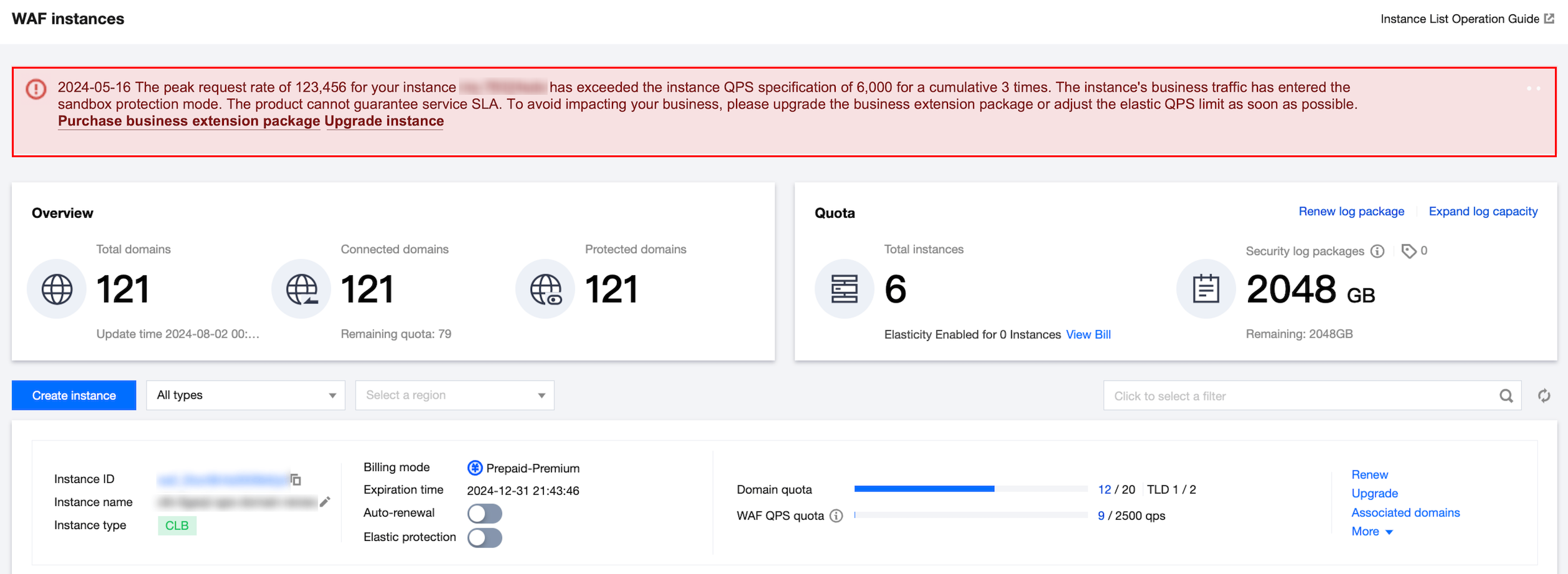
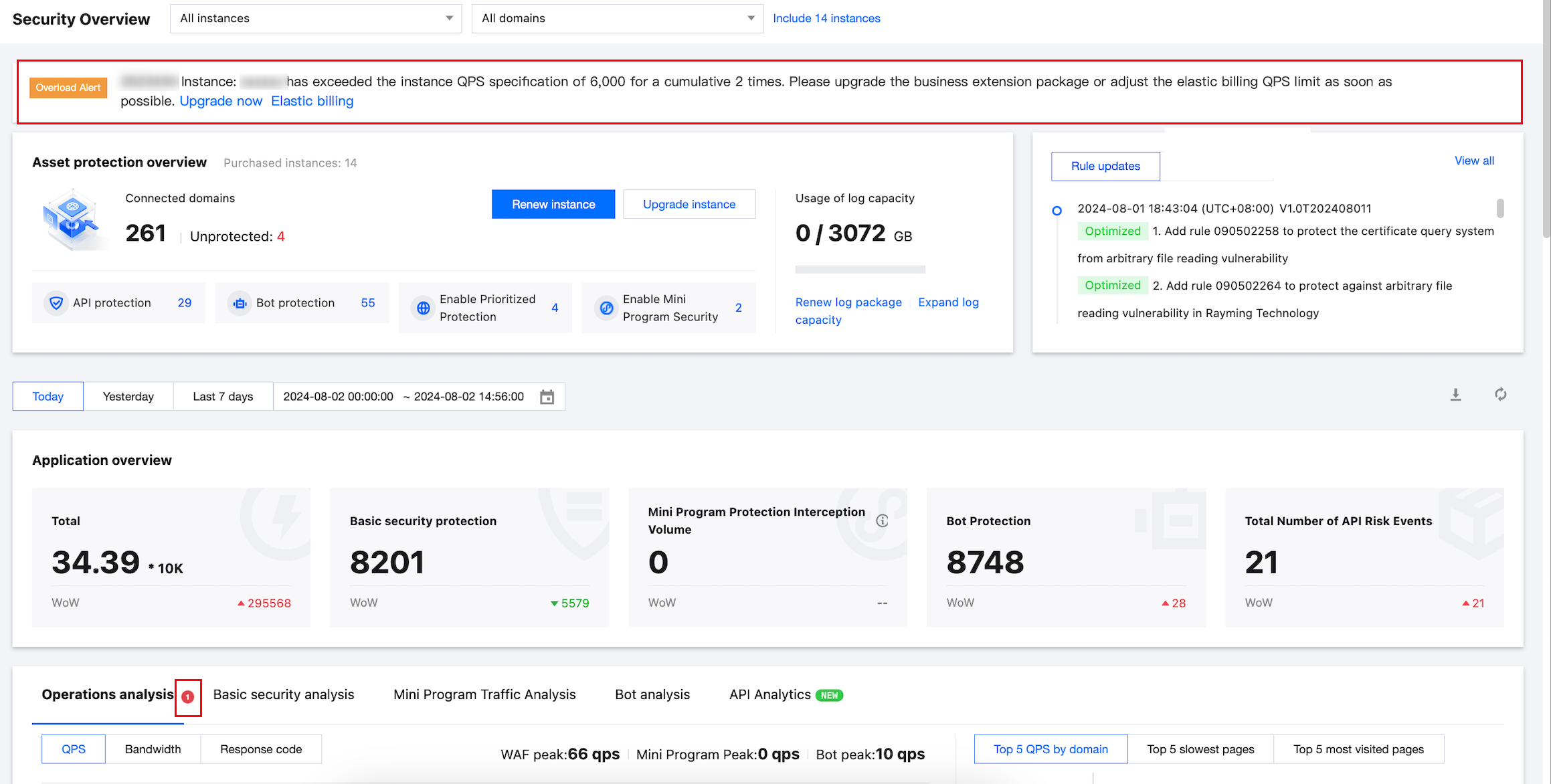
After the instance QPS exceeds the limit, an alarm event reminder is displayed at the top of the Instance Management page in the WAF console (Figure 1). Meanwhile, you can view the peak service QPS and the instance QPS specification value over the past 30 days in the specification column of the instance list. If there are excess events within 30 days, they are highlighted in red, and you can click them to go to the Security Overview page to view the QPS traffic trend of the instance over the past 30 days (Figure 2).
After the instance enters the isolation status, the Security Overview page displays an isolation status alarm. Click Business Operation Analysis to view the actual QPS usage through the QPS peak chart in the QPS area.
5. How to Lift the Sandbox Isolation Status of an Instance
After a yearly/monthly subscription instance enters the isolation status, the isolation will not be automatically removed on the same day, even if the actual QPS usage has dropped back to within the specification value. To remove the isolation, you need to extend the QPS specification value, or wait for the peak service QPS to remain below the specification value for 3 consecutive calendar days. If the instance enters isolation again due to excess after removal, you need to extend the specification value again.
The ways to remove isolation are as follows:
Upgrading the Package or Business Extension Package of the Instance to Extend the QPS Specification Value
On the Instance Management page, select the excess instance and click Upgrade > Domain Extension Pack/Business Extension Pack to upgrade the plan QPS specification, or click Extensions and Value-Added > Business Extension Pack to extend the instance QPS specification value. When the extended specification value exceeds the maximum service peak at the time of the excess on that day, the system automatically removes the isolation, restores the SLA, and resets the number of QPS excesses to zero.
Enabling Elastic Billing to Extend the QPS Specification Value
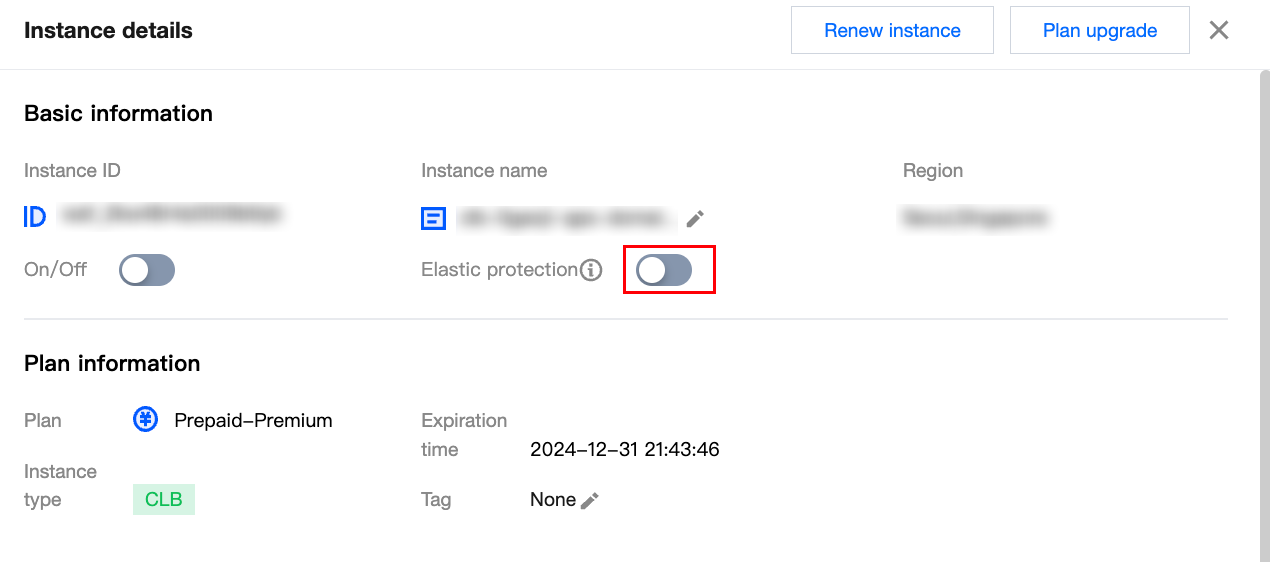
1. For instances with elastic billing disabled, you can click the target instance ID on the Instance Management page.
2. On the instance details page, click
to expand the QPS specification value.
3. After elastic billing is enabled, you can increase the elastic billing upper limit to extend the QPS specification value. When the adjusted specification value exceeds the maximum service peak at the time of the excess on that day, the system automatically removes the isolation, restores the SLA, and resets the QPS excess quantity to zero.
Pay-As-You-Go
1. Conditions for an Instance to Enter and Exit Isolation Status
Within the same calendar day, if the peak service QPS of an instance exceeds the sandbox isolation threshold for a total of 3 times (inclusive), the instance immediately enters the sandbox isolation status and will no longer be covered by the SLA.
Note:
Rules for determining the number of QPS excess occurrences: WAF obtains the QPS value at each time point in real time, and takes the peak value as the instance QPS peak.
When the instance QPS peak exceeds the sandbox isolation threshold, it is counted as one excess occurrence. Excess occurrences within every 5 minutes are consolidated and counted as one occurrence. When the number of excess occurrences reaches 3, the instance immediately enters the isolation status.
During isolation, you can remove the instance from isolation by extending the sandbox isolation threshold: when the extended threshold exceeds the maximum service peak of the day, the isolation is automatically removed, and normal protection and SLA are restored. If the threshold is not extended, the peak service QPS must drop below the threshold within 1 calendar day, and the instance will be removed from isolation on the next calendar day.
2. Impact on the Business When an Instance Enters the Isolated Cluster
During isolation, WAF no longer guarantees the product SLA (regardless of whether the QPS exceeds the specification, service availability is not guaranteed). Domains and protected objects connected to the instance may experience anomalies such as packet loss, rate limiting, connection limiting, protection failure, abnormal log or report data, access timeout, or being routed to DDoS scrubbing or blackholing.
The system notifies users of isolation events via email, SMS, or in-site messages. Users can also view QPS excess warnings and alarm events at the top of the Security Overview and Instance Management pages in the console.
If the sandbox isolation threshold is extended during isolation, and the extended threshold exceeds the maximum service peak at the time of the excess on that day, the isolation status is immediately removed.
3. How to Lift the Sandbox Isolation Status of an Instance
After a pay-as-you-go instance enters the isolation status, it will not be automatically removed from isolation on the same day, even if the actual QPS usage has dropped back to within the specification value. To remove the isolation, you need to extend the sandbox isolation threshold, or wait for the peak service QPS to drop below the threshold within 1 calendar day.