アラート通知変数
ダウンロード
フォーカスモード
フォントサイズ
アラートポリシーで通知内容、カスタムインターフェースコールバック設定、多次元分析を設定する際に、アラート通知変数を使用してアラート通知内容と多次元分析ステートメントをカスタマイズできます。これにより、受信したアラート通知がより明確かつ正確にアラート原因を説明できるようになります。
クイックスタート
アラートポリシーの設定時に、追加通知内容に以下の情報を入力します:
詳細ログ:{{.QueryLog[0][0]}}
設定完了後は下図のようになります:
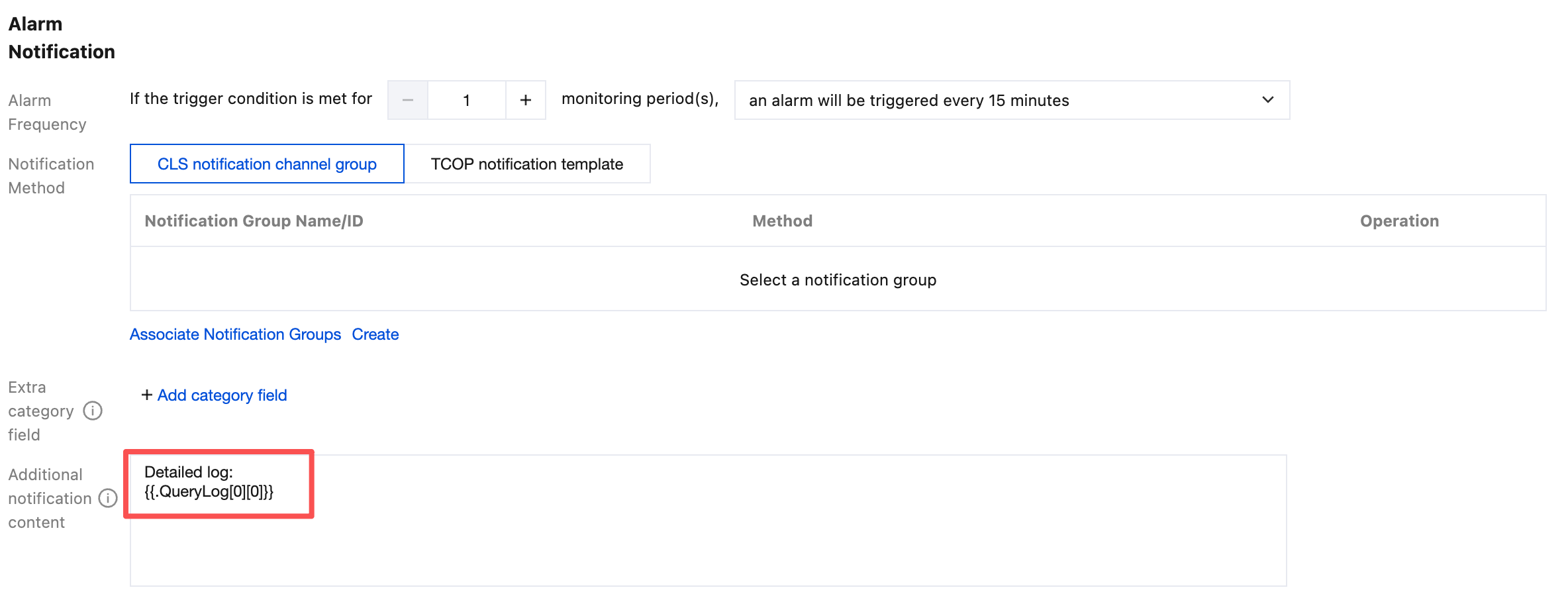
アラート通知を受信すると、追加通知内容は自動的に以下の値に置き換えられます。この値は、アラート発生時の最新の詳細ログを表します。
詳細ログ:{"content":{"body_bytes_sent":"33352","http_referer":"-","http_user_agent":"Mozilla/5.0 (Windows NT 6.2; WOW64) AppleWebKit/537.36 (KHTML, like Gecko) Chrome/30.0.1599.17 Safari/537.36","remote_addr":"201.80.83.199","remote_user":"-","request_method":"GET","request_uri":"/content/themes/test-com/images/header_about.jpg","status":"404","time_local":"01/Nov/2018:01:16:31"},"fileName":"/root/testLog/nginx.log","pkg_id":"285A243662909DE3-70A","source":"172.17.0.2","time":1653831150008,"topicId":"a54de372-ffe0-49ae-a12e-c340bb2b03f2"}
通知変数
変数リスト
変数 | 意味 | 変数値の例 | ログ配信 | 説明 |
{{.RecordId}} | アラート通知ID | 76afb409-4648-xxxx-b67a-fe350129ceb4 | いいえ | アラート通知ごとに異なるIDを使用します。 |
{{.RecordGroupId}} | アラートグループID | 52746a79-7681-495f-xxxx-2715593e625a | はい | アラートはトリガーから復旧まで、途中で通知が何回繰り返し送信されても、対応するIDはすべて同じです。 アラートポリシーでグループトリガー機能を有効にすると、同時に複数のアラートが発生する可能性があり、それぞれ異なるグループとIDに対応します。 |
{{.UIN}} | アカウントID | 100007xxx827 | はい | - |
{{.Nickname}} | アカウントのニックネーム | xx 企業 | はい | - |
{{.Region}} | リージョン | 広州 注意: ログ配信時は英語になります。例えば、ap-guangzhouです。 | はい | - |
{{.Alarm}} | アラートポリシー名 | Nginxエラーログ過多 | はい | - |
{{.AlarmID}} | アラートポリシーID | notice-3abd7ad6-15b7-4168-xxxx-52e5b961a561 | はい | - |
{{.Topic}} | 日志主题名 | nginxLog | はい | - |
{{.TopicId}} | 日志主题 ID | a54de372-ffe0-49ae-xxxx-c340bb2b03f2 | はい | - |
{{.Logset}} | 日志集名称 | demo_logset | いいえ | - |
{{.LogsetId}} | ログセットID | 1284d7c3-a7e3-4005-xxxx-ef95ca05d02e | はい | - |
{{.QueryParams}} | 実行ステートメントのクエリパラメータ | [{ "TopicId": "36c6df96-a6ad-xxxx-99ec-3f0b66dea302", 「TopicName」:「CDN Demo 访问日志日志主题_10000753xxxx」 "TopicType": "log", "Query": "* | select approx_percentile(request_time, 0.99) as p99", "grammarVersion": "cql", "StartTime": 1690956330000, "EndTime": 1690957230000, "QueryUrlPath": "/cls/search?grammarVersion=cql&queryBase64=KiB8IHNlbGVjdCBhcHByb3hfcGVyY2VudGlsZShyZXF1ZXN0X3RpbWUsIDAuOTkpIGFzIHA5OQ%3D%3D®ion=ap-chongqing&time=2023-08-02T14%3A05%3A30.000%2C2023-08-02T14%3A20%3A30.000&topic_id=36c6df96-a6ad-xxxx-99ec-3f0b66dea302" }] | はい | 配列構造です。{{.QueryParams[0]}}は1番目の実行ステートメントを表し、{{.QueryParams[1]}}は2番目の実行ステートメントを表します。以降も同様です。 |
{{.Condition}} | トリガー条件 | $1.errorLogCount > 1 | はい | - |
{{.ConditionGroup}} | アラートグループトリガー時に対応するグループ情報 | {"$1.AppName":"userManageService"} | はい | アラートポリシーでグループトリガー機能を有効にした場合のみ、この変数が使用できます。 |
{{.Level}} | アラートレベル(英語) | Info | はい | Critical Warn Info |
{{.Level_zh}} | アラートレベル(中国語) | リマインダー | いいえ | 緊急 警告 リマインダー |
{{.HappenThreshold}} | アラートに必要なトリガー条件を継続して満たす回数 | 1 | はい | - |
{{.AlertThreshold}} | アラート間隔時間 | 15 | はい | 単位:分 |
{{.Label}} | 追加分類フィールド | {"service":"payService"} | はい | |
{{.StartTime}} | 初回アラートトリガー時刻 | 2022-05-28 18:56:37 | はい | タイムゾーン:Asia/Shanghai |
{{.StartTimeUnix}} | 初回アラートトリガータイムスタンプ | 1653735397099 | はい | ミリ秒級UNIXタイムスタンプ |
{{.NotifyTime}} | 今回のアラート通知時間 | 2022-05-28 19:41:37 | はい | タイムゾーン:Asia/Shanghai |
{{.NotifyTimeUnix}} | 今回のアラート通知タイムスタンプ | 1653738097099 | はい | ミリ秒級UNIXタイムスタンプ |
{{.NotifyType}} | アラート通知タイプ | 1 | はい | 1:アラート通知を表します。 2:復旧通知を表します。 |
{{.ConsecutiveAlertNums}} | 連続アラート回数 | 2 | はい | - |
{{.Duration}} | アラート継続時間 | 0 | はい | 単位:分 |
{{.DetailUrl}} | アラート詳細ページリンク | https://alarm.cls.tencentcs.com/MDv2xxJh | はい | ログインは不要です。 |
{{.QueryUrl}} | 最初の実行ステートメントの検索分析リンク | https://alarm.cls.tencentcs.com/T0pkxxMA | いいえ | 他の実行ステートメントのリンク先を取得する必要がある場合は、 {{.QueryParams}}を使用してください。 |
{{.SilentUrl}} | アラートブロックリンク | https://alarm.cls.tencentcs.com/K6hyxxyG | はい | ログインは不要です。{{.CanSilent}}がtrueの場合にのみ使用できます。例: {{if .CanSilent}}{{.SilentUrl}}{{end}}。 |
{{.CanSilent}} | {{.SilentUrl}}を使用してアラートを直接ブロックできるかどうか | true | はい | 通知チャネルグループで免登录屏蔽告警機能を有効にすると、この値はtrueになります。それ以外の場合はfalseになります。 |
{{.Message}} | 追加通知内容 | - | はい | アラームポリシー設定で入力された「追加通知内容」を指します。最大10KBで、超過した場合は自動的に切り捨てられます。 |
{{.TriggerParams}} | アラートトリガー時のパラメータ | $1.errorLogCount=5; | はい | 実行ステートメントに複数の結果があり、同時にトリガー条件を満たす場合、その中の最初の結果のみが記録されます。 この変数はアラート発生時のみ存在し、アラート復旧時には存在しません。 |
{{.QueryResult}} | 実行ステートメントの実行結果 | {{.QueryResult}}の説明を参照してください。 | はい | - |
{{.TriggerResult}} | トリガー条件を満たす実行ステートメントの結果 | {{.TriggerResult}}の説明を参照してください。 | はい | この変数はアラート発生時のみ存在し、アラート復旧時には存在しません。 |
{{.QueryLog}} | 実行ステートメントの検索条件に一致する詳細ログ | {{.QueryLog}}の説明を参照してください。 | はい | - |
{{.AnalysisResult}} | 多次元分析結果 | {{.AnalysisResult}}の説明を参照してください。 | はい | この変数はアラート発生時のみ存在し、アラート復旧時には存在しません。 |
{{.AnalysisResultFormat}} | フォーマット済み多次元分析結果(英語) | - | いいえ | 内容は{{.AnalysisResult}}と一致しますが、jsonをテキスト形式にフォーマットし、改行や表などを使用して表示することで、内容の可読性を高めます。 |
{{.AnalysisResultFormat_zh}} | フォーマット済み多次元分析結果(中国語) | - | いいえ | |
AlarmExecutionStatus | アラートポリシー実行結果 | TriggerNotice.SendSuccess | はい | ログ配信のみをサポートします。 |
AlarmExecutionErrorDetail | アラートポリシー実行異常の詳細 | {"TriggerFailedReason":"Parse expression failed: Invalid token: '$'","notify_result_group":null} | はい | ログ配信のみをサポートします。 |
Silent | 現在のアラート通知がブロックされているかどうか | すべての通知はすべてブロックされます:SilentAll 一部の通知はブロックされます:SilentPartial ブロックされていません:NotSilent | はい | ログ配信のみをサポートします。 |
関連する説明は以下の通りです:
{{.QueryResult}}
意味:実行ステートメントの実行結果です(トリガー条件を満たすかどうかに関わらず)。
説明:配列構造です。
{{.QueryResult[0]}}は1番目の実行ステートメントの実行結果を表し、{{.QueryResult[1]}}は2番目の実行ステートメントの実行結果を表します。以降も同様です。各実行ステートメントは最大1000件のデータ、最大10KB、最大10個の実行ステートメント、合計最大100KBです。制限を超えた場合は自動的に切り捨てられます。変数値の例:
アラートポリシーに2つの実行ステートメントが存在すると仮定します:
1番目の実行ステートメント:status:>=400 | select count(*) as errorLogCount2番目の実行ステートメント:status:>=400 | select count(*) as errorLogCount,request_uri group by request_uri order by count(*) desc
変数値は以下の通りです:
[[{"errorLogCount": 7}],[{"errorLogCount": 3,"request_uri": "/apple-touch-icon-144x144.png"}, {"errorLogCount": 3,"request_uri": "/feed"}, {"errorLogCount": 1,"request_uri": "/opt/node_apps/test-v5/app/themes/basic/public/static/404.html"}]]
{{.TriggerResult}}
意味:トリガー条件を満たす実行ステートメントの実行結果です。
説明:配列構造です。
{{.TriggerResult[0]}}は1番目の実行ステートメントの実行結果を表し、{{.TriggerResult[1]}}は2番目の実行ステートメントの実行結果を表します。以降も同様です。各実行ステートメントは最大1000件のデータ、最大10KB、最大10個の実行ステートメント、合計最大100KBです。制限を超えた場合は自動的に切り捨てられます。変数値の例:
上記の{{.QueryResult}}変数値の例に基づき、トリガー条件が
$1.errorLogCount > 1の場合、変数値は以下の通りです:[[{"errorLogCount": 7}],[{"errorLogCount": 3,"request_uri": "/apple-touch-icon-144x144.png"}, {"errorLogCount": 3,"request_uri": "/feed"}]]
{{.QueryLog}}
意味:実行ステートメント内の検索条件に一致する詳細ログです(SQLのフィルタ条件は含みません)。
説明:配列構造です。
{{.QueryLog[0]}}は1番目の実行ステートメントの詳細ログを表し、{{.QueryLog[1]}}は2番目の実行ステートメントの詳細ログを表します。以降も同様です。各実行ステートメントは最大10件のデータ、最大50KB、最大10個の実行ステートメント、合計最大150KBです。制限を超えた場合は自動的に切り捨てられます。変数値の例:
[[{"content": {"__TAG__": {"pod": "nginxPod","cluster": "testCluster"},"body_bytes_sent": "32847","http_referer": "-","http_user_agent": "Opera/9.80 (Windows NT 6.1; U; en-US) Presto/2.7.62 Version/11.01","remote_addr": "105.86.148.186","remote_user": "-","request_method": "GET","request_uri": "/apple-touch-icon-144x144.png","status": "404","time_local": "01/Nov/2018:00:55:14"},"fileName": "/root/testLog/nginx.log","pkg_id": "285A243662909DE3-5CD","source": "172.17.0.2","time": 1653739000013,"topicId": "a54de372-ffe0-49ae-a12e-c340bb2b03f2"}, {"content": {"__TAG__": {"pod": "nginxPod","cluster": "testCluster"},"body_bytes_sent": "33496","http_referer": "-","http_user_agent": "Mozilla/5.0 (Macintosh; Intel Mac OS X 10_8_3) AppleWebKit/537.36 (KHTML, like Gecko) Chrome/27.0.1453.93 Safari/537.36","remote_addr": "222.18.168.242","remote_user": "-","request_method": "GET","request_uri": "/opt/node_apps/test-v5/app/themes/basic/public/static/404.html","status": "404","time_local": "01/Nov/2018:00:54:37"},"fileName": "/root/testLog/nginx.log","pkg_id": "285A243662909DE3-5C8","source": "172.17.0.2","time": 1653738975008,"topicId": "a54de372-ffe0-49ae-a12e-c340bb2b03f2"}]]
{{.AnalysisResult}}
意味:多次元分析の結果です。
説明:オブジェクト構造です。第一階層のオブジェクトはそれぞれ各多次元分析の結果に対応します。一級オブジェクトのkeyは多次元分析の名前で、valueはその多次元分析の結果です。アラートトリガー時(つまり{{.NotifyType}}=1)のみこの変数を持ち、アラート復旧時(つまり{{.NotifyType}}=2)はこの変数を持ちません。各多次元分析は最大10KB、最大5個の多次元分析、合計最大50KBです。制限を超えた場合は自動的に切り捨てられます。
関連する元のログ:各ステートメントにつき最大10件のデータで、ユーザー設定に準じます。
フィールドTop5および割合統計:各ステートメントにつき最大5件のデータです。
カスタム検索分析(SQL):各ステートメントにつき最大1000件のデータです。
カスタム検索分析(検索):各ステートメントにつき最大10件のデータです。
変数値の例:
多次元分析のタイプによって、変数値の形式は異なります。例はそれぞれ以下の通りです。
{"詳細ログ": [{"LogParseFailure": "I0911 11:30:28.235387 1 leaderelection.go:273] successfully renewed lease kube-system/external-attacher-leader-com-tencent-cloud-csi-cbs","__FILENAME__": "/var/log/tke-log-agent/test-log9-8/stdout-containerd/csi-cbs-controller-58d8c6f79f-6f48w_kube-system_csi-attacher-100034c83b26d21a6cca51ba53ebc36e81f5e6eec04165478ec3a848d105e042.log","__HOSTNAME__": "VM-0-38-centos","__INDEX_STATUS__": "","__PKG_LOGID__": "7C6A04E2682AF44F-D71A","__SOURCE__": "10.0.0.38","__TAG__.cluster_id": "cls-4mhq30b8","__TAG__.container_id": "100034c83b26d21a6cca51ba53ebc36e81f5e6eec04165478ec3a848d105e042","__TAG__.container_name": "csi-attacher","__TAG__.image_name": "ccr.ccs.tencentyun.com/tkeimages/csi-attacher:v3.0.3","__TAG__.namespace": "kube-system","__TAG__.pod_ip": "10.0.0.32","__TAG__.pod_label_app": "cbs-csi-controller","__TAG__.pod_label_metrics": "cbs-csi-controller","__TAG__.pod_label_pod-template-hash": "58d8c6f79f","__TAG__.pod_name": "csi-cbs-controller-58d8c6f79f-6f48w","__TAG__.pod_uid": "ab4f7b63-2cab-442c-a532-125e767d83ec","__TAG__.stream": "stderr","__TIMESTAMP__": "1757590229046"}]}
ここで
詳細ログはアラートポリシーで設定された多次元分析の名前です。{"Top URL": [{"count": 77,"ratio": 0.45294117647058824,"value": "/"}, {"count": 20,"ratio": 0.11764705882352941,"value": "/favicon.ico"}, {"count": 7,"ratio": 0.041176470588235294,"value": "/blog/feed"}, {"count": 5,"ratio": 0.029411764705882353,"value": "/test-tile-service"}, {"count": 3,"ratio": 0.01764705882352941,"value": "/android-chrome-192x192.png"}]}
ここで
Top URLはアラートポリシーで設定された多次元分析の名前です。{"詳細エラーログ": [{"content": {"__TAG__": {"pod": "nginxPod","cluster": "testCluster"},"body_bytes_sent": "32847","http_referer": "-","http_user_agent": "Opera/9.80 (Windows NT 6.1; U; en-US) Presto/2.7.62 Version/11.01","remote_addr": "105.86.148.186","remote_user": "-","request_method": "GET","request_uri": "/apple-touch-icon-144x144.png","status": "404","time_local": "01/Nov/2018:00:55:14"},"fileName": "/root/testLog/nginx.log","pkg_id": "285A243662909DE3-5CD","source": "172.17.0.2","time": 1653739000013,"topicId": "a54de372-ffe0-49ae-a12e-c340bb2b03f2"}, {"content": {"__TAG__": {"pod": "nginxPod","cluster": "testCluster"},"body_bytes_sent": "33496","http_referer": "-","http_user_agent": "Mozilla/5.0 (Macintosh; Intel Mac OS X 10_8_3) AppleWebKit/537.36 (KHTML, like Gecko) Chrome/27.0.1453.93 Safari/537.36","remote_addr": "222.18.168.242","remote_user": "-","request_method": "GET","request_uri": "/opt/node_apps/test-v5/app/themes/basic/public/static/404.html","status": "404","time_local": "01/Nov/2018:00:54:37"},"fileName": "/root/testLog/nginx.log","pkg_id": "285A243662909DE3-5C8","source": "172.17.0.2","time": 1653738975008,"topicId": "a54de372-ffe0-49ae-a12e-c340bb2b03f2"}]}
ここで
詳細エラーログはアラートポリシーで設定された多次元分析の名前です。{"エラーログURL分布": [{"errorLogCount": 3,"request_uri": "/apple-touch-icon-144x144.png"}, {"errorLogCount": 3,"request_uri": "/feed"}, {"errorLogCount": 1,"request_uri": "/opt/node_apps/test-v5/app/themes/basic/public/static/404.html"}]}
ここで
エラーログURL分布はアラートポリシーで設定された多次元分析の名前です。変数構文
変数構文はGo Template構文に類似しており、アラート通知変数の抽出とフォーマット処理を行うことで、アラート通知内容をより明確に表示できます。すべての変数および変数構文は
{{ }}内にあり、外部のテキストは処理されません。変数抽出
構文形式
{{.variable[x]}} または {{index .variable x}}{{.variable.childNodeName}} または {{index .variable "childNodeName"}}
構文説明
変数が配列の場合、
{{.variable[x]}}を使用して配列のインデックスに基づいて対応する配列要素を抽出します。ここでxは0以上の整数であり、{{index .variable x}}と同等です。変数がオブジェクトの場合、
{{.variable.childNodeKey}}を使用して子オブジェクト名(key)に基づいて対応する子オブジェクト値(value)を抽出します。これは{{index .variable "childNodeName"}}と同等です。注意:
子オブジェクト名にスペース、
$、-などの特殊記号が含まれる場合、または純粋な数字である場合は、{{index .variable "childNodeName"}}形式の構文を使用してください。例えば、{{index .AnalysisResult "Top URL"}}、{{index .ConditionGroup "$1.AppName"}}、{{index .variable "123"}}です。使用例
{{.QueryResult}}変数値は以下の通りです:[[{"errorLogCount": 7 //この値を抽出します。}],[{"errorLogCount": 3,"request_uri": "/apple-touch-icon-144x144.png"}, {"errorLogCount": 3,"request_uri": "/feed"}, {"errorLogCount": 1,"request_uri": "/opt/node_apps/test-v5/app/themes/basic/public/static/404.html"}]]
以下の式を使用して、最初の配列内の errorLogCount の値を取得します:
{{.QueryResult[0][0].errorLogCount}}
結果を返します:
7
ループ処理
構文形式
{{range .variable}}カスタムコンテンツ{{.childNode1}}カスタムコンテンツ{{.childNode2}}...{{end}}
/
{{range $key,$value := .variable}}カスタムコンテンツ{{$key}}カスタムコンテンツ{{$value}}...{{end}}
構文説明
変数が配列または複数の子オブジェクトを含むオブジェクトである場合、この構文を使用して、その中の各要素/オブジェクトを指定された形式で表示できます。
注意:
range構文の内部では、デフォルトで取得されるのは.variable内の要素/オブジェクトです。{{.UIN}}の形式で外部変数を直接取得することはできません。取得する必要がある場合は、range構文の外部で事前に独立した変数を作成してください。例:{{$UIN := .UIN}} //変数を作成します。{{range .variable}}カスタムコンテンツ{{.childNode1}}カスタムコンテンツ{{.childNode2}}...{{$UIN}} //変数を使用します。{{end}}
使用例
{{.QueryResult}} 変数値は以下の通りです:[[{"errorLogCount": 7}],[{"errorLogCount": 3,"request_uri": "/apple-touch-icon-144x144.png"}, {"errorLogCount": 3,"request_uri": "/feed"}, {"errorLogCount": 1,"request_uri": "/opt/node_apps/test-v5/app/themes/basic/public/static/404.html"}]]
以下の式を使用して、2番目の配列内の各request_uriに対応するerrorLogCountをそれぞれ表示します:
{{range .QueryResult[1]}}* {{.request_uri}}のエラーログ数:{{.errorLogCount}}{{end}}
結果を返します:
* /apple-touch-icon-144x144.pngのエラーログ数:3* /feedのエラーログ数:3* /opt/node_apps/test-v5/app/themes/basic/public/static/404.htmlのエラーログ数:1
条件判定
構文形式
{{if boolen}}xxx{{end}}
/
{{if boolen}}xxx{{else}}xxx{{end}}
/
{{if boolen}}xxx{{else if boolen}}xxx{{end}}
構文説明
条件判断の結果に応じて対応する式をそれぞれ実行します。条件判断ではand or notを使用した論理演算と、値の大小比較をサポートしています。
eq arg1 arg2:arg1 == arg2の場合にtrueですne arg1 arg2:arg1 != arg2の場合にtrueですlt arg1 arg2:arg1 < arg2の場合にtrueですle arg1 arg2:arg1 <= arg2の場合にtrueですgt arg1 arg2:arg1 > arg2の場合にtrueですge arg1 arg2:arg1 >= arg2の場合にtrueです
使用例
{{.QueryResult}} 変数値は以下の通りです:[[{"errorLogCount": 7}],[{"errorLogCount": 3,"request_uri": "/apple-touch-icon-144x144.png"}, {"errorLogCount": 3,"request_uri": "/feed"}, {"errorLogCount": 1,"request_uri": "/opt/node_apps/test-v5/app/themes/basic/public/static/404.html"}]]
以下の式を使用して、2番目の配列内のerrorLogCountが2以上かつ100以下であるrequest_uriと、対応するerrorLogCountをそれぞれ表示します:
{{range .QueryResult[1]}}{{if and (ge .errorLogCount 2) (le .errorLogCount 100)}}* {{.request_uri}}のエラーログ数:{{.errorLogCount}}{{end}}{{end}}
結果を返します:
* /apple-touch-icon-144x144.pngのエラーログ数:3* /feedのエラーログ数:3
ifを使用してフィールド値が存在するかどうかを判断することもできます。フィールド値が空白文字列または存在しない場合はfalseに相当します。例:
{{if .QueryLog[0][0].apple}}apple exist, value is : {{.QueryLog[0][0].apple}}{{else}}apple is not exist{{end}}
空白文字の削除
構文形式
{{- xxx}} または {{xxx -}}
構文説明
変数構文は実行プロセス中に構文自体に由来するスペース、インデント、改行などの空白記号を保持します。例えば、ループ反復や条件判定の使用例における戻り値には多くの空白行が含まれ、表示効果に影響を与えます。この場合、
{{ }}の先頭または末尾に-を使用して、その前または後ろの空白記号を削除できます。使用例
条件判定の例をそのまま使用し、式を次のように変更します:
{{- range .QueryResult[1]}}{{- if and (ge .errorLogCount 2) (le .errorLogCount 100)}}* {{.request_uri}}のエラーログ数:{{.errorLogCount}}{{- end}}{{- end}}
結果を返します:
* /apple-touch-icon-144x144.pngのエラーログ数:3* /feedのエラーログ数:3
変数関数
文字列関数
関数 | 説明 | 例 | |
特殊文字のエスケープ | {{escape .variable}} | "などの特殊記号をエスケープして、変数をjsonに配置し、json形式を正しく保ちます。 | 変数値: {{.ExecuteQuery[0]}}の変数値はstatus:>=400 | select count(*) as "错误日志数"です。関数例: {{escape .ExecuteQuery[0]}}返却結果: status:>=400 | select count(*) as \\"错误日志数\\" |
| {{escape_markdown .variable}} | * #などの特殊記号をエスケープして、変数をmarkdownに配置し、markdown形式を正しく保ちます。WeComボット通知チャネルに適用されます。 | |
| {{escape_markdown_html .variable}} | * #などの特殊記号をエスケープして、変数をmarkdownに配置し、markdown形式を正しく保ちます。DingTalkおよびFeishuボット通知チャネルに適用されます。 | |
文字列の切り出し | {{substr .variable start}} | 指定された開始位置と長さ(オプション)に従って文字列を切り出します。開始位置と長さはバイト数で計算され、一般的に英字と数字は1バイト、中国語は3~4バイトを占めます。 | 変数値: {{.QueryLog[0][0].fileName}}の変数値は/root/testLog/nginx.logです。関数例: {{substr .QueryLog[0][0].fileName 6 7 }}返却結果: testLog |
| {{substr .variable start length}} | | |
| {{extract .variable startStringRegex}} | 指定された開始文字と終了文字(オプション)に従って文字列を切り出します。開始文字と終了文字は正規表現で指定します。 | 変数値: {{.QueryLog[0][0].fileName}}の変数値は/root/testLog/nginx.logです。関数例: {{extract .QueryLog[0][0].fileName "/root/" "/nginx"}}返却結果: testLog |
| {{extract .variable startStringRegex endStringRegex}} | | |
| {{trim .variable}} | 元の文字列の先頭と末尾にある空白文字を削除します。 | 関数例: {{trim " Hello, World! "}} 返却結果: Hello, World! |
| {{trimPrefix prefix .variable}} | 元の文字列の指定されたプレフィックスを削除します。 | 関数例: {{trimPrefix "hello" "hello, world!"}}返却結果: , world! |
| {{trimSuffix suffix .variable}} | 元の文字列の指定されたサフィックスを削除します。 | 関数例: {{trimSuffix "world!" "hello, world!"}} 返却結果: hello, |
大文字と小文字の変換 | {{lower .variable}} | 元の文字列内のすべての文字を小文字に変換します。 | 関数例: {{lower "HELLO WORLD"}} 返却結果: hello world |
| {{upper .variable}} | 元の文字列内のすべての文字を大文字に変換します。 | 関数例: {{upper "hello world"}}返却結果: HELLO WORLD |
| {{title .variable}} | 元の文字列をタイトルケースに変換します。つまり、各単語の先頭文字を大文字にし、残りの文字を小文字にします。 | 関数例: {{title "hello world"}}返却結果: Hello World |
文字列置換 | {{replace(oldstr,newstr,originstr)}} | 指定された文字列 originstr内の特定の部分文字列oldstrを別の部分文字列newstrに置換します。 | 関数例: {{replace "foo" "bar" "foo bar foo"}} 返却結果: bar bar bar |
| {{regexReplaceAll(regex,originstr,newstr)}} | 指定された文字列 originstr内で正規表現regexに一致する文字列を、指定された文字列newstrに置換します。 | 関数例: {{regexReplaceAll "h" "hello world" "H"}} 返却結果: Hello world |
文字列マッチング | {{containstr .variable searchstring}} | 変数値に指定された文字列が含まれているかどうかを判断します。判断結果は条件判断構文で使用できます。 | 変数値: {{.QueryLog[0][0].fileName}}の変数値は/root/testLog/nginx.logです。関数例: {{if containstr .QueryLog[0][0].fileName "test"}}テストログ{{else}}非テストログ{{end}}返却結果: テストログ |
| {{regexMatch(regex,string)}} | 指定された文字列と正規表現が一致するかどうかを判断します。一致する場合は true を返し、それ以外の場合は false を返します。 | 関数例: {{regexMatch "^hello" "hello world"}}返却結果: true |
文字列結合 | {{concat .variable1 .variable2 ...}} | 指定された複数の変数または文字列を連結します。 | 関数例: {{concat .Region .Alarm}}返却結果: 広州 Nginxエラーログ過多 |
文字列分割 | {{splitList delimiter string}} | 文字列 stringを区切り文字delimiterで分割して配列にします。 | 関数例: {{splitList "," "apple,banana,orange"}} 返却結果: ["apple" "banana" "orange"] |
文字列ソート | {{sortAlpha stringList}} | 文字列リストをアルファベット順に並べ替えます。 元のリストを直接並べ替えるのではなく、並べ替え済みのリストのコピーを返します。これはリストの不変性の原則に適合します。 | 関数例: {{sortAlpha (splitList "," "banana,apple,orange")}}返却結果: ["apple","banana","orange"] |
長さまたは要素数の統計 | {{len .variable}} | 配列やmapデータ構造の要素数を取得できます。また、文字列の長さも取得できます。数値の長さの取得には対応していません。 | 変数値: {{.QueryResult}}の変数値は[[{"number":19778,"text":"hello"}],[]]関数例:
返却結果:
|
数学計算関数
関数 | 説明 | 例 | |
加算 | {{add .variable1 .variable2 ...}} | 整数(int64)の加算演算です。 | 関数例: {{ add 5 3 }}返却結果: 8 |
| {{addf .variable1 .variable2 ...}} | 浮動小数点数(float64)の加算演算です。 | |
減算 | {{sub .variable1 .variable2}} | 整数(int64)の減算演算です。 | 関数例: {{ sub 10 3 }}返却結果: 7 |
| {{subf .variable1 .variable2}} | 浮動小数点数(float64)の減算演算です。 | |
除算 | {{div .variable1 .variable2}} | 整数(int64)の除算演算です。 | 関数例: {{ div 10 2 }} 返却結果: 5 |
| {{divf .variable1 .variable2}} | 浮動小数点数(float64)の除算演算です。 | |
取模 | {{mod .variable1 .variable2}} | 整数(int64)の剰余演算です。 | 関数例: {{ mod 10 3 }}返却結果: 1 |
乗算 | {{mul .variable1 .variable2}} | 整数(int64)の乗算演算です。 | 関数例: {{ mul 4 5 }} 返却結果: 20 |
| {{mulf .variable1 .variable2}} | 浮動小数点数(float64)の乗算演算です。 | |
最小値 | {{min .variable1 .variable2 ...}} | 整数(int64)の中から最小値を取得します。 | 関数例: {{ min 3 7 }} 返却結果: 3 |
| {{minf .variable1 .variable2 ...}} | 浮動小数点数(float64)の中から最小値を取得します。 | |
最大値 | {{max .variable1 .variable2 ...}} | 整数(int64)の中から最大値を取得します。 | 関数例: {{ max 3 7 }}返却結果: 7 |
| {{maxf .variable1 .variable2 ...}} | 浮動小数点数(float64)の中から最大値を取得します。 | |
丸め | {{ceil .variable}} | 数値を切り上げて整数にします。 | 関数例: {{ ceil 5.3 }}返却結果: 6 |
| {{floor .variable}} | 数値を切り捨てて整数にします。 | |
四捨五入 | {{round .variable decimal}} | 数値 variable を四捨五入し、指定された小数点以下 decimal 桁を保持します。 | 関数例: {{ round 5.6748 2 }}返却結果: 5.67 |
型変換関数
関数 | 説明 | 例 |
{{atoi .variable}} | 文字列を整数に変換します。 | 関数例:
返却結果:
|
{{float64 .variable}} | float64型に変換します。 | |
{{int .variable}} | システム幅に一致する int 型に変換します。 | |
{{int64 .variable}} | int64型に変換します。 | |
{{toString .variable}} | 文字列に変換します。 | |
時刻関数
関数 | 説明 | 例 | |
UNIXタイムスタンプ変換 | {{fromUnixTime .variable}} | UNIXタイムスタンプ(ミリ秒および秒単位のタイムスタンプに対応)を読み取り可能な日付時刻に変換します。タイムゾーンはオプションで、デフォルトはAsia/Shanghaiです。 | 変数値: {{.QueryLog[0][0].time}}の変数値は1653893435008です。関数例:
返却結果:
|
| {{fromUnixTime .variable "timezone"}} | | |
時間フォーマット | {{date "2006-01-02 15:04:05" .variable}} | 指定されたタイムスタンプを指定された形式の文字列に変換します。最初のパラメータは時間形式を示し、 2006-01-02 15:04:05を基準として、形式を調整できます。 | 関数例:
返却結果:
説明:.NotifyTimeUnixはミリ秒タイムスタンプです。divを使用して1000で除算することで秒タイムスタンプに変換します。 |
| {{dateInZone "2006-01-02 15:04:05" .variable timezone}} | date関数と機能は類似しており、タイムゾーンを指定できます。 | |
| {{duration .variable}} | 持续时间(秒)を人が読みやすい形式に変換します。 | 関数例: {{duration (mul .Duration 60)}}返却結果: 4h23m0s説明:.Durationはアラート継続時間で、単位は分です。mulを使用して60を乗算することで秒に変換します。 |
JSONフォーマット関数
関数 | 説明 | 例 |
{{toPrettyJson .variable}} | 指定されたパラメータをフォーマット済みの JSON 文字列に変換し、表示しやすくします。 | 関数例: {{toPrettyJson .TriggerResult}}返却結果:
|
エンコード・デコード/暗号化関数
関数 | 説明 | 例 |
{{base64_encode .variable}} {{base64_decode .variable}} {{base64url_encode .variable}} {{base64url_decode .variable}} {{url_encode .variable}} {{url_decode .variable}} | 指定された変数または文字列に対してエンコード(encode)またはデコード(decode)を行います。なお、base64url はエンコード・デコードの過程で末尾の「=」を削除または補完することはありません。 | 関数例:
返却結果:
|
{{md5 .variable}} {{md5 .variable | base64_encode}} {{md5 .variable | base64url_encode}} {{sha1 .variable}} {{sha1 .variable | base64_encode}} {{sha1 .variable | base64url_encode}} {{sha256 .variable}} {{sha256 .variable | base64_encode}} {{sha256 .variable | base64url_encode}} {{sha512 .variable}} {{sha512 .variable | base64_encode}} {{sha512 .variable | base64url_encode}} | 指定された変数または文字列を特定の暗号化アルゴリズムで暗号化します。デフォルトの戻り値のエンコード形式は16進数文字列です。必要に応じて base64 または base64url エンコード形式に変更できます。 | 関数例:
返却結果:
|
{{hmac_md5 .variable "Secretkey"}} {{hmac_md5 .variable "Secretkey" | base64_encode}} {{hmac_md5 .variable "Secretkey" | base64url_encode}} {{hmac_sha1 .variable "Secretkey"}} {{hmac_sha1 .variable "Secretkey" | base64_encode}} {{hmac_sha1 .variable "Secretkey" | base64url_encode}} {{hmac_sha256 .variable "Secretkey"}} {{hmac_sha256 .variable "Secretkey" | base64_encode}} {{hmac_sha256 .variable "Secretkey" | base64url_encode}} {{hmac_sha512 .variable "Secretkey"}} {{hmac_sha512 .variable "Secretkey" | base64_encode}} {{hmac_sha512 .variable "Secretkey" | base64url_encode}} | 指定された変数または文字列を特定の暗号化アルゴリズムで暗号化します。デフォルトの戻り値のエンコード形式は16進数文字列です。必要に応じて base64 または base64url エンコード形式に変更できます。なお、Secretkey は hmac 暗号化アルゴリズムにおけるキーであり、必要に応じて変更できます。 | 関数例:
返却結果:
|
参考事例
事例1:アラート通知で最新の詳細ログを表示する
要件シナリオ
実行ステートメントの検索条件に一致する最新の詳細ログをアラート通知に追加し、key:valueの形式で表示します。各行に1つのkeyを表示し、CLSプリセットフィールドとメタデータフィールドは含みません。
通知内容の設定
{{range $key,$value := .QueryLog[0][0].content}}{{if not (containstr $key "__TAG__")}}{{- $key}}:{{$value}}{{- end}}{{- end}}
このうち、
.QueryLog[0][0]はアラートポリシーの最初の実行ステートメントの検索条件に一致する最新の詳細ログを表し、その値は次のとおりです:{"content": {"__TAG__": {"a": "b12fgfe","c": "fgerhcdhgj"},"body_bytes_sent": "33704","http_referer": "-","http_user_agent": "Mozilla/5.0 (Windows NT 5.1) AppleWebKit/537.36 (KHTML, like Gecko) Chrome/35.0.3319.102 Safari/537.36","remote_addr": "247.0.249.191","remote_user": "-","request_method": "GET","request_uri": "/products/hadoop)","status": "404","time_local": "01/Nov/2018:07:54:08"},"fileName": "/root/testLog/nginx.log","pkg_id": "285A243662909DE3-210B","source": "172.17.0.2","time": 1653908859008,"topicId": "a54de372-ffe0-49ae-a12e-c340bb2b03f2"}
アラート通知内容
remote_addr:247.0.249.191time_local:01/Nov/2018:07:54:08http_user_agent:Mozilla/5.0 (Windows NT 5.1) AppleWebKit/537.36 (KHTML, like Gecko) Chrome/35.0.3319.102 Safari/537.36remote_user:-http_referer:-body_bytes_sent:33704request_method:GETrequest_uri:/products/hadoop)status:404
事例2:アラート通知で複数の実行ステートメントに対応する詳細ログを表示する
要件シナリオ
アラートポリシーに複数の実行ステートメントがある場合、各ステートメントに対応する詳細ログをアラート通知に追加します。
通知内容の設定
{{- range .QueryLog}}{{- range .}}{{.content}}{{- end}}{{- end}}
このうち、
.QueryLogはアラートポリシーのすべての実行ステートメントの検索条件に一致する詳細ログ(最大10件まで)を表し、その値は次のとおりです:{"QueryLog": [[{"content": {"__TAG__": {"pod": "nginxPod","cluster": "testCluster"},"body_bytes_sent": "32847","http_referer": "-","http_user_agent": "Opera/9.80 (Windows NT 6.1; U; en-US) Presto/2.7.62 Version/11.01","remote_addr": "105.86.148.186","remote_user": "-","request_method": "GET","request_uri": "/apple-touch-icon-144x144.png","status": "404","time_local": "01/Nov/2018:00:55:14"},"fileName": "/root/testLog/nginx.log","pkg_id": "285A243662909DE3-5CD","source": "172.17.0.2","time": 1653739000013,"topicId": "a54de372-ffe0-49ae-a12e-c340bb2b03f2"}, {"content": {"__TAG__": {"pod": "nginxPod","cluster": "testCluster"},"body_bytes_sent": "33496","http_referer": "-","http_user_agent": "Mozilla/5.0 (Macintosh; Intel Mac OS X 10_8_3) AppleWebKit/537.36 (KHTML, like Gecko) Chrome/27.0.1453.93 Safari/537.36","remote_addr": "222.18.168.242","remote_user": "-","request_method": "GET","request_uri": "/opt/node_apps/test-v5/app/themes/basic/public/static/404.html","status": "404","time_local": "01/Nov/2018:00:54:37"},"fileName": "/root/testLog/nginx.log","pkg_id": "285A243662909DE3-5C8","source": "172.17.0.2","time": 1653738975008,"topicId": "a54de372-ffe0-49ae-a12e-c340bb2b03f2"}],[{"content": {"__TAG__": {"pod": "nginxPod","cluster": "testCluster"},"body_bytes_sent": "32847","http_referer": "-","http_user_agent": "Opera/9.80 (Windows NT 6.1; U; en-US) Presto/2.7.62 Version/11.01","remote_addr": "105.86.148.186","remote_user": "-","request_method": "GET","request_uri": "/apple-touch-icon-144x144.png","status": "404","time_local": "01/Nov/2018:00:55:14"},"fileName": "/root/testLog/nginx.log","pkg_id": "285A243662909DE3-5CD","source": "172.17.0.2","time": 1653739000013,"topicId": "a54de372-ffe0-49ae-a12e-c340bb2b03f2"}, {"content": {"__TAG__": {"pod": "nginxPod","cluster": "testCluster"},"body_bytes_sent": "33496","http_referer": "-","http_user_agent": "Mozilla/5.0 (Macintosh; Intel Mac OS X 10_8_3) AppleWebKit/537.36 (KHTML, like Gecko) Chrome/27.0.1453.93 Safari/537.36","remote_addr": "222.18.168.242","remote_user": "-","request_method": "GET","request_uri": "/opt/node_apps/test-v5/app/themes/basic/public/static/404.html","status": "404","time_local": "01/Nov/2018:00:54:37"},"fileName": "/root/testLog/nginx.log","pkg_id": "285A243662909DE3-5C8","source": "172.17.0.2","time": 1653738975008,"topicId": "a54de372-ffe0-49ae-a12e-c340bb2b03f2"}]]}
アラート通知内容
{"__TAG__":{"pod":"nginxPod","cluster":"testCluster"},"body_bytes_sent":"32847","http_referer":"-","http_user_agent":"Opera/9.80 (Windows NT 6.1; U; en-US) Presto/2.7.62 Version/11.01","remote_addr":"105.86.148.186","remote_user":"-","request_method":"GET","request_uri":"/apple-touch-icon-144x144.png","status":"404","time_local":"01/Nov/2018:00:55:14"},{"__TAG__":{"pod":"nginxPod","cluster":"testCluster"},"body_bytes_sent":"33496","http_referer":"-","http_user_agent":"Mozilla/5.0 (Macintosh; Intel Mac OS X 10_8_3) AppleWebKit/537.36 (KHTML, like Gecko) Chrome/27.0.1453.93 Safari/537.36","remote_addr":"222.18.168.242","remote_user":"-","request_method":"GET","request_uri":"/opt/node_apps/test-v5/app/themes/basic/public/static/404.html","status":"404","time_local":"01/Nov/2018:00:54:37"},{"__TAG__":{"pod":"nginxPod","cluster":"testCluster"},"body_bytes_sent":"32847","http_referer":"-","http_user_agent":"Opera/9.80 (Windows NT 6.1; U; en-US) Presto/2.7.62 Version/11.01","remote_addr":"105.86.148.186","remote_user":"-","request_method":"GET","request_uri":"/apple-touch-icon-144x144.png","status":"404","time_local":"01/Nov/2018:00:55:14"},{"__TAG__":{"pod":"nginxPod","cluster":"testCluster"},"body_bytes_sent":"33496","http_referer":"-","http_user_agent":"Mozilla/5.0 (Macintosh; Intel Mac OS X 10_8_3) AppleWebKit/537.36 (KHTML, like Gecko) Chrome/27.0.1453.93 Safari/537.36","remote_addr":"222.18.168.242","remote_user":"-","request_method":"GET","request_uri":"/opt/node_apps/test-v5/app/themes/basic/public/static/404.html","status":"404","time_local":"01/Nov/2018:00:54:37"}
事例3:アラート通知で実行ステートメントの実行結果を表示する
要件シナリオ
実行ステートメントの実行結果のうち、トリガー条件を満たす部分をアラート通知に追加し、リスト形式で表示します。
アラートポリシーの実行ステートメントは次のとおりです:
status:>=400 | select count(*) as errorLogCount,request_uri group by request_uri order by count(*) desc
トリガー条件は次のとおりです:$1.errorLogCount > 10通知内容の設定
{{range .QueryResult[0]}}{{- if gt .errorLogCount 10}}{{.request_uri}}のエラーログ数:{{.errorLogCount}}{{- end}}{{- end}}
このうち、
.QueryResult[0]はアラートポリシーの最初の実行ステートメントの実行結果を表し、その値は次のとおりです:[{"errorLogCount": 161,"request_uri": "/apple-touch-icon-144x144.png"}, {"errorLogCount": 86,"request_uri": "/opt/node_apps/test-v5/app/themes/basic/public/static/404.html"}, {"errorLogCount": 33,"request_uri": "/feed"}, {"errorLogCount": 26,"request_uri": "/wp-login.php"}, {"errorLogCount": 10,"request_uri": "/safari-pinned-tab.svg"}, {"errorLogCount": 7,"request_uri": "/mstile-144x144.png"}, {"errorLogCount": 4,"request_uri": "/atom.xml"}, {"errorLogCount": 3,"request_uri": "/content/plugins/prettify-gc-syntax-highlighter/launch.js?ver=3.5.2?ver=3.5.2"}]
アラート通知内容
/apple-touch-icon-144x144.pngのエラーログ数:161/opt/node_apps/elastic-v5/app/themes/basic/public/static/404.htmlのエラーログ数:86/feedのエラーログ数:33/wp-login.phpのエラーログ数:26
事例4:多次元分析における実行ステートメントの実行結果の使用
要件シナリオ
アラートポリシーで多次元分析を設定する場合、実行ステートメントの結果内の特定のフィールドの値を多次元分析のフィルタ条件として使用する必要があります。
アラートポリシーの設定
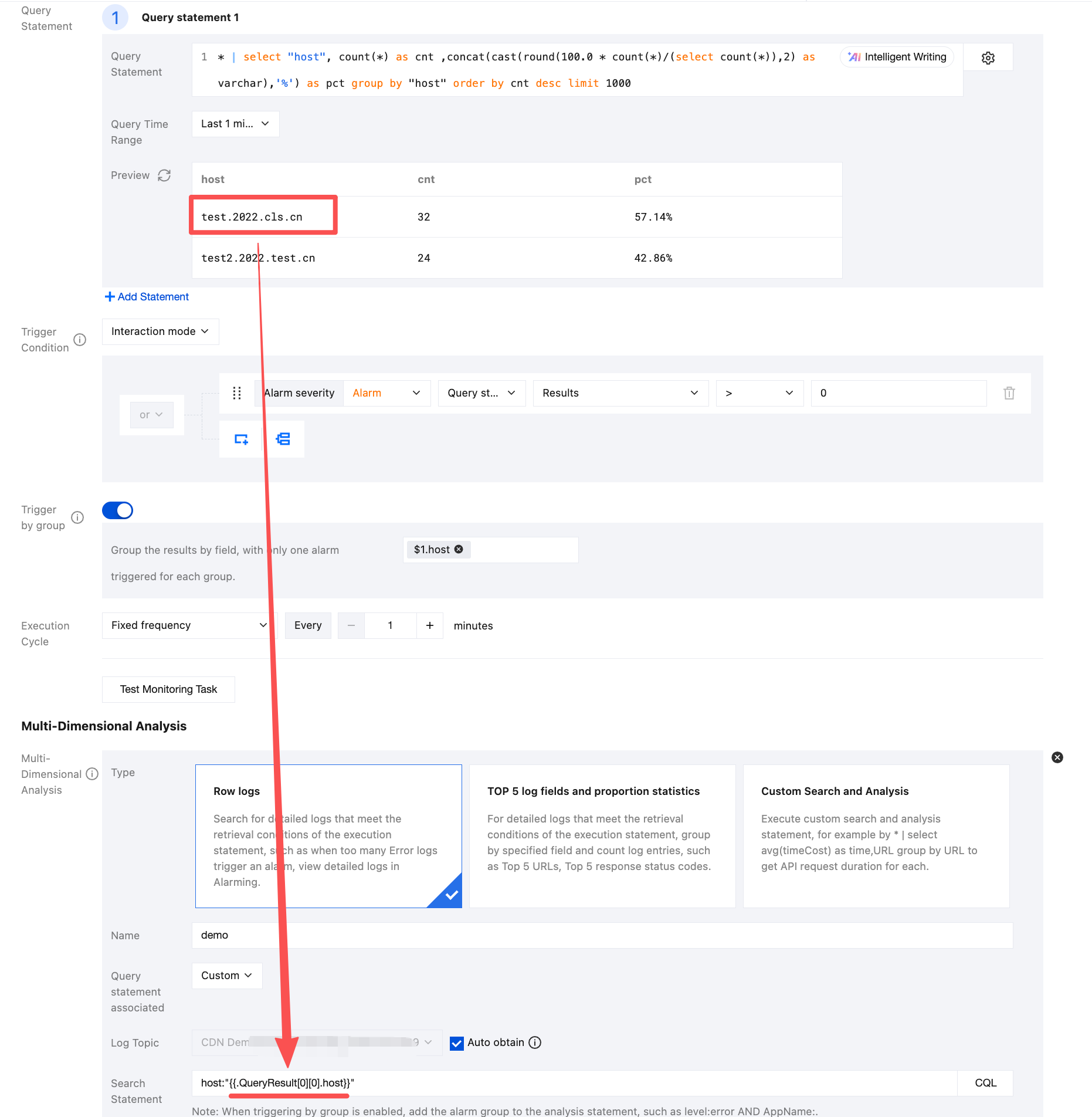
このうち、
{{.QueryResult[0][0].host}}は最初の実行ステートメントの実行結果の最初の行にあるhostを表します。注意:
変数値が文字列の場合、検索分析ステートメントのルールに準拠するため、引用符で囲んでください。検索条件では二重引用符で囲みます。例えば
"{{.QueryResult[0][0].host}}"、SQLでは一重引用符で囲む必要があります。例えば'{{.QueryResult[0][0].host}}'。
フィードバック